
Failed to Generate keytab File When Configuring Kerberos Authentication Source
Symptoms
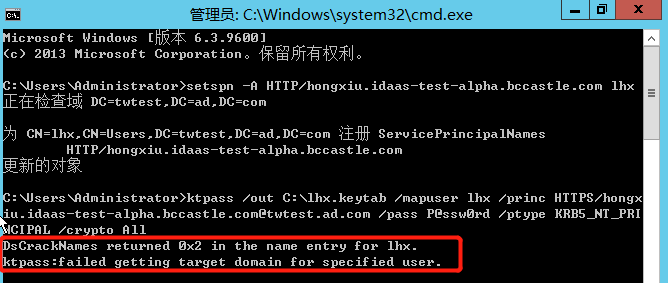
During the Kerberos authentication source configuration phase, when running the command on the AD domain server to generate the keytab file, the error ktpass cannot find user identification is reported, as shown in the figure below.
Possible Cause
In an Active Directory forest, the user identification query used by ktpass.exe does not have a default domain name to use.
Solution
Re-run the following command to generate the keytab file.
ktpass /out {file generation path} /mapuser {AD username created in step 1@AD domain} /princ HTTPS/{IDaaS tenant domain@AD domain} /pass {password of the AD user created in step 1} /ptype KRB5_NT_PRINCIPAL /crypto All