
Process Description
Authentication Process
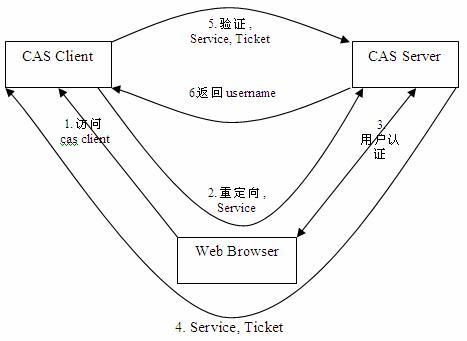
The user attempts to log in to the application provided by CAS Client.
CAS Client analyzes whether the HTTP request contains an authentication ticket ST. If not, it means the current user has not been authenticated, so it redirects to CAS Server and passes Service (i.e., the destination resource address to be accessed).
The user enters authentication information. If the login is successful, CAS Server randomly generates a sufficiently long, unique, and non-forgeable ticket ST, and then redirects to CAS Client with the generated ST attached.
After CAS Client obtains Service and the newly generated ST, it interacts with CAS Server in the background for verification.
CAS Server verifies the identity based on the request parameters Service and ST to ensure the legitimacy of ST, and returns a specified format XML (containing user information) to CAS Client.
CAS Client and CAS Server complete the identity verification of the user, and return the CAS Client access resource to the user.
Development Steps
The development process for BambooCloud IDaaS to access through the CAS protocol is as follows:
Step1: The enterprise administrator creates a CAS protocol application.
Step2: Fill in the authentication configuration and set the application Service address.
Step3: The application developer implements the "Authentication Login" API interface.
Step4: The application developer implements the "Application Service Address" interface.
HTTP Status: 302 REDIRECT https://{app_domain}/callbackhttp
Step6: The application developer implements the "Logout Login" API interface.