
Client Credentials Grant (M2M)
The client credentials grant (Client Credential) is mainly used when one application's backend calls another application system's API resources. Before calling the API resources, the caller needs to authenticate, e.g., obtain an Access Token based on Client ID and Client Secret, and then access the API resources with the token.
The client credentials grant is well suited to Machine-to-Machine (M2M) scenarios, such as initiating application authentication through backend services rather than by a user.
In M2M mode, no user participates throughout; authorization is performed only between application systems. This mode is suitable for scenarios requiring automated authentication and authorization between machines, such as backend services, API calls, and data synchronization.
This document describes the overall process in BambooCloud IDaaS for registering an API consumer application and API resource (API provider), authorizing the API consumer application's access to the API resource, and then securely accessing the API resource.
Terminology
M2M mode: Machine-to-Machine, abbreviated as M2M.
API consumer application: acts as the API consumer (also called M2M application) and needs to access API resources to obtain relevant business data.
API resource: acts as the API provider and exposes API interfaces for API consumers to call.
Authorization Flow
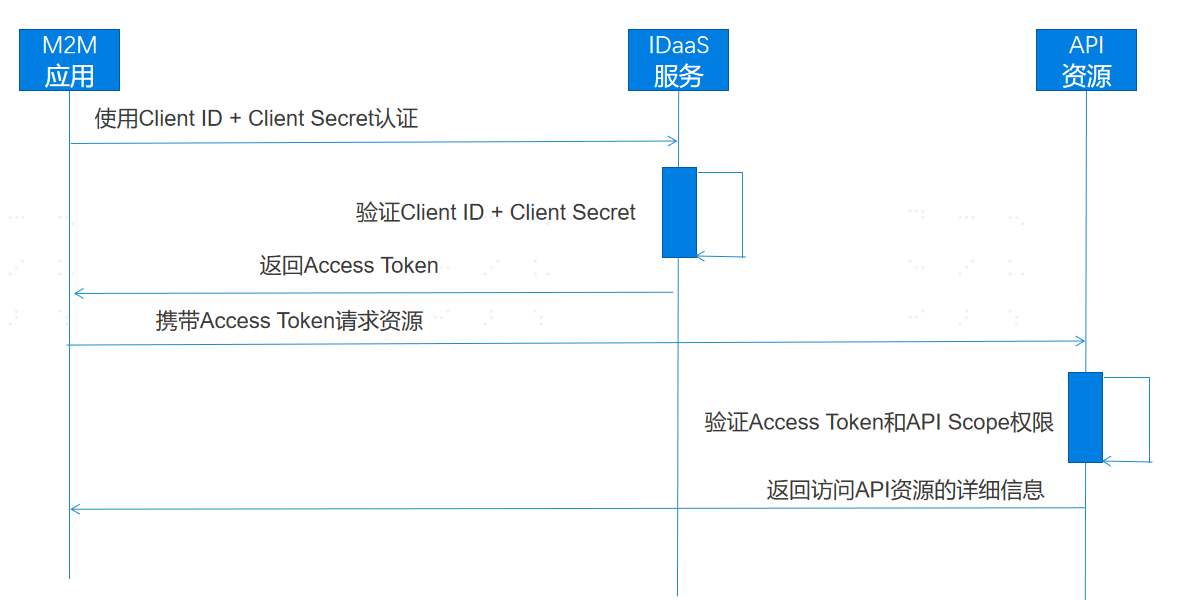
M2M flow:
- The API consumer application (M2M application) uses Client ID and Client Secret to send an authorization request to BambooCloud IDaaS. After BambooCloud IDaaS verifies the Client ID and Client Secret, it returns the issued Access Token to the API consumer application.
- The API consumer application carries the Access Token to access the API resource. The API resource server verifies the validity of the Access Token and checks whether the permission Scope list is within the authorized range.
- After the resource server verifies the Access Token and Scope, it returns the detailed information of the API resource.
Development Steps
The development process for integrating with BambooCloud IDaaS using OAuth 2.0 M2M mode is as follows:
Register API Consumer Application
- Log in to the BambooCloud IDaaS Enterprise Center, select
Resources > Applicationsfrom the navigation bar to enter the application list, clickAdd Self-built Application, fill in the application name, and clickSaveto create the API consumer application. ClickEnter Application Detailsto open the API consumer application details page.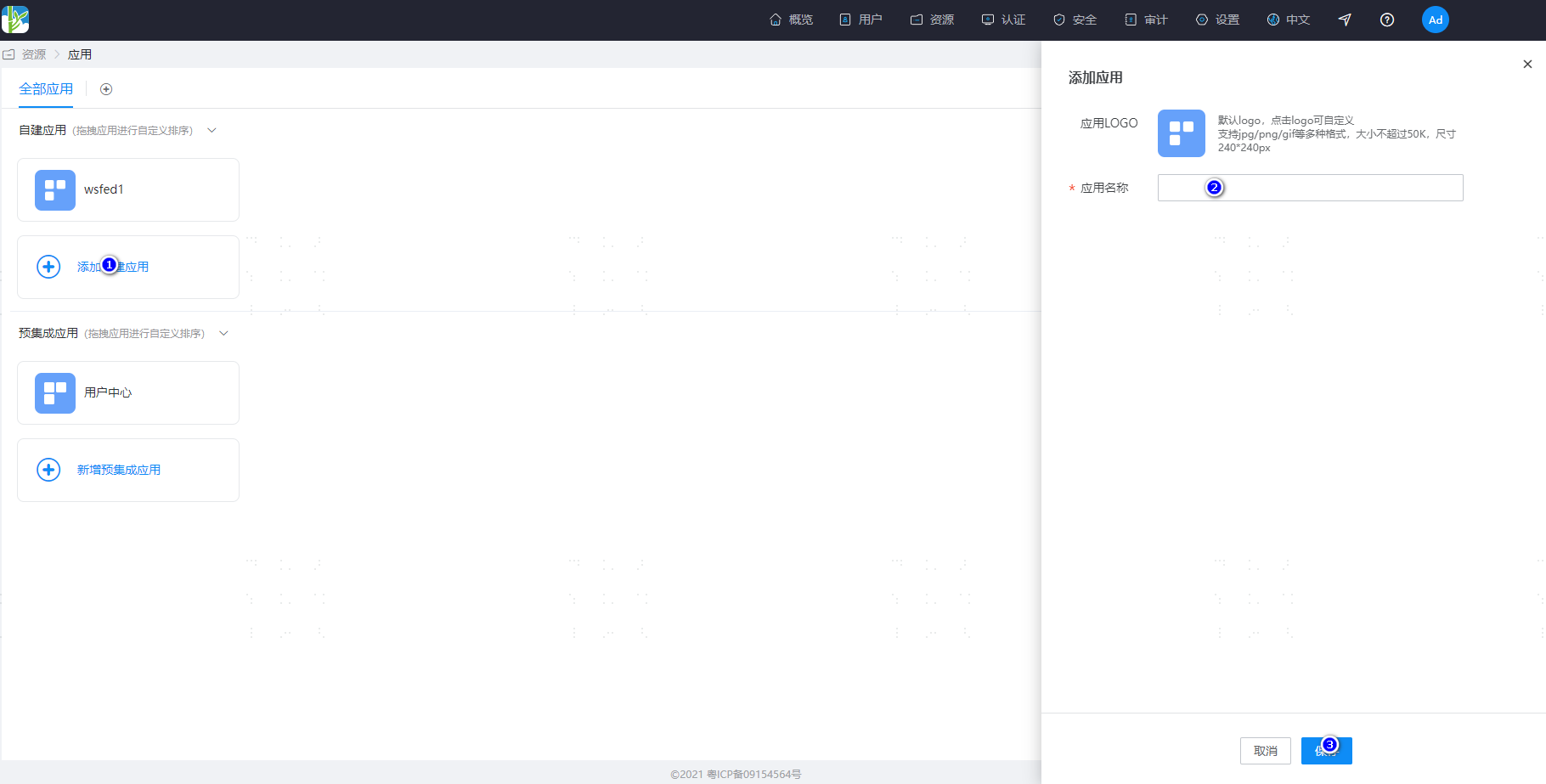
- On the application details page, click
Enablenext toClientSecretto obtain the secret. Copy and save the Client ID and Client Secret assigned by the platform.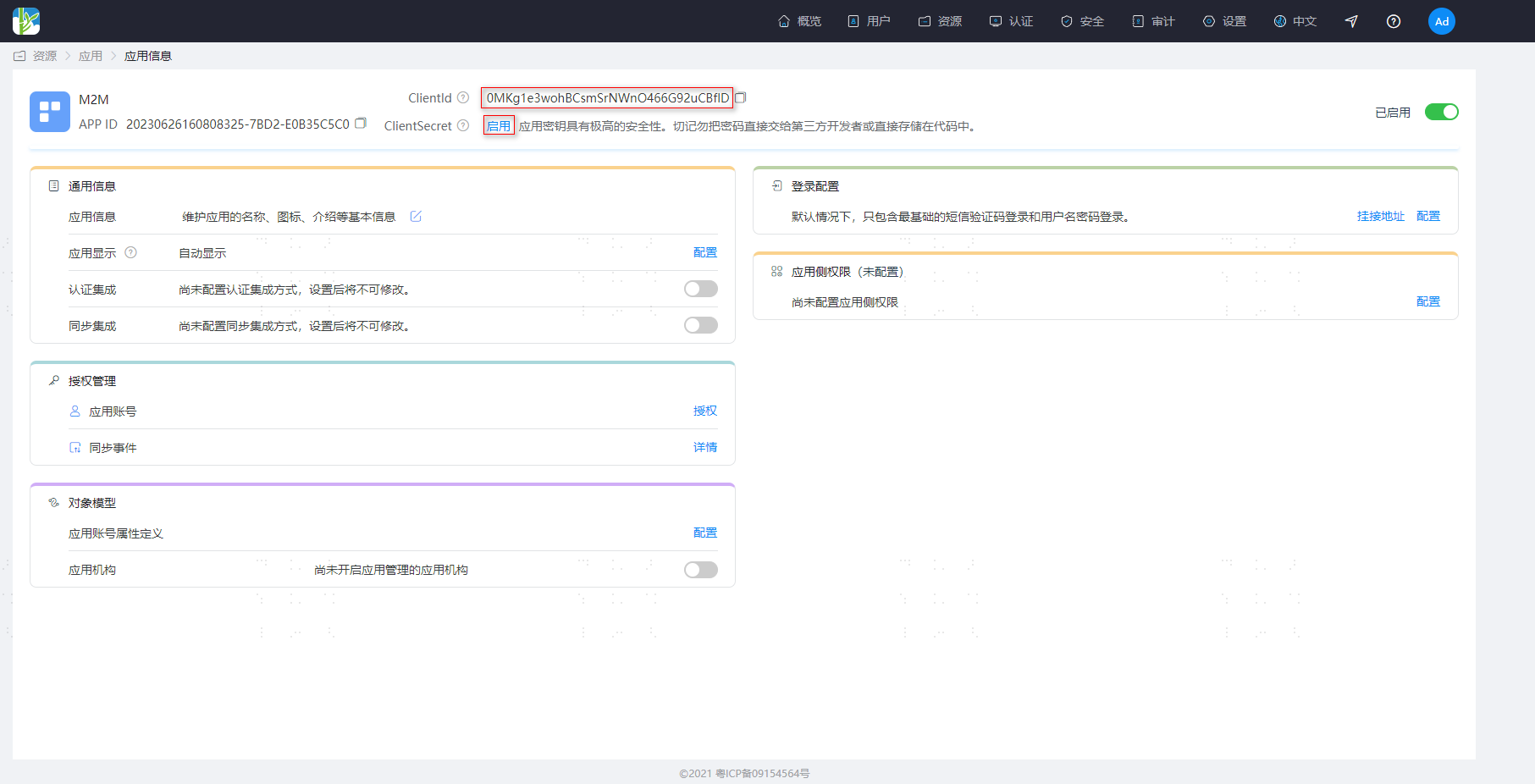 Note: BambooCloud IDaaS does not store ClientSecret. Please keep the secret safe after obtaining it.
Register API Resource (API Provider) and Add Permissions
Log in to the BambooCloud IDaaS Enterprise Center, select
Resources > Enterprise APIsfrom the navigation bar to enter the API product list, clickAdd Custom API Product, enter the product logo, product name, and product API identifier, and click Save.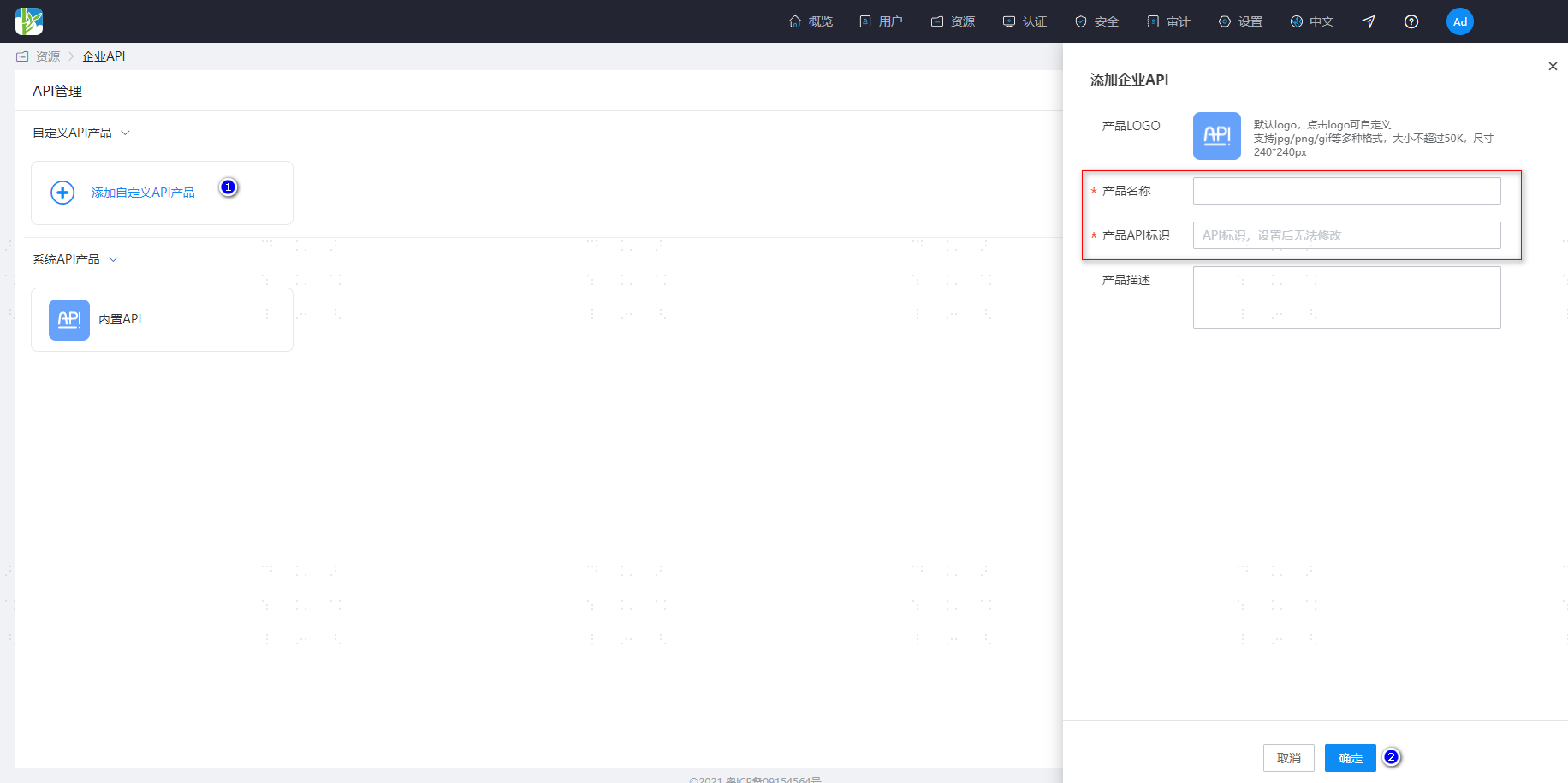 Note: When the API consumer application obtains an IDaaS platform Token, it needs to pass the identifier defined by the API resource. BambooCloud IDaaS looks up the corresponding API resource based on the product API identifier passed.
Enter the Enterprise API details page, click
Permission Infoto open the API permission configuration page, click theAddbutton on the right, enter the permission code and permission description, and click Save.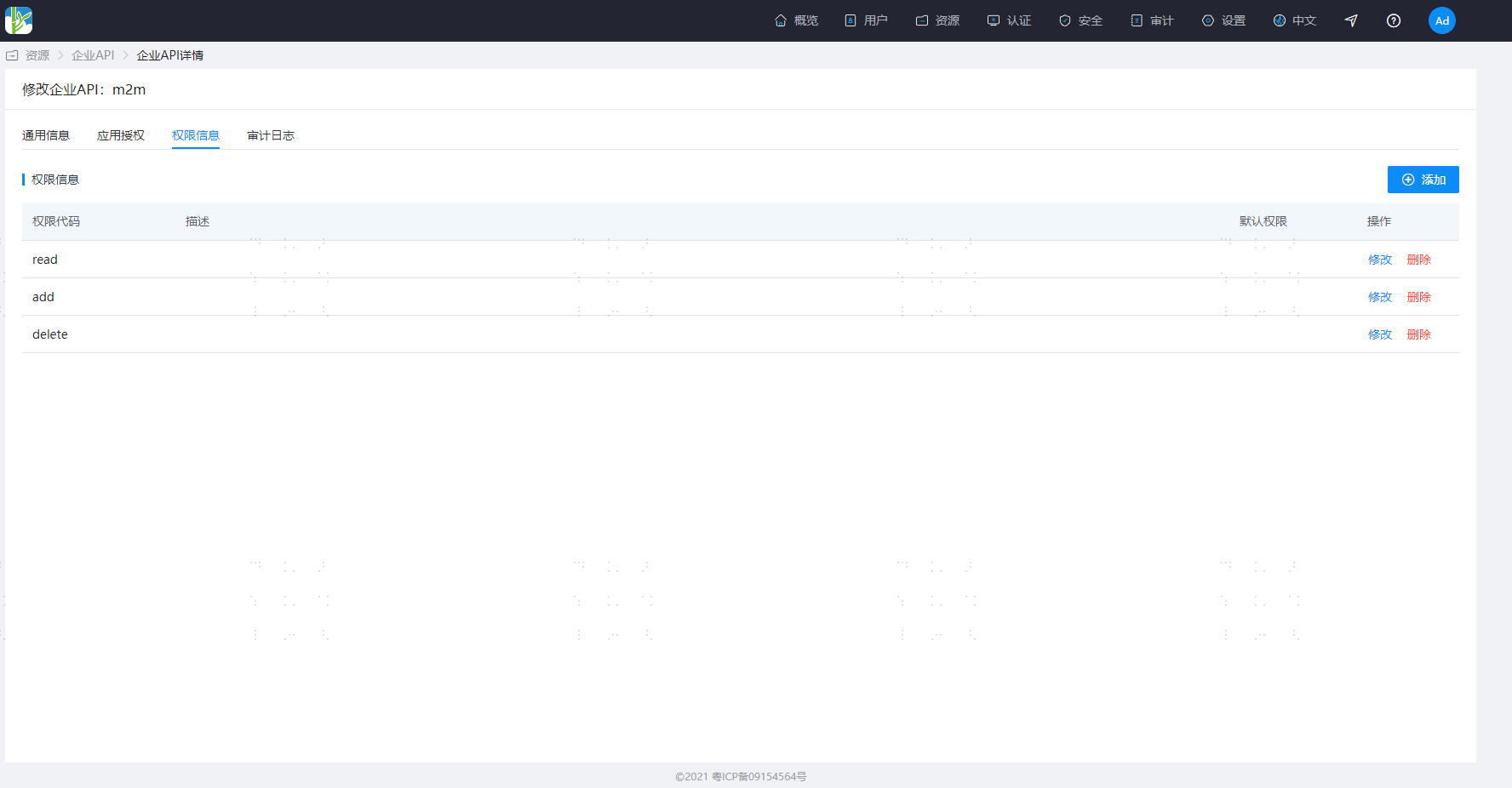
Authorize API Consumer Application and Assign Permission Scopes
- On the API resource (API provider) details configuration page, click
Application Authorizationto enter the API application authorization page and authorize the consumer applications that need to access the API resource.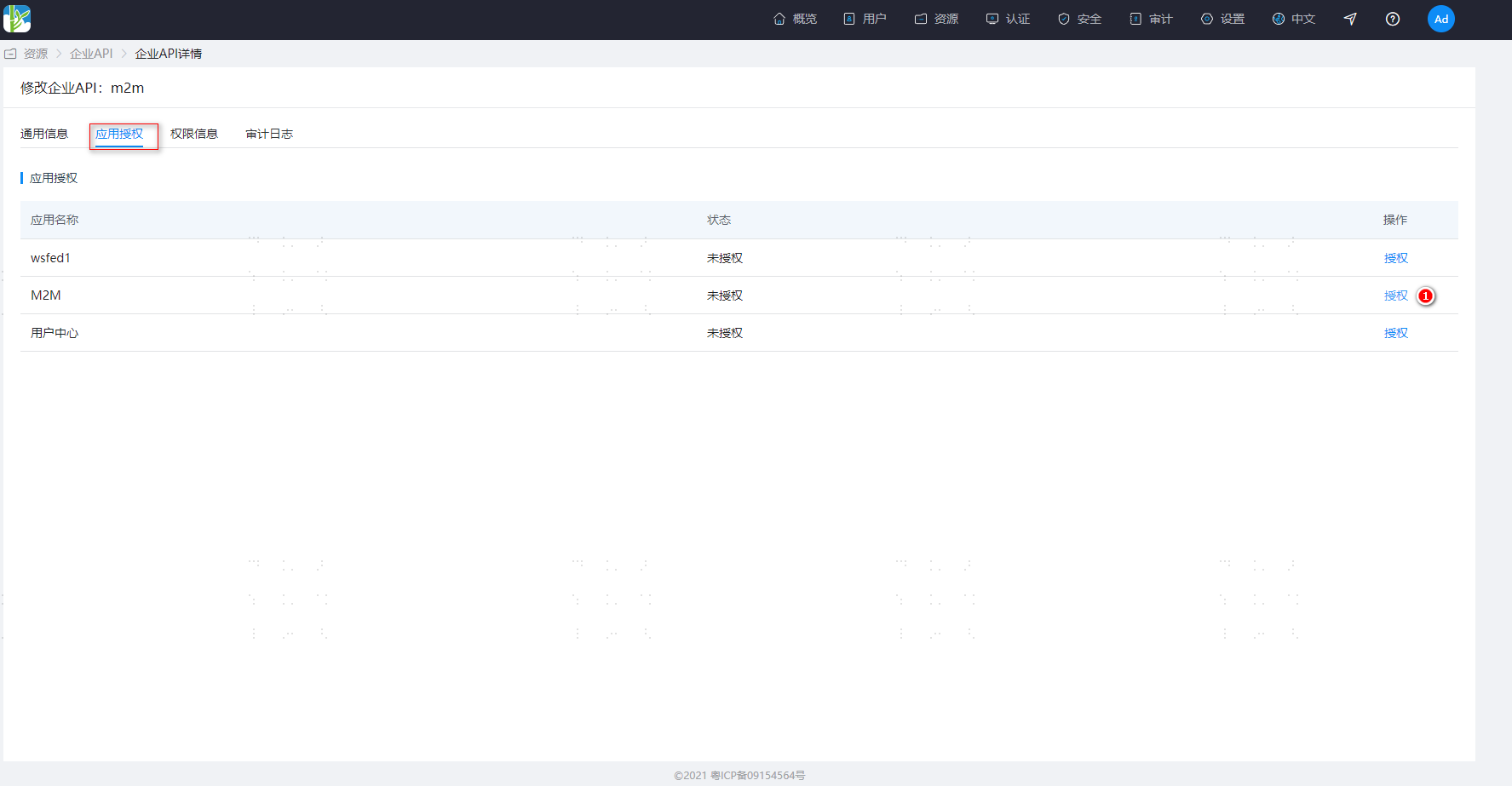
- Select the created "API consumer application" and click to enter the application configuration page. Click the
API Permissionsmenu to open the permission configuration page, select the authorized API resource, and assign the required permission Scopes.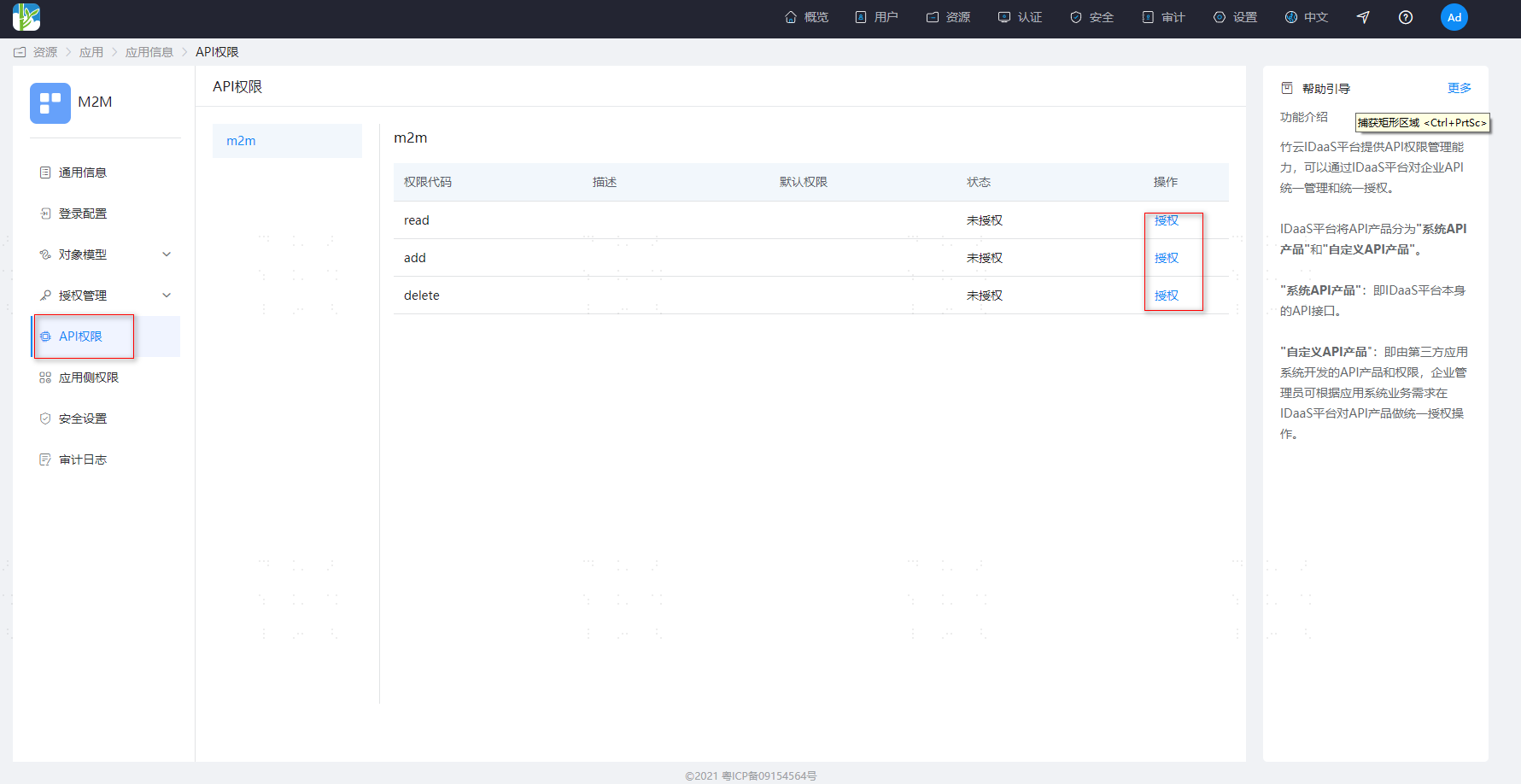
API Consumer Application Obtains Token
The API consumer application calls the BambooCloud IDaaS token endpoint with Client ID and Client Secret parameters. After BambooCloud IDaaS verifies them, it returns the Access Token and permission Scope list.
Request Description
Invalid client credentials error example
POST https://{your_domain}/api/v2/oauth2/tokenRequest Headers
| Parameter | Name | Required | Example | Description |
|---|---|---|---|---|
| Authorization | Authentication info | Required | Basic UnFCMkhKdNOWk9xWA== | Use client_id and client_secret for Base64 authentication. Format: base64(client_id:client_secret) |
| Content-Type | Data type | Required | application/x-www-form-urlencoded | Submit parameters using form data. |
Request Example
POST https://{your_domain}/api/v2/oauth2/tokenAuthorization: Basic UnFCMkhKdGt6bFU...aT0NObkk4NlNOWk9xWA==
Content-Type: application/x-www-form-urlencoded
grant_type=client_credentials&audience=https://apiprovider.com
Request Parameters
| Parameter | Name | Required | Description |
|---|---|---|---|
| grant_type | Yes | String | Fixed value: client_credentials |
| client_id | Yes | String | Client ID assigned by IDaaS to the API consumer application |
| client_secret | Yes | String | Client Secret assigned by IDaaS to the API consumer application |
| audience | Yes | String | Identifier filled in when registering the API resource; a URL is recommended |
Response Example
Success response example
HTTP Status: 200 OK
{
     "access_token": "eyJraWQiOiI3Yzc2ZWYxZTY0OWY0Yjc1OGVkZTczNGQ4ZDY4OWI5OSIsImFsZyI6IlJTMjU2In0.eyJpc3MiOiJodHRwczovL2JhbWJvb2Nsb3VkLmlkYWFzLXRlc3QtYWxwaGEuYmNjYXN0bGUuY29tL2FwaS92MS9vYXV0aDIiLCJhdWQiOiJtMm1hcGkiLCJleHAiOjE2ODc3NzM2OTEsImp0aSI6IlJGa01wWmFWbTQ5R3cyS1hHX2s0cFEiLCJpYXQiOjE2ODc3NzE4OTEsIm5iZiI6MTY4Nzc3MTc3MSwic3ViIjoiME1LZzFlM3dvaEJDc21Tck5Xbk80NjZHOTJ1Q0JmbEQiLCJhenAiOiIwTUtnMWUzd29oQkNzbVNyTlduTzQ2Nkc5MnVDQmZsRCJ9.TIL1WjzqRYdamTgIF591hTq8J08-PrZBRRDvxu9q88wLd5eHjEwfuamGQ2PmdMPXzJy7JCqX8Odr4Kpqlh04jwLYUv1vfIzApM2xjmd8MxU73uG9659PSKyf1yoP9_TLhDd30mgXLN2Fc7IgT1MAnQVTNYmlGU_JrRf-ECE44hMExDcGLScZF7xjJsWjAVX7Wzg4YiVTor3v4oGHdI2-NiEHMdOn2pIvWC_5mxCvIoVRWfYVcrRkpEkyBcWqnhNf422SMDitwkSBkVh73r1-zHOsGLUtci6zbaS2jWjN7OE1tA4iniHsgsx0HyzmfGGo9hLkD6kUpsawzjJH5uqSeg",
    "token_type": "Bearer"
}HTTP Status: 401
{
"error": "invalid_client",
"error_description": "Bad client credentials"
}For more error codes, see OAuth 2.0 Protocol Error Codes.
Response Parameters
| Response Parameter | Type | Description |
|---|---|---|
| access_token | String | Token issued by IDaaS to the consumer application |
| token_type | String | Token type, default is Bearer Token |
API Consumer Application Accesses API Resource
When the API consumer application accesses the API resource, it must carry the Access Token issued by BambooCloud IDaaS in the request header. Example:
Authorization:Bearer eyJraWQilJTMjU2In0.eyJpiOisRCJ9.TIL1WjwzjJH5uqSegNote: The Access Token in the example header is formatted for readability.
API Resource Server (API Provider) Verifies Token
When the API resource server receives a resource request, it must verify the Access Token and permission Scope. After verification, it returns the relevant resource data to the API consumer application.
Token Example Description
BambooCloud IDaaS issues authorization tokens following the standard OAuth 2.0 protocol. The token is encapsulated using standard JWT (JSON Web Token). The decoded Access Token parameters are as follows:
{
	"iss": "https://{yourdomain}/api/v1/oauth2",
	"aud": "https://apiprovider.com",
	"exp": 1687775036,
	"jti": "sFZ-WBf2fj6zHvPxb6k12w",
	"iat": 1687773236,
	"nbf": 1687773116,
	"sub": "0MKg1e3wohBCsmSrNWnO466G92uCBflD",
	"scope": "add read delete",
	"azp": "0MKg1e3wohBCsmSrNWnO466G92uCBflD"
}
Token Parameter Description
| Parameter | Type | Description |
|---|---|---|
| iss | String | Token issuer |
| aud | String | Identifier defined by the API resource (API provider) |
| exp | String | Token expiration time |
| jti | String | Token unique identifier |
| iat | String | Token issuance time |
| nbf | String | Token effective time |
| sub | String | Client ID assigned by IDaaS to the API consumer application |
| scope | String | API permission Scope list. Multiple scopes are separated by spaces. If there are no permissions, this parameter is not returned. |
| azp | String | Client ID assigned by IDaaS to the API consumer application |
Verify Token
The API resource server needs to verify the token validity and permission Scope. Verification steps include:
- Use the IDaaS public key certificate to verify the token signature;
- Verify whether the issuer parameter in the token is valid;
- Verify whether the audience parameter in the token is valid;
- Verify whether the token has expired or is invalid;
- Verify whether the permission Scope list is within the authorized range;
- Verify other custom parameters...
The following is a Java example using a JWT public key to verify the id_token:
import java.util.Map;

import org.apache.commons.lang3.StringUtils;
import org.jose4j.jwk.HttpsJwks;
import org.jose4j.jwt.JwtClaims;
import org.jose4j.jwt.consumer.JwtConsumer;
import org.jose4j.jwt.consumer.JwtConsumerBuilder;
import org.jose4j.keys.resolvers.HttpsJwksVerificationKeyResolver;
import org.jose4j.keys.resolvers.VerificationKeyResolver;

public class JwtVerificationExample {

    public static void main(String[] args){

        try {
            // Token issued by BambooCloud IDaaS
            String idToken = "replace your token";
            // BambooCloud IDaaS JWT keys endpoint
            String jwks_uri = "https://{your_domain}/api/v1/oauth2/keys";
            // Token issuer identifier
            String issuer = "https://{your_domain}/api/v1/oauth2";
            // Identifier defined by the API resource
            String audience = "replace your api identifier";
            VerificationKeyResolver verificationKeyResolver = new HttpsJwksVerificationKeyResolver(new HttpsJwks(jwks_uri));
            JwtConsumer consumer = new JwtConsumerBuilder().setVerificationKeyResolver(verificationKeyResolver)
                    .setRequireExpirationTime()
                    .setAllowedClockSkewInSeconds(300)
                    .setRequireSubject()
                    .setExpectedIssuer(issuer)
                    .setExpectedAudience(audience)
                    .build();
            JwtClaims claims = consumer.processToClaims(idToken);
            Map<String, Object> claimsMap = claims.getClaimsMap();
            // Obtain API permissions
            Object scope = claimsMap.get("scope");
            if (scope != null){
                String[] apiArray = StringUtils.split((String) scope, " ");
                // Verify whether API permissions are satisfied, omitted...
            }
        } catch (Exception e) {
            // Token verification failure handling
        }
    }
}