
Login Flow
PKCE (Proof Key for Code Exchange) uses a cryptographic method to ensure that even if a malicious third party intercepts the authorization code, they cannot exchange it for an Access Token with the authentication server. At the same time, it does not require storing the Client Secret on the client, avoiding Client Secret leakage. This mode is mainly used for clients to obtain user information.
Login Flow
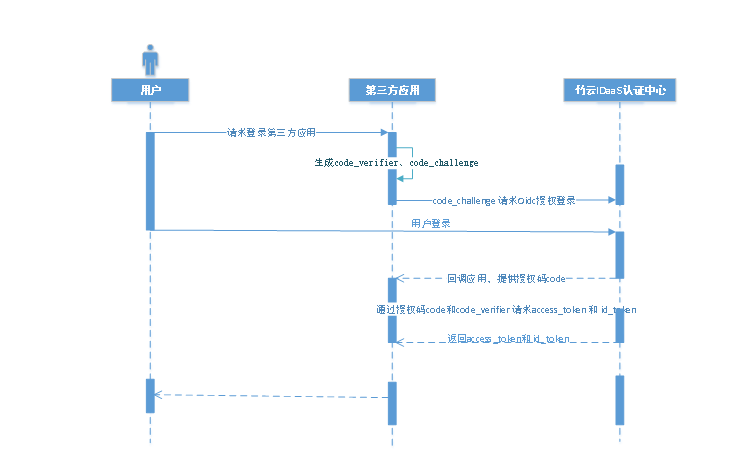
Overall PKCE flow:
The user accesses the third-party application, and the third-party application randomly generates a string of 43-128 characters and URL-Safe Base64 encodes it as the code_verifier. The string is then SHA256 hashed and URL-Safe Base64 encoded as the code_challenge.
The third-party application uses code_challenge to initiate an authorization login request to BambooCloud IDaaS. After the user allows the third-party application to be authorized, BambooCloud IDaaS redirects to the third-party application with the authorization code parameter.
The third-party application uses the authorization code and code_verifier to call the BambooCloud IDaaS API to exchange for the access token access_token and ID token id_token.
The third-party application verifies the signature of id_token and parses user information from the id token.
Development Steps
The development process for integrating with BambooCloud IDaaS using OIDC PKCE authorization code mode is as follows:
Step1: Get PKCE Authorization Code
Click to view the get PKCE authorization code API
Step2: Get PKCE Access Token
Click to view the get PKCE Access Token API