
Passive Mode Authentication
When the user accesses the integrated application, the application initiates a WS-Federation protocol-based authentication login (Passive mode) to the platform. After the user enters username and password and is authenticated, the platform will initiate a POST request through the browser to the assertion consumer address.
Login Flow
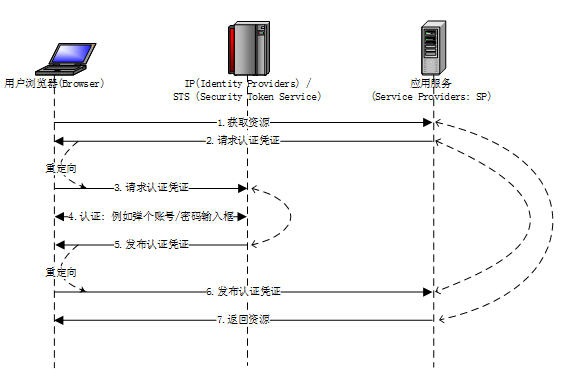
Flow description:
Browser requests resource A from the SP.
SP asks Browser to provide authentication credentials.
Browser requests authentication credentials from IP.
Browser and IP perform authentication, e.g., IP pops up a window for entering account/password, and the user enters and uploads to IP.
IP verifies identity and issues authentication credentials (i.e., response to step 3).
Browser sends the credentials provided by IP to SP (i.e., response to step 2).
SP determines the credentials are valid and returns the resource to Browser (i.e., response to step 1).
Request Description
GET https://{your_domain}/api/v1/sso/wsfed/{your_app_clientId}/passiveRequest Parameters
| Parameter | Required | Value | Description |
|---|---|---|---|
| wa | Yes | wsignin1.0 | Fixed parameter: wsignin1.0 |
| wtrealm | Yes | urn:federation:MicrosoftOnline | Used to identify the accessed application; consistent with the Wtrealm in the application configuration |
| wreply | Yes | https://login.microsoftonline.com/login.srf | Verified when the wreply parameter is carried. Consistent with the Wreply in the application configuration; if HTTP protocol, only the domain needs to be consistent |
| wctx | No | Context parameter; the interface returns the same parameter |
Request Example
https://{your_domain}/api/v1/sso/wsfed/{your_app_clientId}/passive?wa=wsignin1.0&wtrealm=urn:federation:MicrosoftOnlineResponse Example
POST https://{wreply}| Parameter | Required | Value | Description |
|---|---|---|---|
| wa | Yes | wsignin1.0 | Fixed parameter: wsignin1.0 |
| wresult | Yes | SAML 1.1 assertion | |
| wctx | No | Context; returned when the wctx parameter is carried in the request, consistent with the wctx parameter in the request |
Error response example:
{
  "code": "SSO_WSFED_BAD_REQUEST",
  "data": null,
  "message": "Parameter [wtrealm] is incorrect"
}
Logout Flow
Request Description
GET https://{your_domain}/api/v1/sso/wsfed/{your_app_clientId}/logoutRequest Parameters
| Parameter | Required | Value | Description |
|---|---|---|---|
| wa | Yes | wsignout1.0 | Fixed parameter: wsignin1.0 |
| wreply | No | https://login.microsoftonline.com/login.srf | If empty, after logout the browser is redirected to the IDaaS login page. If not empty, after logout the browser is redirected to the specified address |
Request Example
https://{your_domain}/api/v1/sso/wsfed/{your_app_clientId}/logout?wa=wsignout1.0&wreply={your_login_url}