
Login Flow
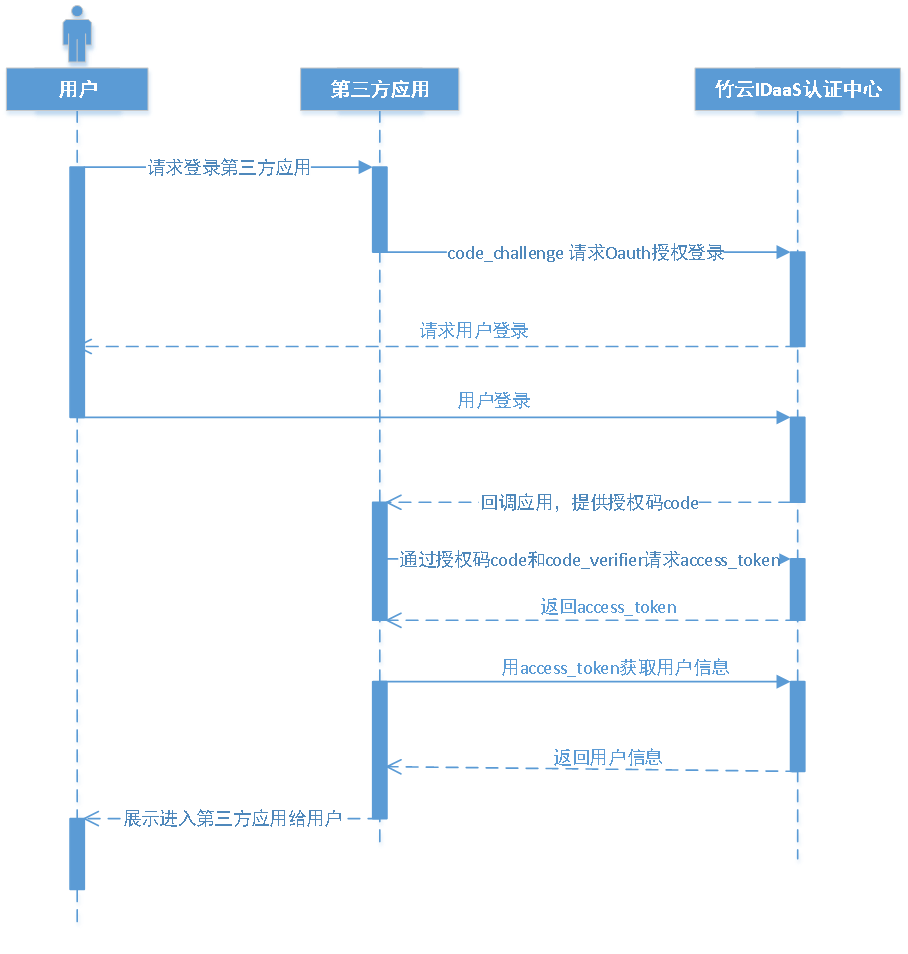
Overall PKCE flow:
The user accesses the third-party application, and the third-party application randomly generates a string of 43-128 characters and URL-Safe Base64 encodes it as the code_verifier. The string is then SHA256 hashed and URL-Safe Base64 encoded as the code_challenge.
The third-party application uses code_challenge to initiate an authorization login request to BambooCloud IDaaS. After the user logs in to BambooCloud IDaaS, BambooCloud IDaaS redirects to the third-party application with the authorization code parameter.
The third-party application uses the authorization code and code_verifier to call the BambooCloud IDaaS API to exchange for the authorization token access_token.
The third-party application uses the authorization token access_token (valid and not expired) to call the BambooCloud IDaaS API to get user information.
Development Steps
The development process for integrating with BambooCloud IDaaS using OAuth2.0 PKCE authorization code mode is as follows:
Step1: Get PKCE Authorization Code
Click to view the get PKCE authorization code API
Step2: Get PKCE Access Token
Click to view the get PKCE Access Token API