
SAML 2.0 Introduction
The full name of SAML is Security Assertion Markup Language. It is a product of the OASIS Security Services Technical Committee. It is an open standard data format based on XML. The most important need SAML addresses is single sign-on (SSO) for web application systems, exchanging authentication and authorization data between different security domains.
This document describes the steps for third-party applications to integrate with BambooCloud IDaaS unified authentication using the SAML protocol, providing reference guidance for application developers performing unified authentication integration.
SAML Authentication Flow
IDP-initiated SSO
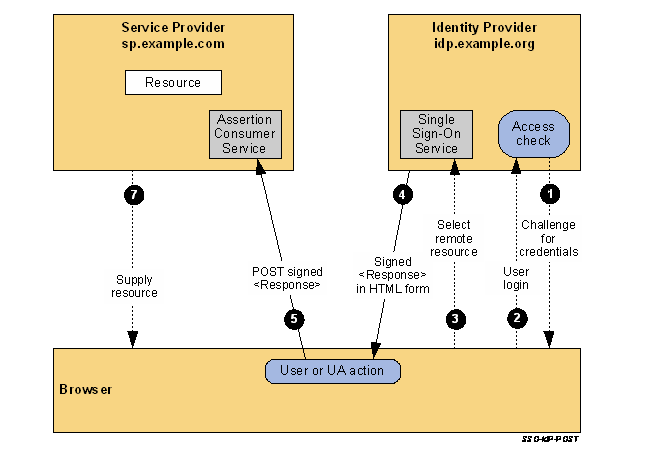
Image source OASIS: http://docs.oasis-open.org/security/saml/Post2.0/sstc-saml-tech-overview-2.0.html
The IdP performs a security context check to determine whether the user login session has expired.
If the user session has expired, the user must log in again.
The user selects a menu option or link on the IdP to request access to the SP website and calls the IdP single sign-on service.
The IdP single sign-on service begins building the SamlResponse, generates the assertion, and returns the assertion to the SP ACS interface through a Post form.
The SP ACS interface receives the SamlResponse, first verifies the digital signature on the assertion, then processes the assertion content, and creates a user session in the SP.
Resources are opened according to user permissions.
SP-initiated SSO
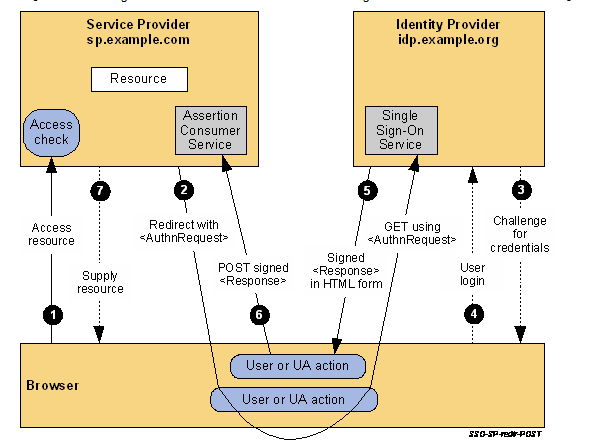
Image source OASIS: http://docs.oasis-open.org/security/saml/Post2.0/sstc-saml-tech-overview-2.0.html
The user accesses a service in the SP.
The SP initiates a Redirect/Post request with SAMLRequest to the IDP SSO interface.
The IdP performs a security context check to confirm whether the user meets the login conditions at the IDP; if not, login is performed; if the user is not logged in at the IDP, login is performed.
The IDP SSO interface builds a SAMLResponse based on the SAMLRequest and current user information.
The IDP returns the assembled SAMLResponse to the SP ACS interface through a Post request.
The SP ACS interface receives the SamlResponse, first verifies the digital signature on the assertion, then processes the assertion content, creates a user session in the SP, and opens resources according to user permissions.
Development Steps
IDP-initiated SSO
After the user logs in to the IDaaS system, this interface can be used to directly access the application. At this time, the browser will first call the IDP SSO interface and return the SAMLResponse.
Request Description
GET https://{your_domain}/api/v1/saml2/idp/ssoRequest Parameters
| Parameter | Name | Required | Description |
|---|---|---|---|
| sp | SP entityId | Required | This value is the SP entityId |
Request Example
GET https://xxxx/api/v1/saml2/idp/sso?sp={sp entity id}Response Parameters
After authentication, the IDP will return the assertion SAMLResponse to the SP ACS address through a Post request. The SP side obtains the current login user information by parsing the response assertion.
Response Example
Standard SAMLResponse.xml is returned.
SP-initiated SSO
The user initiates an authentication request from the SP system to the IDP. This request carries the SP's SAMLRequest. After receiving the request, the IDP completes the user login process, generates an assertion, and returns the response assertion SAMLResponse.
Request Description
POST/GET https://{your_domain}/api/v1/saml2/idp/ssoRequest Parameters
| Parameter | Name | Required | Description |
|---|---|---|---|
| SAMLRequest | SAML request | Required | Content is SAMLRequest |
| RelayState | State check value | Required | This parameter is used for consistency check when the IDP calls back the ACS |
POST Request Example
Form encapsulates SAMLRequest and RelayState parameters.
SAMLRequest: standard SAMLRequest format content.
GET Request Example
GET https://{your_domain}/api/v1/saml2/idp/sso?RelayState=0a13c8ab-0398-4055-aa50-732d9d698283&SAMLRequest=jVLLjtsgFP0Vi70Nxo6ToDijNFHUSNNONPbMYjYVxmQGFYPLxWn79yV2I6WbqCxYwHlcnXNXD786HZ2lA2VNidKEoEgaYVtl3kv0Uu/jBXpYr4B3umebwX+YZ/ljkOCjwDPAxo8SDc4wy0EBM7yTwLxg1ebLI6MJYb2z3gqrUbQBkM4Ho601MHTSVdKdlZAvz48l+vC+B4bx9w6ShneNtULboU2E7XCvh3dlAAf6WUuPL66Yh2lQtAuzKMP9OP5VoxFJIwQHr+XI573CvIOJp9oeV9UT5lpxwJSkS7IkNCXZjJBlkcfzTbhyui12y2K/RdFhV6JvheAzeaKn2Vye8iacBSGiECmd01ws2iLAAAZ5MOC58SWihNKYZHGa1oSyfMmyLJlnizcUHf/G8UmZKeR72TUTCNjnuj7Gx6eqRtHrtawAQFM1bDR3N53cl+XXItD6TuwrfKM9GdGefQ1qh93RaiV+3xjS/98Cre3PrZPcyxJ5N0gU7a3ruL8vcHlRbXwaoay/hABeGo/wehr03/1c/wE=Response Parameters
Standard SAMLResponse.xml is returned.
Get IDP Metadata Interface
Through the IDPMetadata interface, obtain the IDP metadata used to configure the IDP-related settings in the SP system.
Request Description
GET https://{your_domain}/api/v1/saml2/idp/metadataRequest Parameters
None
Request Example
https://lxsamlidp.idaas-test-alpha.bccastle.com/api/v1/saml2/idp/metadata
Response Parameters
Returns the current enterprise IDP Metadata.xml file.
SP-initiated Logout Interface
This logout interface is the IDP's logout interface. When the SP side logs out, this interface can be called to log out the IDP user session.
Request Description
POST/GET https://{your_domain}/api/v1/saml2/idp/logoutRequest Parameters
| Parameter | Name | Required | Description |
|---|---|---|---|
| SAMLRequest | SAML request xml | Required | Content is SAMLLogoutRequest |
POST Request Example
Form encapsulates the SAMLRequest parameter.
SAMLRequest: content in standard SAMLLogoutRequest format.
GET Request Example
GET https://{your_domain}/api/v1/saml2/idp/logout?SAMLRequest=nZJLT8QgFIX/SsO+5RboY8h0jLExaaIufMW4MZSiNrZQe6mZny8z4yTqwoULCAHOd3IOrE+24xB9mBl7ZyuSJkAiY7XrevtSkbvb87gkJ5s1qnGY5IV7cYu/Nu+LQR8FoUW5P6nIMlvpFPYorRoNSq/lzenlhWQJyGl23mk3kKgOut4qv/d69X5CSWmrk1ZrhX4wiXYjVVNP1Yh0R6Z9N9Fhb0vV0CukDNIVrIClwDOAVS7i4jRMgp3l9So/PyNRU1fkqYSct0WmSugKkeuyFMzwTKiCcVY8Z0W4hriYxqJX1leEAWMx8DhNbyGXABLKhIvskUT3x25CFHJoQu6187cG/i5AIZp5F5psjqHfRkxaNbbO6cEt3S74mn5jfxldBVZT/8coULf9F/JAOb7ijcFdoMZ2Zrtp6gdu2rJ97iDmoc9YiLBqjSpipowuU2F4GAfQL+1x88e32HwCResponse Parameters
If the HTTP status code is 200, the call is successful.
| Parameter | Name | Required | Description |
|---|---|---|---|
| SAMLResponse | SAML response result | Required | SAMLLogoutResponse returned by the IDP |
Return Codes
| Parameter | Description |
|---|---|
| invalid_request | Invalid request |
| Unsupported binding | Unsupported binding |
| AMS-0028 | SAML attribute configuration error |
| AMS-0029 | SAML certificate error |
Terminology
IDP: Identity Provider is an entity in the system used to ensure that the user is really who they claim to be — providing authentication. The identity provider is also responsible for confirming which services on various entities in the system can be accessed by the user.
SP: Service Provider.
SSO: Single Sign-On, where the user logs in once and can access all mutually trusted application systems.
IDP Metadata: metadata of the identity provider, i.e., IDaaS metadata.
SP Metadata: metadata of the application.