
Mobile Number One-Click Login
Document Description
This document describes how to integrate one-click login into an Android client. With one-click login, users do not need to enter their mobile number. The SDK launches the authorization page. After the user confirms authorization, the SDK obtains a token. The server carries the token to the carrier gateway to obtain the number currently used by the user to access the internet, and the final authentication result is returned to the App server. The BambooCloud IDaaS one-click login SDK is packaged based on the Alibaba Cloud "Number Authentication" SDK.
Terminology
One-click login, also known as number authentication, integrates the unique data gateway authentication capabilities of the three major carriers to upgrade the SMS verification code method, and is applied in user registration, login, and other scenarios.
Flow Description
Integration Flow Description
- Register Alibaba Cloud's private key and IDaaS server configuration parameters to the IDaaS SDK.
- Terminal network detection: through the Alibaba Cloud server, check whether the network environment is feasible. If the user has enabled 4G data and the network is smooth, successfully call the IDaaS SDK and launch the authorization page.
- The user confirms the content of the authorization page and agrees to the relevant agreements. The IDaaS SDK obtains the authorization TOKEN and passes it to the IDaaS server.
- The IDaaS server uses the TOKEN to obtain the user's mobile number from the Alibaba Cloud server, and then initiates authentication. If authentication succeeds, sessionToken is returned and can be saved to the App client or used for other purposes; if authentication fails, an error code and reason are returned for the next step.
Integration Flow
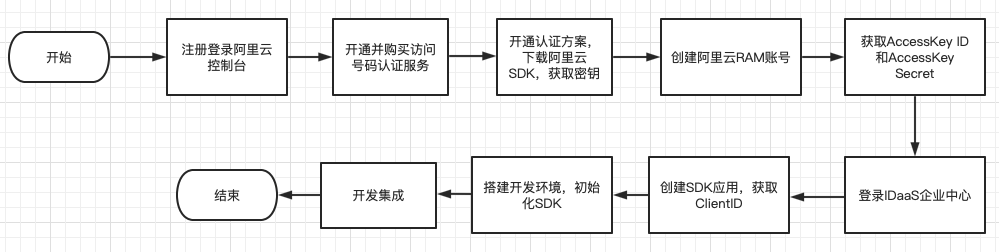
Preparation
Register an Alibaba Cloud Account
Refer to the Alibaba Cloud official website Account Activation Process and Authentication Scheme Management.
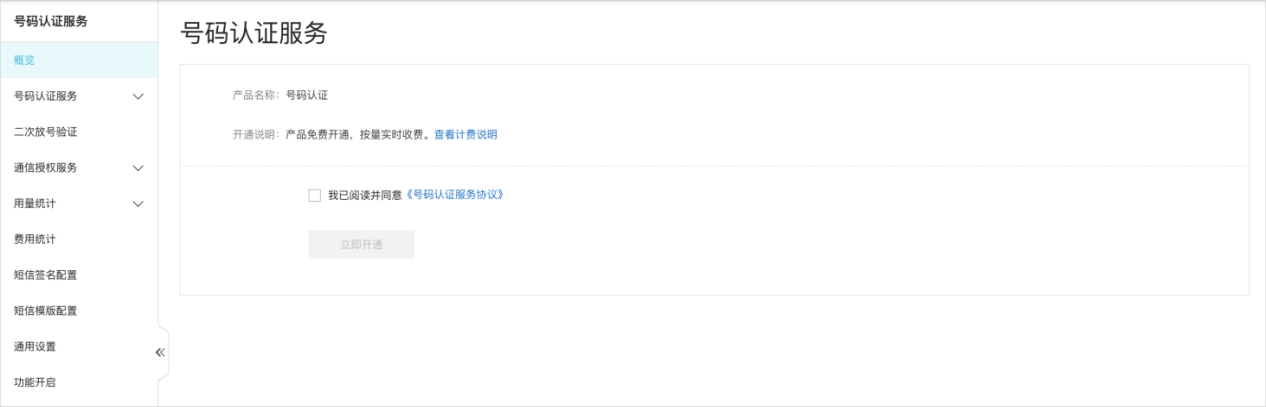
Enable Number Authentication
Visit the Number Authentication Service product details page and enable/purchase as an enterprise user.
Click Enable Now or visit the product console.
On the console homepage, check "I have read and agree to the Number Authentication Service Agreement".
Click Enable Now to complete the product activation.
Log in to the Number Authentication Service Console, on the Standard Edition tab, download and extract the Alibaba Cloud Android SDK.
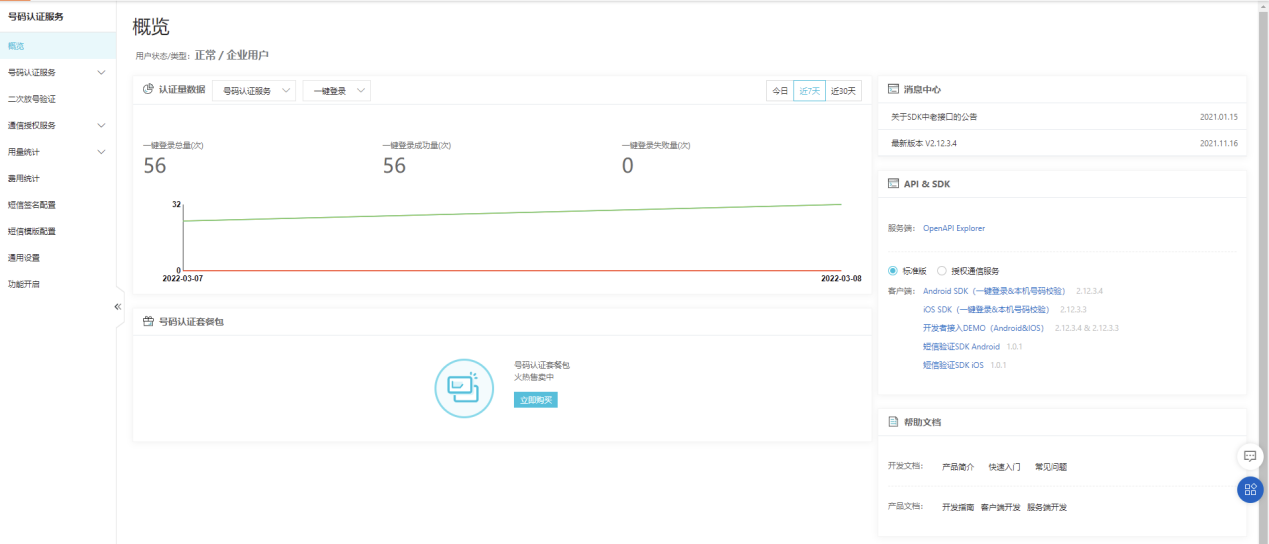
Add Authentication Scheme
In the Alibaba Cloud "Number Authentication" service, add an authentication scheme, fill in the package name of the current project and the corresponding signature.
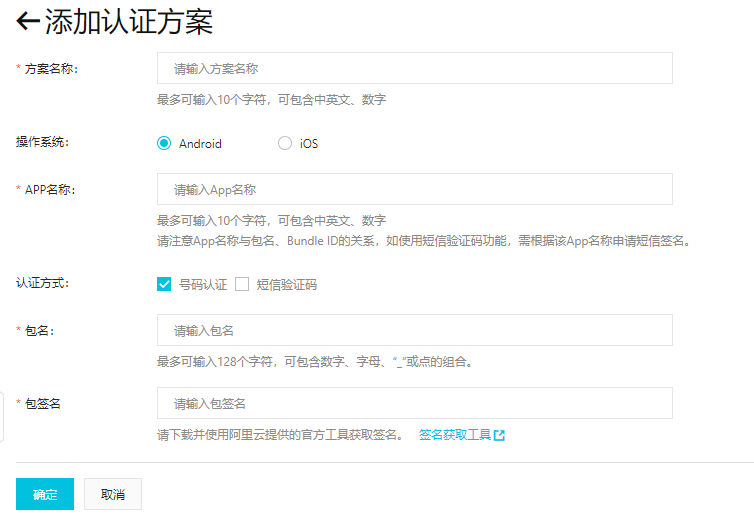
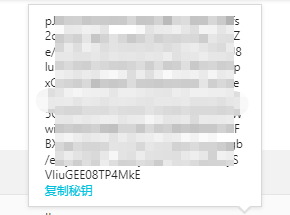
After filling, click OK, save the configuration, obtain the secret key and save it locally in the app. It will be used during initialization in PlatformConfig. See the SDK initialization step.
Configure IDaaS Backend Authentication Source
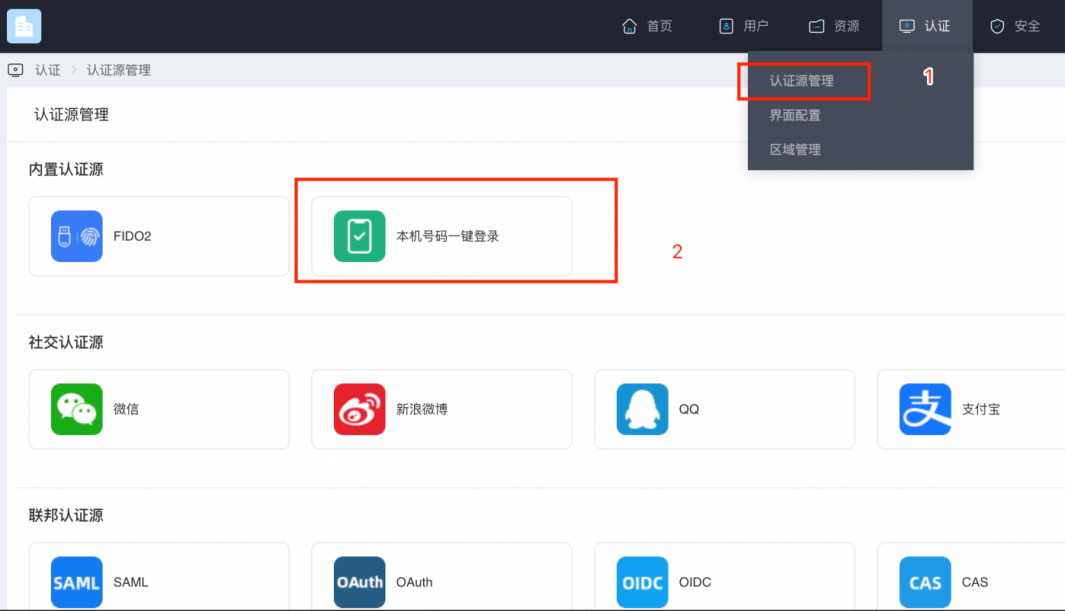
Log in to the IDaaS Enterprise Center, select the menu Authentication -> Authentication Source Management -> Built-in Authentication Sources, and click "Local Number One-Click Login".
The "Local Number One-Click Login" configuration page pops up. For related parameters, see the next step "Obtain the corresponding configuration information from the Alibaba Cloud Console".
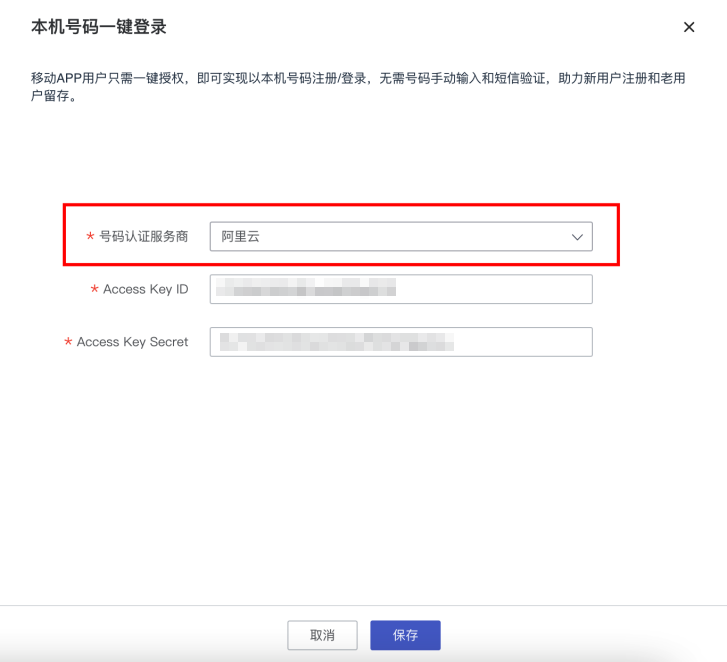
Parameter configuration descriptions for local number one-click login:
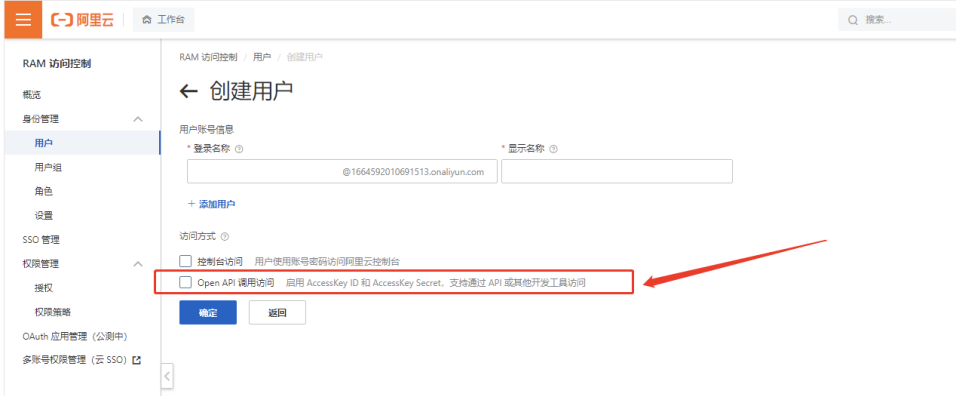
Parameter Parameter Description Number Authentication Service Provider Default: Alibaba Cloud Access Key ID Fill in the AccessKey generated when creating a user in Alibaba Cloud AccessKey Secret Fill in the AccessKey Secret generated when creating a user in Alibaba Cloud Create a user in the Alibaba Cloud Console, check the box below, and refer to How to Obtain AccessKey to obtain the relevant parameters. Fill the obtained parameters into the page in the previous step (these parameters are required for backend integration).
Get ClientId
Log in to the IDaaS Enterprise Center, click [Resources] - [Applications], add a self-built application, select SDK/API for authentication integration, and save.
Obtain the ClientID in the application information.
Environment Setup
Import Dependency Packages
Log in to the Number Authentication Service Console, on the Standard Edition tab, download and extract the Android SDK.
auth_number_product-2.13.3-log-online-standard-cuum-release.aar//Alibaba Cloud one-click login SDK
crashshield-2.1.3.2-release.aar //Alibaba Cloud crash log SDK
main-2.2.2-release.aar // Some core utility classes inside the SDK, such as thread pools, JSON parsing, etc.
logger-2.2.2-release.aar //Used inside the SDK for collecting log information and monitoring alarms
AuthnCenter_MobileNumberAuth_1.5.3.arr   //IDaaS one-click login SDK
Configure build.gradle
Place the aar packages in the libs directory under the App project, and write the following code in build.gradle.
/*begin*/
/*  rxjava2 +  okhttp + retrofit2  */
api 'io.reactivex.rxjava2:rxjava:2.2.10'
api 'io.reactivex.rxjava2:rxandroid:2.1.1'
api 'com.squareup.retrofit2:retrofit:2.6.0'
api 'com.squareup.retrofit2:adapter-rxjava2:2.6.0'
api 'com.squareup.retrofit2:converter-gson:2.6.0'
api 'com.squareup.okhttp3:okhttp:4.3.1'
api 'com.squareup.okhttp3:logging-interceptor:3.6.0'
api 'com.jakewharton.retrofit:retrofit2-rxjava2-adapter:1.0.0'
api 'com.trello.rxlifecycle2:rxlifecycle-components:2.1.0'
api 'com.alibaba:fastjson:1.2.61'
 /*end*/
implementation(name: 'AuthnCenter_MobileNumberAuth_1.5.3', ext: 'aar')
implementation(name: 'auth_number_product-2.13.3-log-online-standard-cuum-release', ext: 'aar')
implementation(name: 'crashshield-2.1.3.2-release', ext: 'aar')
implementation(name: 'main-2.2.2-release', ext: 'aar')
implementation(name: 'logger-2.2.2-release', ext: 'aar')
Note: If the following error occurs during Run: More than one file was found with OS independent path 'lib/x86/libauth_number_product-2.12.3.4-log-online-standard-release_alijtca_plus.so', simply comment out the corresponding import.
//implementation(name: 'auth_number_product-2.12.3.4-log-online-standard-release', ext: 'aar')*
Upgrade to AndroidX Project
Because the Alibaba Cloud SDK version must support AndroidX, the existing project needs to be migrated to AndroidX.
Back up the original project first.
Add the following configuration in gradle.properties
javaandroid.useAndroidX=true android.enableJetifier=trueUpgrade to AndroidX project
In Android Studio, click Refactor -> Migrate to AndroidX -> Migrate -> Do refactor in sequence. This will convert the project to AndroidX. (<font color=red>Note: Please back up the original project before this operation</font>)Compile the project
Configure AndroidManifest
 <!--Permissions-->
    <uses-permission android:name="android.permission.INTERNET" />
    <uses-permission android:name="android.permission.WRITE_EXTERNAL_STORAGE" />
    <uses-permission android:name="android.permission.READ_EXTERNAL_STORAGE" />
    <uses-permission android:name="android.permission.CAMERA" />
    <uses-permission android:name="android.permission.RECORD_AUDIO" />
    <uses-permission android:name="android.permission.READ_PHONE_STATE" />
    <uses-permission android:name="android.permission.MOUNT_UNMOUNT_FILESYSTEM"/>

        <!--Focus attention!!!!!!-->
<!--If window mode is not needed, do not use the authsdk_activity_dialog theme, as it will cause abnormal animations-->
<!--If you need to use the authsdk_activity_dialog theme, then screenOrientation must not specify a definite direction,
such as portrait, sensorPortrait. On Android 8.0, window mode is not allowed to specify orientation, which will cause a crash. Specify behind,
and then specify the specific orientation on the page before the authorization page-->
<activity
    android:name="com.mobile.auth.gatewayauth.LoginAuthActivity"
    android:configChanges="orientation|keyboardHidden|screenSize"
    android:exported="false"
    android:launchMode="singleTop"
    android:screenOrientation="behind"
    android:theme="@style/authsdk_activity_dialog" />

<activity
    android:name="com.mobile.auth.gatewayauth.activity.AuthWebVeiwActivity"
    android:configChanges="orientation|keyboardHidden|screenSize"
    android:exported="false"
    android:launchMode="singleTop"
    android:screenOrientation="behind" />
Configure HTTP Support
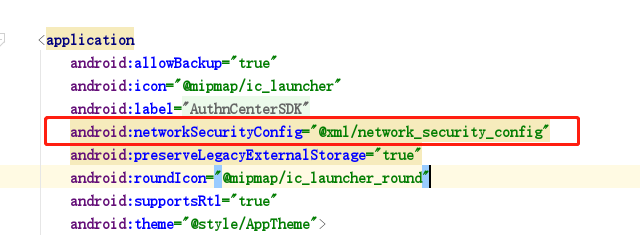
Create a new xml under the res directory and copy the following content, then introduce it in the application.
<?xml version="1.0" encoding="utf-8"?>
<network-security-config>
    <domain-config cleartextTrafficPermitted="true">
        <domain includeSubdomains="true">enrichgw.10010.com</domain> <!-- China Unicom internal 5G request domain, developers need to add -->
        <domain includeSubdomains="true">onekey.cmpassport.com</domain>  <!-- China Mobile internal request domain, developers need to add -->
    </domain-config>
</network-security-config>
Development Integration
SDK Initialization
Save the secret key obtained when adding the authentication scheme on the app side, and register the secret key to the IDaaS SDK at the app entry point.
AuthnCenterSDK.Builder()
                .init(this)
                .setBaseUrl("https://xxx.xxx.com")      //Tenant domain
                .setClientId(xxxx") //Tenant backend application client-id
                .isCheckSSL(false) //Whether to check SSL certificate
                .logEnable(false).build(); //Whether to enable HTTP request log
//Initialize one-click login application secret key
PlatformConfig.Builder().init(this).setAliOneKeyLoginSecret(“Alibaba Cloud application secret key”);
Main methods of the basic configuration initialization class AuthnCenterSDK:
/**
 *  Set IDaaS access address
 * @param baseUrl  Assigned IDaaS address
 * @return
 */
public AuthnCenterSDK setBaseUrl(String baseUrl)
/**
 *  Add request header
 * @param name  Request header name
 * @param value Request header value
 * @return
 */
public AuthnCenterSDK addGlobalHeader(String name, String value)
/**
 *  Whether to enable SSL verification. Only valid for HTTPS
 * @param isCheck    true enable  false disable
 * @return
 */
public AuthnCenterSDK isCheckSSL(boolean isCheck)
/**
 *  Whether to enable log
 * @param isOpen    true enable  false disable
 * @return
 */
public AuthnCenterSDK logEnable(boolean isOpen)
Main methods of the one-click login initialization class AuthnCenterMobileNumberAuthAliYun:
 /**
 *   Initialize one-click login
 * @param context  Android context
 * @param loginListener Callback
 * @return
 */
public AuthnCenterMobileNumberAuthAliYun init(@NotNull Context context, @NotNull AliOneStepListener loginListener)

/**
 *   One-click login method
 * @param config   UI
 */
public void oneKeyLogin(UiConfig config)


 /**
 *  One-click login callback event
 */
public interface AliOneStepListener
{

/**
 *  Success
 * @param code   Fixed success code is 1002
 * @param data   sessionToken
 */
void success(String code, String data);

/**
 *  Failure
 * @param code  Exception error code is 1001; other error codes are returned by the relevant service provider
 * @param msg
 */
void error(String code, String msg);
}


/**
 *  UI configuration abstract class. When defining UI, inherit and implement the configAuthPage() method.
*   Refer to sample code or Alibaba Cloud custom UI code snippets
 */
public abstract class UiConfig {

    public abstract void configAuthPage();

}
Example call:
AuthnCenterMobileNumberAuthAliYun.Builder().init(this, new AliOneStepListener() {
    @Override
    public void success(String code, String data) {
    }
    @Override
    public void error(String code, String msg) {
    }
});

//Launch one-click login
AuthnCenterMobileNumberAuthAliYun.Builder().oneKeyLogin(uiConfig);
Environment Check
To use the one-click login function, the App client must first use Alibaba Cloud's detection method to check whether the environment is suitable. The terminal phone must be in a 4G environment to be called successfully.
PhoneNumberAuthHelper object method introduction:
 /**
 * SDK environment check function. Checks whether the terminal supports number authentication, and returns code through TokenResultListener
 * type 1: local number verification 2: one-click login
 * 600024 Terminal supports authentication
 * 600013 System maintenance, function unavailable
 */
public void checkEnvAvailable(@IntRange(from = 1, to = 2) int type)
Example call:
AuthnCenterMobileNumberAuthAliYun.Builder().mPhoneNumberAuthHelper.checkEnvAvailable(2);After the check succeeds, you can call an acceleration method to speed up the launch of the one-click login authorization page and prevent long waits when calling one-click login (use as needed, not mandatory).
 /**
 * Accelerate authorization page launch
 *
 * @param overdueTime  Pre-fetch number validity period
 * @param listener Pre-fetch number callback
 */
public void accelerateLoginPage(final int overdueTime, final PreLoginResultListener listener)
This interface is mainly used for manually entering the mobile number and clicking OK to accelerate token acquisition.
One-click login scenarios generally do not involve this interface. The SDK built-in package uses the getLoginToken interface; by default, use the SDK built-in one-click login method.
If you have other functions and do not want to use the SDK built-in one-click login, you can directly use the Alibaba Cloud SDK native method for calling. Just replace the native event TokenResultListener with AliYunTokenListener.
Launch Authorization Page
After the environment check succeeds, call the IDaaS SDK one-click login method.
Example code:
//Launch one-click login
AuthnCenterMobileNumberAuthAliYun.Builder().oneKeyLogin(uiConfig);
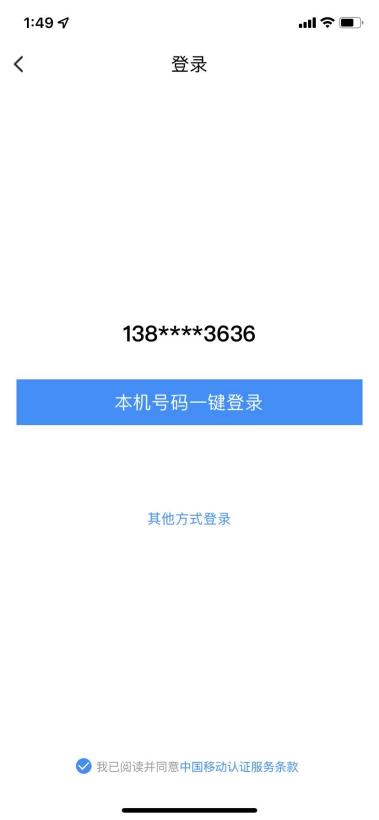
The IDaaS SDK default one-click login page includes the desensitized number, back button, checkbox agreement signing, and other login method buttons. The style and text descriptions of the above components can be customized.
Among them, the local number one-click login, back, and other login method buttons will trigger callbacks from the IDaaS SDK to the App client after clicking, returning the Return Code and related data, and closing the window, i.e., the operation is completed. The checkbox agreement signing will trigger a callback with related data after the operation, but the window will not be closed.
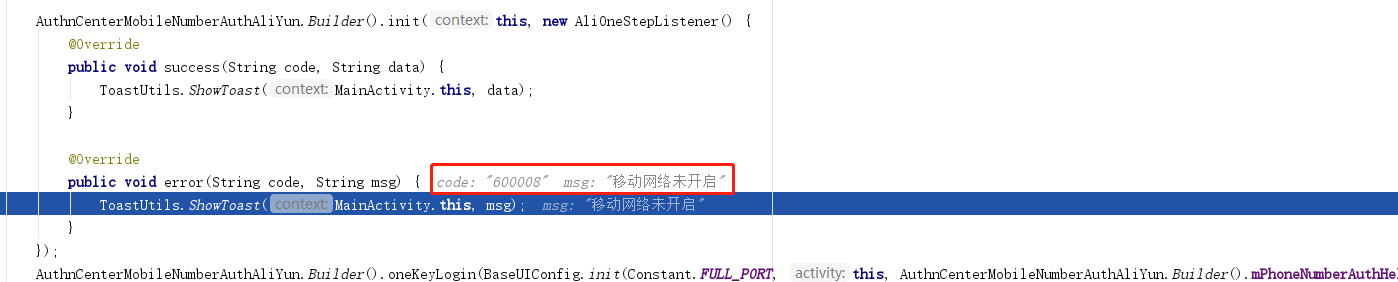
Failure example:
Success example:
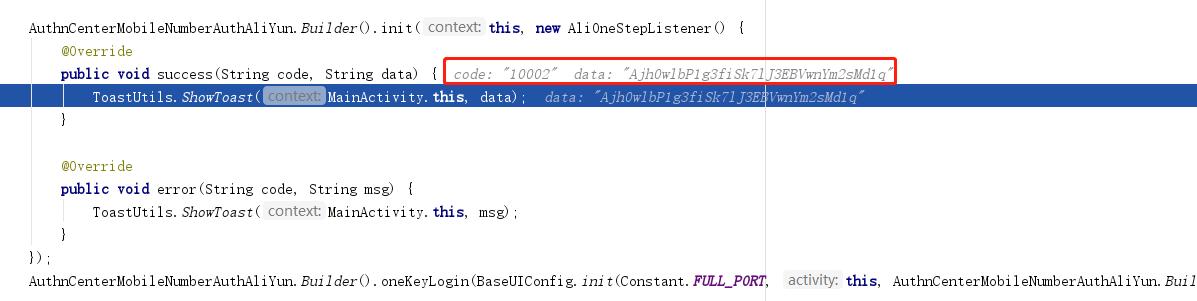
After successful call, you can use the returned sessionToken to exchange for detailed user information. For details, refer to the server API documentation.
Close Loading and Login Interface
AuthnCenterMobileNumberAuthAliYun.*Builder*().**mPhoneNumberAuthHelper**.hideLoginLoading();
*//Close loading*
AuthnCenterMobileNumberAuthAliYun.*Builder*().**mPhoneNumberAuthHelper**.quitLoginPage();
*//Close one-click login interface*
Authorization Interface Design
Ensure users are informed during the login process that their mobile number information will be authorized to the developer. One-click login requires developers to provide an authorization page for users to confirm authorization. Before calling the authorized login method, developers must pop up the authorization page and clearly inform users that the current operation will pass the user's local number information to the application.
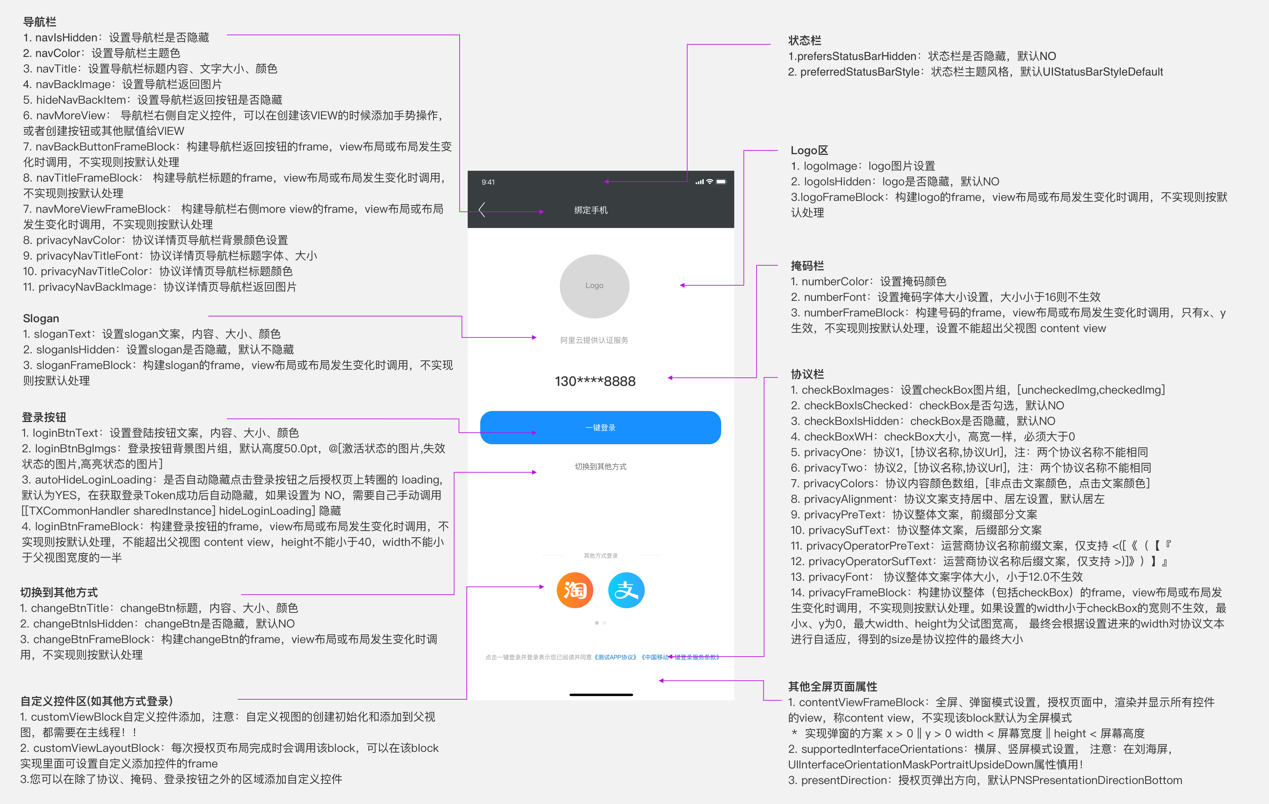
Example code is as follows. For detailed code, refer to the demo.
mAuthHelper.removeAuthRegisterXmlConfig();
mAuthHelper.removeAuthRegisterViewConfig();
//Add custom switch to other login methods
mAuthHelper.addAuthRegistViewConfig("switch_msg", new AuthRegisterViewConfig.Builder()
        .setView(initSwitchView(350))
        .setRootViewId(AuthRegisterViewConfig.RootViewId.ROOT_VIEW_ID_BODY)
        .setCustomInterface(new CustomInterface() {
            @Override
            public void onClick(Context context) {
                Toast.makeText(mContext, "Switched to SMS login method", Toast.LENGTH_SHORT).show();

                mAuthHelper.quitLoginPage();
            }
        }).build());
int authPageOrientation = ActivityInfo.SCREEN_ORIENTATION_SENSOR_PORTRAIT;
if (Build.VERSION.SDK_INT == 26) {
    authPageOrientation = ActivityInfo.SCREEN_ORIENTATION_BEHIND;
}
mAuthHelper.setAuthUIConfig(new AuthUIConfig.Builder()
        .setAppPrivacyOne("《Custom Privacy Agreement》", "https://www.qq.com")
        .setAppPrivacyTwo("《Baidu》", "https://www.baidu.com")
        .setAppPrivacyColor(Color.GRAY, Color.parseColor("#002E00"))
        //Hide default switch to other login methods
        .setSwitchAccHidden(true)
        //Hide default Toast
        .setLogBtnToastHidden(true)
        //Immersive status bar
        .setNavColor(Color.parseColor("#026ED2"))
        .setStatusBarColor(Color.parseColor("#026ED2"))
        .setWebViewStatusBarColor(Color.parseColor("#026ED2"))


        .setLightColor(false)
        .setWebNavTextSizeDp(20)
        //For image or xml parameters, pass the full name without extension. Files need to be placed under drawable or drawable-xxx directory, e.g. in_activity.xml, mytel_app_launcher.png
        .setAuthPageActIn("in_activity", "out_activity")
        .setAuthPageActOut("in_activity", "out_activity")
        .setVendorPrivacyPrefix("《")
        .setVendorPrivacySuffix("》")
        .setPageBackgroundPath("page_background_color")
        .setLogoImgPath("mytel_app_launcher")
        //One-click login button three-state background example login_btn_bg.xml
        .setLogBtnBackgroundPath("login_btn_bg")
        .setScreenOrientation(authPageOrientation)
        .create());
Alipay Return Codes
| Return Code | Chinese Error Message | Suggestion |
|---|---|---|
| 600000 | 获取Token成功 | None. |
| 600001 | 唤起授权页成功 | None. |
| 600002 | 唤起授权页失败 | It is recommended to switch to other login methods. |
| 600004 | 获取运营商配置信息失败 | Create a ticket and contact the engineer. |
| 600005 | 手机终端不安全 | Switch to other login methods. |
| 600007 | 未检测到SIM卡 | Prompt the user to check the SIM card and retry. |
| 600008 | 移动数据网络未开启 | Prompt the user to enable mobile data and retry. |
| 600009 | 无法判断运营商 | Create a ticket and contact the engineer. |
| 600010 | 未知异常 | Create a ticket and contact the engineer. |
| 600011 | 获取Token失败 | Switch to other login methods. |
| 600012 | 预取号失败 | None. |
| 600013 | 运营商维护升级,该功能不可用 | Create a ticket and contact the engineer. |
| 600014 | 运营商维护升级,该功能已达最大调用次数 | Create a ticket and contact the engineer. |
| 600015 | 接口超时 | Switch to other login methods. |
| 600017 | App ID、App Key解析失败 | Secret key not set or set incorrectly. Please first check the secret key information. If the secret key is correct, create a ticket and contact the engineer. |
| 600021 | 点击登录时检测到运营商已切换 | Switch to other login methods. |
| 600023 | 加载⾃定义控件异常 | Check whether the custom control is added correctly. |
| 600024 | 终端环境检查⽀持认证 | None. |
| 600025 | 终端检测参数错误 | Check whether the input parameter type and range are correct. |
| 600026 | 授权页已加载时不允许调用加速或预取号接口 | Check whether preLogin or accelerateAuthPage is called after the authorization page is launched, which is not allowed. |
Authorization Page Click Event Response Codes:
| Response Code | Chinese Error Message |
|---|---|
| 700000 | 点击返回,⽤户取消免密登录。 |
| 700001 | 点击切换按钮,⽤户取消免密登录。 |
| 700002 | 点击登录按钮事件。 |
| 700003 | 点击check box事件。 |
| 700004 | 点击协议富文本文字事件。 |
Carrier Error Codes
China Mobile
| Return Code | Chinese Error Message |
|---|---|
| 103000 | 成功。 |
| 102507 | 登录超时(授权页点登录按钮时)。 |
| 103101 | 请求签名错误。 |
| 103102 | 包签名或Bundle ID错误。 |
| 103111 | 网关IP错误或错误的运营商请求。 |
| 103119 | AppID不存在。 |
| 103211 | 其他错误,请提工单联系工程师。 |
| 103412 | 无效的请求有加密方式错误、非JSON格式和空请求等。 |
| 103414 | 参数校验异常。 |
| 103511 | 服务器IP白名单校验失败。 |
| 103811 | Token为空。 |
| 103902 | 短时间内重复登录,造成script失效。 |
| 103911 | Token请求过于频繁,10分钟内获取Token且未使用的数量不超过30个。 |
| 104201 | Token重复校验失败、失效或不存在。 |
| 105018 | 使用了本机号码校验的Token获取号码,导致Token权限不足。 |
| 105019 | 应用未授权。 |
| 105021 | 已达当天取号限额。 |
| 105302 | AppID不在白名单。 |
| 105313 | 非法请求。 |
| 200005 | 用户未授权(READ_PHONE_STATE)。 |
| 200010 | 无法识别SIM卡或没有SIM卡(Android)。 |
| 200020 | 用户取消登录。 |
| 200021 | 数据解析异常。 |
| 200022 | 无网络。 |
| 200023 | 请求超时。 |
| 200024 | 数据网络切换失败。 |
| 200025 | 位置错误(一般是线程捕获异常、socket、系统未授权移动数据网络权限等,请提工单联系工程师)。 |
| 200026 | 输入参数错误。 |
| 200027 | 未开启移动数据网络或网络不稳定。 |
| 200028 | 网络请求出错。 |
| 200038 | 异网取号网络请求失败。 |
| 200039 | 异网取号网关取号失败。 |
| 200048 | 用户未安装SIM卡。 |
| 200050 | EOF异常。 |
| 200061 | 授权页面异常。 |
| 200064 | 服务端返回数据异常。 |
| 200072 | CA根证书校验失败。 |
| 200082 | 服务器繁忙。 |
| 200086 | ppLocation为空。 |
| 200087 | 仅用于监听授权页成功拉起。 |
| 200096 | 当前网络不支持取号。 |
China Unicom
| Return Code | Chinese Error Message |
|---|---|
| 0 | 表示请求成功。 |
| -10008 | JSON转换失败。 |
| 1,请求超时 | 请求超时。 |
| 1,私网IP查找号码失败 | 私网IP查找号码失败。 |
| 1,私网IP校验错误 | 私网IP校验错误。 |
| 1,源IP鉴权失败 | 源IP鉴权失败。 |
| 1,获取鉴权信息失败 | 获取鉴权信息失败。 |
| 1,获得的手机授权码失败 | 一般是由于请求SDK超时导致的失败。 |
| 1,网关取号失败 | 网关取号失败。 |
| 1,网络请求失败 | 网络请求失败。 |
| 1,验签失败 | 签名校验失败。 |
| 1,传入code和AppID不匹配 | 传入code和AppID不匹配。 |
| 1,似乎已断开与互联网的链接 | 网络不稳定导致连接断开。 |
| 1,此服务器的证书无效 | 连接到不安全的服务器,提工单联系工程师。 |
| 1,PIP校验不通过 | 提工单联系工程师。 |
| 1,网关并发连接数受限 | 提工单联系工程师。 |
| 1,目前不允许数据链接 | 提工单联系工程师。 |
| 1,无法连接到服务器 | 提工单联系工程师。 |
| 1,系统内部错误 | 提工单联系工程师。 |
| 1,取号网关内部错误 | 取号网关内部错误,提工单联系工程师。 |
| 1,connect address error | 连接地址错误,一般是由于超时导致失败。 |
| 1,select socket error | 选择socket错误。 |
| 1,handshake failed | 握手失败。 |
| 1,decode ret_url fail | URL解码失败。 |
| 1,connect error | 连接错误。 |
| 1,read failed | 提工单联系工程师。 |
| 1,response null | 无响应,提工单联系工程师。 |
| 1,未知错误 | 提工单联系工程师。 |
| 2,请求超时 | 接口请求耗时超过timeout设定的值。 |
China Telecom
| Return Code | Chinese Error Message |
|---|---|
| -64 | Permission-denied(无权限访问)。 |
| -65 | API-request-rates-Exceed-Limitations(调用接口超限)。 |
| -10001 | 取号失败,mdn为空。 |
| -10002 | 参数错误。 |
| -10003 | 解密失败。 |
| -10004 | IP受限。 |
| -10005 | 异网取号回调参数异常。 |
| -10006 | mdn取号失败,且属于电信网络。 |
| -10007 | 重定向到异网取号。 |
| -10008 | 超过预设取号阈值。 |
| -10009 | 时间戳过期。 |
| -10013 | Perator_unsupported,提工单联系工程师。 |
| -20005 | Sign-invalid(签名错误)。 |
| -8001 | 网络异常,请求失败。 |
| -8002 | 请求参数错误。 |
| -8003 | 请求超时。 |
| -8004 | 移动数据网络未开启。 |
| -8010 | 无网络连接(网络错误)。 |
| -720001 | Wi-Fi切换4G请求异常。 |
| -720002 | Wi-Fi切换4G超时。 |
| 80000 | 请求超时。 |
| 80001 | 网络连接失败、网络链接已中断、Invalid argument、目前不允许数据连接。 |
| 80002 | 响应码错误404。 |
| 80003 | 网络无连接。 |
| 80005 | socket超时异常。 |
| 80007 | IO异常。 |
| 80008 | No route to host. |
| 80009 | Nodename nor servname provided, or not known. |
| 80010 | Socket closed by remote peer. |
| 80800 | Wi-Fi切换超时。 |
| 80801 | Wi-Fi切换异常。 |
IDaaS Return Codes
| HTTP Status Code | Error Code (error_code) | Error Message (error_msg) | Chinese Error Message |
|---|---|---|---|
| 400 | IDAAS.SDK.COMMON.1001 | Parameter {0} cannot be left blank | 参数 {0} 不能为空 |
| 400 | IDAAS.SDK.COMMON.1002 | The {0} parameter format is incorrect | 参数 {0} 格式错误 |
| 400 | IDAAS.SDK.COMMON.1003 | Device information is incomplete | 设备信息不完整 |
| 400 | IDAAS.SDK.COMMON.1004 | Signature decryption error | 签名解密错误 |
| 400 | IDAAS.SDK.COMMON.1005 | The {0} has failed | {0} 已失效 |
| 400 | IDAAS.SDK.COMMON.1006 | The {0} parameter error | {0} 参数错误 |
| 400 | IDAAS.SDK.COMMON.1007 | The {0} parameter type error | {0}参数类型错误 |
| 500 | IDAAS.SDK.COMMON.1008 | The system is busy. Try again later | 系统繁忙。稍后再试 |
| 400 | IDAAS.SDK.COMMON.1009 | Unknown authentication configuration | 未知的认证配置 |
| 400 | IDAAS.SDK.COMMON.1010 | Failed to obtain the enterprise center global configuration | 获取企业中心全局配置失败 |
| 400 | IDAAS.SDK.COMMON.1011 | Failed to obtain the international area code configuration | 获取国际区号配置失败 |
| 400 | IDAAS.SDK.COMMON.1012 | The x-client-ID is incorrect and the corresponding application cannot be found | X-client-id错误,找不到对应的应用 |
| 400 | IDAAS.SDK.COMMON.1013 | The corresponding user is not found | 未找到对应的用户 |
| 400 | IDAAS.SDK.COMMON.1014 | Application private key not found | 未找到应用私钥 |
| 400 | IDAAS.SDK.LOGIN.1001 | Error calling interface | 调用 {0} 接口出错 |
| 400 | IDAAS.SDK.LOGIN.1002 | User not bound | 用户未绑定 |
| 400 | IDAAS.SDK.LOGIN.1003 | The user has been locked due to too many unsuccessful login attempts. It will be unlocked in {0} minutes and {1} seconds | 由于多次登录失败,用户已被锁定。 它将在 {0} 分钟和 {1} 秒内解锁 |
| 400 | IDAAS.SDK.LOGIN.1004 | Failed to obtain the password policy | 获取密码策略错误 |
| 400 | IDAAS.SDK.LOGIN.1005 | Invalid username or password. Remaining login attempts: | 无效的用户名或密码。 其余登录尝试次数: |
| 400 | IDAAS.SDK.LOGIN.1006 | Configuration error, unable to find wechat authentication source | 配置错误,找不到微信认证源 |
| 400 | IDAAS.SDK.LOGIN.1007 | Configuration error, unable to find alipay authentication source | 配置错误,找不到支付宝认证源 |
| 400 | IDAAS.SDK.LOGIN.1008 | The configuration is incorrect. The one-click login authentication source cannot be found | 配置错误,无法找到一键登录认证源 |
| 400 | IDAAS.SDK.SMS.1001 | {0} slide base map is not initialized successfully, please check the path | {0} 滑动底图未初始化成功,请检查路径 |
| 400 | IDAAS.SDK.SMS.1002 | {0} verification code coordinate resolution failed | {0} 验证码坐标解析失败 |
| 400 | IDAAS.SDK.SMS.1003 | {0} verification code coordinate verification fails | {0} 验证码坐标校验失败 |
| 400 | IDAAS.SDK.SMS.1004 | The graphic verification code is incorrect | 图形验证码校验错误 |
| 400 | IDAAS.SDK.SMS.1005 | SMS verification code verification is incorrect | 短信验证码验证错误 |
| 400 | IDAAS.SDK.SMS.1006 | The email verification code is incorrect | 邮件验证码验证错误 |
| 400 | IDAAS.SDK.SMS.1007 | Sending scenario does not exist | 发送场景不存在 |
| 400 | IDAAS.SDK.SMS.1008 | Failed to send the verification code | 发送验证码失败 |
| 400 | IDAAS.SDK.SOCIAL.1001 | The social account is unbound incorrectly | 社交账号解绑错误 |
| 400 | IDAAS.SDK.SOCIAL.1002 | The social account has been bound, please unbind it first | 社交账号已绑定,请先解绑 |
| 400 | IDAAS.SDK.PWD.1001 | The password length is incorrect | 密码长度错误 |
| 400 | IDAAS.SDK.PWD.1002 | The password cannot be the username | 密码不能为用户名 |
| 400 | IDAAS.SDK.PWD.1003 | Your password complexity is low | 你的密码复杂度过低 |
| 400 | IDAAS.SDK.PWD.1004 | The password is weak | 密码很弱 |
| 400 | IDAAS.SDK.PWD.1005 | The password is used before, cannot be used again | 该密码已被使用过,不能再次使用 |
| 400 | IDAAS.SDK.PWD.1006 | Password cannot username in reverse order | 密码不能是用户名的倒序 |
| 400 | IDAAS.SDK.PWD.1007 | The number of repeated password characters exceeded the upper limit | 密码重复字符数超过限制 |
| 400 | IDAAS.SDK.PWD.1008 | Password cannot contain :username, phone number, email prefix, name in PinYing | 密码不能包含:用户名、电话号码、邮件前缀、拼音名 |
| 400 | IDAAS.SDK.MFA.1001 | The mobile doesn't match the user | 手机号和用户不匹配 |
| 400 | IDAAS.SDK.MFA.1002 | The access control policy is incorrect | 访问控制策略配置错误 |
| 400 | IDAAS.SDK.MFA.1003 | Access control authentication source type conversion error | 访问控制身份验证源类型转换错误 |