
WeChat Login
Documentation
This document describes how to integrate WeChat authorized login on an Android client. In the WeChat login scenario, the user's phone has the WeChat app installed. When the user taps the WeChat login button in the client app, the IDaaS SDK launches the authorization page in the WeChat app. After the user taps the "Authorize Login" button and authorization succeeds, the WeChat app redirects back to the client app. The IDaaS SDK automatically receives the temporary ticket and sends it to the IDaaS server for authentication. The final authentication result is returned to the client app.
Flow Description
Login Flow
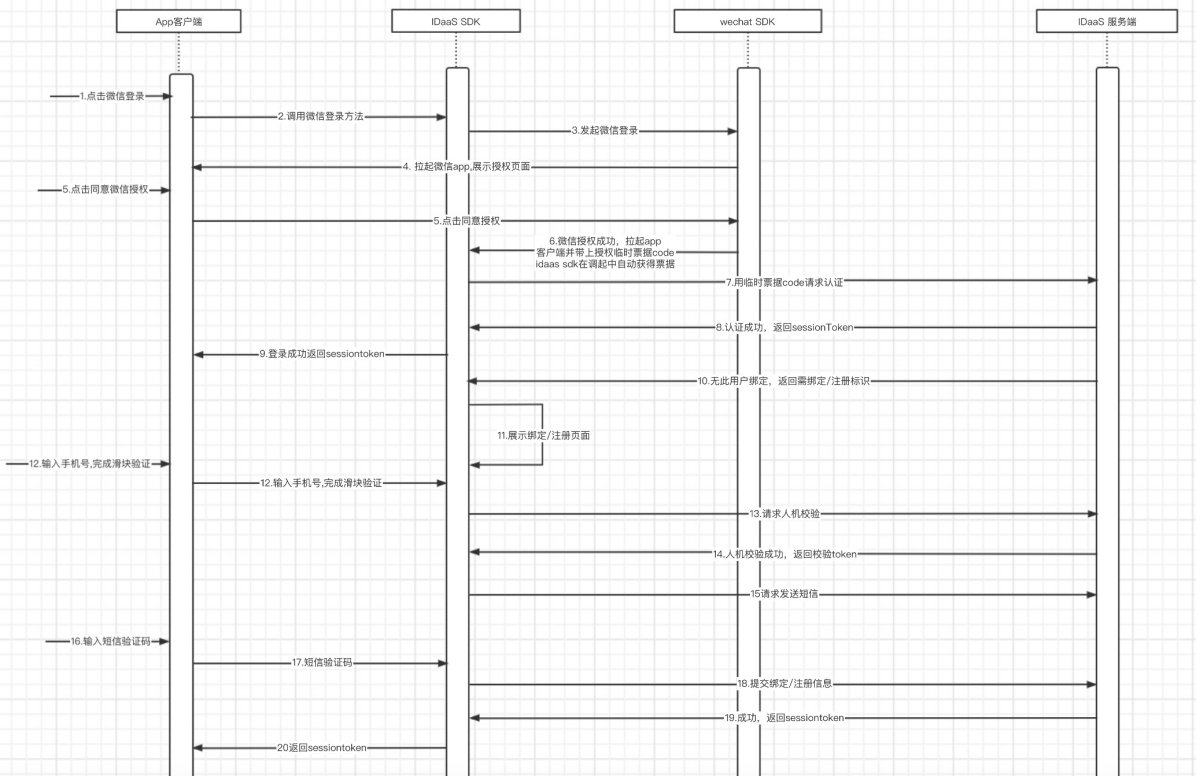
Integration Flow Description
The user taps the WeChat login button in the app client.
The app client calls the IDaaS SDK WeChat login method.
The IDaaS SDK sends a login authorization request to the WeChat SDK.
The WeChat SDK launches the WeChat app on the phone and displays the authorization login page.
The user taps the "Authorize Login" button.
WeChat authorization succeeds; the client app is launched and carries the WeChat authorization ticket. At this time, the IDaaS SDK automatically obtains the WeChat authorization ticket during the launch.
IDaaS uses the WeChat authorization ticket to request authentication from the IDaaS server.
The IDaaS server queries whether the mobile number is bound. If it is already bound, the IDaaS server authentication succeeds and returns the sessionToken to the IDaaS SDK.
The IDaaS SDK returns the sessionToken to the app client.
If the IDaaS server finds that the mobile number is not bound, it returns an identifier indicating that binding or registration is required.
The IDaaS server displays the binding or registration page.
The user enters the mobile number, taps "Get Verification Code", and completes the slider verification.
The IDaaS SDK takes the slider verification code to the IDaaS server to request slider verification.
The IDaaS server verifies the slider successfully and returns a token to the IDaaS SDK.
The IDaaS SDK uses the token and mobile number to request the IDaaS server to send an SMS verification code.
The user receives the SMS verification code, enters it in the verification code input box, and taps the bind or register button.
The IDaaS SDK submits the binding or login data to the IDaaS server.
Binding or registration succeeds; the IDaaS server returns the sessionToken to the IDaaS SDK.
The IDaaS SDK returns the sessionToken to the client app.
Prerequisites
Get clientID
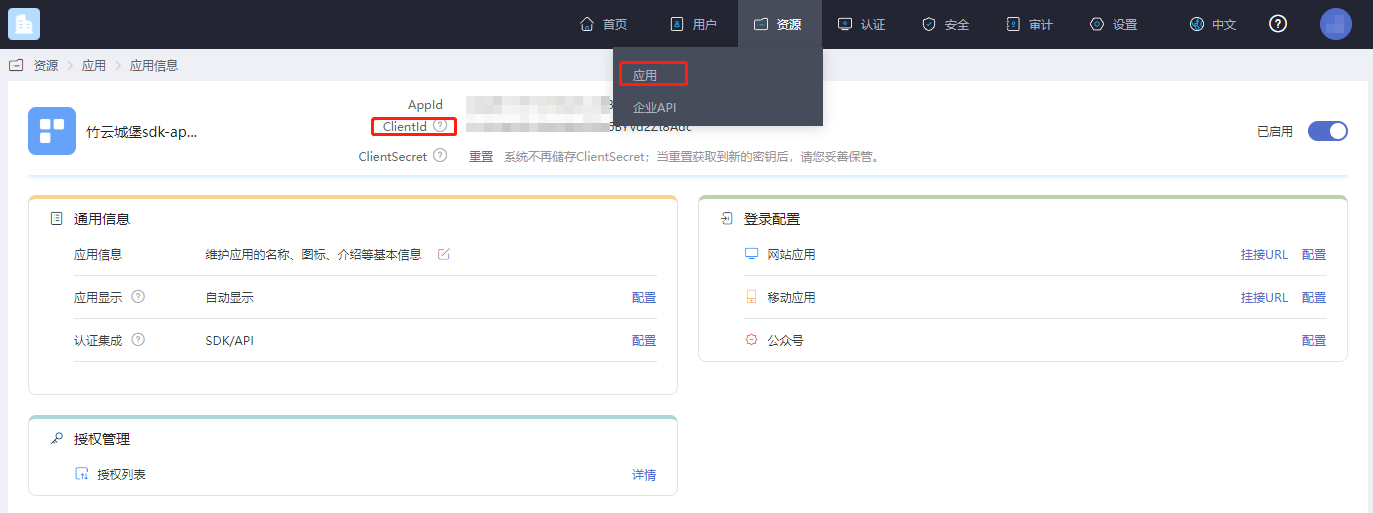
Log in to the BambooCloud IDaaS Enterprise Center, click "Resources --> Applications", select the relevant application, and view the clientID.
Configure the Authentication Source
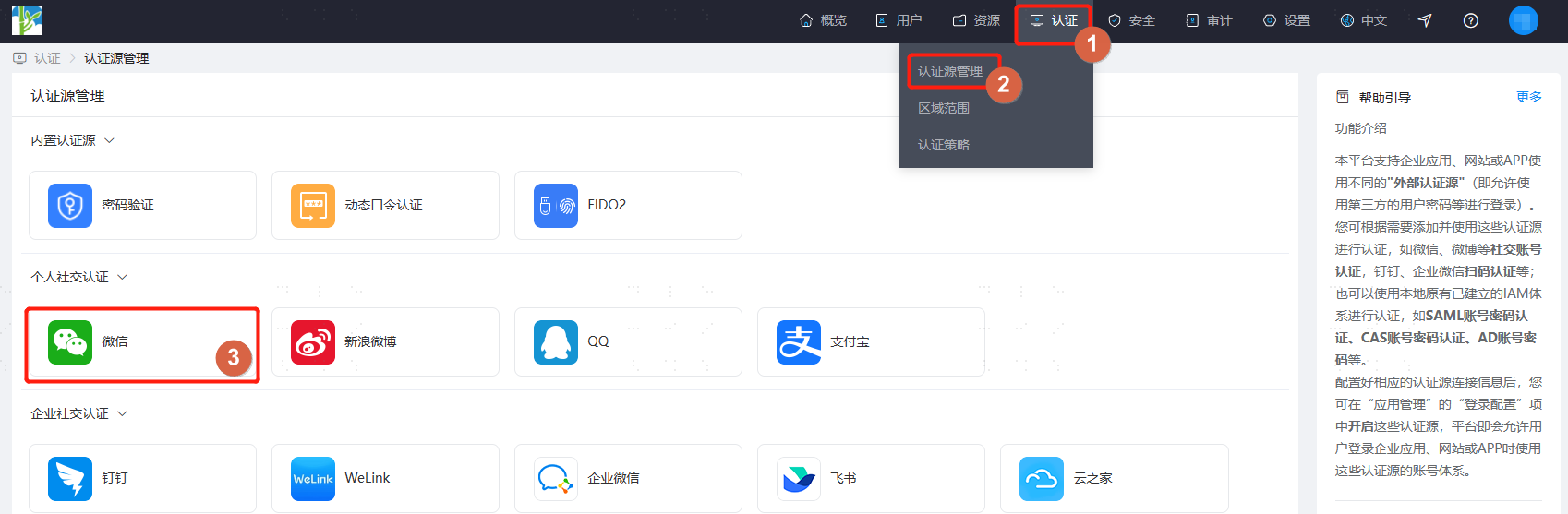
Log in to the BambooCloud IDaaS Enterprise Center, click "Authentication --> Authentication Source Management --> WeChat".
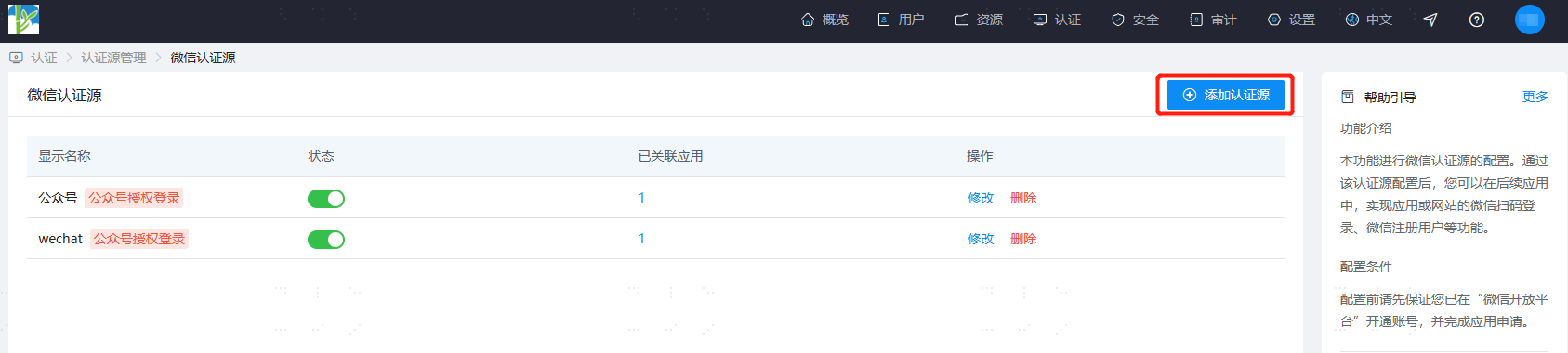
Click "Add Authentication Source".
Enter the AppKey and AppSecret obtained after registering the app on the WeChat Open Platform. The channel selection box should be "Mobile Application". Enter the display name.
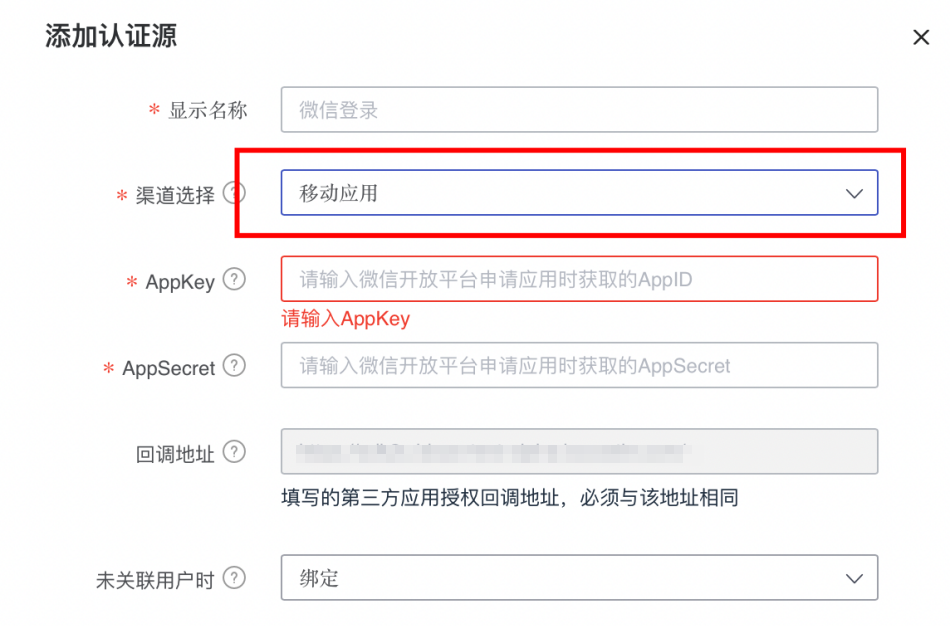
Click "OK" to get an authentication source as shown below.

Go to "Resources --> Applications" and create a self-built application.
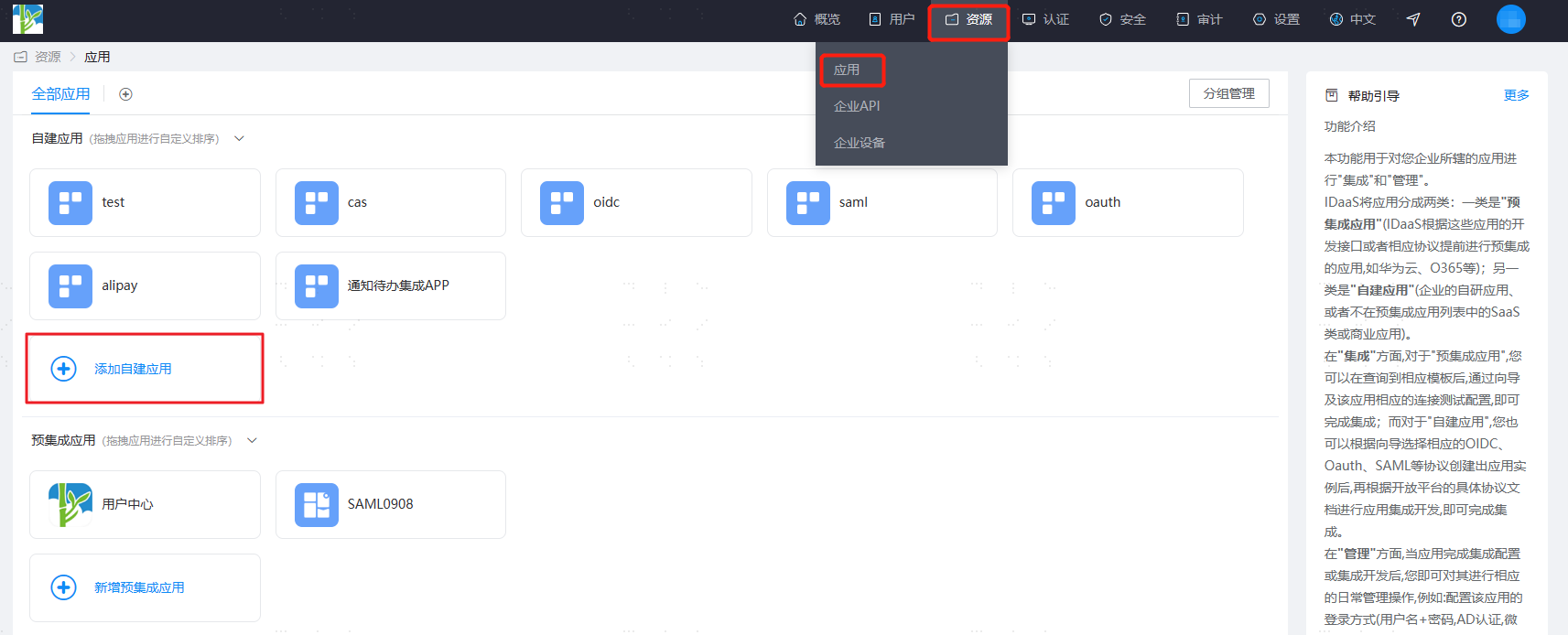
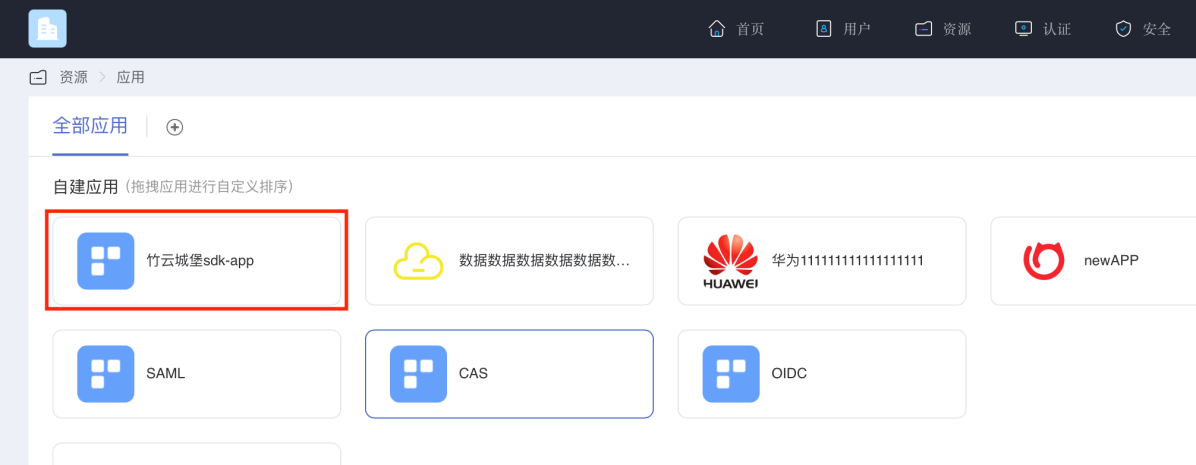
Click to enter the details of the newly created application.
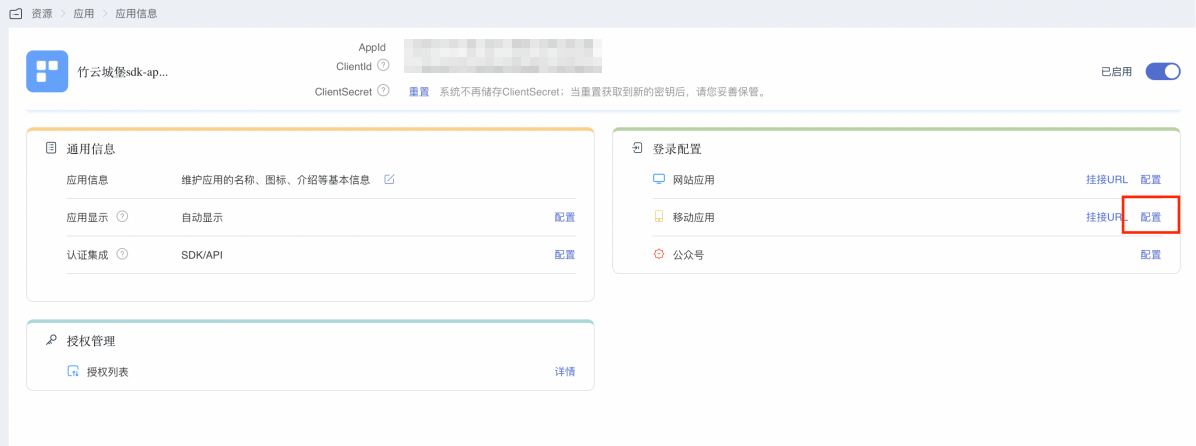
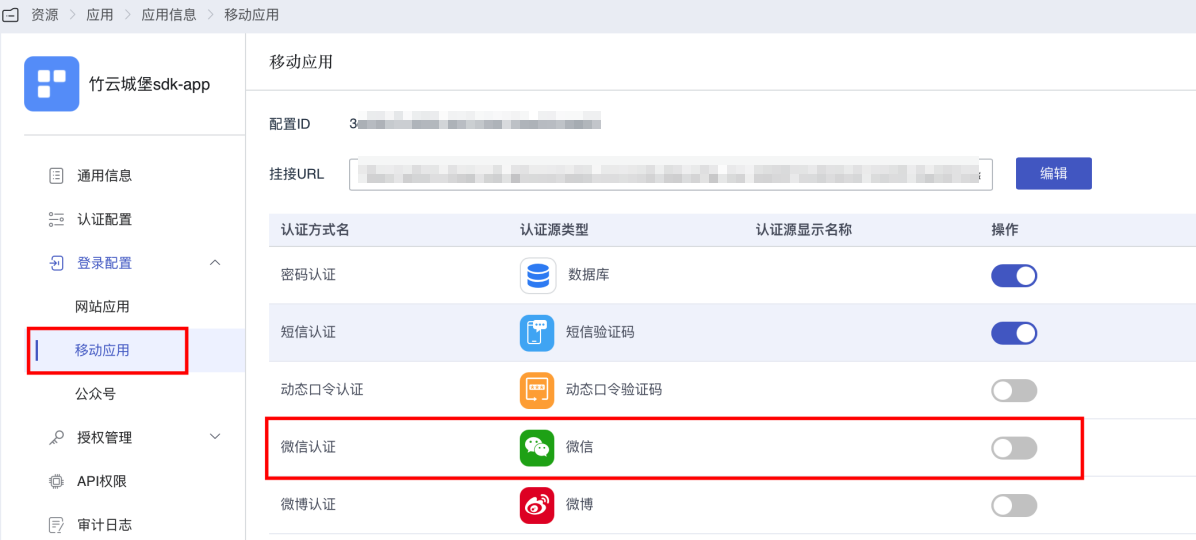
Go to "Login Configuration --> Mobile Application --> Configure".
In the window shown below, click the enable button next to the WeChat entry.
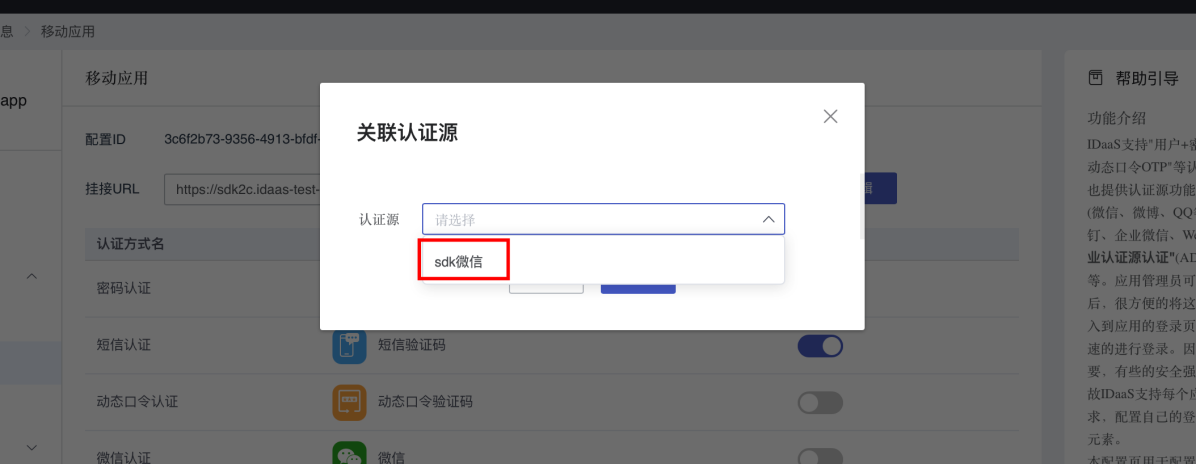
In the pop-up window shown below, select the authentication source you just configured and save.
Add Dependencies
Before integrating WeChat OAuth authorized login, you need to register a developer account on the WeChat Open Platform, have a mobile application that has passed review, and obtain the corresponding AppID and AppSecret. After applying for WeChat login and passing review, you can start the integration process.
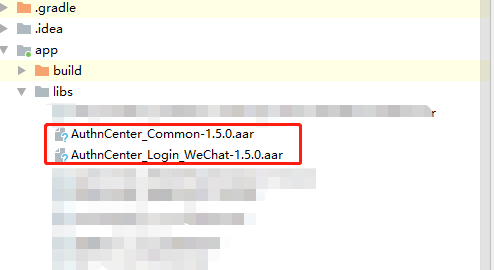
Import the aar package into the lib folder, as shown below:
Configure Package Name
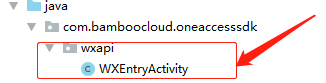
Create a new wxapi directory under the directory corresponding to your package name, and add a WXEntryActivity class under the wxapi directory. This class inherits from Activity (copy this class directly from the demo):
Configure build.gradle
/*begin*/
    /*  rxjava2 +  okhttp + retrofit2  */
    api 'io.reactivex.rxjava2:rxjava:2.2.10'
    api 'io.reactivex.rxjava2:rxandroid:2.1.1'
    api 'com.squareup.retrofit2:retrofit:2.6.0'
    api 'com.squareup.retrofit2:adapter-rxjava2:2.6.0'
    api 'com.squareup.retrofit2:converter-gson:2.6.0'
    api 'com.squareup.okhttp3:okhttp:4.3.1'
    api 'com.squareup.okhttp3:logging-interceptor:3.6.0'
    api 'com.jakewharton.retrofit:retrofit2-rxjava2-adapter:1.0.0'
    api 'com.trello.rxlifecycle2:rxlifecycle-components:2.1.0'
    api 'com.alibaba:fastjson:1.2.61'
     /*end*/

    //Common library, required
    implementation(name: 'AuthnCenter_Common-1.5.3', ext: 'aar')
    //WeChat login SDK, required
    implementation(name: ''AuthnCenter_WeChat-1.5.3', ext: 'aar')
    //WeChat official dependency library, required
    implementation 'com.tencent.mm.opensdk:wechat-sdk-android-without-mta:6.6.23'
Configure AndroidManifest
  <!--Permissions-->
    <uses-permission android:name="android.permission.INTERNET" />
    <uses-permission android:name="android.permission.WRITE_EXTERNAL_STORAGE" />
    <uses-permission android:name="android.permission.READ_EXTERNAL_STORAGE" />
    <uses-permission android:name="android.permission.CAMERA" />
    <uses-permission android:name="android.permission.RECORD_AUDIO" />
    <uses-permission android:name="android.permission.READ_PHONE_STATE" />
    <uses-permission android:name="android.permission.MOUNT_UNMOUNT_FILESYSTEMS"/>

        <!--  WeChat redirect, must register -->
        <activity
            android:name=".wxapi.WXEntryActivity"
            android:exported="true"
            android:label="WeChat Page"
            android:launchMode="singleTask"
            android:taskAffinity="com.authncenter.luzhou"
            android:theme="@android:style/Theme.Translucent.NoTitleBar" />
        <!-- International area code page, register as needed -->
        <activity
            android:name="com.authncenter.wechat.view.CountryCodeListActivity"
            android:launchMode="singleTask"
            android:screenOrientation="portrait" />
        <!-- SMS verification page, register as needed -->
        <activity
            android:name="com.authncenter.wechat.view.MsgActivity"
            android:launchMode="singleTask"
            android:screenOrientation="portrait" />
Development Integration
Built-in API Introduction
Brief introduction to methods of the AuthnCenterAPI basic configuration initialization main class:
/**
 * SMS verification code -- send SMS
 */
public void smsSend(Context context, SendSmsReq req, RequestListener listener)

/**
 * Get country/area code. Note: if international area codes are configured, call this method to obtain them.
 */
public void getCountryCode(Context context, RequestListener listener)

/**
 * Social account binding interface
 * @param context      context
 * @param stateToken   temporary token returned after the current login
 * @param otpsmsReq    binding object information
 * @param listener     event callback
 */
public void socialBind(Context context, String stateToken, OTPSMSReq otpsmsReq, RequestListener listener)

/**
 *  Register
 * @param context      context
 * @param stateToken   temporary token returned after the current login
 * @param otpsmsReq    registration object information
 * @param listener     event callback
 */
public void register(Context context, String stateToken, OTPSMSReq otpsmsReq, RequestListener listener)
Brief introduction to methods of the WeChat login main class AuthnCenterLoginWeChat:
/**
 *   WeChat login
 * @param context  context
 * @param loginListener  event listener
 * @param loginType       LoginType.DEFAULT (built-in), LoginType.CUSTOM (custom)
 */
public void loginByWechat(Context context, WeChatLoginListener loginListener, LoginType loginType)

/**
 *    Set WeChat callback code
 * @param context  context
 * @param code     authorization code returned by WeChat
 */
public void setWechatCode(Context context, String code)
Mobile International Area Code Acquisition
If international number support is enabled, call the international area code acquisition interface first. The interface returns the configured list of international area codes along with regular expressions for phone numbers. The following image shows how to configure the international area code list and preferred area code.
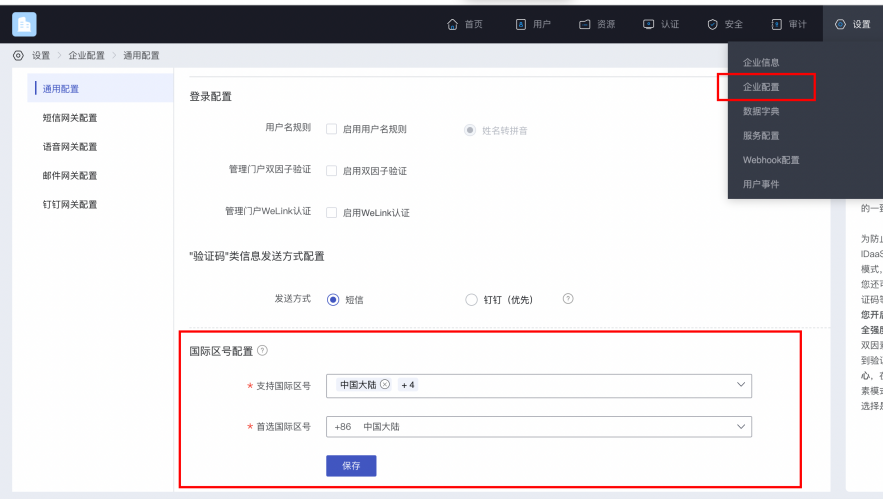
Sample code for obtaining the international area code list:
AuthnCenterAPI.Builder().getCountryCode(this, new RequestListener<CountryCodeInfoRsp>() {
    @Override
    public void success(CountryCodeInfoRsp codeInfoRsp) {

    }

    @Override
    public void error(String code, String errorMessage) {
    }
});
Success example code=0, value of data:
{
	"phoneAreaCodeDefinitions": [
		{
			"areaCode": "86",
			"displayMapping": {
				"zh-TW": "Mainland China",
				"en": "China",
				"zh-CN": "Mainland China"
			},
			"countryCode": "CN",
			"mobileRegex": "^(\\+86){0,1}\\-?1\\d{10}$",
			"areaCodeSuffixes": []
		},
		{
			"areaCode": "852",
			"displayMapping": {
				"zh-TW": "Hong Kong",
				"en": "Hong Kong",
				"zh-CN": "Hong Kong"
			},
			"countryCode": "HK",
			"mobileRegex": "^(\\+852){1}\\-?0{0,1}[1,4,5,6,7,8,9](?:\\d{7}|\\d{8}|\\d{12})$",
			"areaCodeSuffixes": []
		},
		{
			"areaCode": "886",
			"displayMapping": {
				"zh-TW": "Taiwan",
				"en": "Taiwan",
				"zh-CN": "Taiwan"
			},
			"countryCode": "TW",
			"mobileRegex": "^(\\+886){1}\\-?[6,7,9](?:\\d{7}|\\d{8})$",
			"areaCodeSuffixes": []
		},
		{
			"areaCode": "853",
			"displayMapping": {
				"zh-TW": "Macau",
				"en": "Macau",
				"zh-CN": "Macau"
			},
			"countryCode": "MO",
			"mobileRegex": "^(\\+853){1}\\-?0{0,1}[1,4,5,6,7,8,9](?:\\d{7}|\\d{8}|\\d{12})$",
			"areaCodeSuffixes": []
		},
		{
			"areaCode": "93",
			"displayMapping": {
				"zh-TW": "Afghanistan",
				"en": "Afghanistan",
				"zh-CN": "Afghanistan"
			},
			"countryCode": "AF",
			"mobileRegex": "^(\\+93){1}\\-\\d{6,11}",
			"areaCodeSuffixes": []
		}
	],
	"preferredAreaCode": "CN"
}
Return parameters:
| Parameter | Name | Type | Description |
|---|---|---|---|
| preferredAreaCode | Preferred international area code | String | The preferred international area code configured in the current Enterprise Center |
| countryCode | Country/region code | String | Country/region code |
| areaCode | International dialing code | String | International dialing code |
| areaCodeSuffixes | International dialing code suffix | String | International dialing code suffix |
| mobileRegex | Mobile number format regex | String | Mobile number format regex |
| displayMapping | Multilingual display name mapping | String | Multilingual display name mapping |
Built-in Slider Verification
Human-machine interaction verification is required when sending a verification code.
BlockPuzzleDialog mBlockPuzzleDialog = new BlockPuzzleDialog(mContext);
mBlockPuzzleDialog.setOnResultsListener(new OnResultsListener() {
        @Override
        public void onResultsClick(String result) {
            LogUtil.getInstance().d("Secondary verification callback result mCaptchaToken:" + result);
            //This callback result is the captchaToken parameter for SMS verification
        }
        @Override
        public void onError(String code, String msg) {
            ToastUtils.ShowToast(mContext, String.format("Error code: %s  Error message: %s", code, msg));
        }
    });
}
Send Verification Code
The app client needs its own UI page, which contains several necessary components: a mobile number input box, a verification code input box, a button (or event) to trigger obtaining the verification code, and a login button (or event).
After the user enters the mobile number and before tapping (triggering) the send verification code event, the app client checks the mobile number format.
Tap (trigger) the send verification code event; the app client calls the IDaaS SDK send verification code method, as shown below:
//Send verification code
SendSmsReq sendSmsReq = new SendSmsReq();
sendSmsReq.setMobile(getPhoneNum());
sendSmsReq.setType(SendSmsType.login);//type enum
sendSmsReq.setCaptcha_token(“result returned after slider verification succeeds”);
AuthnCenterAPI.Builder().smsSend(mContext, sendSmsReq
        , new RequestListener<BaseResponse>() {
            @Override
            public void success(BaseResponse rsp) {
            }
            @Override
            public void error(String code, String errorMessage) {
            }
        });
Built-in UI Development Integration
Initialization
AuthnCenterSDK.Builder()
                .init(this)
                .setBaseUrl("https://xxx.xxx.com")      //tenant domain
                .setClientId("xxxx") //application client-id from the tenant console
                .isCheckSSL(false) //whether to check the SSL certificate
                .logEnable(false).build(); //whether to enable HTTP request logs
PlatformConfig.Builder().init(this).setWechatAppId(wechatAppId); //Set WeChat APPID
UI Customization
The caller can use BindThemeConfig to set the text, description, color, etc. of the binding page. The specific attributes are as follows:
//Custom page
BindThemeConfig.Builder().setBindTitle("I am the title")
        .setBindDes("I am the details")
        .setBindButtonText("I just want to change the button text")
        .setBindButtonTextDefaultColor("#367517")
        .setBindButtonTextColor("#C8E2B1")
        .setBindButtonTextOnPressColor("#F9F400")
        .setSendMsgColor("#976D00")
        .setSendMsgNoActiviColor("#50A625")
        .setDialogTitle("I just want to customize")
        .setDialogBtnConfirmColor("#FFB6C1");
Attribute Description
| Parameter | Type | Description | Example |
|---|---|---|---|
| setBackFont | String | Change the back text | None |
| setBackFontColor | String | Change the back text color | Hex color, e.g. #FFFFFF |
| setBackImg | int | Set the back icon | Resource file R |
| setBackFontSize | int | Set the back text size | 14sp |
| setCountryCodeVisibility | boolean | Set whether the international area code is displayed | Default is true |
| setBindTitle | String | Binding page title | None |
| setBindDes | String | Binding page description | None |
| setBindButtonText | String | Binding button text | None |
| setBindButtonTextDefaultColor | String | Default background color of the binding button text | Hex color, e.g. #FFFFFF |
| setBindButtonTextColor | String | Binding button text color | Hex color, e.g. #FFFFFF |
| setBindButtonTextOnPressColor | String | Background color of the binding button text after clicking | Hex color, e.g. #FFFFFF |
| setSendMsgColor | String | Send SMS button text color | Hex color, e.g. #FFFFFF |
| setSendMsgNoActiviColor | String | Countdown text color | Hex color, e.g. #FFFFFF |
| setDialogTitle | String | Unbind dialog title | None |
| setDialogBtnConfirmColor | String | Unbind dialog confirm button color | Hex color, e.g. #FFFFFF |
| sendMsgNoActiveBackground | int | Send SMS button background resource | Android color or background resource file (R) |
| setButtonBackground | int | Default send SMS button background resource | Android color or background resource file (R) |
| setSendMsgBackground | int | Binding button background resource | Android color or background resource file (R) |
WeChat Login Built-in Page
 AuthnCenterLoginWeChat.Builder().loginByWechat(this, new WeChatLoginListener() {
            @Override
            public void success(String code, String data) {
                 //Success callback
            }

            @Override
            public void error(String code, String errorMessage) {
               //Failure callback
            }
        }, LoginType.DEFAULT);
API Development Integration
If you choose this integration method, after the login returns, you need to handle binding or registration business and basic mobile number verification operations by yourself based on the returned status.
At the same time, you can fill in your own registration information in the AndroidManifest file.
Call Sequence Description
After login succeeds, if the returned status is binding, you need to call:
Get country/area code (call this based on whether international support is configured) (getCountryCode)
Slider verification (BlockPuzzleDialog )
Send SMS (smsSend)
Bind or register (socialBind/register)
Initialization
AuthnCenterSDK.Builder()
                .init(this)
                .setBaseUrl("https://xxx.xxx.com")      //tenant domain
                .addGlobalHeader("X-client-id", "xxxx") //application client-id from the tenant console
                .isCheckSSL(false) //whether to check the SSL certificate
                .logEnable(false).build(); //whether to enable HTTP request logs
PlatformConfig.Builder().init(this).setWechatAppId(wechatAppId); //Set WeChat APPID
WeChat Login (Custom UI)
AuthnCenterLoginWeChat.Builder().loginByWechat(this, new WeChatLoginListener() {
    @Override
    public void success(String code, String data) {
//Here, jump to your own page for binding or registration based on the code return value
        Intent intent = new Intent(MainActivity.this, WechatActivity.class);
        intent.putExtra(SocialType.STATETOKEN, data);
        intent.putExtra(SocialType.BINDTYPE, SocialType.WX);
        switch (code) {
   case "10002":   //Login succeeded
ToastUtils.ShowToast(MainActivity.this, "Login succeeded: " + data);
                return;
            case "10003":   //Bind user
               intent.putExtra(SocialType.ACTIONTYPE, ActionType.BIND);
                break;
            case "10004": //Register user
                intent.putExtra(SocialType.ACTIONTYPE, ActionType.REGISTER);
                break;
        }
        intent.setFlags(Intent.FLAG_ACTIVITY_NEW_TASK);
        startActivity(intent);
    }

    @Override
    public void error(String code, String errorMessage) {
        ToastUtils.ShowToast(MainActivity.this, "SDK callback code: " + code + "---- msg " + errorMessage);
    }
}, LoginType.CUSTOM);
Here, judge based on the returned code:
| Code | Description |
|---|---|
| 10001 | AuthCenter server error |
| 10002 | Success |
| 10003 | User binding required |
| 10004 | User registration required |
Return Codes
| Status Code | Error Code (error_code) | Error Message (error_msg) | Chinese Error Message | Remediation |
|---|---|---|---|---|
| 400 | IDAAS.SDK.COMMON.1001 | Parameter {0} cannot be left blank | 参数 {0} 不能为空 | |
| 400 | IDAAS.SDK.COMMON.1002 | The {0} parameter format is incorrect | 参数 {0} 格式错误 | |
| 400 | IDAAS.SDK.COMMON.1003 | Device information is incomplete | 设备信息不完整 | |
| 400 | IDAAS.SDK.COMMON.1004 | Signature decryption error | 签名解密错误 | |
| 400 | IDAAS.SDK.COMMON.1005 | The {0} has failed | {0} 已失效 | |
| 400 | IDAAS.SDK.COMMON.1006 | The {0} parameter error | {0} 参数错误 | |
| 400 | IDAAS.SDK.COMMON.1007 | The {0} parameter type error | {0}参数类型错误 | |
| 500 | IDAAS.SDK.COMMON.1008 | The system is busy. Try again later | 系统繁忙。稍后再试 | |
| 400 | IDAAS.SDK.COMMON.1009 | Unknown authentication configuration | 未知的认证配置 | |
| 400 | IDAAS.SDK.COMMON.1010 | Failed to obtain the enterprise center global configuration | 获取企业中心全局配置失败 | |
| 400 | IDAAS.SDK.COMMON.1011 | Failed to obtain the international area code configuration | 获取国际区号配置失败 | |
| 400 | IDAAS.SDK.COMMON.1012 | The x-client-ID is incorrect and the corresponding application cannot be found | X-client-id错误,找不到对应的应用 | |
| 400 | IDAAS.SDK.COMMON.1013 | The corresponding user is not found | 未找到对应的用户 | |
| 400 | IDAAS.SDK.COMMON.1014 | Application private key not found | 未找到应用私钥 | |
| 400 | IDAAS.SDK.LOGIN.1001 | Error calling interface | 调用 {0} 接口出错 | |
| 400 | IDAAS.SDK.LOGIN.1002 | User not bound | 用户未绑定 | |
| 400 | IDAAS.SDK.LOGIN.1003 | The user has been locked due to too many unsuccessful login attempts. It will be unlocked in {0} minutes and {1} seconds | 由于多次登录失败,用户已被锁定。 它将在 {0} 分钟和 {1} 秒内解锁 | |
| 400 | IDAAS.SDK.LOGIN.1004 | Failed to obtain the password policy | 获取密码策略错误 | |
| 400 | IDAAS.SDK.LOGIN.1005 | Invalid username or password. Remaining login attempts: | 无效的用户名或密码。 其余登录尝试次数: | |
| 400 | IDAAS.SDK.LOGIN.1006 | Configuration error, unable to find wechat authentication source | 配置错误,找不到微信认证源 | |
| 400 | IDAAS.SDK.LOGIN.1007 | Configuration error, unable to find alipay authentication source | 配置错误,找不到支付宝认证源 | |
| 400 | IDAAS.SDK.LOGIN.1008 | The configuration is incorrect. The one-click login authentication source cannot be found | 配置错误,无法找到一键登录认证源 | |
| 400 | IDAAS.SDK.SMS.1001 | {0} slide base map is not initialized successfully, please check the path | {0} 滑动底图未初始化成功,请检查路径 | |
| 400 | IDAAS.SDK.SMS.1002 | {0} verification code coordinate resolution failed | {0} 验证码坐标解析失败 | |
| 400 | IDAAS.SDK.SMS.1003 | {0} verification code coordinate verification fails | {0} 验证码坐标校验失败 | |
| 400 | IDAAS.SDK.SMS.1004 | The graphic verification code is incorrect | 图形验证码校验错误 | |
| 400 | IDAAS.SDK.SMS.1005 | SMS verification code verification is incorrect | 短信验证码验证错误 | |
| 400 | IDAAS.SDK.SMS.1006 | The email verification code is incorrect | 邮件验证码验证错误 | |
| 400 | IDAAS.SDK.SMS.1007 | Sending scenario does not exist | 发送场景不存在 | |
| 400 | IDAAS.SDK.SMS.1008 | Failed to send the verification code | 发送验证码失败 | |
| 400 | IDAAS.SDK.SOCIAL.1001 | The social account is unbound incorrectly | 社交账号解绑错误 | |
| 400 | IDAAS.SDK.SOCIAL.1002 | The social account has been bound, please unbind it first | 社交账号已绑定,请先解绑 | |
| 400 | IDAAS.SDK.PWD.1001 | The password length is incorrect | 密码长度错误 | |
| 400 | IDAAS.SDK.PWD.1002 | The password cannot be the username | 密码不能为用户名 | |
| 400 | IDAAS.SDK.PWD.1003 | Your password complexity is low | 你的密码复杂度过低 | |
| 400 | IDAAS.SDK.PWD.1004 | The password is weak | 密码很弱 | |
| 400 | IDAAS.SDK.PWD.1005 | The password is used before, cannot be used again | 该密码已被使用过,不能再次使用 | |
| 400 | IDAAS.SDK.PWD.1006 | Password cannot username in reverse order | 密码不能是用户名的倒序 | |
| 400 | IDAAS.SDK.PWD.1007 | The number of repeated password characters exceeded the upper limit | 密码重复字符数超过限制 | |
| 400 | IDAAS.SDK.PWD.1008 | Password cannot contain :username, phone number, email prefix, name in PinYing | 密码不能包含:用户名、电话号码、邮件前缀、拼音名 | |
| 400 | IDAAS.SDK.MFA.1001 | The mobile doesn't match the user | 手机号和用户不匹配 | |
| 400 | IDAAS.SDK.MFA.1002 | The access control policy is incorrect | 访问控制策略配置错误 | |
| 400 | IDAAS.SDK.MFA.1003 | Access control authentication source type conversion error | 访问控制身份验证源类型转换错误 |