
One-Click Mobile Login
Documentation
This document describes how to integrate the one-click login feature on an iOS client. One-click login, also known as number authentication, integrates the data gateway authentication capabilities of the three major carriers, upgrading the SMS verification code method for user registration, login, and other scenarios.
One-click login use case: the user does not need to enter a mobile number. The SDK invokes the authorization page; after the user confirms authorization, the SDK obtains a token. The server uses the token to fetch the mobile number currently used by the user from the carrier gateway, and the final authentication result is returned to the app server.
The BambooCloud IDaaS one-click login SDK is based on Alibaba Cloud's "Number Authentication" SDK. Users can integrate this SDK following Alibaba Cloud's access specifications.
Flow Description
One-Click Login Flow
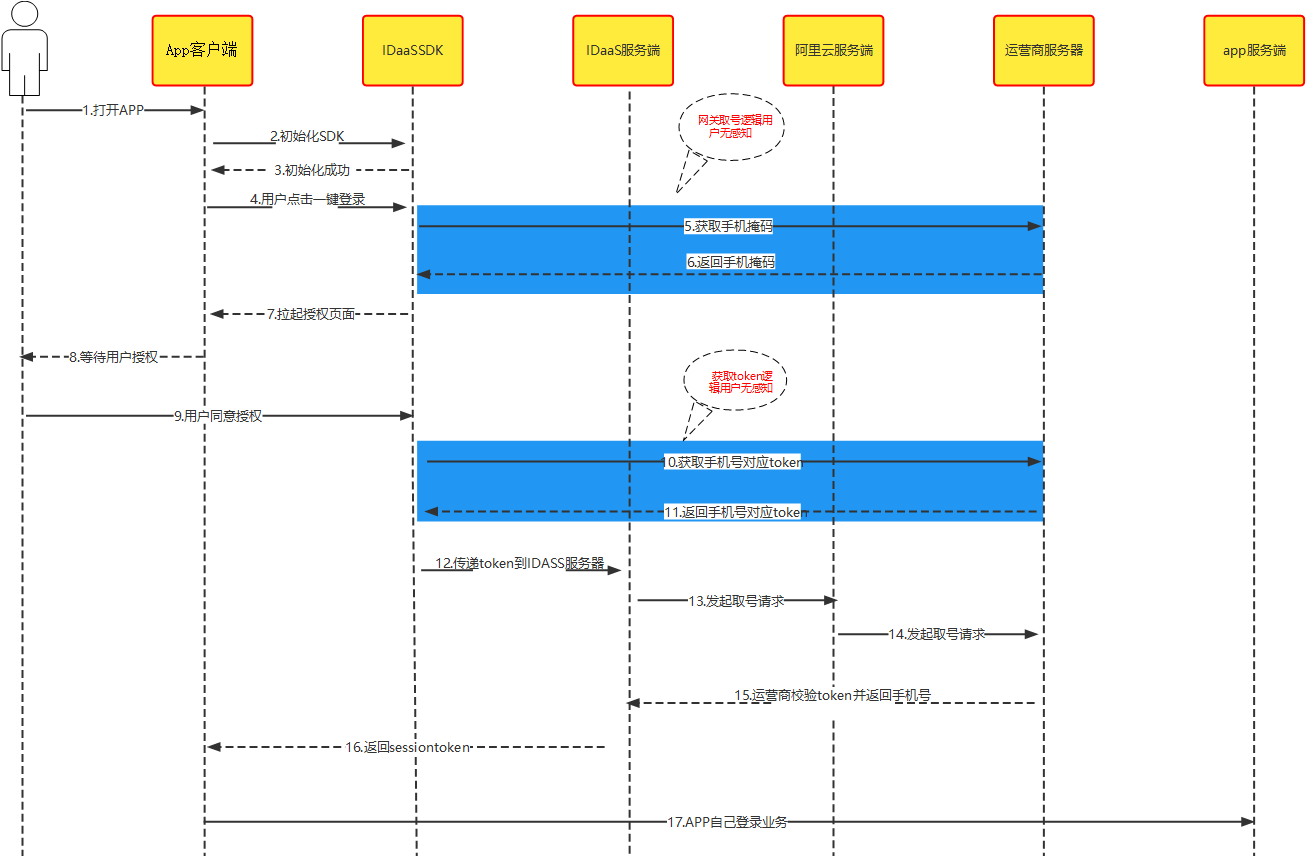
Integration flow description
Register the Alibaba Cloud private key and IDaaS server configuration parameters into the IDaaS SDK.
The terminal performs a network check via the Alibaba Cloud server. If the user has enabled 4G mobile data and the network is smooth, the IDaaS SDK is successfully invoked and the authorization page is displayed.
The user confirms the authorization page content and agrees to the relevant agreements. The IDaaS SDK obtains the authorization TOKEN and passes it to the IDaaS server.
The IDaaS server uses the TOKEN to fetch the user's mobile number from the Alibaba Cloud server and then initiates authentication. If authentication succeeds, session_token and id_token are returned and can be saved to the app client or used otherwise; if authentication fails, an error code and reason are returned for the next step.
The client can use id_token to verify login validity and obtain basic user information.
The client can use session_token to refresh id_token.
Integration Flow
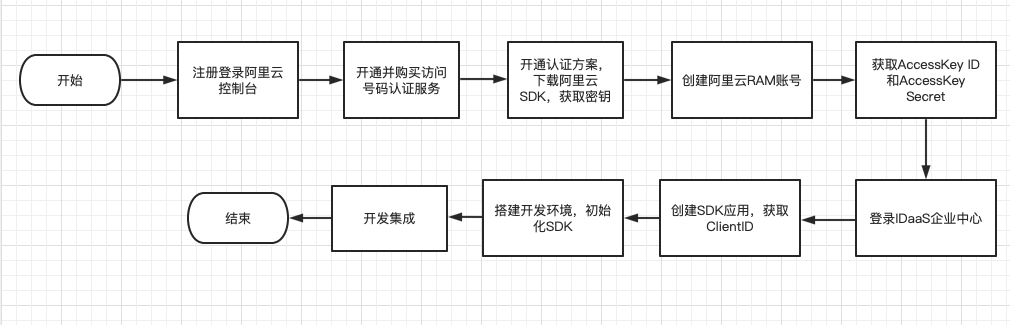
Prerequisites
Register an Alibaba Cloud Account
Refer to the Alibaba Cloud official website for the account opening process and authentication scheme management.
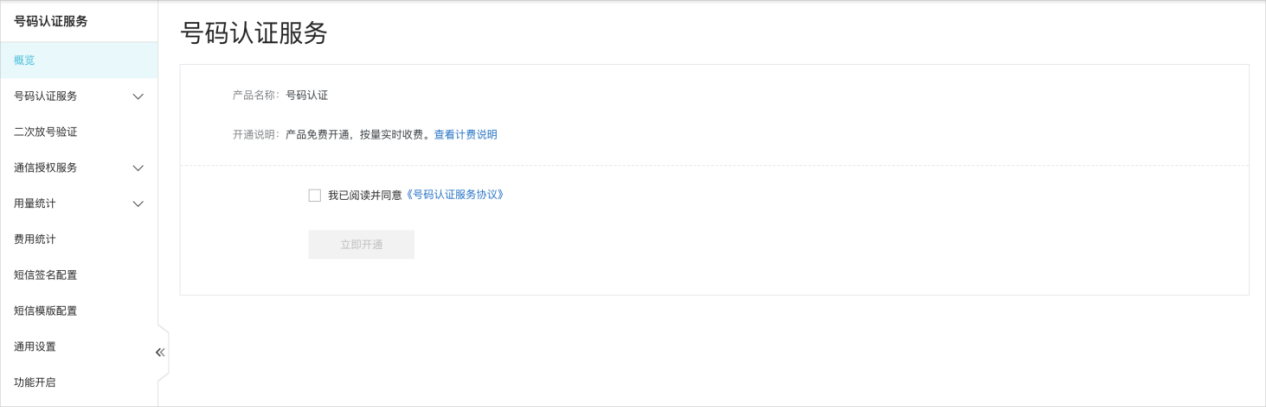
Enable Number Authentication
Visit the Number Authentication Service product details page to purchase as an enterprise user.
Click Enable Now or visit the product console.
On the console homepage, check "I have read and agree to the Number Authentication Service Agreement".
Click Enable Now to complete the service activation.
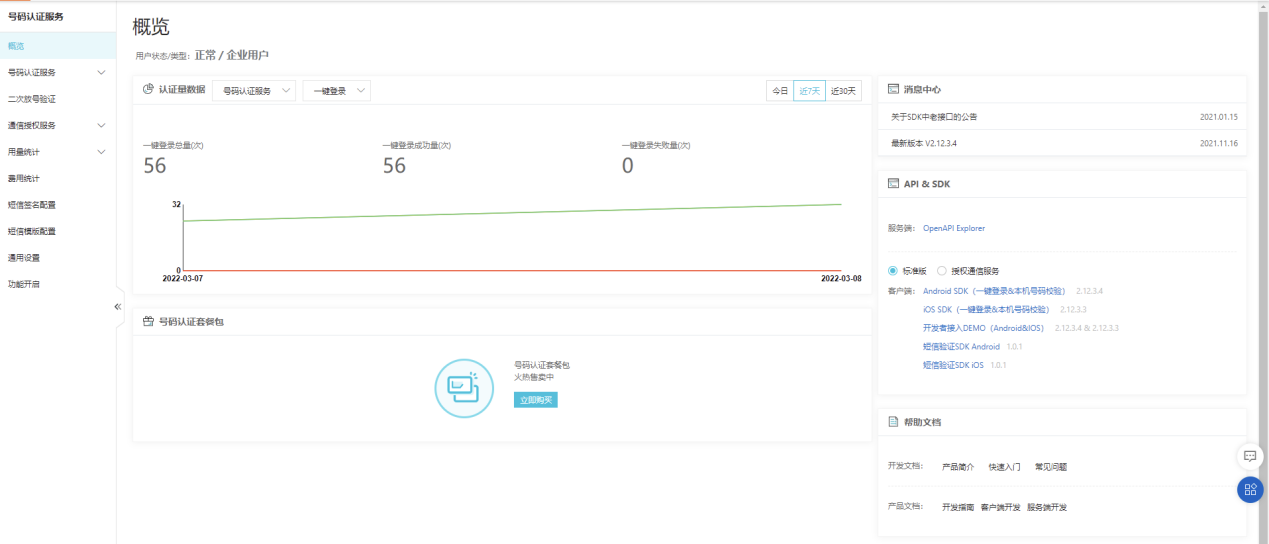
Log in to the Number Authentication Service Console, and on the Standard Edition tab, download and unzip the iOS SDK.
Add Authentication Scheme
For the iOS app access scheme, you need to use the Bundle ID of the iOS app listed on the App Store. Fill it in as follows.
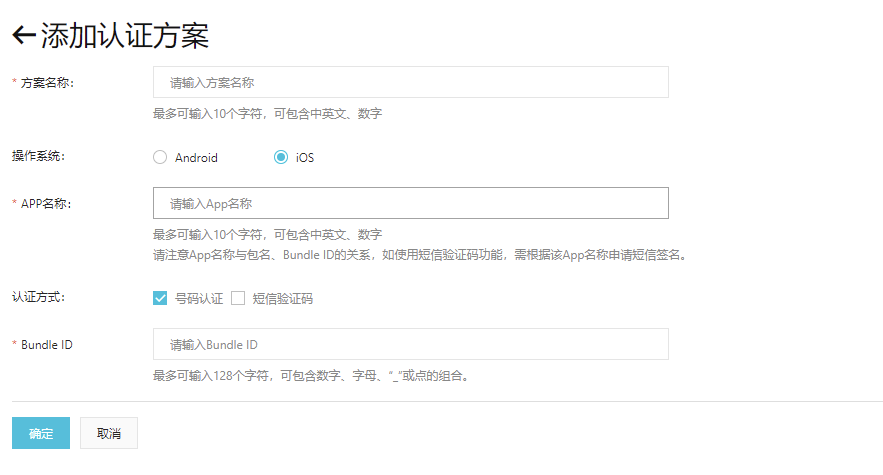
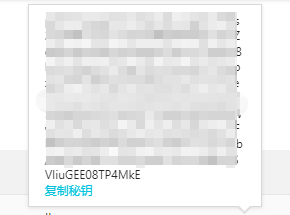
After filling in, click OK to save the configuration. Obtain the secret key and save it locally in the app. When using the IDaaS SDK, pass it to the SDK initialization method (used during AppDelegate initialization); see the SDK initialization steps.
Configure IDaaS Backend Authentication Source
Log in to the IDaaS Enterprise Center, select "Authentication -> Authentication Source Management -> Built-in Authentication Sources", and click "One-Click Local Number Login".
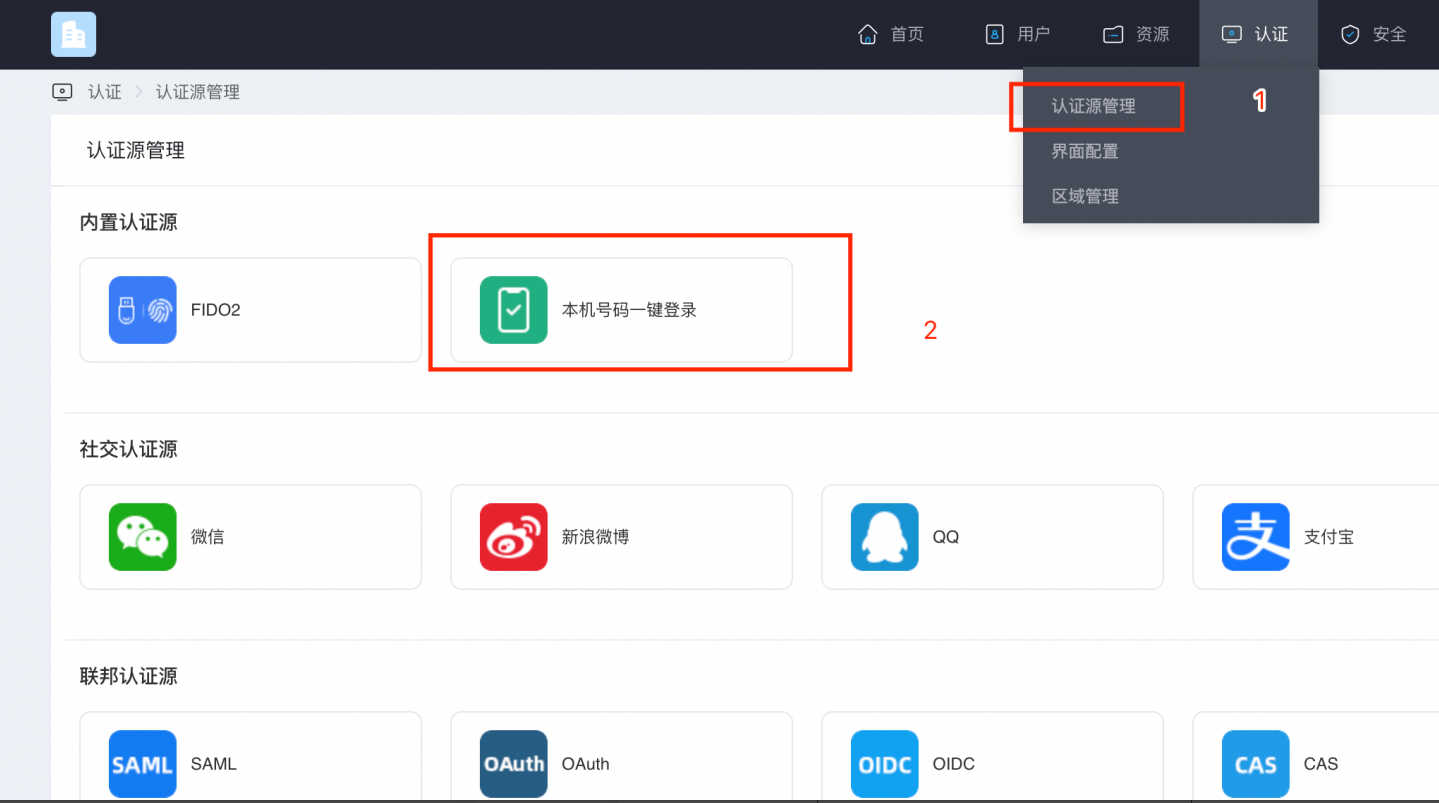
The "One-Click Local Number Login" configuration page pops up; configure the required parameters.
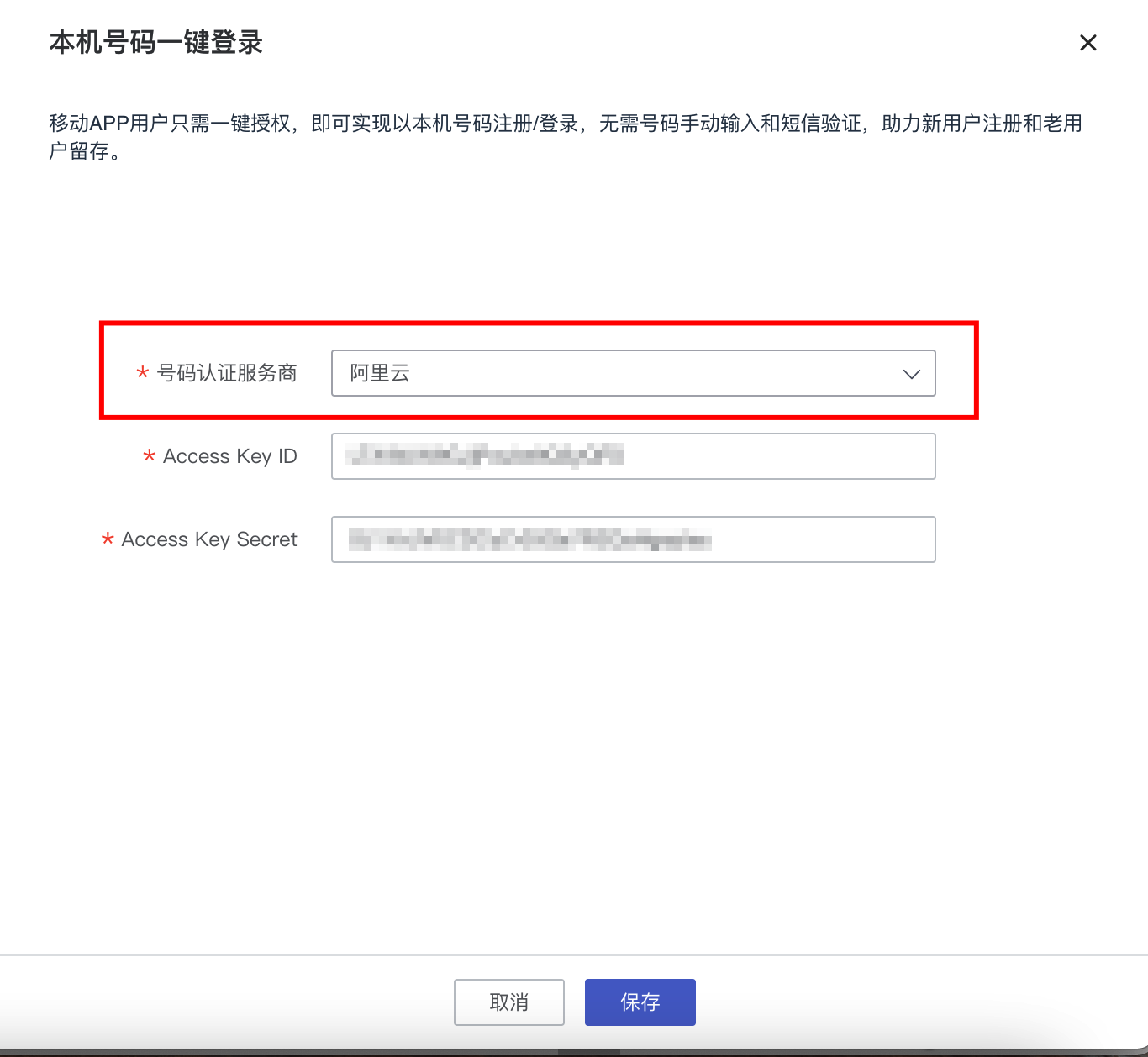
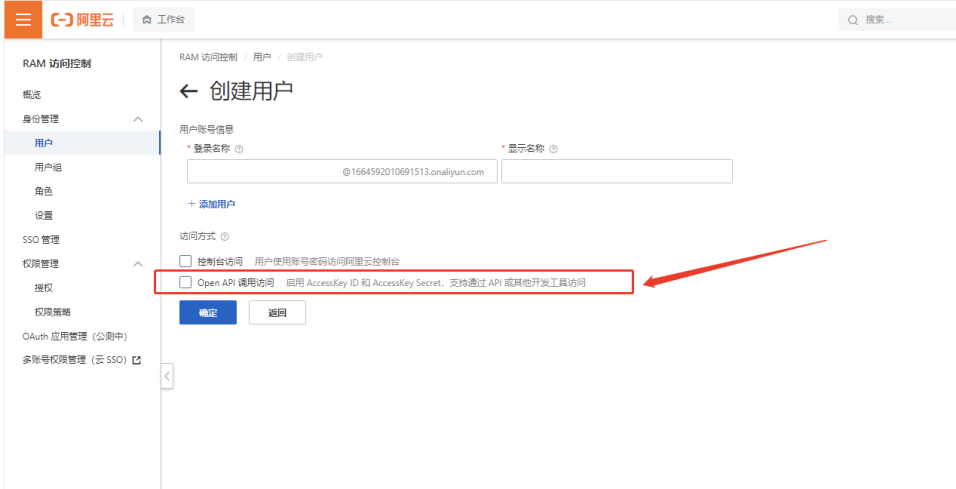
Parameter Parameter Description Number Authentication Service Provider Default: Alibaba Cloud Access Key ID Enter the AccessKey generated when creating the Alibaba Cloud user AccessKey Secret Enter the AccessKey Secret generated when creating the Alibaba Cloud user Create a user in the Alibaba Cloud console, check the box, and obtain the AccessKey and AccessKey Secret parameters. Fill the obtained parameters into the previous page.
Log in to the IDaaS backend, click Resources --> Applications, select the relevant application, and you can view it.
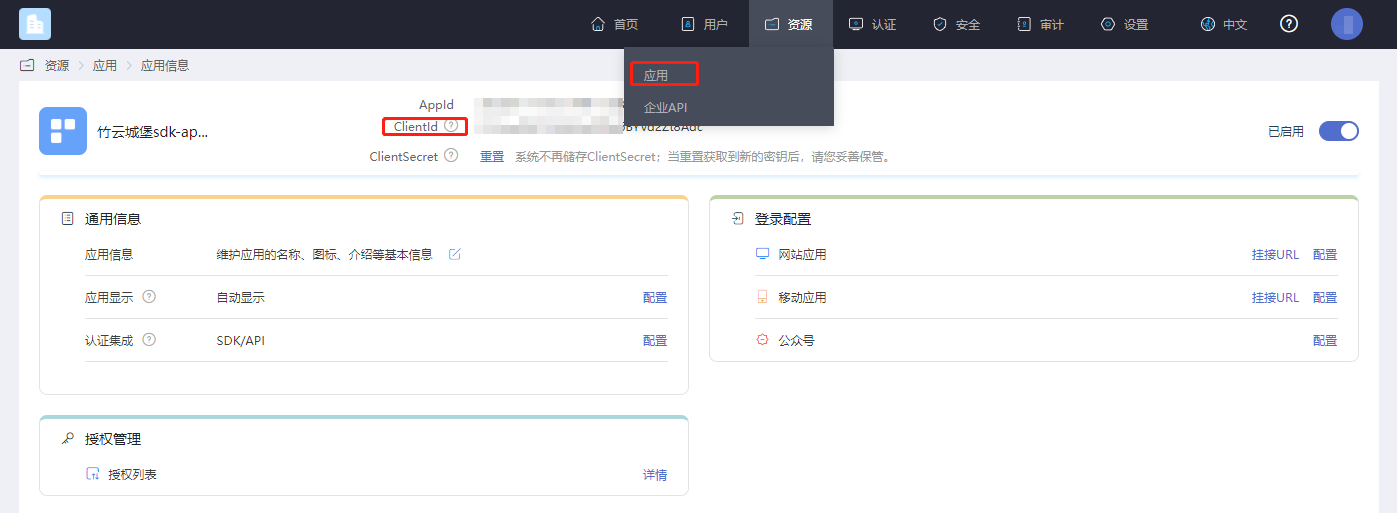
Environment Setup
Add Dependencies
Log in to the Number Authentication Service Console, and on the Standard Edition tab, download and unzip the iOS SDK.
ATAuthSDK.framework  // Alibaba Cloud SDK, current version is 2.13.2
YTXMonitor.framework 	// Alibaba Cloud SDK, current version is 2.3.2
YTXOperators.framework 	// Alibaba Cloud SDK, current version is 1.3.2
Add Main Libraries
AuthnCenter_common_2C.framework
AuthnCenter_mobileNumberAuth_AliYun_2C.framework
AuthnCenter_mobileNumberAuth_AliYun_2C.bundle//Resource file
Drag the dependency libraries and IDaaS SDK into the project and import them as follows:
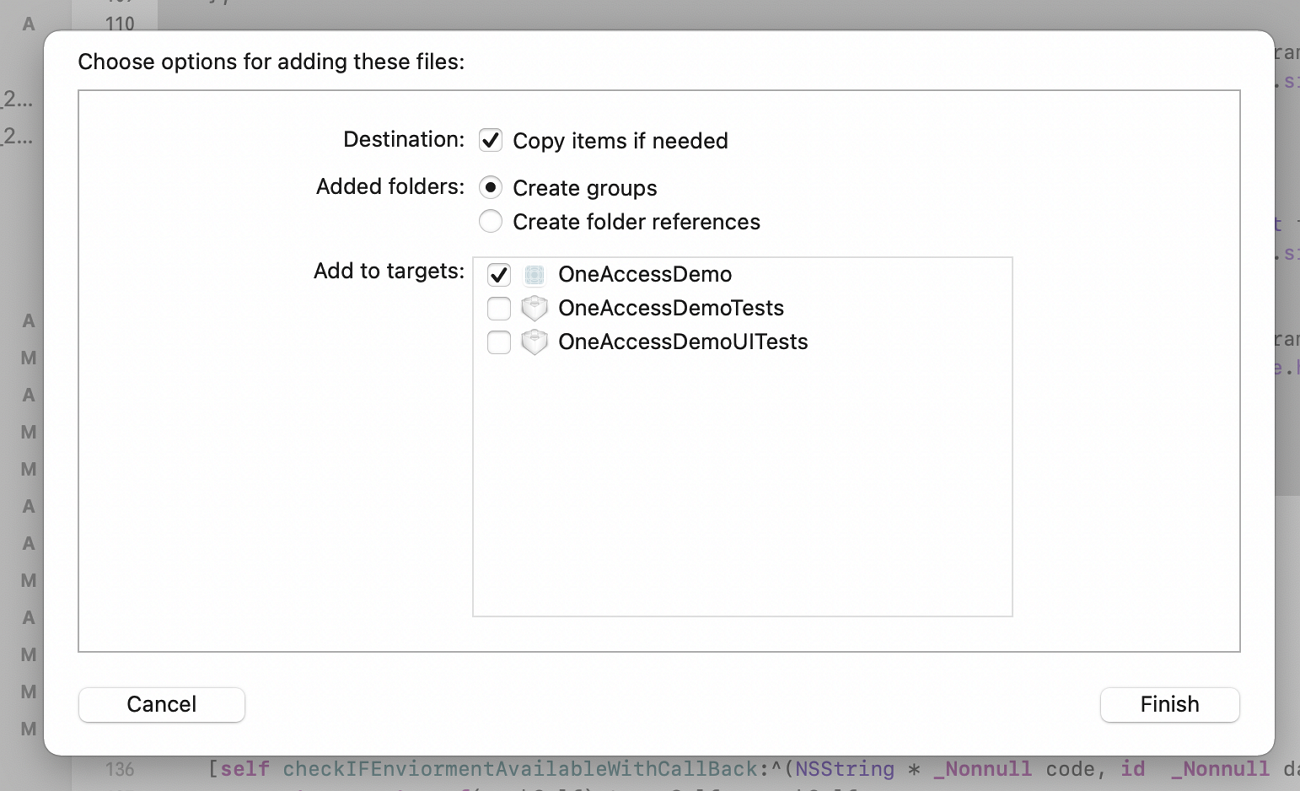
Also introduce the Pod dependency:
pod 'JWT', '~> 3.0.0-beta.14'
Target Settings
The IDaaS one-click login SDK minimum supported version is iOS 11.
Introduce the following packages in Framework, Library, and Embedded Content:
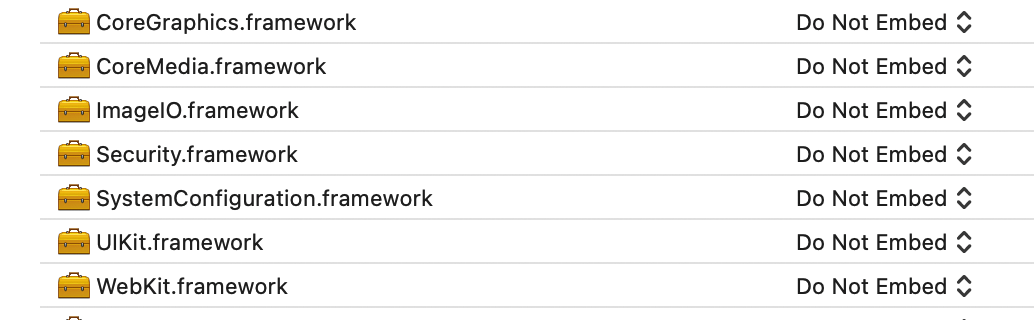
Add the main libraries and dependencies in Framework, Libraries, and Embedded Content, and add -ObjC in Other Linker Flags.

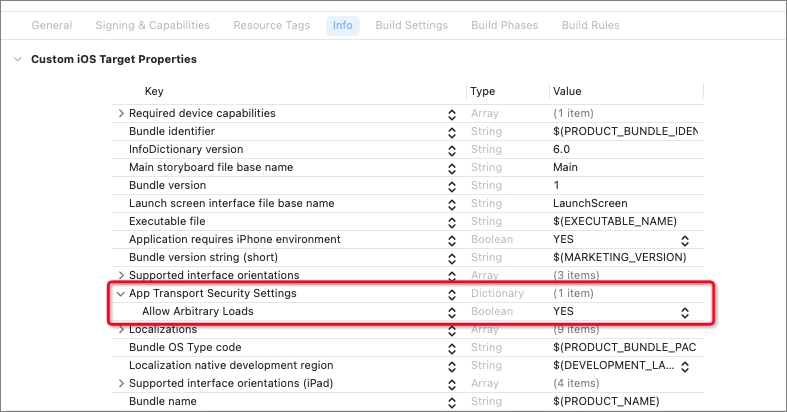
If your terminal device uses a China Unicom SIM card with 5G mobile data, it may cause the one-click login feature to fail to obtain the local number. You can select TARGETS > Info > Custom iOS Target Properties > App Transport Security Settings > Allow Arbitrary Loads in the menu bar and set its value to YES to resolve this issue.
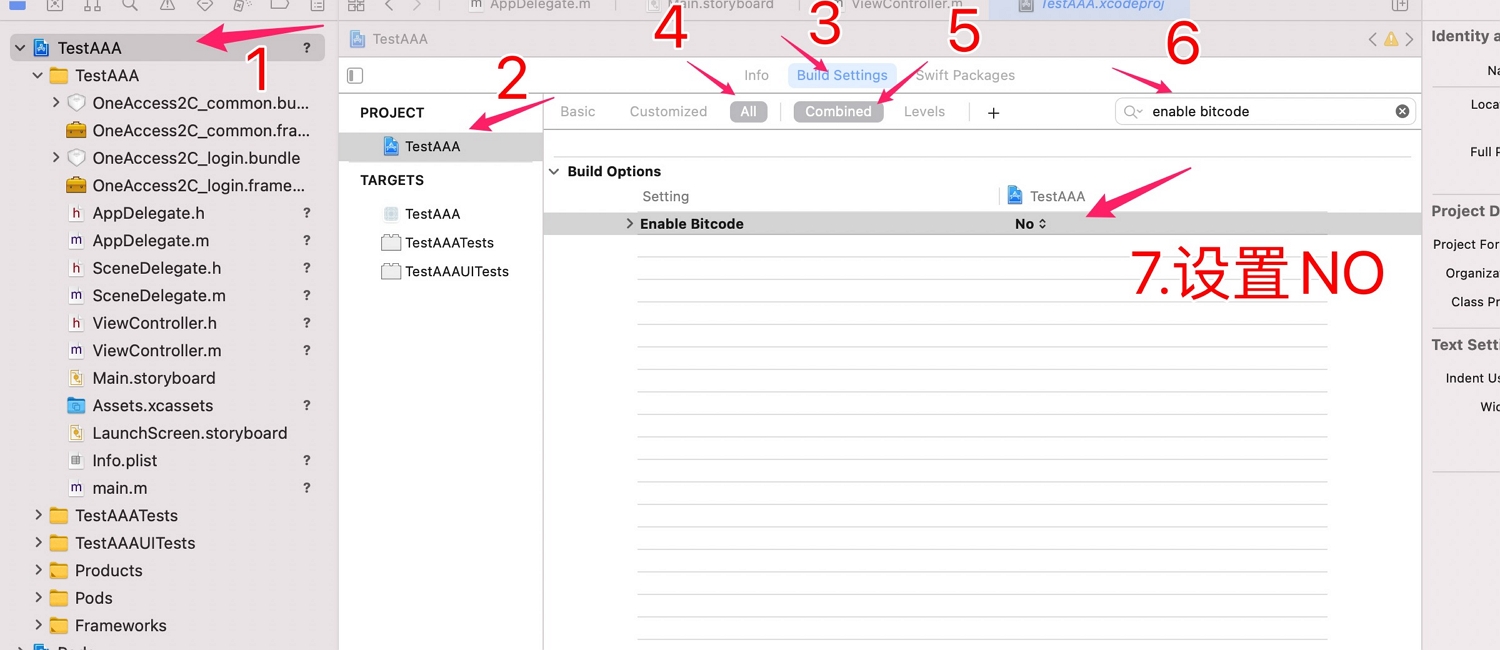
Configure bitcode as shown below, set bitcode to NO.
Development Integration
Import header files:
//Reference in AppDelegate as follows
#import < AuthnCenter_common_2C /BCIDACommonManager.h>
#import <AuthnCenter_mobileNumberAuth_AliYun_2C/BCMobileNumberAuthManager.h>
SDK Initialization
Save the secret key obtained when adding the authentication scheme in the app, and register the key with the IDaaS SDK at the app entry point. The IDaaS SDK provides two initialization methods. After calling the initialization methods, you can call startMobileAuthWithWindowsMode to invoke the one-click login page where needed.
Example of one-click local number login initialization: initialize both methods in the didFinishLaunchingWithOptions method of AppDelegate.
//1. Basic configuration initialization
[[[[[BCIDACommonManager sharedInstance] initWithDomain:@"https://your-backend-tenant.com"] initWithClientID:@"your-backend-tenant-clientID"] initWithSSLCerVerification:NO] setLogEnabled:YES] ;

//2. One-click login initialization method
[[BCMobileNumberAuthManager sharedInstance] registAliYunSecreteKey:aliYunSecKey andWithCompletionHandler:^(NSDictionary * _Nonnull resultDic) {
        //Success resultDic=@{resuFltCode:600000,msg:...}
}];
Brief introduction to the basic configuration initialization main class BCIDACommonManager methods:
/**
  * Method name: sharedInstance
   * @param none
   * @return singleton instance class
 */
+ (instancetype )sharedInstance ;

/**
  * Method name: initWithDomain
   * @param domain, ending with .com.
   * @return instance class
 */
-(BCIDACommonManager)initWithDomain:(NSString)domain

/**
  * Method name: initWithClientID
   * @param client id.
   * @return instance class
 */
-(BCIDACommonManager)initWithClientID:(NSString)clientID;

/**
  * Method name: setLogEnabled
   * @param boolean value indicating whether to enable log.
   * @return instance class
 */
-(void)setLogEnabled:(BOOL)enable;

/**
  * Method name: initWithSSLCerVerification
   * @param boolean value setting whether SSL certificate verification is enabled.
   * @return instance class
 */
-(BCIDACommonManager*)initWithSSLCerVerification:(bool)sslCerVerification;
Brief introduction to the one-click login initialization main class BCMobileNumberAuthManager methods:
/**
  * Method name: sharedInstance
   * @param none
   * @return singleton instance class
 */
+ (instancetype )sharedInstance ;

/**
  * Method name: registAliYunSecreteKey
   * @param aliYunSecreteKey pass in the Alibaba Cloud private key.
   * @return BCMobileNumberAuthRegistCompletionHandler callback function, containing NSDictionary * resultDic. On success, resultDic=@{resuFltCode:600000,msg:...}; for other cases, the "resultCode" value refers to PNSReturnCode
 */
-(void)registAliYunSecreteKey:(NSString*)aliYunSecreteKey andWithCompletionHandler:(BCMobileNumberAuthRegistCompletionHandler)completionCallBack;
Environment Check
For the app client to use the one-click login feature, it must first check whether the environment is suitable through Alibaba Cloud's detection method. The terminal phone must be in a 4G environment to be successfully invoked. After the initial or switched mobile data network, the environment needs to be rechecked; generally, call it once at the beginning of a login authentication flow.
TXCommonHandler object method introduction:
/**
* Method name: checkEnvAvailableWithComplete
* @brief: check and prepare the invocation environment. The following functional interfaces can only be called when resultDic returns PNSCodeSuccess. Recall after initial or switched mobile data network; generally, call it once at the beginning of a login authentication flow.
*@param complete: asynchronous result callback. On success, resultDic=@{resultCode:600000, msg:...}; for other cases, the "resultCode" value refers to PNSReturnCode. Only successful callbacks can ensure subsequent interface calls.
*/
[TXCommonHandler sharedInstance];//Get Alibaba Cloud singleton
-(void)checkEnvAvailableWithComplete:(void(^_Nullable)(NSDictionary* Nullable resultDic))complete;
After the check succeeds, you can call an acceleration method to speed up the one-click login authorization page display and prevent a long wait when invoking one-click login. (The acceleration method is not mandatory depending on the actual situation.)
/**
* Method name: accelerateLoginPageWithTimeout
* @brief: accelerate the one-click login authorization page display to prevent a long wait when calling getLoginTokenWithTimeout:controller:model:complete:
* @param timeout: interface timeout (unit: s), default 3.0s, value 0.0 uses default timeout
* @param complete: asynchronous result callback. On success, resultDic=@{resultCode:600000,msg:...}; for other cases, the "resultCode" value refers to PNSReturnCode
*/
-(void)accelerateLoginPageWithTimeout:(NSTimeInterval)timeout complete:(void (^_Nullable)(NSDictionary * Nonnull resultDic))complete;
Invoke Authorization Page
After the environment check succeeds and the acceleration method is called, invoke the IDaaS SDK one-click login method.
Sample code:
[[BCMobileNumberAuthManager sharedInstance] startMobileAuthWithWindowsMode:nil andWithViewController:self andWithCompletionCallBack:^(NSString * _Nonnull code, id  _Nonnull data) {
        //When code=@"0", login is successful, data returns session_token and id_token; when code=other, login failed.
    }];
//Callback function returns result, authorization page automatically closes
Main class BCMobileNumberAuthManager method introduction:
/**
* Method name: startMobileAuthWithWindowsMode
* @brief: one-click login page invocation flow
* @param (TXCustomModel*)customMode page customization class; use this class to customize page styles, refer to the following chapters
*@param (UIViewController*)fromVC present the one-click login page from the current view controller
* @param BCMobileNumberAuthProcessCompletionHandler() callback function see the following table
*/
-(void)startMobileAuthWithWindowsMode:(TXCustomModel*)customMode andWithViewController:(UIViewController*)fromVC andWithCompletionCallBack:(BCMobileNumberAuthProcessCompletionHandler)completionCallBack;
BCMobileNumberAuthProcessCompletionHandler callback function return codes:
| Code | Description |
|---|---|
| code=0 | Login successful. At this time, data returns NSDictionary: data=@{@"session_token":sessionTokenContent,@"id_token":idTokenContent}; |
| code=1 | Login failed, data returns string describing error |
| code=error code (Alibaba Cloud error code and event code), please refer to the Alibaba Cloud error code table (Return Codes and Event Response Codes) | Login unsuccessful, data returns NSDictionary from which the current operation result value can be obtained. |
| code=error code (SDK backend error code) | Login unsuccessful, data returns string error description information |
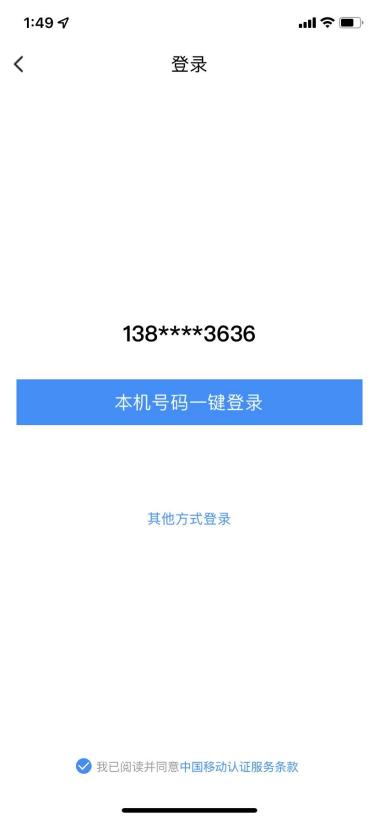
The IDaaS SDK default one-click login page includes a desensitized number, back button, checkbox agreement signing, and other login method buttons. The style and text description of the above components can be customized.
Among them, the one-click local number login, back, and other login method buttons will trigger a callback from the IDaaS SDK to the app client after being tapped, returning Return Codes and related data, and close the window, completing the operation. The checkbox agreement signing returns related data via callback but does not close the window.
Authorization Page Design
To ensure that users are informed that their mobile number information will be authorized for developer use during login, one-click login requires developers to provide an authorization page for user confirmation. Before calling the authorization login method, developers must pop up the authorization page and clearly inform the user that the current operation will pass the user's local number information to the application.
TXCustomModel *model = [[TXCustomModel alloc] init];
//It is Alibaba Cloud's page style customization class. You can instantiate the class, set the page style, and then pass this instance to the SDK invocation method.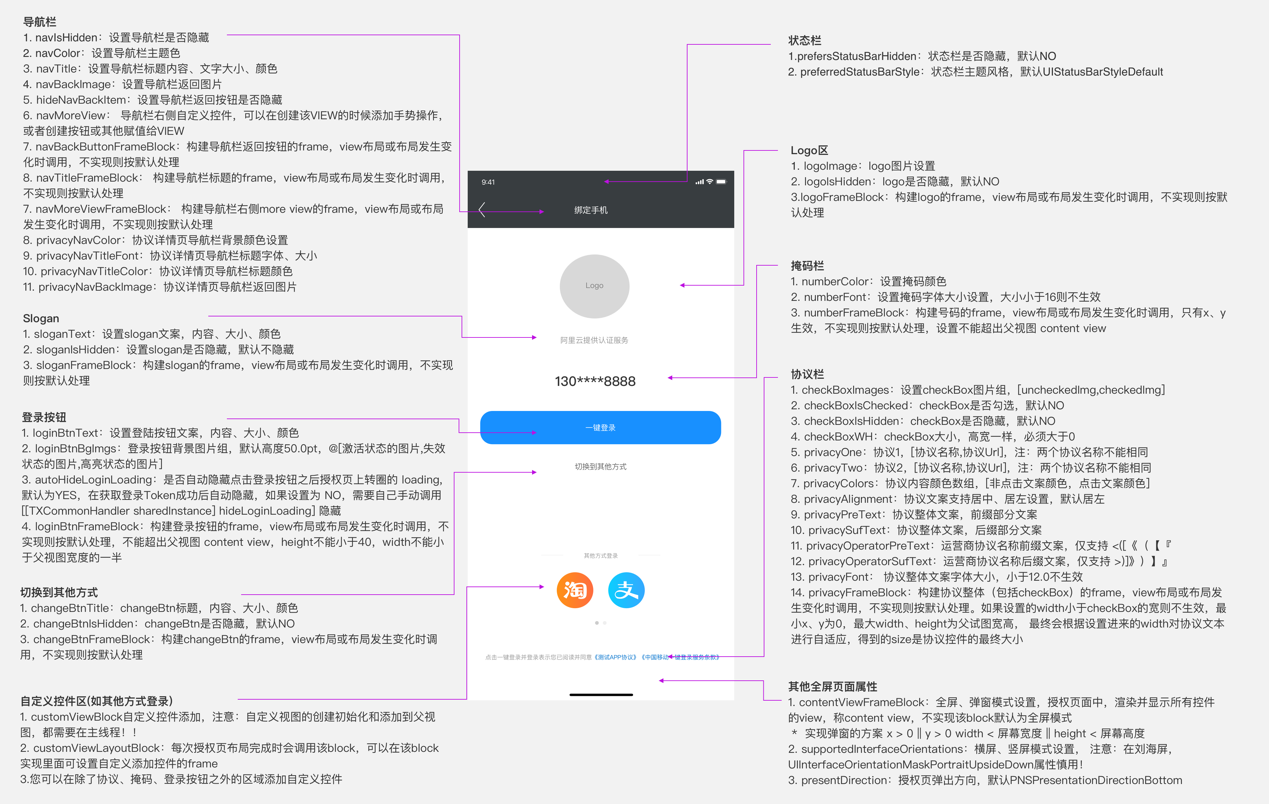
Sample code:
-(TXCustomModel*)AddThemeExample{
    TXCustomModel *model = [[TXCustomModel alloc] init];

        model.supportedInterfaceOrientations = UIInterfaceOrientationMaskPortrait;
         model.navIsHidden = NO;
         model.logoIsHidden = NO;
    model.navColor=[UIColor clearColor];
        NSDictionary *attributes = @{
            NSForegroundColorAttributeName : [UIColor whiteColor],
            NSFontAttributeName : [UIFont systemFontOfSize:20.0]
        };
        NSDictionary *attributesNavTex = @{
            NSForegroundColorAttributeName : [UIColor blackColor],
            NSFontAttributeName : [UIFont systemFontOfSize:20.0]
        };
        NSDictionary *attributesslogenTex = @{
            NSForegroundColorAttributeName : [UIColor grayColor],
            NSFontAttributeName : [UIFont systemFontOfSize:20.0]
        };
        UIColor* UIBlue=[UIColor colorWithRed:255.0/255.0 green:99.0/255.0 blue:71.0/255.0 alpha:1.0];
        NSDictionary *attributeschangeTex = @{
            NSForegroundColorAttributeName : UIBlue,
            NSFontAttributeName : [UIFont systemFontOfSize:15.0]
        };

        model.navTitle = [[NSAttributedString alloc] initWithString:@"Login" attributes:attributesNavTex];
        model.loginBtnText=[[NSAttributedString alloc] initWithString:@"One-Click Local Number Login" attributes:attributes];

        UIImage* backImage=  [UIImage imageNamed:@"fanhuianniu-2"];
        UIImage* uncheckImage=[UIImage imageNamed:@"gou-2"];
        UIImage* checkImage=[UIImage imageNamed:@"gou"];

        model.navBackImage=backImage;
        model.checkBoxImages=@[uncheckImage,checkImage];
        model.changeBtnTitle=[[NSAttributedString alloc] initWithString:@"Other Login Methods" attributes:attributeschangeTex];
        model.privacyFrameBlock = ^CGRect(CGSize screenSize, CGSize superViewSize, CGRect frame) {

            float startx= (BCIDAScreenWidth-frame.size.width)*0.5;
            frame.origin.x=startx;

            return frame;
        };
        model.logoImage = [UIImage imageNamed:@"wangluo"];

    model.logoFrameBlock = ^CGRect(CGSize screenSize, CGSize superViewSize, CGRect frame) {
        frame=CGRectMake(frame.origin.x, (frame.origin.y+100), frame.size.width, frame.size.height);
        return frame;
    };

       model.numberFrameBlock = ^CGRect(CGSize screenSize, CGSize superViewSize, CGRect frame) {
            frame=CGRectMake(frame.origin.x, (frame.origin.y+40), frame.size.width, frame.size.height);
            return frame;
        };
        model.privacyNavBackImage=backImage;
        model.sloganIsHidden=YES;
        model.loginBtnFrameBlock = ^CGRect(CGSize screenSize, CGSize superViewSize, CGRect frame) {
            frame=CGRectMake(frame.origin.x, (frame.origin.y+40), frame.size.width, frame.size.height);
            return frame;
        };
    model.changeBtnFrameBlock = ^CGRect(CGSize screenSize, CGSize superViewSize, CGRect frame) {
        frame=CGRectMake(frame.origin.x, (frame.origin.y+40), frame.size.width, frame.size.height);
        return frame;
    };
    return model;

}
ID Token Verification and User Info Retrieval
After successful login, session_token and id_token are returned. id_token can be used to obtain user information and verify login validity.
Verify idToken
Get user info from idtoken (this method can be called directly without verification)
Verify id_token
Call example:
  [[BCIDAIDTokenManager sharedInstance] verifySignWithIdToken:idToken andWithCallBack:^(NSString * _Nonnull code, id  _Nonnull data) {
          }];
Main class BCIDAIDTokenManager introduction:
/**
   * Method name: sharedInstance
   * @param no input parameters
   * @return returns the singleton instance
*/
+ (instancetype )sharedInstance;

/**
* Method name: verifySignWithIdToken
* @brief: method to verify whether idtoken is within login validity and consistent with the app
* @param idToken returned at login
* @param BCIDAIdTokenVerifyHandlerBlock callback function:
NSString code
id       data
**/
-(void)verifySignWithIdToken:(NSString*)idToken andWithCallBack:(BCIDAIdTokenVerifyHandlerBlock)callback;
Return values:
| code (NSString) | data | data Type and Description |
|---|---|---|
| 0 | success | [NSString] Signature verification successful |
| 1 | Error description | [NSString] Input parameter is empty, SDK initialization parameters domain and clientID are not set |
| 106 | Expired | [NSString] Expired idtoken |
| 107 | clientID mismatch | [NSString] Possibly used another app's clientID |
| 103 | Signature verification failed | [NSString] Signature verification process failed |
| 102 | Failed to obtain public key | [NSString] Error during signature verification process |
| See error code collection at end of document | See error code collection at end of document | May also return error codes at the end of the document |
Parse User Info from idToken
Call example:
[[BCIDAIDTokenManager sharedInstance] getUserInfoFromIdTokenWithIdToken:idToken andWithCallBack:^(NSString * _Nonnull code, id  _Nonnull data) {

}];
Main class BCIDAIDTokenManager introduction:
/**
   * Method name: sharedInstance
   * @param no input parameters
   * @return returns the singleton instance
*/
+ (instancetype )sharedInstance;

/**
* Method name: getUserInfoFromIdTokenWithIdToken
* @brief: parse user info from idToken
* @param idToken returned at login
* @param BCIDAIdTokenGetInfoHandlerBlock callback function:
NSString code
id       data

**/
-(void)getUserInfoFromIdTokenWithIdToken:(NSString*)idToken andWithCallBack:(BCIDAIdTokenGetInfoHandlerBlock)callback;
User info parameter description:
| Parameter Name | Description |
|---|---|
| iss | Token issuer |
| aud | Token recipient, app's clientId |
| exp | Token expiration time |
| jti | Token id |
| iat | Token issue time |
| sub | Fixed as subject |
| name | User name |
| mobile | User mobile number |
| id | User id |
| userName | Username |
| User email |
Callback function return value:
Success example:
code=0
data=
{
	"id": "20220729174957176-2C7F-A2C54C293",
	"exp": 1659407592,
	"nbf": 1659407172,
	"mobile": "+86-13808603636",
	"jti": "7iwCYPo8EYcmLAD18x-CAw",
	"iss": "https:\/\/sdk2c.idaas-test-alpha.bccastle.com\/api\/v1\/oauth2",
	"userName": "zhangrui1",
	"sub": "20220729174957176-2C7F-A2C54C293",
	"aud": "S1ScicdIVR1QUbNs8TBz6BYVd2Zt8Adc",
	"iat": 1659407292,
	"email": "",
	"name": "zhangrui1"
}

Failure example
code=102
Refresh ID Token
Call example:
[[BCIDAIDTokenRefreshManager sharedInstance] refreshIdTokenWithSessionToken:sessionToken andWithCallBack:^(NSString * _Nonnull code, id  _Nonnull data) {
            NSString* jsonS=(NSString*)data;
         NSDictionary* dict=  [self dictionaryWithJsonString:jsonS];//Parse jsonStr to NSDictionary
          NSString* idTok= [dict objectForKey:@"id_token"];
            NSString* session_tok=[dict objectForKey:@"session_token"];
            NSString* expr=[dict objectForKey:@"expire"];
                  }];
Main class BCIDAIDTokenManager introduction:
/**
   * Method name: sharedInstance
   * @param no input parameters
   * @return returns the singleton instance
*/
+ (instancetype )sharedInstance;

/**
* Method name: refreshIdTokenWithSessionToken
* @brief: refresh idToken
* @param sessionToken returned at login
* @param BCIDAIdTokenRefreshIDTokenHandlerBlock callback function:
NSString code
id       data

**/
-(void)refreshIdTokenWithSessionToken:(NSString*)sessionToken andWithCallBack:(BCIDAIdTokenRefreshIDTokenHandlerBlock)callBack;
Callback function return value:
Success example:
code=0
data=
{
  "id_token" : "eyJraWQiOiJhODJkzJjLmlkYWFzLXRllKp6w",
  "session_token" : "apcOKuyry7kASh9h6mtf2G2GbettkyiU",
  "expire" : 7200
}

Failure example (no data obtained)
code=1
Alibaba Cloud Return Codes
| Return Code | Return Code Description | Suggestion |
|---|---|---|
| 600000 | Token obtained successfully | None. |
| 600001 | Authorization page invoked successfully | None. |
| 600002 | Authorization page invocation failed | Switch to other login methods. |
| 600004 | Failed to obtain carrier configuration information | Create a ticket and contact the engineer. |
| 600005 | Mobile terminal is not secure | Switch to other login methods. |
| 600007 | No SIM card detected | Prompt the user to check the SIM card and retry. |
| 600008 | Mobile data network not enabled | Prompt the user to enable mobile data network and retry. |
| 600009 | Unable to determine carrier | Create a ticket and contact the engineer. |
| 600010 | Unknown exception | Create a ticket and contact the engineer. |
| 600011 | Failed to obtain token | Switch to other login methods. |
| 600012 | Pre-fetch number failed | None. |
| 600013 | Carrier maintenance upgrade, this feature is unavailable | Create a ticket and contact the engineer. |
| 600014 | Carrier maintenance upgrade, this feature has reached the maximum call count | Create a ticket and contact the engineer. |
| 600015 | Interface timeout | Switch to other login methods. |
| 600017 | App ID, App Key parsing failed | Key not set or set incorrectly. Please check the key information first; if the key is correct, create a ticket and contact the engineer. |
| 600021 | Carrier switch detected when tapping login | Switch to other login methods. |
| 600023 | Custom control loading exception | Check whether the custom control is added correctly. |
| 600024 | Terminal environment supports authentication | None. |
| 600025 | Terminal detection parameter error | Check whether the input parameter type and range are correct. |
| 600026 | Acceleration or pre-fetch interface is not allowed when the authorization page is already loaded | Check whether preLogin or accelerateAuthPage is called after the authorization page is invoked, which is not allowed. |
Authorization Page Click Event Response Codes
| Response Code | Response Code Description |
|---|---|
| 700000 | Tapped back, user cancelled password-free login. |
| 700001 | Tapped switch button, user cancelled password-free login. |
| 700002 | Tapped login button event. |
| 700003 | Tapped check box event. |
| 700004 | Tapped agreement rich text event. |
Carrier Error Codes
China Mobile
| Return Code | Return Code Description |
|---|---|
| 103000 | 成功。 |
| 102507 | 登录超时(授权页点登录按钮时)。 |
| 103101 | 请求签名错误。 |
| 103102 | 包签名或Bundle ID错误。 |
| 103111 | 网关IP错误或错误的运营商请求。 |
| 103119 | AppID不存在。 |
| 103211 | 其他错误,请提工单联系工程师。 |
| 103412 | 无效的请求有加密方式错误、非JSON格式和空请求等。 |
| 103414 | 参数校验异常。 |
| 103511 | 服务器IP白名单校验失败。 |
| 103811 | Token为空。 |
| 103902 | 短时间内重复登录,造成script失效。 |
| 103911 | Token请求过于频繁,10分钟内获取Token且未使用的数量不超过30个。 |
| 104201 | Token重复校验失败、失效或不存在。 |
| 105018 | 使用了本机号码校验的Token获取号码,导致Token权限不足。 |
| 105019 | 应用未授权。 |
| 105021 | 已达当天取号限额。 |
| 105302 | AppID不在白名单。 |
| 105313 | 非法请求。 |
| 200005 | 用户未授权(READ_PHONE_STATE)。 |
| 200010 | 无法识别SIM卡或没有SIM卡(Android)。 |
| 200020 | 用户取消登录。 |
| 200021 | 数据解析异常。 |
| 200022 | 无网络。 |
| 200023 | 请求超时。 |
| 200024 | 数据网络切换失败。 |
| 200025 | 位置错误(一般是线程捕获异常、socket、系统未授权移动数据网络权限等,请提工单联系工程师)。 |
| 200026 | 输入参数错误。 |
| 200027 | 未开启移动数据网络或网络不稳定。 |
| 200028 | 网络请求出错。 |
| 200038 | 异网取号网络请求失败。 |
| 200039 | 异网取号网关取号失败。 |
| 200048 | 用户未安装SIM卡。 |
| 200050 | EOF异常。 |
| 200061 | 授权页面异常。 |
| 200064 | 服务端返回数据异常。 |
| 200072 | CA根证书校验失败。 |
| 200082 | 服务器繁忙。 |
| 200086 | ppLocation为空。 |
| 200087 | 仅用于监听授权页成功拉起。 |
| 200096 | 当前网络不支持取号。 |
China Unicom
| Return Code | Return Code Description |
|---|---|
| 0 | 表示请求成功。 |
| -10008 | JSON转换失败。 |
| 1,请求超时 | 请求超时。 |
| 1,私网IP查找号码失败 | 私网IP查找号码失败。 |
| 1,私网IP校验错误 | 私网IP校验错误。 |
| 1,源IP鉴权失败 | 源IP鉴权失败。 |
| 1,获取鉴权信息失败 | 获取鉴权信息失败。 |
| 1,获得的手机授权码失败 | 一般是由于请求SDK超时导致的失败。 |
| 1,网关取号失败 | 网关取号失败。 |
| 1,网络请求失败 | 网络请求失败。 |
| 1,验签失败 | 签名校验失败。 |
| 1,传入code和AppID不匹配 | 传入code和AppID不匹配。 |
| 1,似乎已断开与互联网的链接 | 网络不稳定导致连接断开。 |
| 1,此服务器的证书无效 | 连接到不安全的服务器,提工单联系工程师。 |
| 1,PIP校验不通过 | 提工单联系工程师。 |
| 1,网关并发连接数受限 | 提工单联系工程师。 |
| 1,目前不允许数据链接 | 提工单联系工程师。 |
| 1,无法连接到服务器 | 提工单联系工程师。 |
| 1,系统内部错误 | 提工单联系工程师。 |
| 1,取号网关内部错误 | 取号网关内部错误,提工单联系工程师。 |
| 1,connect address error | 连接地址错误,一般是由于超时导致失败。 |
| 1,select socket error | 选择socket错误。 |
| 1,handshake failed | 握手失败。 |
| 1,decode ret_url fail | URL解码失败。 |
| 1,connect error | 连接错误。 |
| 1,read failed | 提工单联系工程师。 |
| 1,response null | 无响应,提工单联系工程师。 |
| 1,未知错误 | 提工单联系工程师。 |
| 2,请求超时 | 接口请求耗时超过timeout设定的值。 |
China Telecom
| Return Code | Return Code Description |
|---|---|
| -64 | Permission-denied(无权限访问)。 |
| -65 | API-request-rates-Exceed-Limitations(调用接口超限)。 |
| -10001 | 取号失败,mdn为空。 |
| -10002 | 参数错误。 |
| -10003 | 解密失败。 |
| -10004 | IP受限。 |
| -10005 | 异网取号回调参数异常。 |
| -10006 | mdn取号失败,且属于电信网络。 |
| -10007 | 重定向到异网取号。 |
| -10008 | 超过预设取号阈值。 |
| -10009 | 时间戳过期。 |
| -10013 | Perator_unsupported,提工单联系工程师。 |
| -20005 | Sign-invalid(签名错误)。 |
| -8001 | 网络异常,请求失败。 |
| -8002 | 请求参数错误。 |
| -8003 | 请求超时。 |
| -8004 | 移动数据网络未开启。 |
| -8010 | 无网络连接(网络错误)。 |
| -720001 | Wi-Fi切换4G请求异常。 |
| -720002 | Wi-Fi切换4G超时。 |
| 80000 | 请求超时。 |
| 80001 | 网络连接失败、网络链接已中断、Invalid argument、目前不允许数据连接。 |
| 80002 | 响应码错误404。 |
| 80003 | 网络无连接。 |
| 80005 | socket超时异常。 |
| 80007 | IO异常。 |
| 80008 | No route to host. |
| 80009 | Nodename nor servname provided, or not known. |
| 80010 | Socket closed by remote peer. |
| 80800 | Wi-Fi切换超时。 |
| 80801 | Wi-Fi切换异常。 |
IDaaS Return Codes
| Status Code | Error Code (error_code) | Chinese Error Message | Remediation |
|---|---|---|---|
| 400 | IDAAS.SDK.COMMON.1001 | Parameter {0} cannot be left blank | |
| 参数 {0} 不能为空 | |||
| 400 | IDAAS.SDK.COMMON.1002 | The {0} parameter format is incorrect | |
| 参数 {0} 格式错误 | |||
| 400 | IDAAS.SDK.COMMON.1003 | Device information is incomplete | |
| 设备信息不完整 | |||
| 400 | IDAAS.SDK.COMMON.1004 | Signature decryption error | |
| 签名解密错误 | |||
| 400 | IDAAS.SDK.COMMON.1005 | The {0} has failed | |
| {0} 已失效 | |||
| 400 | IDAAS.SDK.COMMON.1006 | The {0} parameter error | |
| {0} 参数错误 | |||
| 400 | IDAAS.SDK.COMMON.1007 | The {0} parameter type error | |
| {0}参数类型错误 | |||
| 500 | IDAAS.SDK.COMMON.1008 | The system is busy. Try again later | |
| 系统繁忙。稍后再试 | |||
| 400 | IDAAS.SDK.COMMON.1009 | Unknown authentication configuration | |
| 未知的认证配置 | |||
| 400 | IDAAS.SDK.COMMON.1010 | Failed to obtain the enterprise center global configuration | |
| 获取企业中心全局配置失败 | |||
| 400 | IDAAS.SDK.COMMON.1011 | Failed to obtain the international area code configuration | |
| 获取国际区号配置失败 | |||
| 400 | IDAAS.SDK.COMMON.1012 | The x-client-ID is incorrect and the corresponding application cannot be found | |
| X-client-id错误,找不到对应的应用 | |||
| 400 | IDAAS.SDK.COMMON.1013 | The corresponding user is not found | |
| 未找到对应的用户 | |||
| 400 | IDAAS.SDK.COMMON.1014 | Application private key not found | |
| 未找到应用私钥 | |||
| 400 | IDAAS.SDK.LOGIN.1001 | Error calling interface | |
| 调用 {0} 接口出错 | |||
| 400 | IDAAS.SDK.LOGIN.1002 | User not bound | |
| 用户未绑定 | |||
| 400 | IDAAS.SDK.LOGIN.1003 | The user has been locked due to too many unsuccessful login attempts. It will be unlocked in {0} minutes and {1} seconds | |
| 由于多次登录失败,用户已被锁定。 它将在 {0} 分钟和 {1} 秒内解锁 | |||
| 400 | IDAAS.SDK.LOGIN.1004 | Failed to obtain the password policy | |
| 获取密码策略错误 | |||
| 400 | IDAAS.SDK.LOGIN.1005 | Invalid username or password. Remaining login attempts: | |
| 无效的用户名或密码。 其余登录尝试次数: | |||
| 400 | IDAAS.SDK.LOGIN.1006 | Configuration error, unable to find wechat authentication source | |
| 配置错误,找不到微信认证源 | |||
| 400 | IDAAS.SDK.LOGIN.1007 | Configuration error, unable to find alipay authentication source | |
| 配置错误,找不到支付宝认证源 | |||
| 400 | IDAAS.SDK.LOGIN.1008 | The configuration is incorrect. The one-click login authentication source cannot be found | |
| 配置错误,无法找到一键登录认证源 | |||
| 400 | IDAAS.SDK.SMS.1001 | {0} slide base map is not initialized successfully, please check the path | |
| {0} 滑动底图未初始化成功,请检查路径 | |||
| 400 | IDAAS.SDK.SMS.1002 | {0} verification code coordinate resolution failed | |
| {0} 验证码坐标解析失败 | |||
| 400 | IDAAS.SDK.SMS.1003 | {0} verification code coordinate verification fails | |
| {0} 验证码坐标校验失败 | |||
| 400 | IDAAS.SDK.SMS.1004 | The graphic verification code is incorrect | |
| 图形验证码校验错误 | |||
| 400 | IDAAS.SDK.SMS.1005 | SMS verification code verification is incorrect | |
| 短信验证码验证错误 | |||
| 400 | IDAAS.SDK.SMS.1006 | The email verification code is incorrect | |
| 邮件验证码验证错误 | |||
| 400 | IDAAS.SDK.SMS.1007 | Sending scenario does not exist | |
| 发送场景不存在 | |||
| 400 | IDAAS.SDK.SMS.1008 | Failed to send the verification code | |
| 发送验证码失败 | |||
| 400 | IDAAS.SDK.SOCIAL.1001 | The social account is unbound incorrectly | |
| 社交账号解绑错误 | |||
| 400 | IDAAS.SDK.SOCIAL.1002 | The social account has been bound, please unbind it first | |
| 社交账号已绑定,请先解绑 | |||
| 400 | IDAAS.SDK.PWD.1001 | The password length is incorrect | |
| 密码长度错误 | |||
| 400 | IDAAS.SDK.PWD.1002 | The password cannot be the username | |
| 密码不能为用户名 | |||
| 400 | IDAAS.SDK.PWD.1003 | Your password complexity is low | |
| 你的密码复杂度过低 | |||
| 400 | IDAAS.SDK.PWD.1004 | The password is weak | |
| 密码很弱 | |||
| 400 | IDAAS.SDK.PWD.1005 | The password is used before, cannot be used again | |
| 该密码已被使用过,不能再次使用 | |||
| 400 | IDAAS.SDK.PWD.1006 | Password cannot username in reverse order | |
| 密码不能是用户名的倒序 | |||
| 400 | IDAAS.SDK.PWD.1007 | The number of repeated password characters exceeded the upper limit | |
| 密码重复字符数超过限制 | |||
| 400 | IDAAS.SDK.PWD.1008 | Password cannot contain :username, phone number, email prefix, name in PinYing | |
| 密码不能包含:用户名、电话号码、邮件前缀、拼音名 | |||
| 400 | IDAAS.SDK.MFA.1001 | The mobile doesn't match the user | |
| 手机号和用户不匹配 | |||
| 400 | IDAAS.SDK.MFA.1002 | The access control policy is incorrect | |
| 访问控制策略配置错误 | |||
| 400 | IDAAS.SDK.MFA.1003 | Access control authentication source type conversion error | |
| 访问控制身份验证源类型转换错误 |