
WeChat Mini Program Quick Implementation Example
Prerequisites
Add a WeChat Mini Program authentication source on the IDaaS platform, and configure the WeChat Mini Program authorized authentication method for the application. Please refer to Configuring WeChat Mini Program Authorized Login
Operation Steps
WeChat Mini Program Login
WeChat Mini Program login is divided into two steps:
- Obtain the user login credential (
code) from the WeChat Mini Program, and then exchange it for user login state information. - Call the IDaaS WeChat Mini Program login API with the credential (
code) obtained in the first step. When logging in for the first time and the user is not bound to an IDaaS user, astate_tokenis returned, and user information needs to be bound. When the user has been successfully bound,session_tokenandid_tokenare returned, and user information can be obtained throughid_token.
Obtain WeChat Mini Program Login Authorization Code
Use the wx.login method to obtain the WeChat Mini Program login credential code. For the official WeChat documentation on wx.login, please refer to the official documentation.
wx.login({
  success (res) {
    if (res.code) {
     // Console print
     console.log("Authorization code obtained by wx.login: "+ res.code)
    } else {
      console.log('Login failed!' + res.errMsg)
    }
  }
})
Result example

Call the IDaaS WeChat Mini Program Login API
Use the login credential code obtained by wx.login to call the IDaaS WeChat Mini Program Login API
POSTMAN request example
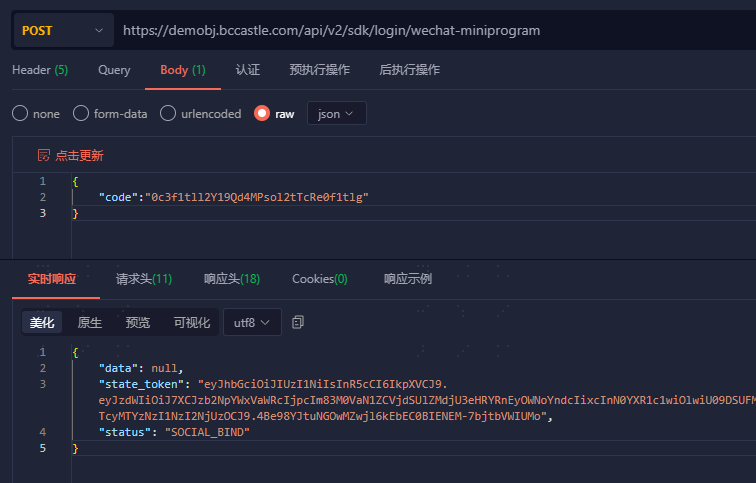
Result example
Response Example
First login requires binding user information; state_token is used for the subsequent binding flow.Response Example
Success Example
HTTP/1.1 200 OK
{
    "state_token": "eyJhbGcCJ9.eyJzdWMCJ9…tL2VPS8",
    "data": null,
    "status": "USER_REGISTER"
}

Bound user returns session_token and id_token
Success Example
HTTP/1.1 200 OK
{
    "session_token": "btsiBjx85prcZu6I6Ki057Tmw3nSF2VO",
    "expire": 432000,
    "status": "SUCCESS",
    "id_token": "eyJraWQn0.eyJpc3MiOiJodHR…g1A7jG8O0uw"
}
Bind User Information
When a user logs in to the WeChat Mini Program for the first time and is not bound to an IDaaS user, IDaaS returns state_token to the WeChat Mini Program, and the WeChat Mini Program needs to bind IDaaS user information.
After the Mini Program successfully binds IDaaS user information, IDaaS returns session_token and id_token to the WeChat Mini Program, and the Mini Program can obtain user information through id_token.
Binding user information is divided into two steps:
- Obtain the WeChat Mini Program mobile number dynamic token
code. - Call the IDaaS WeChat authorized mobile binding user API with the one-time password (
code) obtained in the first step. After the user is bound, IDaaS returnssession_tokenandid_tokento the WeChat Mini Program, and the Mini Program can obtain user information throughid_token.
Obtain WeChat Mini Program Mobile Number Dynamic Token
Use the getPhoneNumber method to obtain the mobile number dynamic token (code). For the official WeChat Mini Program documentation on getPhoneNumber, please refer to the official documentation.
<button open-type="getPhoneNumber" bindgetphonenumber="getPhoneNumber"></button>

Page({
  getPhoneNumber (e) {
    // Console print
    console.log("Authorization code obtained by getPhoneNumber: "+e.detail.code)  // dynamic token
  }
})
Result example
When the "Get Mobile Number" button is clicked, the WeChat authorization pop-up is triggered.
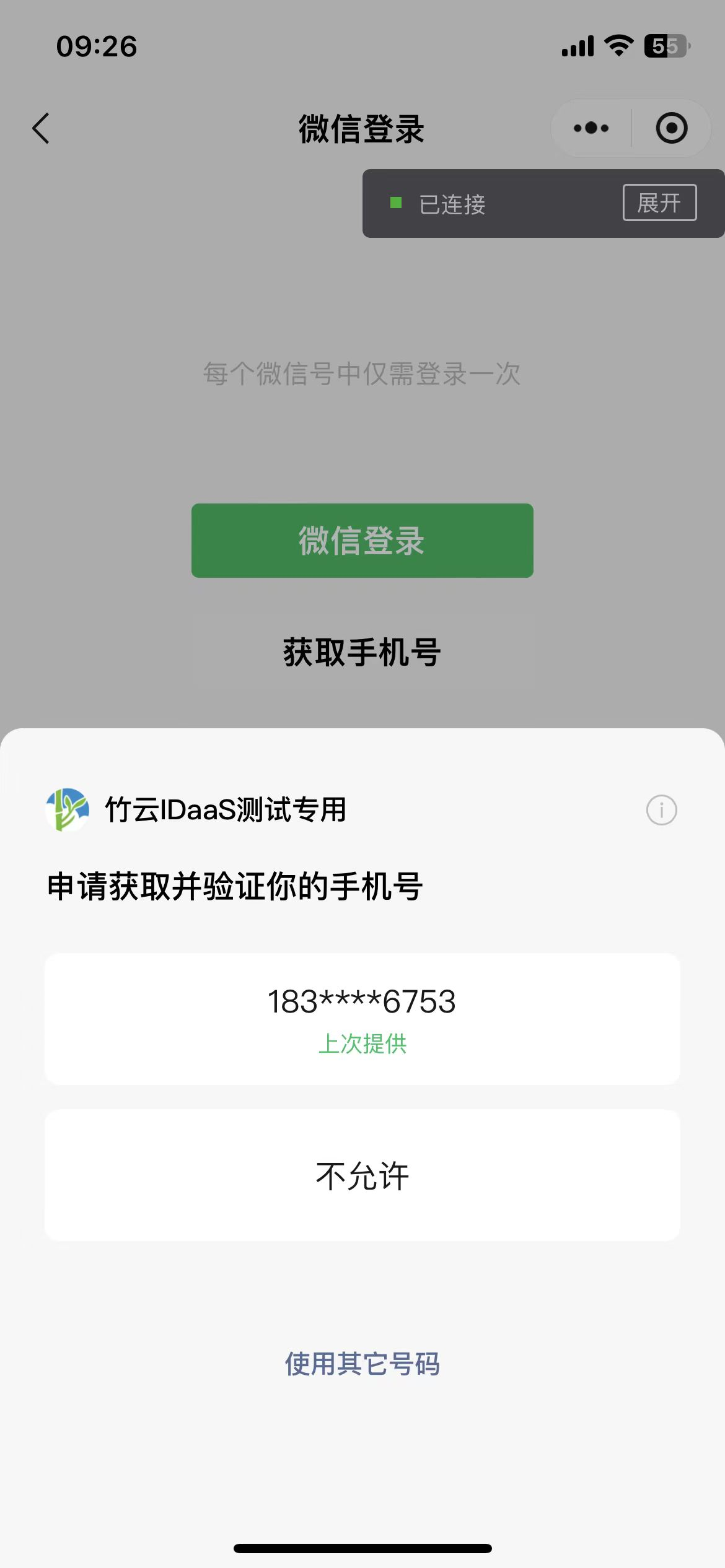
When the user clicks the mobile number to authorize, obtain the dynamic token (code) returned by WeChat.

Call the IDaaS WeChat Authorized Mobile Binding User API
Use the dynamic token code obtained by getPhoneNumber to call the IDaaS WeChat Authorized Mobile Binding User API
POSTMAN request example
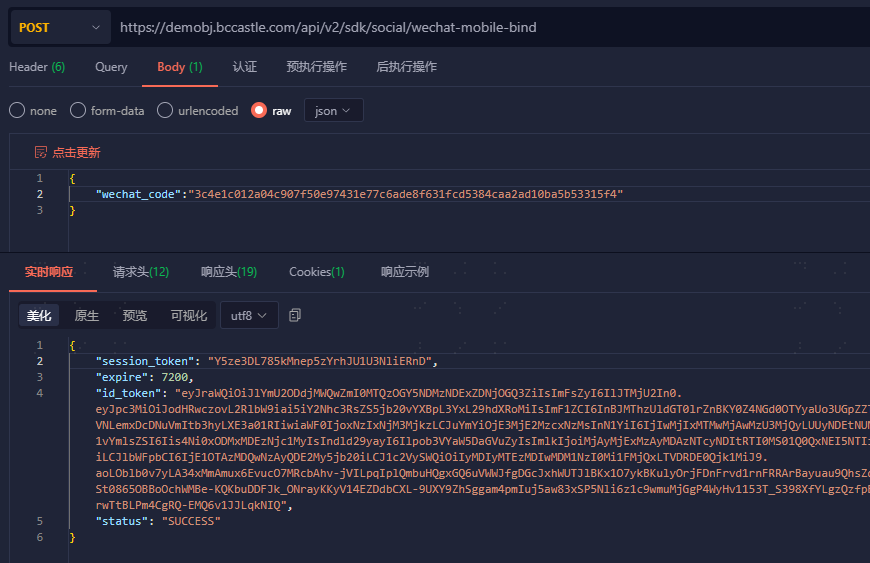
Result example
Success Example
HTTP/1.1 200 OK
{
    "session_token": "btsiBjx85prcZu6I6Ki057Tmw3nSF2VO",
    "expire": 7200,
    "status": "SUCCESS",
    "id_token": "eyJraWQn0.eyJpc3MiOiJodHR…g1A7jG8O0uw"
}
Error Example
HTTP/1.1 400 Bad Request
{
	"error_code": "SDK.COMMON.1005",
	"error_msg": "state_token has expired"
}
Get User Info from id_token
After the WeChat Mini Program login is successful, or after the first login binding is successful, session_token and id_token are returned. The id_token is in JWT format and contains user identity information. Please refer to Get User Info from id_token to obtain user information. The token validity period defaults to 5 minutes.