
Password Login
Documentation
This document describes how to integrate the password login feature on an iOS client.
Flow Description
Login scenarios:
Username + password login: the user enters the username and password, the IDaaS SDK verifies the username and password and returns session_token and id_token to the app client.
Mobile number + password login: the user enters the mobile number and password, the IDaaS SDK verifies the mobile number and password and returns session_token and id_token to the app client.
Email + password login: the user enters the email and password, the IDaaS SDK verifies the email and password and returns session_token and id_token to the app client.
Unified user password login interface: username/mobile number/email + password login can be implemented on one page, returning session_token and id_token to the app client.
Flows serving login scenarios:
After tapping the login button, the system returns that the password will expire soon, reminding the user to change the password. This can be ignored or the user can jump to the change password page.
After tapping the login button, the system returns that the password has expired and the user must be forced to change the password.
Forgot password before login, retrieve password via mobile number.
Login Flow
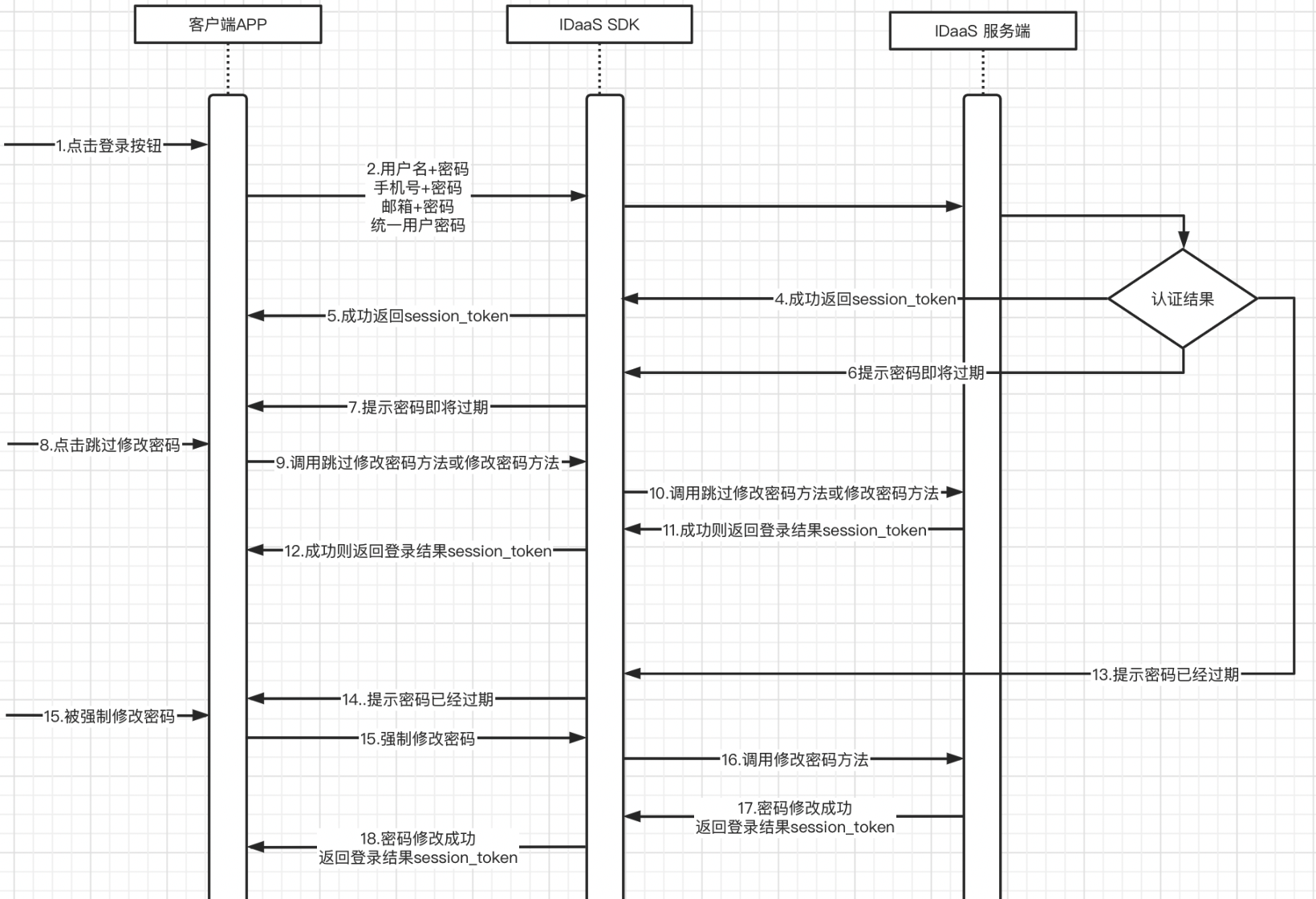
Integration flow description
Enter username + password / mobile number + password / email + password, and tap the login button.
The app client calls the login method (4 types).
The IDaaS SDK calls the IDaaS server for authentication. Authentication results are divided into four types (success, password will expire soon, password expired, failure).
In the success case, the IDaaS server returns session_token and id_token.
The IDaaS SDK returns session_token and id_token to the app client.
If the password will expire soon, the IDaaS server returns the password-will-expire-soon parameter.
The IDaaS SDK returns password-will-expire-soon to the app client.
The user can choose to skip changing the password or change it directly.
The app client calls the skip password change method or the change password method based on the user's tap.
The IDaaS SDK calls the IDaaS server skip password change interface or the change password interface.
The IDaaS server returns session_token and id_token upon successful verification, or error codes upon failure.
The IDaaS SDK returns success/failure parameters to the app client.
If the password has already expired, the IDaaS server returns the force password change parameter to the IDaaS SDK.
The IDaaS SDK returns the force password change parameter to the client app.
The user is forced to change the password, and the app client calls the change password method.
The IDaaS SDK calls the IDaaS server change password interface.
The IDaaS server returns session_token and id_token to the IDaaS SDK upon successful password change / returns error codes upon password change failure.
The IDaaS SDK returns session_token and id_token to the app client upon successful password change / returns error codes upon password change failure.
The client can use id_token to verify login validity and obtain basic user information.
The client can use session_token to refresh id_token.
Password Recovery Flow
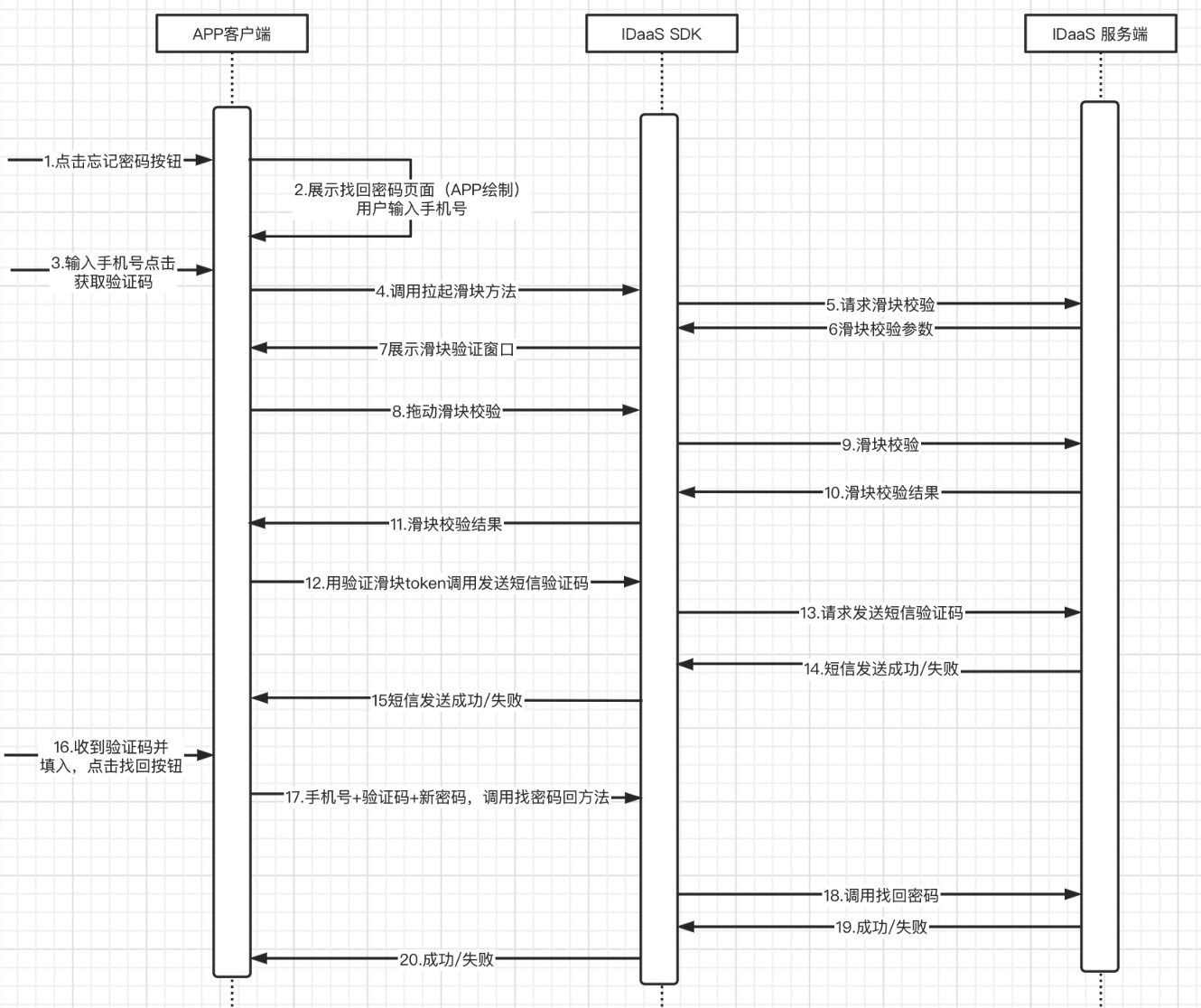
Integration flow description
The user taps the forgot password button.
The app client displays the password recovery page, which needs to be provided by the app itself.
The user enters the mobile number and taps the get verification code button.
The app calls the slider verification method.
The IDaaS SDK requests the IDaaS server slider verification interface.
The IDaaS server returns the slider verification parameter.
The IDaaS SDK invokes the slider verification window display.
The user drags the slider to verify.
The IDaaS SDK sends the slider verification to the IDaaS server.
The IDaaS server returns the slider verification result.
The IDaaS SDK returns the slider verification result to the app client.
The app client uses the slider token to call the IDaaS SDK send SMS verification code method.
The IDaaS SDK calls the IDaaS server send verification code interface.
The IDaaS server returns the send verification code result to the IDaaS SDK.
The IDaaS SDK returns the send verification code result to the app client.
The user receives the SMS verification code, fills it in, and taps the password recovery button.
The app client calls the IDaaS SDK password recovery method with mobile number + verification code + new password.
The IDaaS SDK calls the IDaaS server password recovery interface.
The IDaaS server returns the password recovery result to the IDaaS SDK.
The IDaaS SDK returns the password recovery result to the app client.
Environment Setup
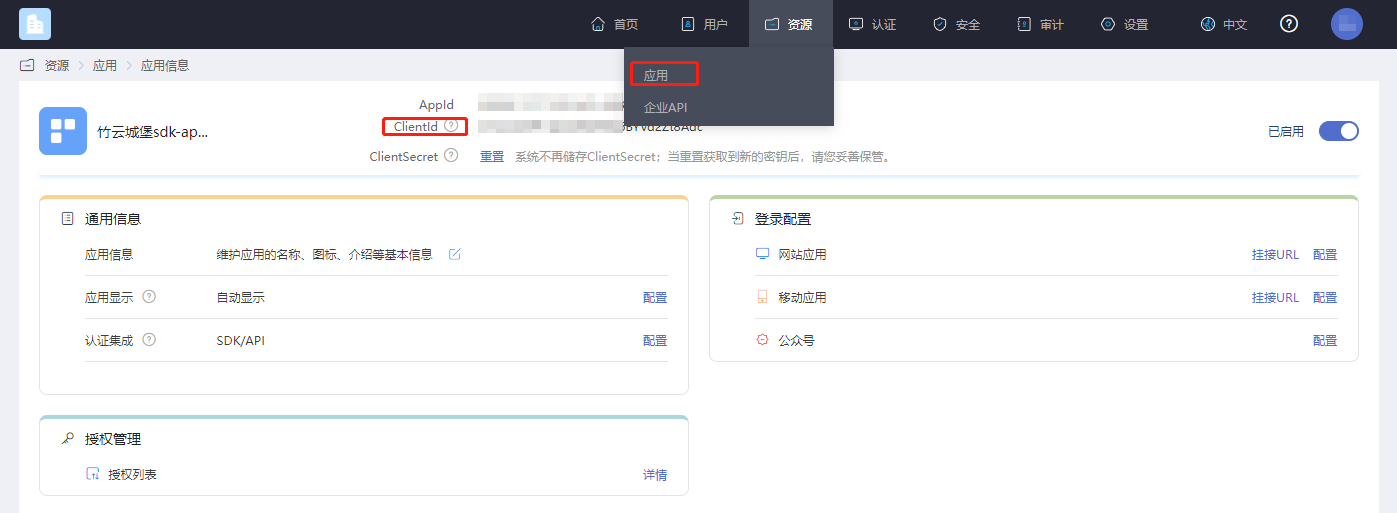
Get clientID
Log in to the IDaaS Enterprise Center, click "Resources --> Applications", select the relevant application, and you can view it.
Password Policy Settings
This setting is used to configure the password expiration time and reminder duration. First, go to the password policy module via the path shown below.

The following can be enabled under Password Expiration:
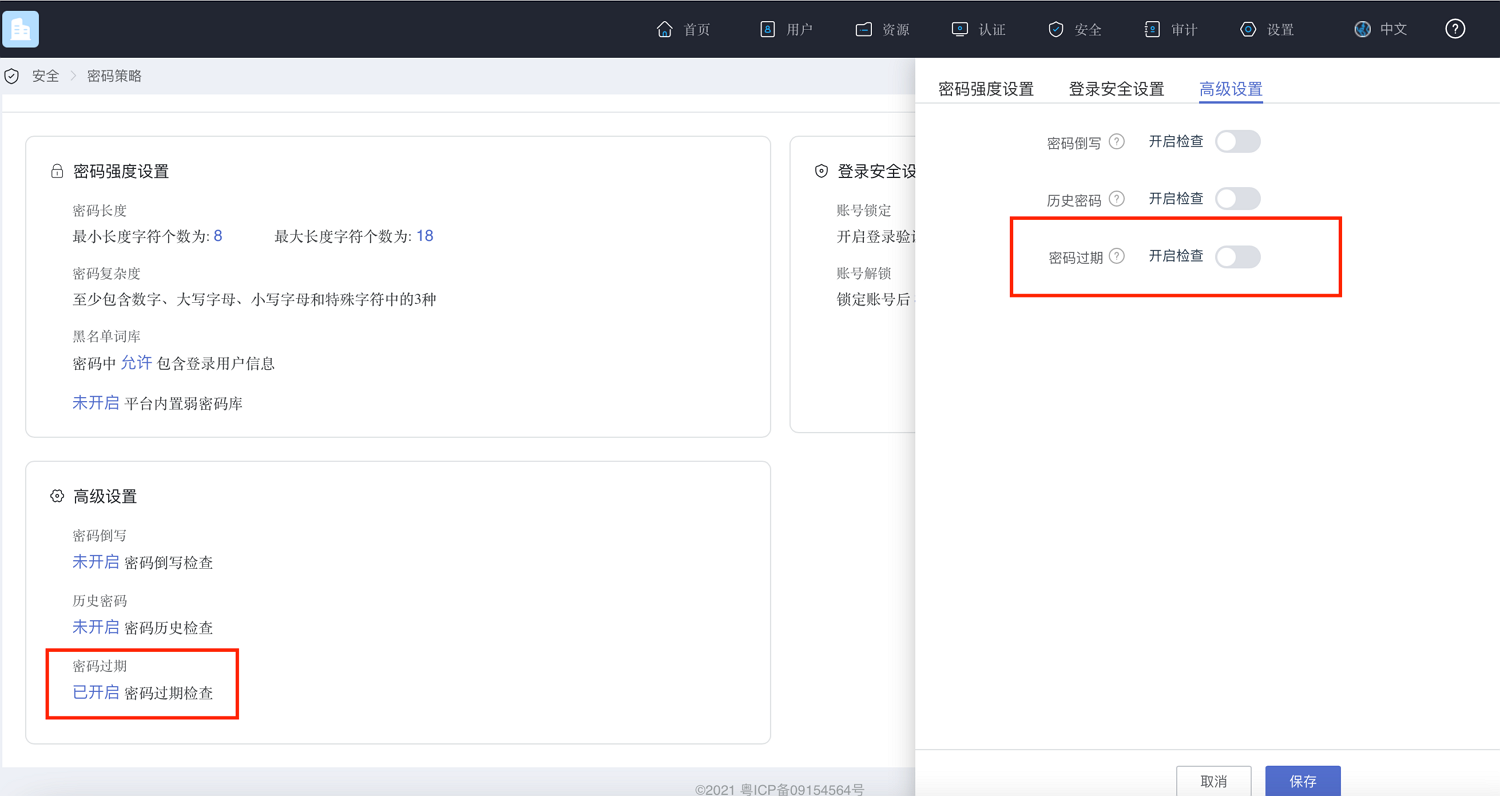
After enabling, you can set how long until the password expires and how many days in advance to notify, as shown below.
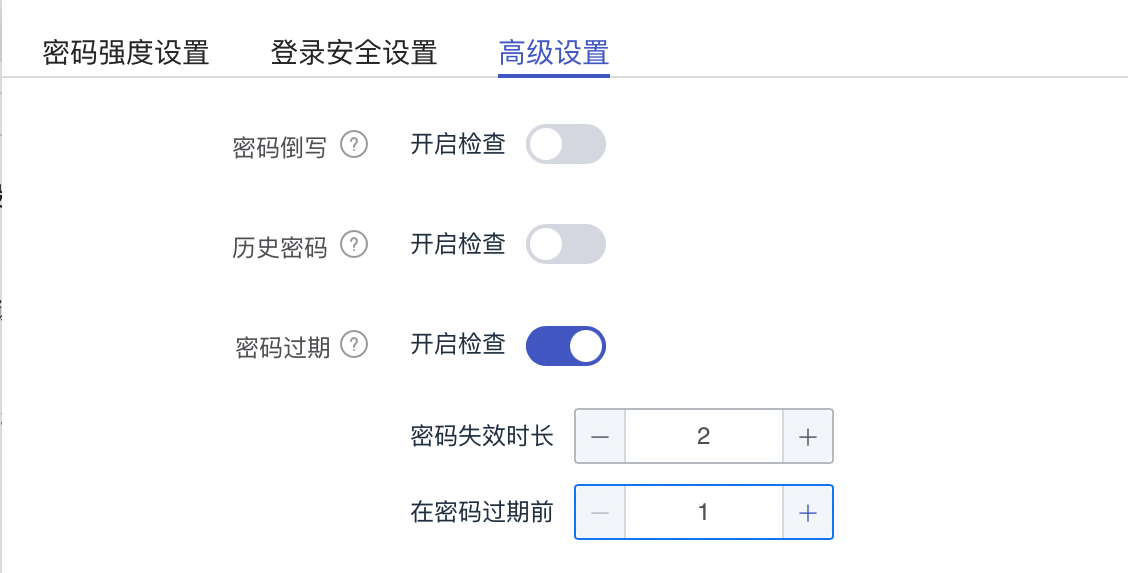
This setting is for the IDaaS server to detect how long the currently logged-in password needs to be changed and to prompt the user to change it a few days in advance. After password expiration check is enabled, every login will be checked according to the configured settings.
Add Dependencies
No third-party SDK dependencies.
Add Main Libraries
AuthnCenter_common_2C.framework
AuthnCenter_PWLogin_2C.framework
AuthnCenter_PWLogin_2C.bundle
Drag the IDaaS SDK into the project and import it as follows:
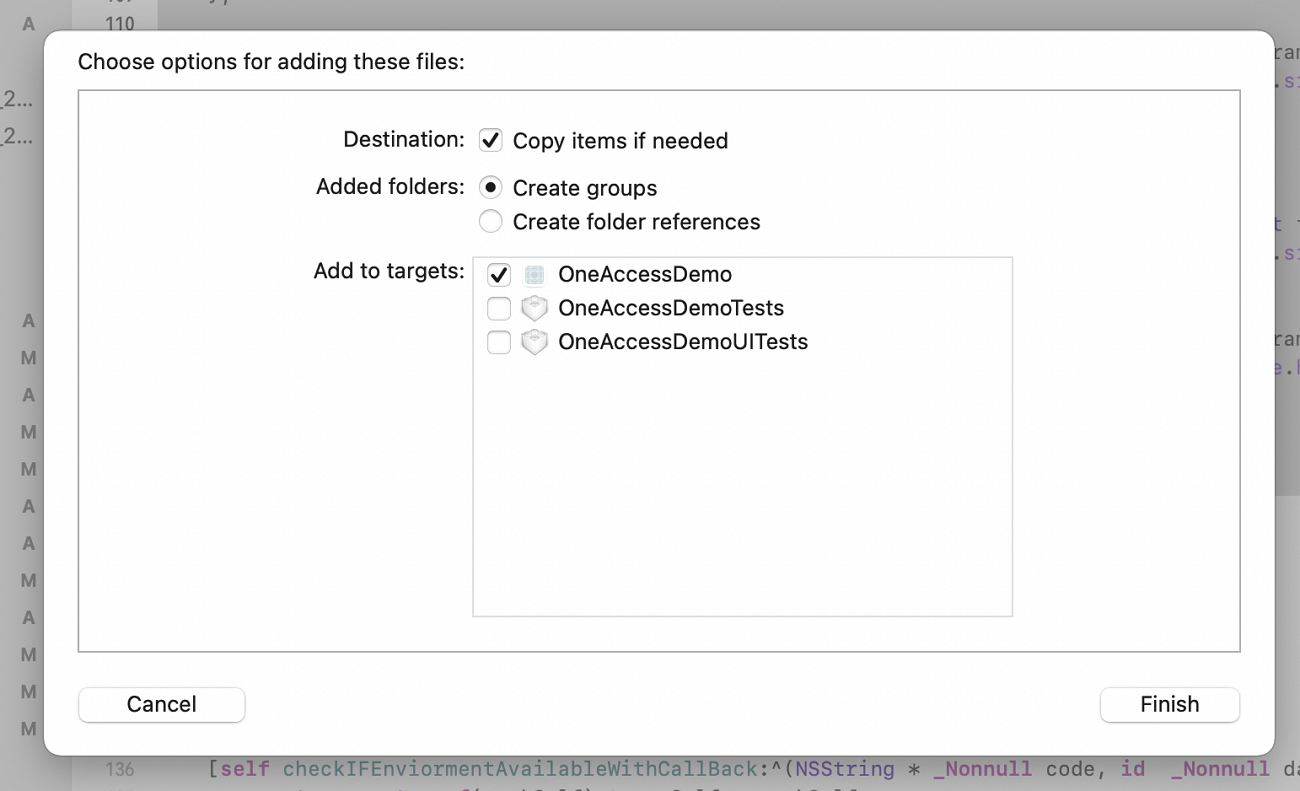
Also introduce the Pod dependency.
pod 'JWT', '~> 3.0.0-beta.14'
Target Settings
The IDaaS password login SDK minimum supported version is iOS 10.
Add the main libraries and dependencies in Framework, Libraries, and Embedded Content, and add -ObjC in Other Linker Flags.

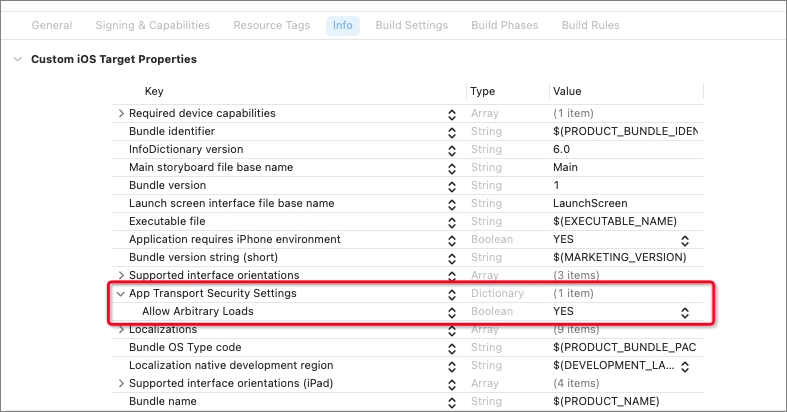
In the menu bar, select TARGETS > Info > Custom iOS Target Properties > App Transport Security Settings > Allow Arbitrary Loads, as shown below.
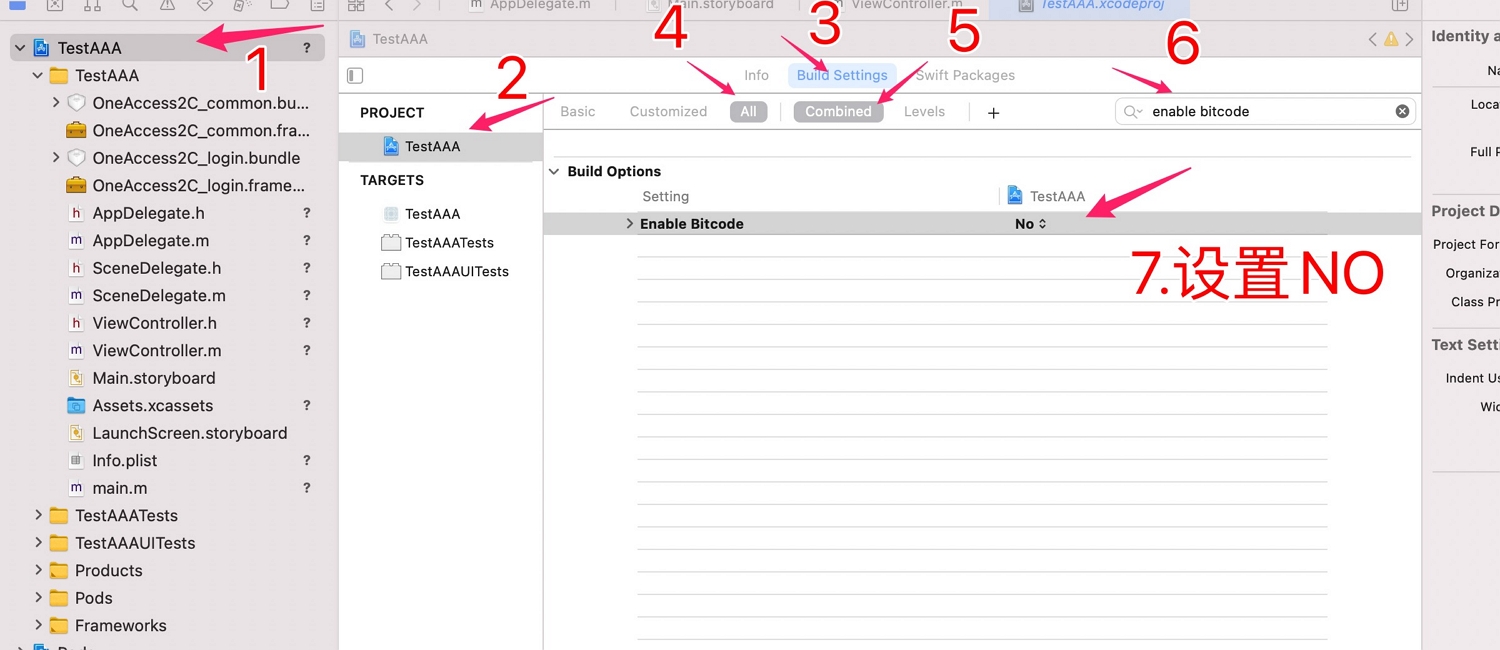
Configure bitcode as shown below, set bitcode to NO.
Development Integration
Built-in API Introduction
- Choose one login method (username password / mobile password / email password / unified username password), and call force password change or skip password change as needed (change password method / skip password change method).
- You can use the mobile number to retrieve the password. The app client builds its own password recovery page, which needs three elements: mobile number input box, verification code input box, get verification code button, and retrieve button. After tapping the get verification code button, call the IDaaS:
- SDK slider verification method and call the IDaaS.
- SDK send SMS method. After receiving the verification code, tap the retrieve button, and the app client calls the IDaaS.
- SDK password recovery method.
SDK Initialization
Initialize the initialization method in the didFinishLaunchingWithOptions method of AppDelegate:
//Reference in AppDelegate as follows
#import <AuthnCenter_common_2C /BCIDACommonManager.h>

//1. Basic configuration initialization
[[[[[BCIDACommonManager sharedInstance] initWithDomain:@"https://your-server-tenant.com"] initWithClientID:@"server-tenant-clientID"] initWithSSLCerVerification:NO] setLogEnabled:YES] ;
Brief introduction to the basic configuration initialization main class BCIDACommonManager methods:
/**
  * Method name: sharedInstance
   * @param none
   * @return singleton instance class
 */
+ (instancetype )sharedInstance ;

/**
  * Method name: initWithDomain
   * @param domain, starting with https:// and ending with .com.
   * @return instance class
 */
-(BCIDACommonManager)initWithDomain:(NSString)domain

/**
  * Method name: initWithClientID
   * @param client id.
   * @return instance class
 */
-(BCIDACommonManager)initWithClientID:(NSString)clientID;

/**
  * Method name: setLogEnabled
   * @param boolean value indicating whether to enable log.
   * @return instance class
 */
-(void)setLogEnabled:(BOOL)enable;

/**
  * Method name: initWithSSLCerVerification
   * @param boolean value setting whether SSL certificate verification is enabled.
   * @return instance class
 */
-(BCIDACommonManager*)initWithSSLCerVerification:(bool)sslCerVerification;
Get International Dialing Codes
If international number support is enabled, please call the international dialing code acquisition API first. The API returns the configured list of international dialing codes with regular expressions for phone numbers. The figure below shows how to configure the list of international dialing codes and the preferred code.
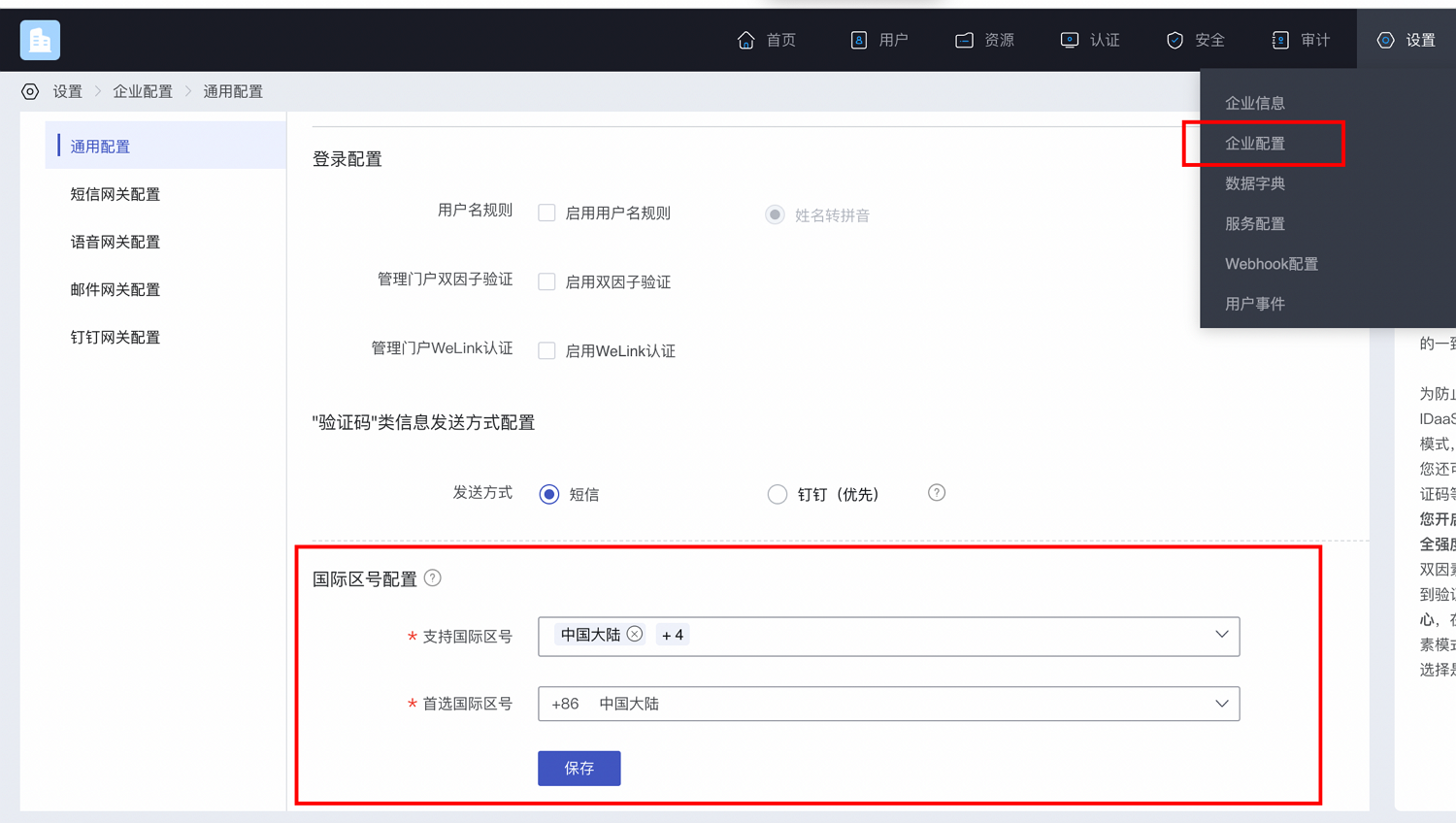
The IDaaS SDK provides an API to get international dialing codes:
Sample code to get the international dialing code list:
#import <AuthnCenter_common_2C/BCIDAInternationalPhoneCodeManager.h>


[BCIDAInternationalPhoneCodeManager getInternaltionalAreaCodeWithCompletionHandler:^(NSString * _Nonnull code, id  _Nonnull data) {
        __strong __typeof(weakSelf)strongSelf = weakSelf;
        dispatch_async(dispatch_get_main_queue(), ^{
            NSDictionary* dic=(NSDictionary*)data;
        //Check whether the phone number matches the regular expression
 BOOL flag=  [strongSelf parseDictionary:dic andWithMoile:mobile];

        });
    }];
Main class method introduction:
/**
* Method name: getInternaltionalAreaCodeWithCompletionHandler
* @brief: get international dialing code method
* @param
*@param
* @param BCSMSGetInternationalAreaCodeHandlerBlock () result callback function code=0, data returns NSDictionary result
**/
+(void)getInternaltionalAreaCodeWithCompletionHandler:(BCSMSGetInternationalAreaCodeHandlerBlock)resultHander;
Success example code=0, data value:
{
	"phoneAreaCodeDefinitions": [
		{
			"areaCode": "86",
			"displayMapping": {
				"zh-TW": "Mainland China",
				"en": "China",
				"zh-CN": "Mainland China"
			},
			"countryCode": "CN",
			"mobileRegex": "^(\\+86){0,1}\\-?1\\d{10}$",
			"areaCodeSuffixes": []
		},
		{
			"areaCode": "852",
			"displayMapping": {
				"zh-TW": "Hong Kong",
				"en": "Hong Kong",
				"zh-CN": "Hong Kong"
			},
			"countryCode": "HK",
			"mobileRegex": "^(\\+852){1}\\-?0{0,1}[1,4,5,6,7,8,9](?:\\d{7}|\\d{8}|\\d{12})$",
			"areaCodeSuffixes": []
		},
		{
			"areaCode": "886",
			"displayMapping": {
				"zh-TW": "Taiwan",
				"en": "Taiwan",
				"zh-CN": "Taiwan"
			},
			"countryCode": "TW",
			"mobileRegex": "^(\\+886){1}\\-?[6,7,9](?:\\d{7}|\\d{8})$",
			"areaCodeSuffixes": []
		},
		{
			"areaCode": "853",
			"displayMapping": {
				"zh-TW": "Macau",
				"en": "Macau",
				"zh-CN": "Macau"
			},
			"countryCode": "MO",
			"mobileRegex": "^(\\+853){1}\\-?0{0,1}[1,4,5,6,7,8,9](?:\\d{7}|\\d{8}|\\d{12})$",
			"areaCodeSuffixes": []
		},
		{
			"areaCode": "93",
			"displayMapping": {
				"zh-TW": "Afghanistan",
				"en": "Afghanistan",
				"zh-CN": "Afghanistan"
			},
			"countryCode": "AF",
			"mobileRegex": "^(\\+93){1}\\-\\d{6,11}",
			"areaCodeSuffixes": []
		}
	],
	"preferredAreaCode": "CN"
}
Return parameter format:
| Parameter Name | Chinese Name | Type | Description |
|---|---|---|---|
| preferredAreaCode | Preferred International Dialing Code | String | Preferred international dialing code configured in the current Enterprise Center |
| countryCode | Country/Region Code | String | Country/region code |
| areaCode | International Dialing Code | String | International dialing code |
| areaCodeSuffixes | International Dialing Code Suffix | String | International dialing code suffix |
| mobileRegex | Mobile Number Format Regex | String | Mobile number format regex |
| displayMapping | Multi-language Display Name Mapping | String | Multi-language display name mapping |
Built-in Slider Verification
This slider verification method pair is used with the "Retrieve Password via Mobile Number" and "Register via Mobile SMS Code" pages.
Please check the mobile number format before calling this method.
Tap (trigger) the send verification code event; the app client calls the IDaaS SDK slider verification method as shown below:
//Import the request header
#import <AuthnCenter_PWLogin_2C/BCPWSlideVerifyCodeManager.h>

//Tap (trigger) the send verification code event
 [BCPWSlideVerifyCodeManager startSlidingVerifyCodePageWithMobileNumber:mobile andWithResultHandler:^(NSString * _Nonnull code, id  _Nonnull data) {

    //Result handling

    }];
BCPWSlideVerifyCodeManager object method introduction:
/**
* Method name: startSlidingVerifyCodePageWithMobileNumber
* @brief: tap to invoke slider verification
*@ param mobile mobile number: with area code "+86-13800000000" or without area code "13800000000" are both acceptable.
*@param complete: asynchronous result callback:
1. When slider verification succeeds, returns code=0 data=slider token
2. When slider verification fails, returns code=other (refer to error codes)
3. code=105, data="User closed" means the close button of the slider box was tapped, so the app client can receive the user's behavior of closing the slider
**/

+(void)startSlidingVerifyCodePageWithMobileNumber:(NSString*)mobile andWithResultHandler:(BCPWSlideCodeHandlerBlock)resultHandler;
When slider verification succeeds with code=0, sample code to send SMS:
//When forgetting password (modifying password via mobile number), choose type:
   pwSlideSMSSendType     type= pwSlideSMSForgetPassword;
 //When registering a new user via mobile number, choose type:
  pwSlideSMSSendType      type= pwSlideSMSRegist;

[BCPWSlideVerifyCodeManager sendSMSWithSlideResultWithToken:token andMobile:mobile andWithType:type andWithCallBack:^(NSString * _Nonnull code, id  _Nonnull data) {
        if ([code isEqualToString:@"0"]) {
            NSLog(@"SMS sent successfully--code=%@   data=%@",code,data);
        }else{
            NSLog(@"SMS sent failed--code=%@   data=%@",code,data);

        }

    }];
SMS sending object BCPWSlideVerifyCodeManager method introduction:
/**
* Method name: sendSMSWithSlideResultWithToken
* @brief: call this method to send SMS,
*@ param token token obtained after slider verification succeeds in the previous method
*@ param mobile mobile number
*@ param mobile (pwSlideSMSSendType enum) type
When forgetting password and sending SMS verification code: pass type= pwSlideSMSForgetPassword
When registering a new user and sending SMS verification code: pass type= pwSlideSMSRegist

*@param complete: asynchronous result callback. SMS sent successfully returns code=0, code=other means SMS sending failed
**/

+(void)sendSMSWithSlideResultWithToken:(NSString*)token andMobile:(NSString*)mobile andWithType:(pwSlideSMSSendType)type andWithCallBack:(BCPWSendSMSHandlerBlock)callBack;
Username/Password Login
Code example:
//Import the request header
#import <AuthnCenter_PWLogin_2C/BCUserNamePWLoginManager.h>

//Tap (trigger) the send verification code event
[[BCUserNamePWLoginManager sharedInstance] loginByUserName:userName andWithPassword:passWord andWithCallBackHandler:^(NSString * _Nonnull code, id  _Nonnull data) {
 dispatch_async(dispatch_get_main_queue(), ^{
            NSLog(@"Result==%@==%@",code,data);

            });
 }];
BCUserNamePWLoginManager object method introduction:
/**
  * Method name: sharedInstance
   * @param none
   * @return singleton instance class
 */
+ (instancetype )sharedInstance ;

/**
* Method name: loginByUserName
* @brief: username + password login,
Login successful code=0 data=session_token.
Unsuccessful returns code=error code, data returns error reason.
*@ param username username.
*@ param password password.
*@param BCUserNamePWLoginHandlerBlock: asynchronous result callback containing two return parameters NSString code and id type data:
1. code=0 success, data returns session_token and id_token,
2. code=101 indicates that password change is required or password will expire soon, should jump
data =【status= PASSWORD_WARN】password not expired but will expire soon
             【status= PASSWORD_EXPIRED】password expired, must change
3. code=1 error data (NSDictionary type) returns "error_code" and "error_msg"
**/

-(void)loginByUserName:(NSString*)username andWithPassword:(NSString*)password andWithCallBackHandler:(BCUserNamePWLoginHandlerBlock)callBack;
Return parameter list:
Success example 1 (successful match returns session_token):
code=0
data=
{
    "session_token": "btsiBjx85prcZu6I6Ki057Tmw3nSF2VO",
    "id_token": content,
    "expire": 432000,
    "status": "SUCCESS"
}
Success example 2 (returns password will expire soon flow):
code=101
data=
{
    "status": "PASSWORD_WARN",
	"state_token": "eyJhbGciOiJIUzI1NiIsInR5cCI6IkpXVCJ9.eyJzdWIiOiJ7XCJ1c2VySWRcIjpcIjIwMjIwMjExMTY0NDUwNjk5LTE2M0QtNTVFMEI1RTRCXCIsXCJzdGF0dXNcIjpcIlBBU1NXT1JEX0VYUElSRURcIn0iLCJleHAiOjE2NDQ1NzEzNjAsImlhdCI6MTY0NDU2OTU2MCwianRpIjoiMTY0NDU2OTU2MDIwNDAifQ.WGk9GGQGmKsmo4UmCzKfiC9x1Fj0WBowdO7jEStMvB4",
	"data": "{\"maxLength\":18,\"minLength\":8,\"regEx\":\"^(?![a-zA-Z]+$)(?![A-Z0-9]+$)(?![A-Z~!#$%&+\\-,*:;<=>@_?^、`~\\./]+$)(?![a-z0-9]+$)(?![a-z~!#$%&+\\-,*:;<=>@_?^、`~\\./]+$)(?![0-9~!#$%&+\\-,*:;<=>@_?^、`~\\./]+$)[a-zA-Z0-9~!#$%&+\\-,*:;<=>@_?^、`~\\./]{1,}$\",\"tip\":\"At least 3 of digits, uppercase letters, lowercase letters, and special characters\"}"
}
Success example 3 (returns password expired flow):
Code=101,
data=
{
    "status": "PASSWORD_EXPIRED",
    "state_token":"eyJhbGciOiJIUzI1NiIsInR5cCI6IkpXVCJ9.eyJzdWJqZWN0Ijoie1wic3RhdGVcIjpcIlBBU1NXT1JEX1dBUk5cIixcInVzZXJJZFwiOlwiMjAyMTA3MjYxNzQwNTgxNDUtOTFCQy0xM0UwMTRBQkJcIn0iLCJpZCI6IjIwMjEwNzI2MTc0MDU4MTQ1LTkxQkMtMTNFMDE0QUJCIiwiZXhwIjoxNjI43MTkwLCJpYXQiOjEasd2Mjg4NDY1OTB9.-egHWNfNPIxNnM540_wTYMtFwB4C9ymznEPRiIC4we0",
    "data": "{\"maxLength\":18,\"minLength\":8,\"regEx\":\"^(?![a-zA-Z]+$)(?![A-Z0-9]+$)(?![A-Z~!#$%&+\\-,*:;<=>@_?^、`~\\./]+$)(?![a-z0-9]+$)(?![a-z~!#$%&+\\-,*:;<=>@_?^、`~\\./]+$)(?![0-9~!#$%&+\\-,*:;<=>@_?^、`~\\./]+$)[a-zA-Z0-9~!#$%&+\\-,*:;<=>@_?^、`~\\./]{1,}$\",\"tip\":\"At least 3 of digits, uppercase letters, lowercase letters, and special characters\"}"
}

Error example
{
    "error_code": "IDAAS.SDK.COMMON.1001",
    "error_msg": "Parameter X-client-id cannot be left blank."
}
Mobile/Password Login
Code example:
//Import the request header
#import <AuthnCenter_PWLogin_2C/BCPhonePWLoginManager.h>

//Tap (trigger) the login button
[[BCPhonePWLoginManager sharedInstance] loginByPhoneNumber:phoneStr andWithPassword:passWord andWithCallBackHandler:^(NSString * _Nonnull code, id  _Nonnull data) {

            dispatch_async(dispatch_get_main_queue(), ^{
            NSLog(@"Result==%@==%@",code,data);

            });
        }];
BCPhonePWLoginManager object method introduction:
/**
  * Method name: sharedInstance
   * @param none
   * @return singleton instance class
 */
+ (instancetype )sharedInstance ;


/**
* Method name: loginByPhoneNumber
* @brief: mobile number + password login
*@ param username username.
*@ param password password.
*@param BCPhonePWLoginHandlerBlock: asynchronous result callback containing two return parameters NSString code and id type data:
1. code=0 success, data returns session_token and id_token,
2. code=101 indicates that password change is required or password will expire soon, should jump
data =【status= PASSWORD_WARN】password not expired but will expire soon
             【status= PASSWORD_EXPIRED】password expired, must change
3. code=1 error data (NSDictionary type) returns "error_code" and "error_msg"

**/
-(void) loginByPhoneNumber:(NSString*)mobile andWithPassword:(NSString*)password andWithCallBackHandler:(BCPhonePWLoginHandlerBlock)callBack;
Return parameter list:
Success example 1 (successful match returns session_token):
code=0
data=
{
    "session_token": "btsiBjx85prcZu6I6Ki057Tmw3nSF2VO",
    "id_token": content,
    "expire": 432000,
    "status": "SUCCESS"
}
Success example 2 (returns password will expire soon flow):
code=101
data=
{
    "status": "PASSWORD_WARN",
	"state_token": "eyJhbGciOiJIUzI1NiIsInR5cCI6IkpXVCJ9.eyJzdWIiOiJ7XCJ1c2VySWRcIjpcIjIwMjIwMjExMTY0NDUwNjk5LTE2M0QtNTVFMEI1RTRCXCIsXCJzdGF0dXNcIjpcIlBBU1NXT1JEX0VYUElSRURcIn0iLCJleHAiOjE2NDQ1NzEzNjAsImlhdCI6MTY0NDU2OTU2MCwianRpIjoiMTY0NDU2OTU2MDIwNDAifQ.WGk9GGQGmKsmo4UmCzKfiC9x1Fj0WBowdO7jEStMvB4",
	"data": "{\"maxLength\":18,\"minLength\":8,\"regEx\":\"^(?![a-zA-Z]+$)(?![A-Z0-9]+$)(?![A-Z~!#$%&+\\-,*:;<=>@_?^、`~\\./]+$)(?![a-z0-9]+$)(?![a-z~!#$%&+\\-,*:;<=>@_?^、`~\\./]+$)(?![0-9~!#$%&+\\-,*:;<=>@_?^、`~\\./]+$)[a-zA-Z0-9~!#$%&+\\-,*:;<=>@_?^、`~\\./]{1,}$\",\"tip\":\"At least 3 of digits, uppercase letters, lowercase letters, and special characters\"}"
}
Success example 3 (returns password expired flow):
Code=101,
data=
{
    "status": "PASSWORD_EXPIRED",
    "state_token":"eyJhbGciOiJIUzI1NitFwmznEPRiIC4we0",
    "data": "{\"maxLength\":18,\"minLength\":8,\"regEx\":\"^(?![a-zA-Z]+$)(?![A-Z0-9]+$)(?![A-Z~!#$%&+\\-,*:;<=>@_?^、`~\\./]+$)(?![a-z0-9]+$)(?![a-z~!#$%&+\\-,*:;<=>@_?^、`~\\./]+$)(?![0-9~!#$%&+\\-,*:;<=>@_?^、`~\\./]+$)[a-zA-Z0-9~!#$%&+\\-,*:;<=>@_?^、`~\\./]{1,}$\",\"tip\":\"At least 3 of digits, uppercase letters, lowercase letters, and special characters\"}"
}

Error example
{
    "error_code": "IDAAS.SDK.COMMON.1001",
    "error_msg": "Parameter X-client-id cannot be left blank."
}
Email/Password Login
Code example:
//Import the request header
#import <AuthnCenter_PWLogin_2C/BCEmailPWLoginManager.h>

//Tap (trigger) the login button
[[BCEmailPWLoginManager sharedInstance] loginByEmail:emailStr andPassword:passWord andWithCallBackHandler:^(NSString * _Nonnull code, id  _Nonnull data) {
            dispatch_async(dispatch_get_main_queue(), ^{
            NSLog(@"Result==%@==%@",code,data);

            });
        }];
BCEmailPWLoginManager object method introduction:
/**
  * Method name: sharedInstance
   * @param none
   * @return singleton instance class
 */
+ (instancetype )sharedInstance ;


/**
* Method name: loginByEmail
* @brief: email + password login. Unsuccessful returns code=error code, data returns error reason. Password sent successfully code=0 data=session_token.
*@ param email username.
*@ param password password.
*@param BCEmailPWLoginHandlerBlock: asynchronous result callback containing two return parameters NSString code and id type data:
1. code=0 success, data returns session_token and id_token,
2. code=101 indicates that password change is required or password will expire soon, should jump
data =【status= PASSWORD_WARN】password not expired but will expire soon
             【status= PASSWORD_EXPIRED】password expired, must change
3. code=1 error data (NSDictionary type) returns "error_code" and "error_msg"

**/

-(void)loginByEmail:(NSString*)email andPassword:(NSString*)password andWithCallBackHandler:(BCEmailPWLoginHandlerBlock)callBack;
Return parameter list:
Success example 1 (successful match returns session_token):
code=0
data=
{
    "session_token": "btsiBjx85prcZu6I6Ki057Tmw3nSF2VO",
    "id_token":"xxxxxx",
    "expire": 432000,
    "status": "SUCCESS"
}

Success example 2 (returns password will expire soon flow):
code=101
data=
{
    "status": "PASSWORD_WARN",
	"state_token": "eyJhbGciOiJIUzI1NiIsInR5cCI6IkpXVCJ9.eyJzdWIiOiJ7XCJ1c2VySWRcIjpcIjIwMjIwMjExMTY0NDUwNjk5LTE2M0QtNTVFMEI1RTRCXCIsXCJzdGF0dXNcIjpcIlBBU1NXT1JEX0VYUElSRURcIn0iLCJleHAiOjE2NDQ1NzEzNjAsImlhdCI6MTY0NDU2OTU2MCwianRpIjoiMTY0NDU2OTU2MDIwNDAifQ.WGk9GGQGmKsmo4UmCzKfiC9x1Fj0WBowdO7jEStMvB4",
	"data": "{\"maxLength\":18,\"minLength\":8,\"regEx\":\"^(?![a-zA-Z]+$)(?![A-Z0-9]+$)(?![A-Z~!#$%&+\\-,*:;<=>@_?^、`~\\./]+$)(?![a-z0-9]+$)(?![a-z~!#$%&+\\-,*:;<=>@_?^、`~\\./]+$)(?![0-9~!#$%&+\\-,*:;<=>@_?^、`~\\./]+$)[a-zA-Z0-9~!#$%&+\\-,*:;<=>@_?^、`~\\./]{1,}$\",\"tip\":\"At least 3 of digits, uppercase letters, lowercase letters, and special characters\"}"
}

Success example 3 (returns password expired flow):
Code=101,
data=
{
    "status": "PASSWORD_EXPIRED",
    "state_token":"e_wTYMtFwB4C9ymznEPRiIC4we0",
    "data": "{\"maxLength\":18,\"minLength\":8,\"regEx\":\"^(?![a-zA-Z]+$)(?![A-Z0-9]+$)(?![A-Z~!#$%&+\\-,*:;<=>@_?^、`~\\./]+$)(?![a-z0-9]+$)(?![a-z~!#$%&+\\-,*:;<=>@_?^、`~\\./]+$)(?![0-9~!#$%&+\\-,*:;<=>@_?^、`~\\./]+$)[a-zA-Z0-9~!#$%&+\\-,*:;<=>@_?^、`~\\./]{1,}$\",\"tip\":\"At least 3 of digits, uppercase letters, lowercase letters, and special characters\"}"
}

Error example
{
    "error_code": "IDAAS.SDK.COMMON.1001",
    "error_msg": "Parameter X-client-id cannot be left blank."
}
Unified Username/Password Login
Code example:
//Import the request header
#import <AuthnCenter_PWLogin_2C/BCAllInOnePWLoginManager.h>

//Tap (trigger) the login button
[[BCAllInOnePWLoginManager sharedInstance] loginByAllInOneString:userName andWithPassword:passWord andWithCallBackHandler:^(NSString * _Nonnull code, id  _Nonnull data) {

            dispatch_async(dispatch_get_main_queue(), ^{
            NSLog(@"Result==%@==%@",code,data);

            });
        }];
BCAllInOnePWLoginManager object method introduction:
/**
  * Method name: sharedInstance
   * @param none
   * @return singleton instance class
 */
+ (instancetype )sharedInstance ;

/**
* Method name: loginByAllInOneString
* @brief: unified login field + password login. Unsuccessful returns code=error code, data returns error reason. Password sent successfully code=0 data=session_token.
*@ param allStr unified login field.
*@ param password password.
*@param BCAllInOnePWLoginHandlerBlock: asynchronous result callback containing two return parameters NSString code and id type data:
1. code=0 success, data returns session_token and id_token,
2. code=101 indicates that password change is required or password will expire soon, should jump
data =【status= PASSWORD_WARN】password not expired but will expire soon
             【status= PASSWORD_EXPIRED】password expired, must change
3. code=1 error data (NSDictionary type) returns "error_code" and "error_msg"

**/
-(void)loginByAllInOneString:(NSString*)allStr andWithPassword:(NSString*)password andWithCallBackHandler:(BCAllInOnePWLoginHandlerBlock)callBack;
Return parameter list:
Success example 1 (successful match returns session_token):
code=0
data=
{
    "session_token": "btsiBjx85prcZu6I6Ki057Tmw3nSF2VO",
    "id_token": content,
    "expire": 432000,
    "status": "SUCCESS"
}

Success example 2 (returns password will expire soon flow):
code=101
data=
{
    "status": "PASSWORD_WARN",
	"state_token": "eyJhFj0WBowdO7jEStMvB4",
	"data": "{\"maxLength\":18,\"minLength\":8,\"regEx\":\"^(?![a-zA-Z]+$)(?![A-Z0-9]+$)(?![A-Z~!#$%&+\\-,*:;<=>@_?^、`~\\./]+$)(?![a-z0-9]+$)(?![a-z~!#$%&+\\-,*:;<=>@_?^、`~\\./]+$)(?![0-9~!#$%&+\\-,*:;<=>@_?^、`~\\./]+$)[a-zA-Z0-9~!#$%&+\\-,*:;<=>@_?^、`~\\./]{1,}$\",\"tip\":\"At least 3 of digits, uppercase letters, lowercase letters, and special characters\"}"
}
Success example 3 (returns password expired flow):
Code=101,
data=
{
    "status": "PASSWORD_EXPIRED",
    "state_token":"eyJhbGciHWNfNPIxNnM540_wTYMtFwB4C9ymznEPRiIC4we0",
    "data": "{\"maxLength\":18,\"minLength\":8,\"regEx\":\"^(?![a-zA-Z]+$)(?![A-Z0-9]+$)(?![A-Z~!#$%&+\\-,*:;<=>@_?^、`~\\./]+$)(?![a-z0-9]+$)(?![a-z~!#$%&+\\-,*:;<=>@_?^、`~\\./]+$)(?![0-9~!#$%&+\\-,*:;<=>@_?^、`~\\./]+$)[a-zA-Z0-9~!#$%&+\\-,*:;<=>@_?^、`~\\./]{1,}$\",\"tip\":\"At least 3 of digits, uppercase letters, lowercase letters, and special characters\"}"
}

Error example
{
    "error_code": "IDAAS.SDK.COMMON.1001",
    "error_msg": "Parameter X-client-id cannot be left blank."
}
Skip Password Change
Code example:
//Import the request header
#import <AuthnCenter_PWLogin_2C/BCPWPassWordUpdateManager.h>

//Tap (trigger) the login button
[[BCPWPassWordUpdateManager sharedInstance] skipPassWordModifyWithStateToken:state_token andWithCallBackHandler:^(NSString * _Nonnull code, id  _Nonnull data) {
        NSString* msg=[NSString stringWithFormat:@"Result after skipping password change: code=%@-------data=%@",code,data];
          }];
BCPWPassWordUpdateManager object method introduction:
/**
  * Method name: sharedInstance
   * @param none
   * @return singleton instance class
 */
+ (instancetype )sharedInstance ;

/**
* Method name: skipPassWordModifyWithStateToken
* @brief: skip password change, only used when the login interface returns status: "PASSWORD_WARN" (when login interface code=101)
*@ param state_token state_token field returned by the login interface (when login interface code=101).
*@param BCSkipPasswordModifyHandlerBlock: asynchronous result callback
code=0 success, code=other failure
**/
-(void)skipPassWordModifyWithStateToken:(NSString*)state_token andWithCallBackHandler:(BCSkipPasswordModifyHandlerBlock)callBack;
Return parameters:
| Code | Description |
|---|---|
| code=0 success | data returns NSDictionary: data=@{@"session_token":sessionTokenContent,@"id_token":idTokenContent}; |
| code=other | data=failure description |
Change Password
Code example:
//Import the request header
#import <AuthnCenter_PWLogin_2C/BCPWPassWordUpdateManager.h>

//Tap (trigger) the login button
[[BCPWPassWordUpdateManager sharedInstance] modifyPasswordWithStateToken:_state_token andWithNewPassword:nePass andWithOldPassword:oldPass andWithCallBackHandler:^(NSString * _Nonnull code, id  _Nonnull data) {
        NSString* str=[NSString stringWithFormat:@"code=%@-----data=%@",code,data];


    }];
BCPWPassWordUpdateManager object method introduction:
/**
  * Method name: sharedInstance
   * @param none
   * @return singleton instance class
 */
+ (instancetype )sharedInstance ;

/**
* Method name: modifyPasswordWithStateToken
* @brief: change password, only used when the login interface returns status: " PASSWORD_EXPIRED " (when login interface code=101)
*@ param state_token state_token field returned by the login interface.
*@param newPassword
*@param oldPassword
*@param BCPWModifyPasswordHandlerBlock: asynchronous result callback
code=0 success, code=other failure
**/

-(void)modifyPasswordWithStateToken:(NSString*)state_token andWithNewPassword:(NSString*)newPassword andWithOldPassword:(NSString*)oldPassword andWithCallBackHandler:(BCPWModifyPasswordHandlerBlock)callBack;
Return parameters:
| Code | Description |
|---|---|
| code=0 success | data returns NSDictionary: data=@{@"session_token":sessionTokenContent,@"id_token":idTokenContent}; |
| code=other | data=failure description |
Retrieve Password via Mobile Number
The app client needs to build its own interface including a mobile number input box, tap get verification code, verification code input box, new password input box, and submit button. After tapping get verification code, please call the slider verification method in this document to get the verification code.
//Import the request header
#import <AuthnCenter_PWLogin_2C/BCPWForgetPassWordManager.h>

//Tap (trigger) the send verification code event
[[BCPWForgetPassWordManager sharedInstance] forgetPasswordChangePassWordByPhone:mobile andVerifyCode:verifyC andWithNewPassword:newPassword andWithCompletionHandler:^(NSString * _Nonnull code, id  _Nonnull data) {
        dispatch_async(dispatch_get_main_queue(), ^{
        NSString* str=[NSString stringWithFormat:@"code=%@------data=%@",code,data];
        });

    }];
BCPWForgetPassWordManager object method introduction:
/**
  * Method name: sharedInstance
   * @param none
   * @return singleton instance class
 */
+ (instancetype )sharedInstance ;


/**
* Method name: forgetPasswordChangePassWordByPhone
* @brief: retrieve password via mobile number
*@ param mobile mobile number: with area code "+86-13800000000" or without area code "13800000000" are both acceptable.
*@ param verifyCode SMS verification code
*@ param  newPassword new password
*@param complete: BCPWforgetPasswordModifyByPhoneHandlerBlock asynchronous result callback, code=0 password change successful, code=other failure.
**/
-(void)forgetPasswordChangePassWordByPhone:(NSString*)mobile andVerifyCode:(NSString*)verifyCode andWithNewPassword:(NSString*)newPassword andWithCompletionHandler:(BCPWforgetPasswordModifyByPhoneHandlerBlock)callBack;
Return parameters:
| Code | Description |
|---|---|
| code=0 success | data=success |
| code=other | data=failure description |
Register via Mobile SMS Code
The user builds the interface themselves. Mobile number and verification code are required fields. You can use the two IDaaS SDK slider verification and send SMS methods to get the verification code. Other personal information parameters are optional. Successful registration means successful login and returns session_token and id_token.
Code example:
//Import the request header
#import <AuthnCenter_SMSLogin_2C/BCPWRegistByPhoneNumManager.h>

//Tap register
  [[BCPWRegistManager sharedInstance] registUserByPhone:mobile andWithVerifyCode:verifyCode andWithUserName:username andWithName:name andWithEmail:email andWithPassword:password andWithHeadImageURLStr:headIma andWithGender:gender andWithBirthDay:birthDay andWithNickName:nickName andWithAddress:address andWithZipCode:zipCode andWithFirstName:FirstNAme andWithMiddleName:middleName andWithLastName:lastName andWithIndustry:industry andWithExtension:nil andWithCompletionHandler:^(NSString * _Nonnull code, id  _Nonnull data) {
   }];
BCPWRegistManager object method introduction:
/**
* Method name: registUserByPhone
* @brief: register a new user with mobile number
*@ param mobile mobile number (required): with area code "+86-13800000000" or without area code "13800000000" are both acceptable.
*@ param verifyCode (required): SMS verification code
*@param complete: BCPWRegistByPhoneHandlerBlock asynchronous result callback, code=0 success data returns session_token and id_token, code=other failure.
**/

-(void)registUserByPhone:(NSString*)mobile andWithVerifyCode:(NSString*)verifyCode andWithUserName:(NSString*)userName andWithName:(NSString*)name andWithEmail:(NSString*)email andWithPassword:(NSString*)password andWithHeadImageURLStr:(NSString*)headImageUrlStr andWithGender:(NSString*)gender andWithBirthDay:(NSString*)birthday andWithNickName:(NSString*)nickName andWithAddress:(NSString*)address andWithZipCode:(NSString*)zipCode andWithFirstName:(NSString*)firstName andWithMiddleName:(NSString*)middleName andWithLastName:(NSString*)lastName andWithIndustry:(NSString*)industry andWithExtension:(NSDictionary*)extendDic andWithCompletionHandler:(BCPWRegistByPhoneHandlerBlock)callBack;
Input parameter description:
| Parameter Name | Type | Required | Code Example |
|---|---|---|---|
| mobile | NSString | Yes | Both with area code "+86-13800000000" and without area code "13800000000" are acceptable |
| verifyCode | NSString | Yes | Use the verification code received via SMS |
| userName | NSString | No | Username, letters and numbers |
| name | NSString | No | Chinese, English, and numbers |
| NSString | No | ||
| password | NSString | No | Password |
| headImageUrlStr | NSString | No | Avatar URL "https://thirdwx.qlogo.cn/mmopen/vi_32/Q0j4TwGTfTIQ8QOTSn3y4cYHLlMC3sv6RCBmeMkxtOog47Zr3v2Afbqc2bmP0WibUIUskX39eJlJ" |
| gender | NSString | No | Optional values: female: female; male: male; unknow: confidential. This parameter will be format-checked; if it does not match, the callback function will return an error |
| birthday | NSString | No | Format: yyyy-MM-dd. This parameter will be format-checked; if it does not match, the callback function will return an error |
| nickName | NSString | No | Nickname, Chinese/English/numbers |
| address | NSString | No | Address |
| zipCode | NSString | No | Zip code |
| firstName | NSString | No | First name |
| middleName | NSString | No | Middle name |
| lastName | NSString | No | Last name |
| industry | NSString | No | Industry |
| extendDic | NSDictionary | No | Pass newly added backend parameters in the following format; age is the parameter name newly configured in the Enterprise Center. |
Return parameters:
| Code | Description |
|---|---|
| code=0 success | Data returns NSDictionary: data= {"session_token":sessionTokenContent,"id_token":idTokenContent}; |
| code=other | data=failure description |
Parameter input example:
{
  "user_name": "zhangsan",
  "name": "Zhang San",
  "email": "15200000000@qq.com",
  "pwd": "QWE@qwe123",
  "head_img": "https://thirdwx.qlogo.cn/mmopen/vi_32/Q0j4TwGTfTIQ8QOTSn3y4cYHLlMC3sv6RCBmeMkxtOog47Zr3v2Afbqc2bmP0WibUIUskX39eJlJ",
  "attr_gender":"male",
  "attr_birthday": "2022-02-17",
  "attr_nick_name": "Zhang San",
  "mailing_address": "Wuhan, Hubei",
  "zip_code": "430000",
  "first_name": "zhangsan",
  "middle_name": "zhangsan",
  "last_name": "zhangsan",
  "industry": "Public Institution",
  "extension": {
    "age":"18"
  }
}
ID Token Verification and User Info Retrieval
After successful login, session_token and id_token are returned. id_token can be used to obtain user information and verify login validity.
Flow:
- Verify idToken
- Get user info from idtoken (this method can be called directly without verification)
Verify id_token
Call example:
  [[BCIDAIDTokenManager sharedInstance] verifySignWithIdToken:idToken andWithCallBack:^(NSString * _Nonnull code, id  _Nonnull data) {
          }];
Main class BCIDAIDTokenManager introduction:
/**
   * Method name: sharedInstance
   * @param no input parameters
   * @return returns the singleton instance
*/
+ (instancetype )sharedInstance;

/**
* Method name: verifySignWithIdToken
* @brief: method to verify whether idtoken is within login validity and consistent with the app
* @param idToken returned at login
* @param BCIDAIdTokenVerifyHandlerBlock callback function:
NSString code
id       data
**/
-(void)verifySignWithIdToken:(NSString*)idToken andWithCallBack:(BCIDAIdTokenVerifyHandlerBlock)callback;
Return values:
| code (NSString) | data | data Type and Description |
|---|---|---|
| 0 | success | [NSString] Signature verification successful |
| 1 | Error description | [NSString] Input parameter is empty, SDK initialization parameters domain and clientID are not set |
| 106 | Expired | [NSString] Expired idtoken |
| 107 | clientID mismatch | [NSString] Possibly used another app's clientID |
| 103 | Signature verification failed | [NSString] Signature verification process failed |
| 102 | Failed to obtain public key | [NSString] Error during signature verification process |
| See error code collection at end of document | See error code collection at end of document | May also return error codes at the end of the document |
Parse User Info from idToken
Call example:
[[BCIDAIDTokenManager sharedInstance] getUserInfoFromIdTokenWithIdToken:idToken andWithCallBack:^(NSString * _Nonnull code, id  _Nonnull data) {

}];
Main class BCIDAIDTokenManager introduction:
/**
   * Method name: sharedInstance
   * @param no input parameters
   * @return returns the singleton instance
*/
+ (instancetype )sharedInstance;

/**
* Method name: getUserInfoFromIdTokenWithIdToken
* @brief: parse user info from idToken
* @param idToken returned at login
* @param BCIDAIdTokenGetInfoHandlerBlock callback function:
NSString code
id       data

**/
-(void)getUserInfoFromIdTokenWithIdToken:(NSString*)idToken andWithCallBack:(BCIDAIdTokenGetInfoHandlerBlock)callback;
User info parameter description:
| Parameter Name | Description |
|---|---|
| iss | Token issuer |
| aud | Token recipient, app's clientId |
| exp | Token expiration time |
| jti | Token id |
| iat | Token issue time |
| sub | Fixed as subject |
| name | User name |
| mobile | User mobile number |
| id | User id |
| userName | Username |
| User email |
Callback function return value:
Success example:
code=0
data=
{
	"id": "20220729174957176-2C7F-A2C54C293",
	"exp": 1659407592,
	"nbf": 1659407172,
	"mobile": "+86-13808603636",
	"jti": "7iwCYPo8EYcmLAD18x-CAw",
	"iss": "https:\/\/sdk2c.idaas-test-alpha.bccastle.com\/api\/v1\/oauth2",
	"userName": "zhangrui1",
	"sub": "20220729174957176-2C7F-A2C54C293",
	"aud": "S1ScicdIVR1QUbNs8TBz6BYVd2Zt8Adc",
	"iat": 1659407292,
	"email": "",
	"name": "zhangrui1"
}

Failure example
code=102
Refresh IDToken
Call example:
[[BCIDAIDTokenRefreshManager sharedInstance] refreshIdTokenWithSessionToken:sessionToken andWithCallBack:^(NSString * _Nonnull code, id  _Nonnull data) {
            NSString* jsonS=(NSString*)data;
         NSDictionary* dict=  [self dictionaryWithJsonString:jsonS];//Parse jsonStr to NSDictionary
          NSString* idTok= [dict objectForKey:@"id_token"];
            NSString* session_tok=[dict objectForKey:@"session_token"];
            NSString* expr=[dict objectForKey:@"expire"];
                  }];
Main class BCIDAIDTokenManager introduction:
/**
   * Method name: sharedInstance
   * @param no input parameters
   * @return returns the singleton instance
*/
+ (instancetype )sharedInstance;

/**
* Method name: refreshIdTokenWithSessionToken
* @brief: refresh idToken
* @param sessionToken returned at login
* @param BCIDAIdTokenRefreshIDTokenHandlerBlock callback function:
NSString code
id       data

**/
-(void)refreshIdTokenWithSessionToken:(NSString*)sessionToken andWithCallBack:(BCIDAIdTokenRefreshIDTokenHandlerBlock)callBack;
Callback function return value:
Success example:
code=0
data=
{
  "id_token" : "eyJraWQiOiJhODJkzJjLmlkYWFzLXRllKp6w",
  "session_token" : "apcOKuyry7kASh9h6mtf2G2GbettkyiU",
  "expire" : 7200
}

Failure example (no data obtained)
code=1
Return Codes
| Status Code | Error Code (error_code) | Chinese Error Message | Remediation |
|---|---|---|---|
| 400 | IDAAS.SDK.COMMON.1001 | Parameter {0} cannot be left blank | |
| 参数 {0} 不能为空 | |||
| 400 | IDAAS.SDK.COMMON.1002 | The {0} parameter format is incorrect | |
| 参数 {0} 格式错误 | |||
| 400 | IDAAS.SDK.COMMON.1003 | Device information is incomplete | |
| 设备信息不完整 | |||
| 400 | IDAAS.SDK.COMMON.1004 | Signature decryption error | |
| 签名解密错误 | |||
| 400 | IDAAS.SDK.COMMON.1005 | The {0} has failed | |
| {0} 已失效 | |||
| 400 | IDAAS.SDK.COMMON.1006 | The {0} parameter error | |
| {0} 参数错误 | |||
| 400 | IDAAS.SDK.COMMON.1007 | The {0} parameter type error | |
| {0}参数类型错误 | |||
| 500 | IDAAS.SDK.COMMON.1008 | The system is busy. Try again later | |
| 系统繁忙。稍后再试 | |||
| 400 | IDAAS.SDK.COMMON.1009 | Unknown authentication configuration | |
| 未知的认证配置 | |||
| 400 | IDAAS.SDK.COMMON.1010 | Failed to obtain the enterprise center global configuration | |
| 获取企业中心全局配置失败 | |||
| 400 | IDAAS.SDK.COMMON.1011 | Failed to obtain the international area code configuration | |
| 获取国际区号配置失败 | |||
| 400 | IDAAS.SDK.COMMON.1012 | The x-client-ID is incorrect and the corresponding application cannot be found | |
| X-client-id错误,找不到对应的应用 | |||
| 400 | IDAAS.SDK.COMMON.1013 | The corresponding user is not found | |
| 未找到对应的用户 | |||
| 400 | IDAAS.SDK.COMMON.1014 | Application private key not found | |
| 未找到应用私钥 | |||
| 400 | IDAAS.SDK.LOGIN.1001 | Error calling interface | |
| 调用 {0} 接口出错 | |||
| 400 | IDAAS.SDK.LOGIN.1002 | User not bound | |
| 用户未绑定 | |||
| 400 | IDAAS.SDK.LOGIN.1003 | The user has been locked due to too many unsuccessful login attempts. It will be unlocked in {0} minutes and {1} seconds | |
| 由于多次登录失败,用户已被锁定。 它将在 {0} 分钟和 {1} 秒内解锁 | |||
| 400 | IDAAS.SDK.LOGIN.1004 | Failed to obtain the password policy | |
| 获取密码策略错误 | |||
| 400 | IDAAS.SDK.LOGIN.1005 | Invalid username or password. Remaining login attempts: | |
| 无效的用户名或密码。 其余登录尝试次数: | |||
| 400 | IDAAS.SDK.LOGIN.1006 | Configuration error, unable to find wechat authentication source | |
| 配置错误,找不到微信认证源 | |||
| 400 | IDAAS.SDK.LOGIN.1007 | Configuration error, unable to find alipay authentication source | |
| 配置错误,找不到支付宝认证源 | |||
| 400 | IDAAS.SDK.LOGIN.1008 | The configuration is incorrect. The one-click login authentication source cannot be found | |
| 配置错误,无法找到一键登录认证源 | |||
| 400 | IDAAS.SDK.SMS.1001 | {0} slide base map is not initialized successfully, please check the path | |
| {0} 滑动底图未初始化成功,请检查路径 | |||
| 400 | IDAAS.SDK.SMS.1002 | {0} verification code coordinate resolution failed | |
| {0} 验证码坐标解析失败 | |||
| 400 | IDAAS.SDK.SMS.1003 | {0} verification code coordinate verification fails | |
| {0} 验证码坐标校验失败 | |||
| 400 | IDAAS.SDK.SMS.1004 | The graphic verification code is incorrect | |
| 图形验证码校验错误 | |||
| 400 | IDAAS.SDK.SMS.1005 | SMS verification code verification is incorrect | |
| 短信验证码验证错误 | |||
| 400 | IDAAS.SDK.SMS.1006 | The email verification code is incorrect | |
| 邮件验证码验证错误 | |||
| 400 | IDAAS.SDK.SMS.1007 | Sending scenario does not exist | |
| 发送场景不存在 | |||
| 400 | IDAAS.SDK.SMS.1008 | Failed to send the verification code | |
| 发送验证码失败 | |||
| 400 | IDAAS.SDK.SOCIAL.1001 | The social account is unbound incorrectly | |
| 社交账号解绑错误 | |||
| 400 | IDAAS.SDK.SOCIAL.1002 | The social account has been bound, please unbind it first | |
| 社交账号已绑定,请先解绑 | |||
| 400 | IDAAS.SDK.PWD.1001 | The password length is incorrect | |
| 密码长度错误 | |||
| 400 | IDAAS.SDK.PWD.1002 | The password cannot be the username | |
| 密码不能为用户名 | |||
| 400 | IDAAS.SDK.PWD.1003 | Your password complexity is low | |
| 你的密码复杂度过低 | |||
| 400 | IDAAS.SDK.PWD.1004 | The password is weak | |
| 密码很弱 | |||
| 400 | IDAAS.SDK.PWD.1005 | The password is used before, cannot be used again | |
| 该密码已被使用过,不能再次使用 | |||
| 400 | IDAAS.SDK.PWD.1006 | Password cannot username in reverse order | |
| 密码不能是用户名的倒序 | |||
| 400 | IDAAS.SDK.PWD.1007 | The number of repeated password characters exceeded the upper limit | |
| 密码重复字符数超过限制 | |||
| 400 | IDAAS.SDK.PWD.1008 | Password cannot contain :username, phone number, email prefix, name in PinYing | |
| 密码不能包含:用户名、电话号码、邮件前缀、拼音名 | |||
| 400 | IDAAS.SDK.MFA.1001 | The mobile doesn't match the user | |
| 手机号和用户不匹配 | |||
| 400 | IDAAS.SDK.MFA.1002 | The access control policy is incorrect | |
| 访问控制策略配置错误 | |||
| 400 | IDAAS.SDK.MFA.1003 | Access control authentication source type conversion error | |
| 访问控制身份验证源类型转换错误 |