
Overview
WeChat Mini Program is a new way to connect users and services. It can be easily accessed and shared within WeChat and delivers an excellent user experience.
Does your enterprise currently own or plan to apply for an enterprise WeChat Mini Program?
BambooCloud IDaaS provides corresponding openAPIs. You can call various APIs to implement features such as registering and logging in to enterprise application systems through the Mini Program.
Prerequisites
Before formally calling the APIs, ensure that the enterprise administrator has completed the following operations:
- Registered the Mini Program on the WeChat public platform and obtained the AppID and AppSecret parameters. For details, please refer to the Mini Program registration section in Configuring WeChat Authentication Source.
- Created a self-built enterprise application in the IDaaS enterprise center platform, and configured a WeChat authentication source with the login scenario set to Mini Program authorized login for this application. For details, please refer to the authentication source configuration section in Configuring WeChat Authentication Source.
- Configured the WeChat Mini Program authorized login authentication method for the self-built enterprise application in the IDaaS enterprise center platform. For details, please refer to Configuring WeChat Mini Program Authorized Login.
Login Scenarios
Mini Program Login
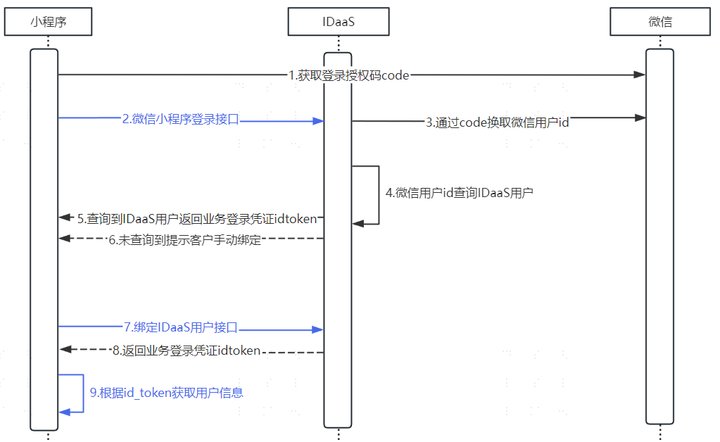
- When the user opens the Mini Program, it displays a login button. After the user clicks the login button, the Mini Program sends a login request to the WeChat server (
wx.login()). After receiving the request, the WeChat server verifies the identity and validity of the Mini Program. If verification passes, the WeChat server generates a temporary login credential (code).
TIP
The code is valid for only 5 minutes. If the Mini Program backend does not use this temporary credential to exchange for the WeChat user ID at the WeChat backend server within 5 minutes, the credential becomes invalid and wx.login must be called again to generate a new login credential.
In the
wx.loginsuccess callback, the WeChat login credential is obtained. Thenwx.requestis used to pass thecodeto IDaaS and call the WeChat Mini Program Login API, so as to exchange for the WeChat user identity ID later.IDaaS uses the temporary login credential (
code) to send a request to the WeChat server to obtain the user's unique identifier (openid) and session key (session_key).IDaaS then queries the IDaaS user database using the WeChat-side user identity
openidobtained from the WeChat server through thecode.If a user in the IDaaS user database corresponds to the WeChat-side user identity
openid, IDaaS generates the business login credentialsid_tokenandsession_token.If no user in the IDaaS user database corresponds to the WeChat-side user identity
openid, IDaaS returns the status codestatus, prompting the Mini Program that user binding is required.
TIP
With this binding information, the next time the Mini Program needs the user to log in, it can obtain the WeChat identity openid through wx.login(), and query the IDaaS-side user ID through the binding information. This silent authorization login method is very convenient.
- Based on whether the status is
SOCIAL_BIND(bind an existing user on the IDaaS side) orUSER_REGISTER(bind an existing user on the IDaaS side or a non-existing user), call the binding user API.
TIP
When the status is SOCIAL_BIND: binding flow. Choose one of the following binding methods:
WeChat Authorized Mobile Binding User;
Mobile or Email Binding User;
Username and Password Binding User
When the status is USER_REGISTER: binding or registration flow. Choose one of the following binding methods:
WeChat Authorized Mobile Binding or Registering User;
Mobile or Email Binding or Registering User
After binding succeeds, IDaaS generates the business login credentials
id_tokenandsession_token.After IDaaS generates the business login credential
id_token, the Mini Program parses theid_tokenthrough Get User Info from id_token to obtain user information.
TIP
The Mini Program should keep the user identity information corresponding to the id_token, and use the refresh session_token API to refresh the validity period of id_token to maintain login, so that we do not need to obtain the code again every time, saving a lot of communication overhead.
Mini Program Mobile Number Login
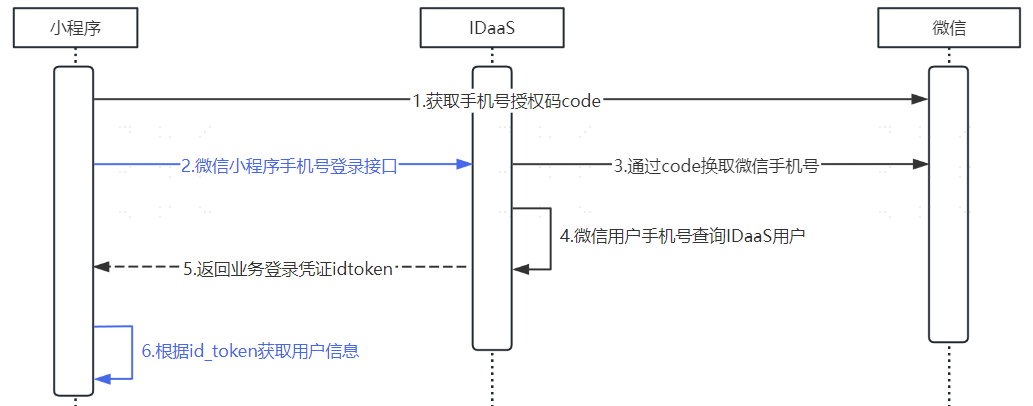
- When the user opens the Mini Program, it displays a mobile number login button. After the user clicks the mobile number login button, the Mini Program sends a mobile number quick verification (
wx.getPhoneNumber()) or real-time mobile number verification (wx.getRealtimePhoneNumber()) request to the WeChat server. After receiving the request, the WeChat server verifies the identity and validity of the Mini Program. If verification passes, the WeChat server generates a temporary credential (code).
TIP
The code is valid for only 5 minutes. If the Mini Program backend does not use this temporary credential to exchange for the WeChat mobile number at the WeChat backend server within 5 minutes, the credential becomes invalid and a new login credential must be generated. The difference between the Mobile Number Quick Verification Component and the Mobile Number Real-time Verification Component is: The mobile number real-time verification component verifies the mobile number selected by the user in real time on each request; The mobile number quick verification component also verifies the number, but does not guarantee real-time verification.
Obtain the temporary credential
codefrom the WeChat Mini Program, then usewx.requestto pass thecodeto IDaaS and call the WeChat Mini Program Mobile Number Login API, so as to exchange for the WeChat user identity ID later.IDaaS uses the temporary credential (
code) to send a request to the WeChat server to obtain the user's mobile number.IDaaS then queries the IDaaS user database using the WeChat-side user mobile number obtained from the WeChat server through the
code.If a user mobile number in the IDaaS user database matches the WeChat-side user mobile number, IDaaS generates the business login credentials
id_tokenandsession_token.After IDaaS generates the business login credential
id_token, the Mini Program parses theid_tokenthrough Get User Info from id_token to obtain user information.
TIP
The Mini Program should keep the user identity information corresponding to the id_token, and use the refresh session_token API to refresh the validity period of id_token to maintain login, so that we do not need to obtain the code again every time, saving a lot of communication overhead.