
Password Login
Document Description
This document describes how to integrate password login into an Android client.
Flow Description
Login Flow
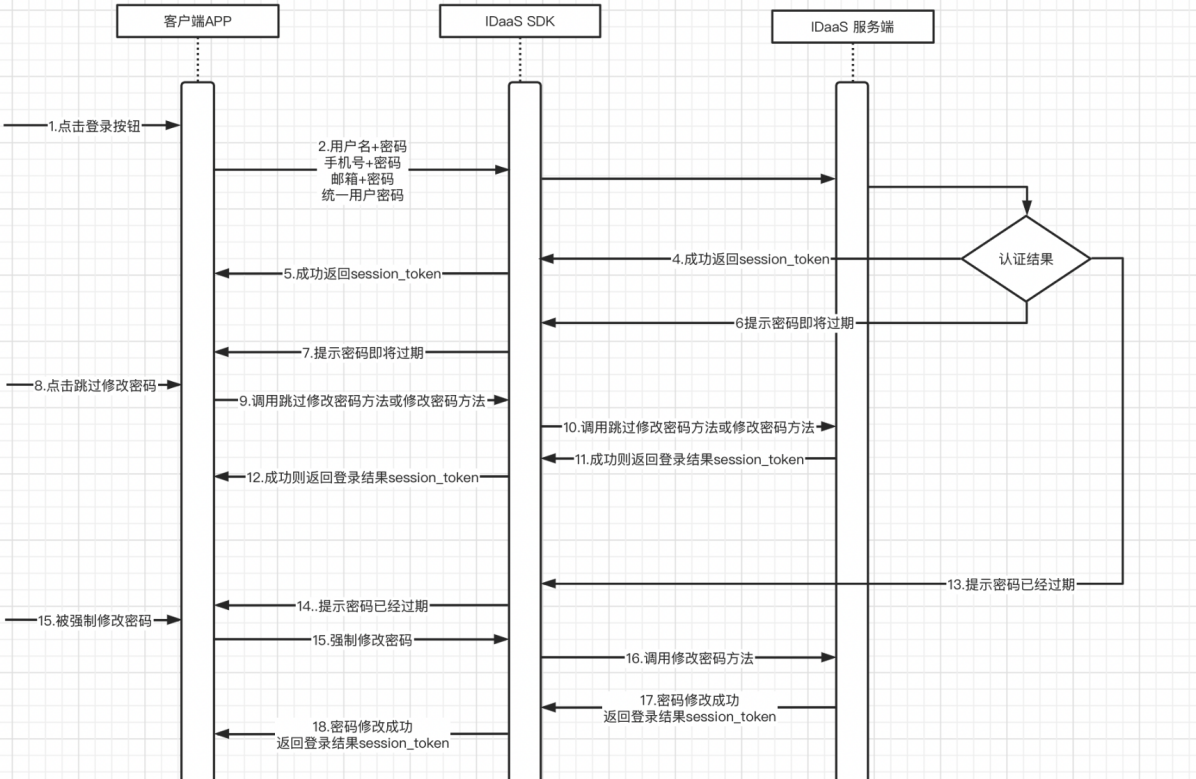
Integration Flow Description
The user enters username + password / mobile + password / email + password and clicks the login button.
The APP client calls the login method (4 methods).
The IDaaS SDK calls the IDaaS server for authentication. The authentication result falls into four categories: success, password about to expire, password expired, and failure.
On success, the IDaaS server returns session_token.
The IDaaS SDK returns session_token to the APP client.
If the password is about to expire, the IDaaS server returns the password-about-to-expire parameter.
The IDaaS SDK returns the password-about-to-expire parameter to the APP client.
The user can choose to skip changing the password or change it directly.
Based on the user's button click, the APP client calls the skip-change-password method or the change-password method.
The IDaaS SDK calls the IDaaS server skip-change-password API or the change-password API.
The IDaaS server returns session_token if validation succeeds, or an error code if it fails.
The IDaaS SDK returns the success or failure parameters to the APP client.
If the password has already expired, the IDaaS server returns a force-change-password parameter to the IDaaS SDK.
The IDaaS SDK returns the force-change-password parameter to the client APP.
The user is forced to change the password. The APP client calls the change-password method.
The IDaaS SDK calls the IDaaS server change-password API.
The IDaaS server returns session_token to the IDaaS SDK if the password change succeeds, or an error code if it fails.
The IDaaS SDK returns session_token to the APP client if the password change succeeds, or an error code if it fails.
Forgot Password Flow
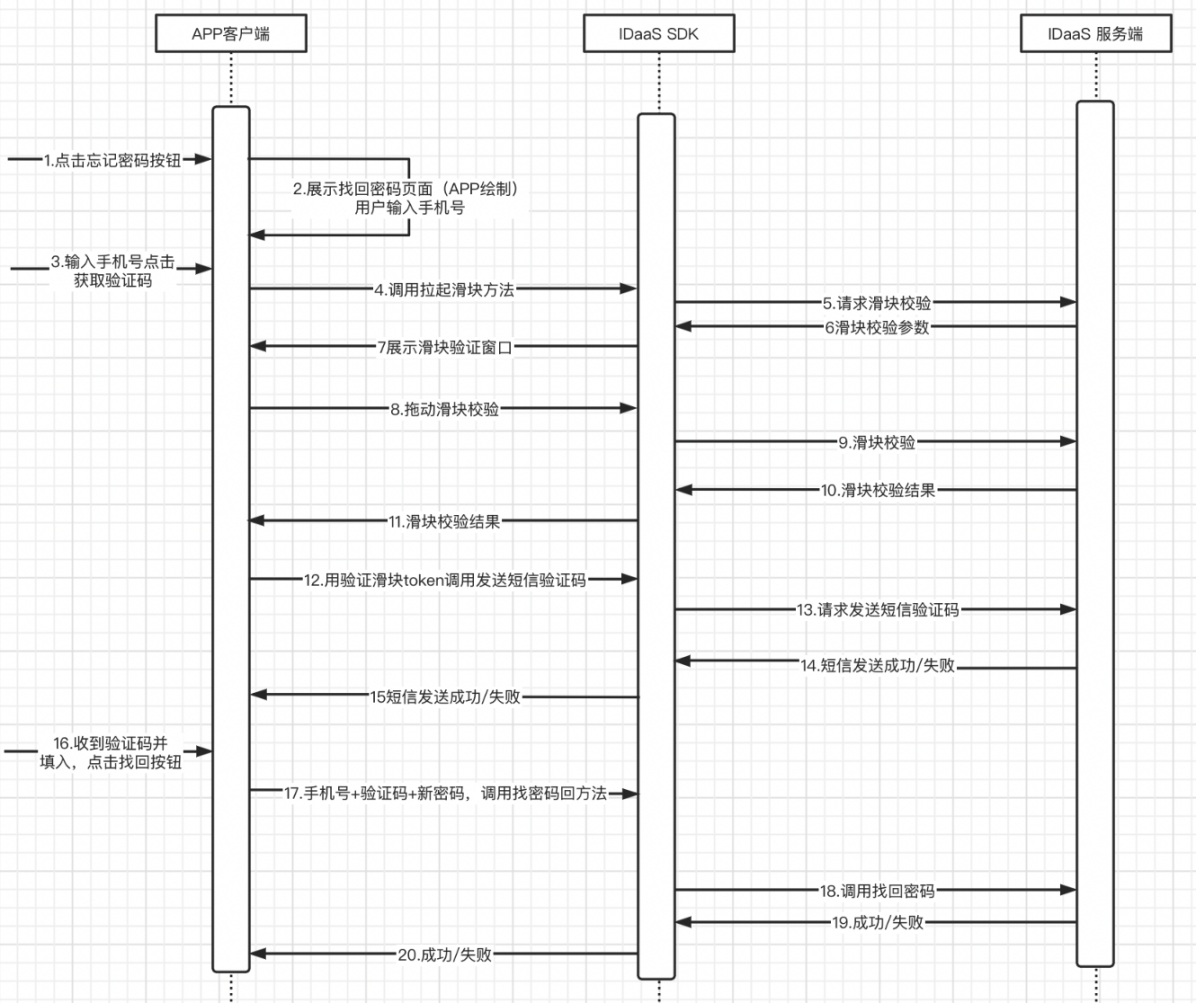
Integration Flow Description
The user clicks the Forgot Password button.
The APP client displays the forgot-password page, which must be provided by the APP itself.
The user enters the mobile number and clicks the Get Verification Code button.
The APP calls the slider verification method.
The IDaaS SDK requests the IDaaS server slider verification API.
The IDaaS server returns the slider verification parameters.
The IDaaS SDK launches the slider verification window.
The user drags the slider to verify.
The IDaaS SDK sends the slider verification to the IDaaS server.
The IDaaS server returns the slider verification result.
The IDaaS SDK returns the slider verification result to the APP client.
The APP client calls the IDaaS SDK send-SMS-verification-code method using the slider token.
The IDaaS SDK calls the IDaaS server send-verification-code API.
The IDaaS server returns the send-verification-code result to the IDaaS SDK.
The IDaaS SDK returns the send-verification-code result to the APP client.
The user receives the SMS verification code, enters it, and clicks the Find Password button.
The APP client calls the IDaaS SDK find-password method with mobile number + verification code + new password.
The IDaaS SDK calls the IDaaS server find-password API.
The IDaaS server returns the find-password result to the IDaaS SDK.
The IDaaS SDK returns the find-password result to the APP client.
Environment Setup
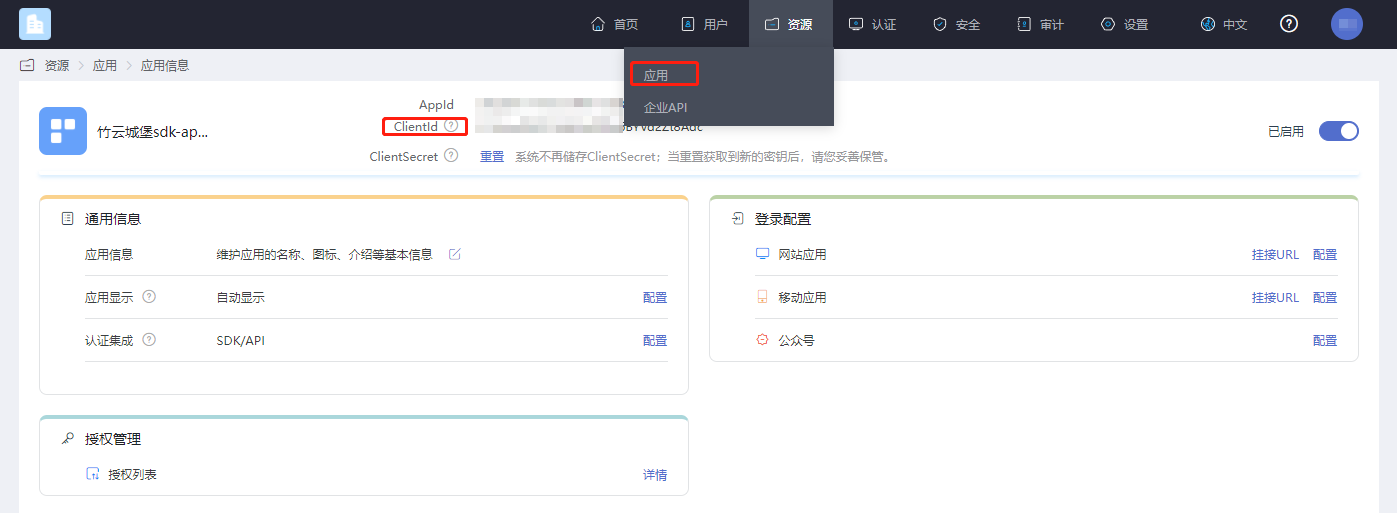
Get clientID
Log in to the IDaaS Enterprise Center platform, click "Resources --> Applications", select the relevant application, and view it.
Password Policy Settings
This setting is used to configure password expiration time and reminder duration.
First, follow the path shown in the figure below to the password policy module.

You can enable password expiration as follows:
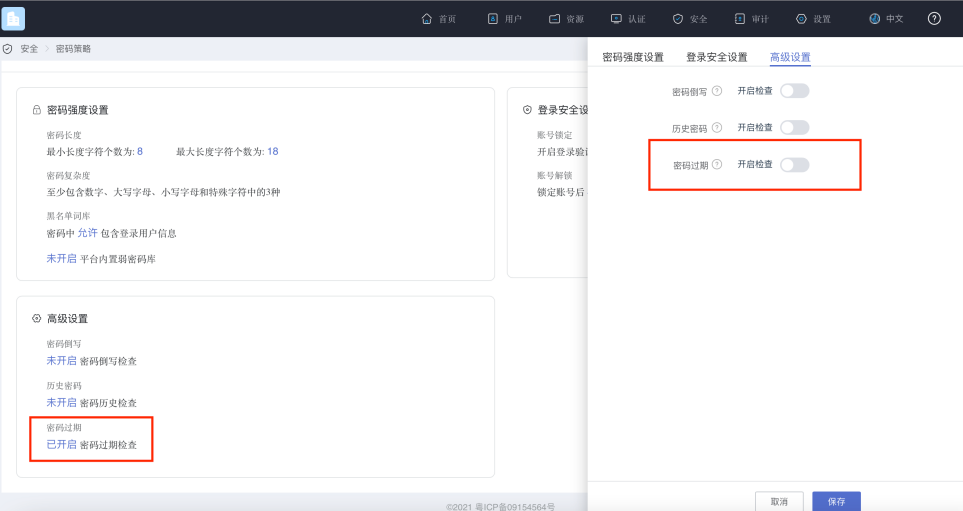
After enabling it, you can set how long until the password expires and how many days in advance to notify the user, as shown below.
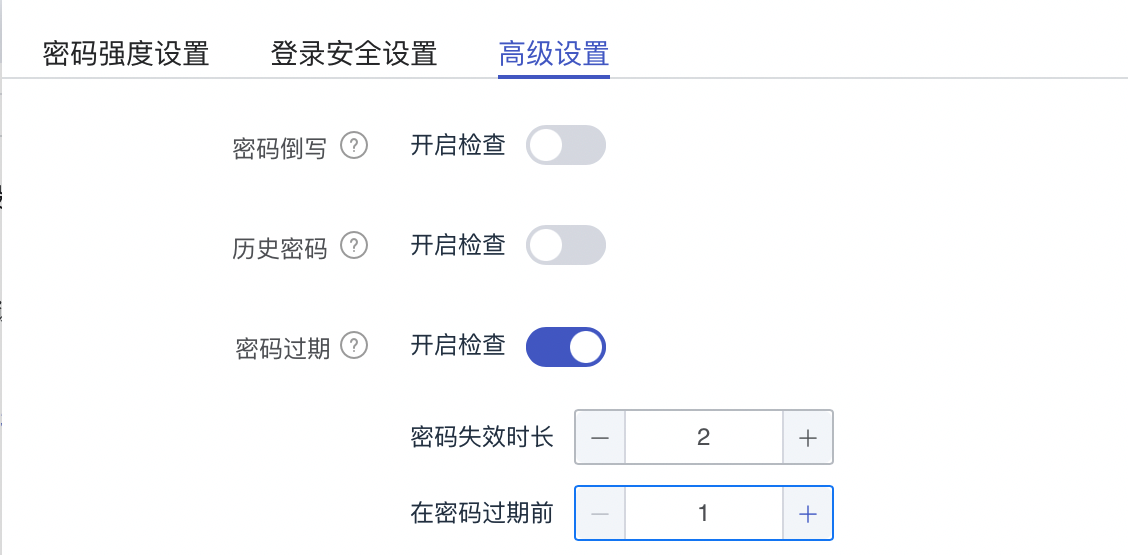
This setting is used for the IDaaS server to check, after login, how long the current password can be used before it must be changed, and to prompt the user to modify it a few days in advance. After password expiration checking is enabled, it will be checked on every login according to the configured settings.
Import Dependency Packages
No third-party SDK dependencies.
Configure build.gradle
/*begin*/
    /*  rxjava2 +  okhttp + retrofit2  */
    api 'io.reactivex.rxjava2:rxjava:2.2.10'
    api 'io.reactivex.rxjava2:rxandroid:2.1.1'
    api 'com.squareup.retrofit2:retrofit:2.6.0'
    api 'com.squareup.retrofit2:adapter-rxjava2:2.6.0'
    api 'com.squareup.retrofit2:converter-gson:2.6.0'
    api 'com.squareup.okhttp3:okhttp:4.3.1'
    api 'com.squareup.okhttp3:logging-interceptor:3.6.0'
    api 'com.jakewharton.retrofit:retrofit2-rxjava2-adapter:1.0.0'
    api 'com.trello.rxlifecycle2:rxlifecycle-components:2.1.0'
    api 'com.alibaba:fastjson:1.2.61'
     /*end*/

    //Common library, required
    implementation(name: 'AuthnCenter_Common-1.5.3', ext: 'aar')
    //Password login SDK, required
    implementation(name: ''AuthnCenter_PWDLogin-1.5.3', ext: 'aar')
Configure AndroidManifest
 <!--Permissions-->
    <uses-permission android:name="android.permission.INTERNET" />
    <uses-permission android:name="android.permission.WRITE_EXTERNAL_STORAGE" />
    <uses-permission android:name="android.permission.READ_EXTERNAL_STORAGE" />
    <uses-permission android:name="android.permission.CAMERA" />
    <uses-permission android:name="android.permission.RECORD_AUDIO" />
    <uses-permission android:name="android.permission.READ_PHONE_STATE" />
    <uses-permission android:name="android.permission.MOUNT_UNMOUNT_FILESYSTEM"/>
Initialization
AuthnCenterSDK.Builder().init(this)
        .setBaseUrl("https://xxx.idaas-xxxx.bccastle.com") //IDaaS application secondary domain
        .setClientId(zlgV9yb7CsHqaPOlsPad70S9EyEIHw7j")  //Applied application clientId
        .isCheckSSL(true)  //Whether to enable SSL verification; recommended for HTTPS
        .logEnable(true)  //Recommended during integration; disable after going live
        .build();
Development Integration
Built-in API Introduction
Main methods of the basic configuration initialization class AuthnCenterAPI:
/**
 * SMS verification code -- send SMS
 */
public void smsSend(Context context, SendSmsReq req, RequestListener listener)

/**
 * Get country/area code. Note: If international area codes are configured, call this API to obtain them.
 */
public void getCountryCode(Context context, RequestListener listener)
Main methods of the password login initialization class AuthnCenterPWDLogin:
/**
 * Username password login
 *
 * @param context Context
 * @param userName  Username
 * @param password   Password
 * @param loginListener  Event callback
 */
public void userLoginRequest(Context context, String userName, String password, PWLoginListener loginListener)

/**
 * Unified user password login
 *   Supports username + password, mobile + password, and email + password
 * @param context Context
 * @param userName  Username
 * @param password   Password
 * @param loginListener  Event callback
 */
public void userLoginAuthRequest(Context context, String userName, String password, PWLoginListener loginListener)

/**
 * Mobile + password
 *
 * @param context Context
 * @param mobile  Mobile number
 * @param password   Password
 * @param loginListener  Event callback
 */
public void userLoginMobilePwd(Context context, String mobile, String password, PWLoginListener loginListener)

/**
 * Email + password
 *
 * @param context Context
 * @param email   Email
 * @param password   Password
 * @param loginListener  Event callback
 */
public void userLoginEmailPwd(Context context, String email, String password, PWLoginListener loginListener)

/**
 * SMS registration
 *
 * @param context Context
 * @param userInfoReq  Registration user entity
 * @param loginListener  Event callback
 */
public void userRegister(Context context, UserInfoReq userInfoReq, PWLoginListener loginListener)

/**
 * Find password
 *
 * @param context Context
 * @param findPwdReq   Find password entity
 * @param loginListener  Event callback
 */
public void findPwd(Context context, FindPwdReq findPwdReq, PWLoginListener loginListener)

/**
 * Skip change password
 *
 * @param context Context
 * @param stateToken stateToken
 * @param loginListener  Event callback
 */
public void skipPwd(Context context, String stateToken, PWLoginListener loginListener)

/**
 * Force change password
 *
 * @param context Context
 * @param pwdReq    Change password entity
 * @param stateToken stateToken
 * @param loginListener  Event callback
 */
public void updatePwd(Context context, UpdatePwdReq pwdReq, String stateToken, PWLoginListener loginListener)
PWLoginListener returns different CODE codes when the login API callbacks. For different application scenarios, the integrator needs to determine and handle related business logic accordingly.
Currently, only the cases where the password is about to expire or has expired return the following codes. Refer to the integration DEMO for details.
| Code | Built-in Enum Value | Meaning |
|---|---|---|
| 10006 | SDKCodeType.SDK_PASSWORD_EXPIRED.getCode() | Password has expired |
| 10007 | SDKCodeType.SDK_PASSWORD_WARN.getCode() | Password is about to expire |
Mobile International Area Code Acquisition
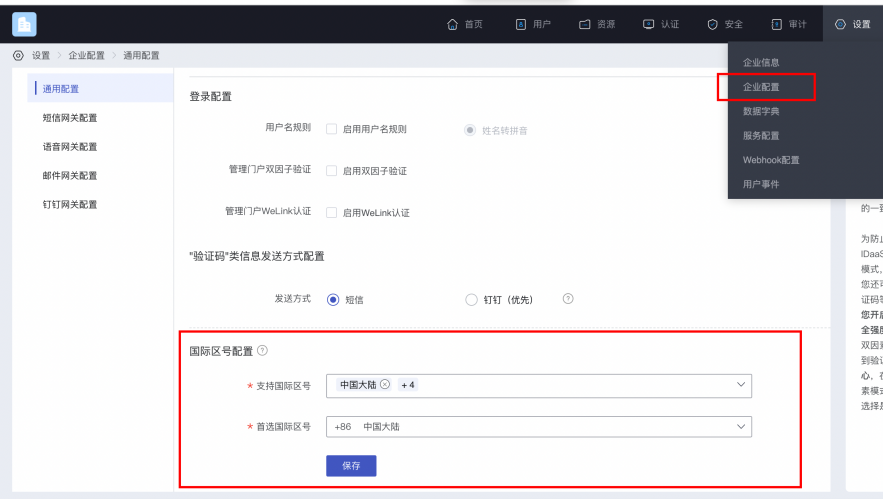
If international number support is enabled, call the international area code acquisition API first. The API returns the configured list of international area codes, along with regular expressions for phone number formats. The figure below shows how to configure the international area code list and preferred area code.
Sample code for obtaining the international area code list:
AuthnCenterAPI.Builder().getCountryCode(this, new RequestListener<CountryCodeInfoRsp>() {
    @Override
    public void success(CountryCodeInfoRsp codeInfoRsp) {

    }

    @Override
    public void error(String code, String errorMessage) {
    }
});
Success example: code=0, data value:
{
	"phoneAreaCodeDefinitions": [
		{
			"areaCode": "86",
			"displayMapping": {
				"zh-TW": "Mainland China",
				"en": "China",
				"zh-CN": "Mainland China"
			},
			"countryCode": "CN",
			"mobileRegex": "^(\\+86){0,1}\\-?1\\d{10}$",
			"areaCodeSuffixes": []
		},
		{
			"areaCode": "852",
			"displayMapping": {
				"zh-TW": "Hong Kong",
				"en": "Hong Kong",
				"zh-CN": "Hong Kong"
			},
			"countryCode": "HK",
			"mobileRegex": "^(\\+852){1}\\-?0{0,1}[1,4,5,6,7,8,9](?:\\d{7}|\\d{8}|\\d{12})$",
			"areaCodeSuffixes": []
		},
		{
			"areaCode": "886",
			"displayMapping": {
				"zh-TW": "Taiwan",
				"en": "Taiwan",
				"zh-CN": "Taiwan"
			},
			"countryCode": "TW",
			"mobileRegex": "^(\\+886){1}\\-?[6,7,9](?:\\d{7}|\\d{8})$",
			"areaCodeSuffixes": []
		},
		{
			"areaCode": "853",
			"displayMapping": {
				"zh-TW": "Macau",
				"en": "Macau",
				"zh-CN": "Macau"
			},
			"countryCode": "MO",
			"mobileRegex": "^(\\+853){1}\\-?0{0,1}[1,4,5,6,7,8,9](?:\\d{7}|\\d{8}|\\d{12})$",
			"areaCodeSuffixes": []
		},
		{
			"areaCode": "93",
			"displayMapping": {
				"zh-TW": "Afghanistan",
				"en": "Afghanistan",
				"zh-CN": "Afghanistan"
			},
			"countryCode": "AF",
			"mobileRegex": "^(\\+93){1}\\-\\d{6,11}",
			"areaCodeSuffixes": []
		}
	],
	"preferredAreaCode": "CN"
}
Return Parameters:
| Parameter Name | Chinese Name | Type | Description |
|---|---|---|---|
| preferredAreaCode | Preferred international area code | String | Preferred international area code configured in the current enterprise center |
| countryCode | Country/region code | String | Country/region code |
| areaCode | International dialing code | String | International dialing code |
| areaCodeSuffixes | International dialing code suffixes | String | International dialing code suffixes |
| mobileRegex | Mobile number format regex | String | Mobile number format regex |
| displayMapping | Multilingual display name mapping | String | Multilingual display name mapping |
Built-in Slider Verification
When sending a verification code, human-machine interaction verification needs to be called:
BlockPuzzleDialog mBlockPuzzleDialog = new BlockPuzzleDialog(mContext);
mBlockPuzzleDialog.setOnResultsListener(new OnResultsListener() {
        @Override
        public void onResultsClick(String result) {
            LogUtil.getInstance().d("Secondary verification callback result mCaptchaToken:" + result);
            //This callback result is the captchaToken parameter for SMS verification
        }
        @Override
        public void onError(String code, String msg) {
            ToastUtils.ShowToast(mContext, String.format("Error code : %s  Error message : %s", code, msg));
        }
    });
}
Username Password Login
AuthnCenterPW.Builder().userLoginRequest(this, name, pwd, new PWLoginListener<LoginRsp>() {
    @Override
    public void success(String code, LoginRsp rsp) {
        loginRsp = rsp;
        if (code.equals(SDKCodeType.SDK_SUCCESS.getCode())) {
            ToastUtils.ShowToast(MainActivity.this, "Login successful. Returned data:" + rsp.getSession_token());
            return;
        }
        onNext(code); //Determine whether the password is expired based on the return value. Refer to the returned CODE for judgment: 10006 password has expired, 10007 password is about to expire. The integrator can refer to the DEMO onNext method.
    }
    @Override
    public void error(String code, String t) {
        ToastUtils.ShowToast(MainActivity.this, "Login failed. Returned data:" + t);
    }
});
Mobile Password Login
AuthnCenterPW.Builder().userLoginMobilePwd(this, name, pwd, new  PWLoginListener<LoginRsp>() {
    @Override
    public void success(String code, LoginRsp rsp) {
        loginRsp = rsp;
        if (code.equals(SDKCodeType.SDK_SUCCESS.getCode())) {
            ToastUtils.ShowToast(MainActivity.this, "Login successful. Returned data:" + rsp.getSession_token());
            return;
        }
        onNext(code);
    }
    @Override
    public void error(String code, String t) {
        ToastUtils.ShowToast(MainActivity.this, "Login failed. Returned data:" + t);
    }
});
Email Password Login
AuthnCenterPW.Builder().userLoginEmailPwd(this, name, pwd, new PWLoginListener<LoginRsp>() {

    @Override
    public void success(String code, LoginRsp rsp) {
        loginRsp = rsp;
        if (code.equals(SDKCodeType.SDK_SUCCESS.getCode())) {
            ToastUtils.ShowToast(MainActivity.this, "Login successful. Returned data:" + rsp.getSession_token());
            return;
        }
        onNext(code);
    }
    @Override
    public void error(String code, String t) {
        ToastUtils.ShowToast(MainActivity.this, "Login failed. Returned data:" + t);
    }
});
Unified Username Password Login
AuthnCenterPW.Builder().userLoginAuthRequest(this, name, pwd, new  PWLoginListener<LoginRsp>() {
    @Override
    public void success(String code, LoginRsp rsp) {
        loginRsp = rsp;
        if (code.equals(SDKCodeType.SDK_SUCCESS.getCode())) {
            ToastUtils.ShowToast(MainActivity.this, "Login successful. Returned data:" + rsp.getSession_token());
            return;
        }
        onNext(code); //Determine whether the password is expired based on the return value. Refer to the returned CODE for judgment: 10006 password has expired, 10007 password is about to expire

    }
    @Override
    public void error(String code, String t) {
        ToastUtils.ShowToast(MainActivity.this, "Login failed. Returned data:" + t);
    }
});
Skip Change Password
AuthnCenterPW.Builder().skipPwd(MainActivity.this, loginRsp.getState_token(), new PWLoginListener<LoginRsp>() {
    @Override
    public void success(String code, LoginRsp rsp) {
        loginRsp = rsp;
        ToastUtils.ShowToast(MainActivity.this, "Skip change successful. Returned data:" + rsp.getSession_token());
    }
    @Override
    public void error(String code, String t) {
        ToastUtils.ShowToast(MainActivity.this, "Skip change failed. Returned data:" + t);
    }
});
Force Change Password
UpdatePwdReq up = new UpdatePwdReq();
up.setOld_password(oldPwd);
up.setNew_password(newPwd);
AuthnCenterPW.Builder().updatePwd(MainActivity.this, up, loginRsp.getState_token(), new PWLoginListener<LoginRsp>() {
    @Override
    public void success(String code, LoginRsp rsp) {
        loginRsp = rsp;
        ToastUtils.ShowToast(MainActivity.this, "Force change successful. Returned data:" + rsp.getSession_token());
    }
    @Override
    public void error(String code, String t) {
        ToastUtils.ShowToast(MainActivity.this, "Force change failed. Returned data:" + t);
    }
});
SMS Registration
UserInfoReq ur = new UserInfoReq();
ur.setUser_name(et_name.getText().toString().replace(" ", ""));
ur.setPwd(et_new_pwd.getText().toString().replace(" ", ""));
ur.setMobile(moblie);
ur.setVerify_code(verifyCode);
ur.setAttr_birthday(et_new_birthday.getText().toString().replace(" ", ""));
ur.setName("Test One");
ur.setAttr_nick_name("Test Nickname");
ur.setMailing_address("Test Address");
ur.setZip_code("430000");
ur.setAttr_gender(SexType.MALE.getSex()); //Gender enum
ur.setEmail("111@111.com");
ur.setFirst_name("Test First_name");
ur.setLast_name("Test Last_name");
ur.setIndustry("Test Industry");
ur.setHead_img("https://www.baidu.com/img/PCtm_d9c8750bed0b3c7d089fa7d55720d6cf.png");
TestExtensionBean tb = new TestExtensionBean();
tb.setAge(12);
ur.setExtension(tb);
AuthnCenterPW.Builder().userRegister(RegisterActivity.this, ur, new PWLoginListener<LoginRsp>() {
    @Override
    public void success(String code, LoginRsp rsp) {
        if (code.equals(SDKCodeType.SDK_SUCCESS.getCode()))
            ToastUtils.ShowToast(RegisterActivity.this, "Registration successful: " + rsp.getSession_token());
    }
    @Override
    public void error(String code, String t) {
        ToastUtils.ShowToast(RegisterActivity.this, "Registration failed: " + t);
    }
});
UserInfoReq SMS registration entity related field descriptions:
| Parameter Name | Chinese Name | Required | Type | Description |
|---|---|---|---|---|
| user_name | Username | No | String | |
| name | Name | No | String | |
| mobile | Mobile number | Yes | String | |
| verify_code | SMS verification code | Yes | String | |
| No | String | |||
| pwd | Password | No | String | |
| head_img | Avatar (URL) | No | String | |
| attr_gender | Gender | No | String | Optional values: female: Female; male: Male; unknow: Confidential |
| attr_birthday | Birthday | No | String | Format: yyyy-MM-dd |
| attr_nick_name | Nickname | No | String | |
| mailing_address | Mailing address | No | String | |
| zip_code | Zip code | No | String | |
| first_name | First name | No | String | |
| middle_name | Middle name | No | String | |
| last_name | Last name | No | String | |
| industry | Industry | No | String | |
| extension | Extension attribute | No | JSONObject | Extended attributes need to be defined in the enterprise |
Return Codes
| HTTP Status Code | Error Code (error_code) | Error Message (error_msg) | Chinese Error Message |
|---|---|---|---|
| 400 | IDAAS.SDK.COMMON.1001 | Parameter {0} cannot be left blank | 参数 {0} 不能为空 |
| 400 | IDAAS.SDK.COMMON.1002 | The {0} parameter format is incorrect | 参数 {0} 格式错误 |
| 400 | IDAAS.SDK.COMMON.1003 | Device information is incomplete | 设备信息不完整 |
| 400 | IDAAS.SDK.COMMON.1004 | Signature decryption error | 签名解密错误 |
| 400 | IDAAS.SDK.COMMON.1005 | The {0} has failed | {0} 已失效 |
| 400 | IDAAS.SDK.COMMON.1006 | The {0} parameter error | {0} 参数错误 |
| 400 | IDAAS.SDK.COMMON.1007 | The {0} parameter type error | {0}参数类型错误 |
| 500 | IDAAS.SDK.COMMON.1008 | The system is busy. Try again later | 系统繁忙。稍后再试 |
| 400 | IDAAS.SDK.COMMON.1009 | Unknown authentication configuration | 未知的认证配置 |
| 400 | IDAAS.SDK.COMMON.1010 | Failed to obtain the enterprise center global configuration | 获取企业中心全局配置失败 |
| 400 | IDAAS.SDK.COMMON.1011 | Failed to obtain the international area code configuration | 获取国际区号配置失败 |
| 400 | IDAAS.SDK.COMMON.1012 | The x-client-ID is incorrect and the corresponding application cannot be found | X-client-id错误,找不到对应的应用 |
| 400 | IDAAS.SDK.COMMON.1013 | The corresponding user is not found | 未找到对应的用户 |
| 400 | IDAAS.SDK.COMMON.1014 | Application private key not found | 未找到应用私钥 |
| 400 | IDAAS.SDK.LOGIN.1001 | Error calling interface | 调用 {0} 接口出错 |
| 400 | IDAAS.SDK.LOGIN.1002 | User not bound | 用户未绑定 |
| 400 | IDAAS.SDK.LOGIN.1003 | The user has been locked due to too many unsuccessful login attempts. It will be unlocked in {0} minutes and {1} seconds | 由于多次登录失败,用户已被锁定。 它将在 {0} 分钟和 {1} 秒内解锁 |
| 400 | IDAAS.SDK.LOGIN.1004 | Failed to obtain the password policy | 获取密码策略错误 |
| 400 | IDAAS.SDK.LOGIN.1005 | Invalid username or password. Remaining login attempts: | 无效的用户名或密码。 其余登录尝试次数: |
| 400 | IDAAS.SDK.LOGIN.1006 | Configuration error, unable to find wechat authentication source | 配置错误,找不到微信认证源 |
| 400 | IDAAS.SDK.LOGIN.1007 | Configuration error, unable to find alipay authentication source | 配置错误,找不到支付宝认证源 |
| 400 | IDAAS.SDK.LOGIN.1008 | The configuration is incorrect. The one-click login authentication source cannot be found | 配置错误,无法找到一键登录认证源 |
| 400 | IDAAS.SDK.SMS.1001 | {0} slide base map is not initialized successfully, please check the path | {0} 滑动底图未初始化成功,请检查路径 |
| 400 | IDAAS.SDK.SMS.1002 | {0} verification code coordinate resolution failed | {0} 验证码坐标解析失败 |
| 400 | IDAAS.SDK.SMS.1003 | {0} verification code coordinate verification fails | {0} 验证码坐标校验失败 |
| 400 | IDAAS.SDK.SMS.1004 | The graphic verification code is incorrect | 图形验证码校验错误 |
| 400 | IDAAS.SDK.SMS.1005 | SMS verification code verification is incorrect | 密码验证码验证错误 |
| 400 | IDAAS.SDK.SMS.1006 | The email verification code is incorrect | 邮件验证码验证错误 |
| 400 | IDAAS.SDK.SMS.1007 | Sending scenario does not exist | 发送场景不存在 |
| 400 | IDAAS.SDK.SMS.1008 | Failed to send the verification code | 发送验证码失败 |
| 400 | IDAAS.SDK.SOCIAL.1001 | The social account is unbound incorrectly | 社交账号解绑错误 |
| 400 | IDAAS.SDK.SOCIAL.1002 | The social account has been bound, please unbind it first | 社交账号已绑定,请先解绑 |
| 400 | IDAAS.SDK.PWD.1001 | The password length is incorrect | 密码长度错误 |
| 400 | IDAAS.SDK.PWD.1002 | The password cannot be the username | 密码不能为用户名 |
| 400 | IDAAS.SDK.PWD.1003 | Your password complexity is low | 你的密码复杂度过低 |
| 400 | IDAAS.SDK.PWD.1004 | The password is weak | 密码很弱 |
| 400 | IDAAS.SDK.PWD.1005 | The password is used before, cannot be used again | 该密码已被使用过,不能再次使用 |
| 400 | IDAAS.SDK.PWD.1006 | Password cannot username in reverse order | 密码不能是用户名的倒序 |
| 400 | IDAAS.SDK.PWD.1007 | The number of repeated password characters exceeded the upper limit | 密码重复字符数超过限制 |
| 400 | IDAAS.SDK.PWD.1008 | Password cannot contain :username, phone number, email prefix, name in PinYing | 密码不能包含:用户名、电话号码、邮件前缀、拼音名 |
| 400 | IDAAS.SDK.MFA.1001 | The mobile doesn't match the user | 手机号和用户不匹配 |
| 400 | IDAAS.SDK.MFA.1002 | The access control policy is incorrect | 访问控制策略配置错误 |
| 400 | IDAAS.SDK.MFA.1003 | Access control authentication source type conversion error | 访问控制身份验证源类型转换错误 |