
Secondary Biometric Authentication
Document Description
This document describes how the iOS client can integrate biometric authentication. Biometric authentication means using the mobile phone's fingerprint / face recognition as multi-factor authentication when logging in on a PC.
When the user logs in on a PC and selects "Use Authenticator as Secondary Authentication", the user opens the APP at the same time. Ensuring login status and that the device is bound, the App queries the back end for secondary authentication requests. If any, the APP invokes the phone's biometric recognition to confirm the device owner, and notifies the IDaaS server to proceed with the authentication authorization flow.
Flow Description
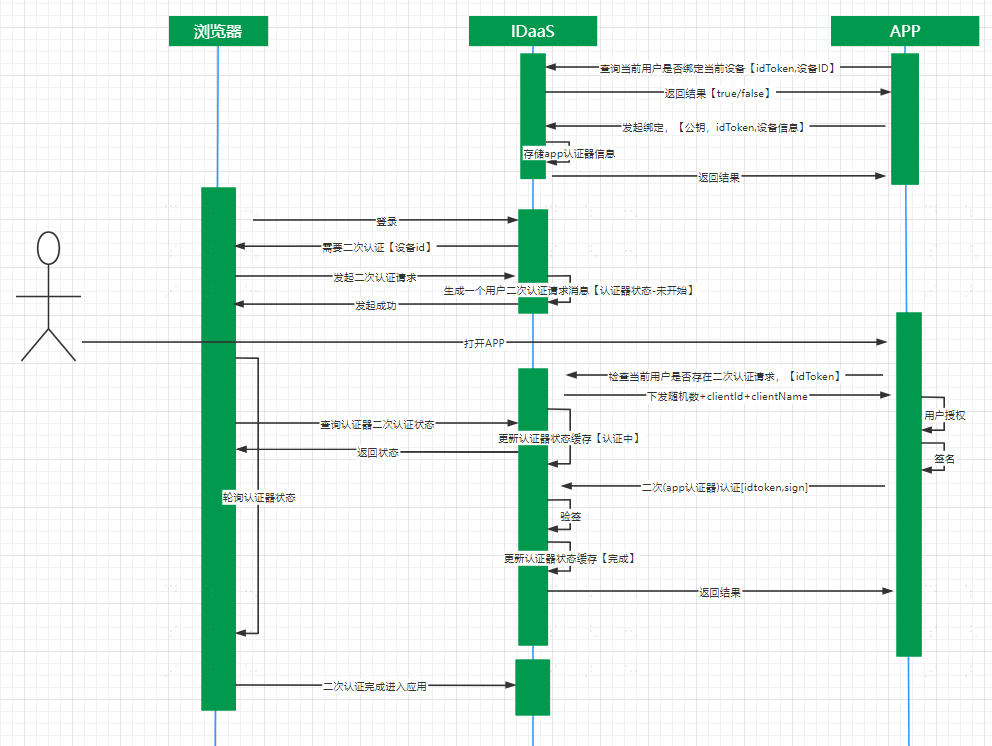
Device Binding Integration Flow Description
- The App client calls the method to query the device binding status. The IDaaS SDK requests the IDaaS server to query whether the device is bound.
- If the query result shows that this device is not bound, the App client calls the device binding method. The IDaaS SDK initiates the binding flow, invokes the phone's fingerprint / face recognition to confirm the device owner. The IDaaS server records this device as bound and returns binding success/failure to the App client.
Secondary Authentication Flow Description
- The user opens a PC browser to log in to the IDaaS system, selects "Use Authenticator as Secondary Authentication", and taps Verify. The App client calls the method to query whether there is a secondary authentication request. The IDaaS server returns a random string.
- The App client obtains the random string and uses it to call the secondary authentication method. The IDaaS SDK initiates the secondary authentication flow, invokes the phone's fingerprint / face recognition to confirm the device owner, and sends the secondary authentication request to the IDaaS server. After server verification passes, the PC web page automatically refreshes its status.
Unbinding Flow Description
- The App client calls the method to query the device binding status. The IDaaS SDK requests the IDaaS server to query whether the device is bound.
- If the query result shows that this device is bound, the App client calls the unbinding method. The IDaaS SDK initiates the unbinding flow, invokes the phone's fingerprint / face recognition to confirm the device owner. The IDaaS server records this device as unbound and returns unbinding success/failure to the App client.
Preparation
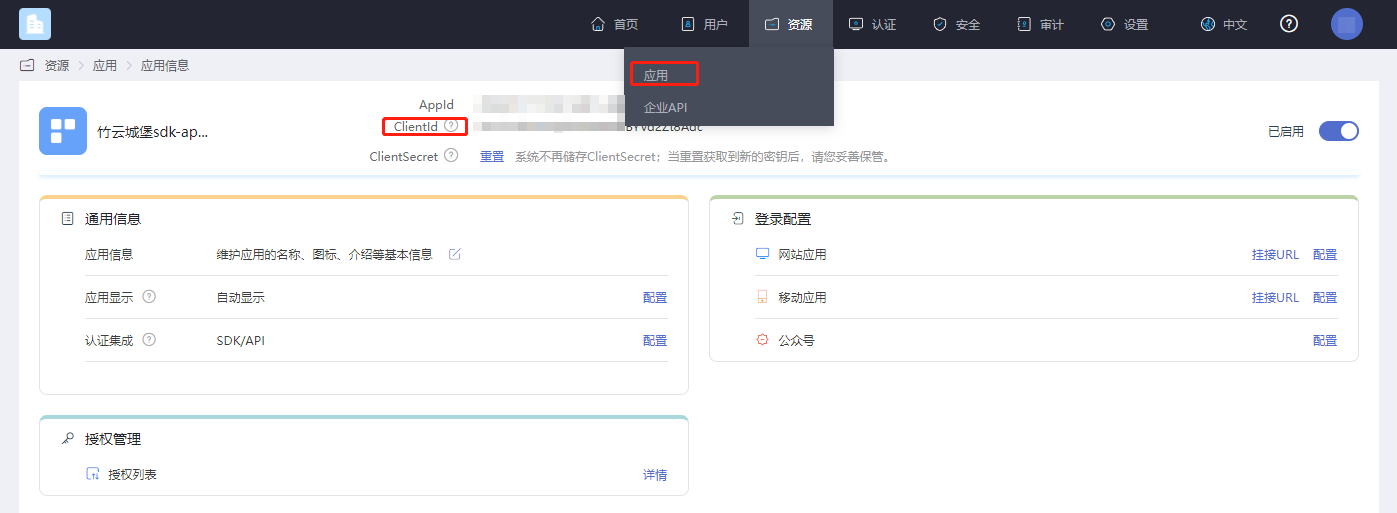
Obtain clientID
Log in to the IDaaS Enterprise Center, click Resources > Applications, and select the relevant application to view it.
Enable Secondary Authentication
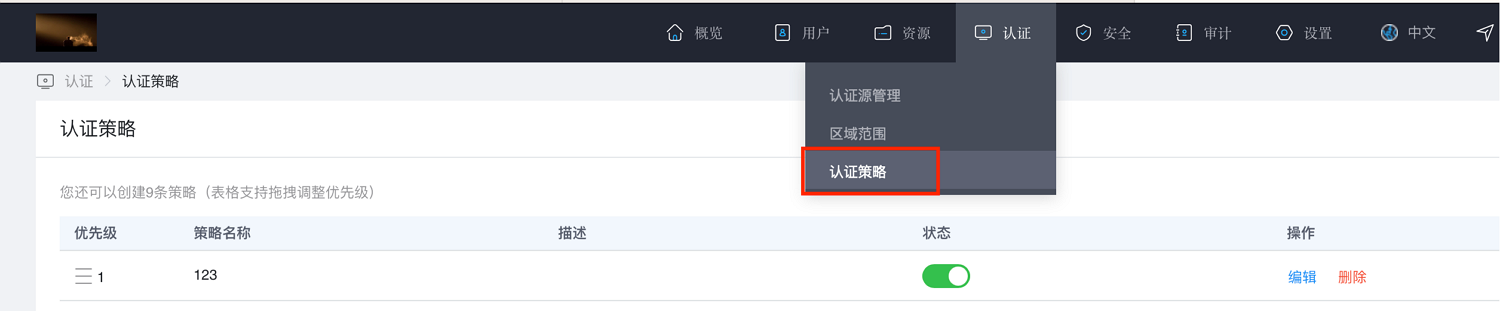
Log in to the IDaaS Enterprise Center, click Authentication > Authentication Policy.
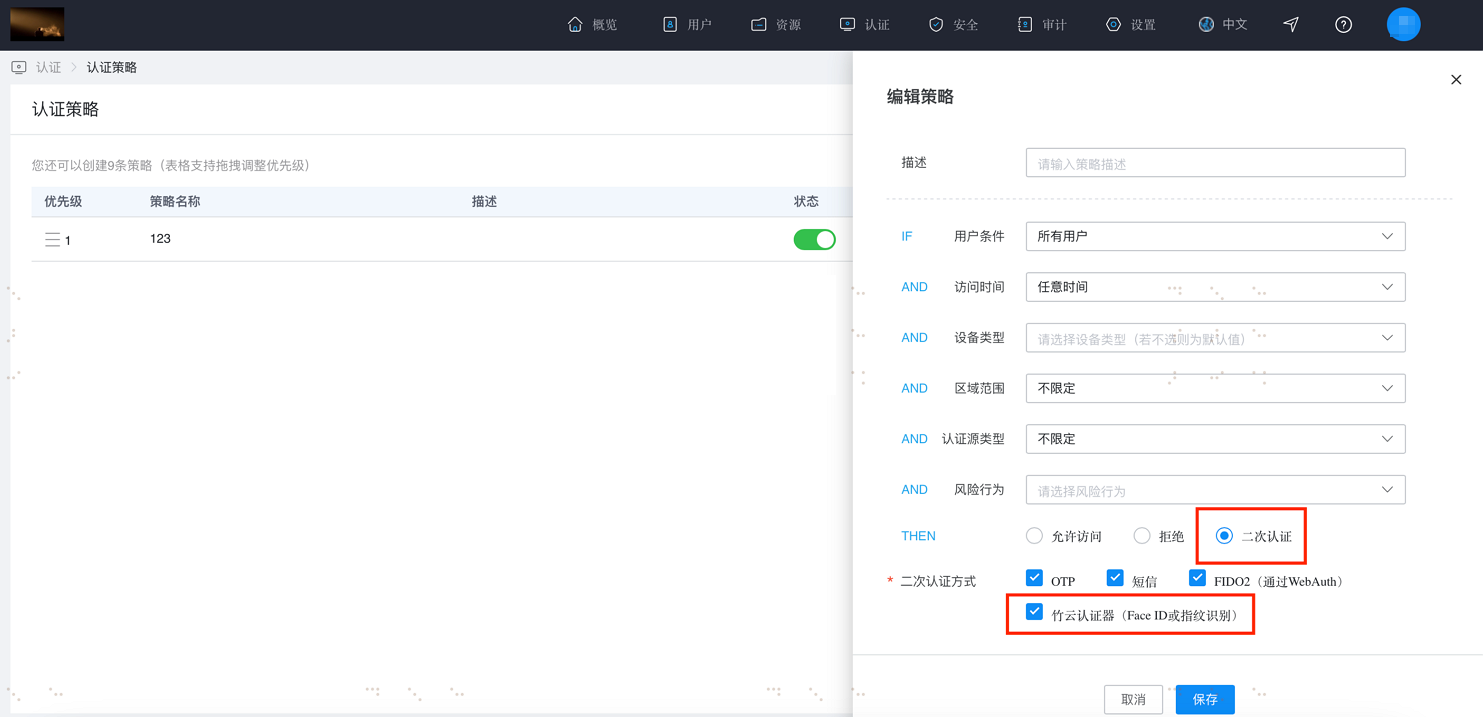
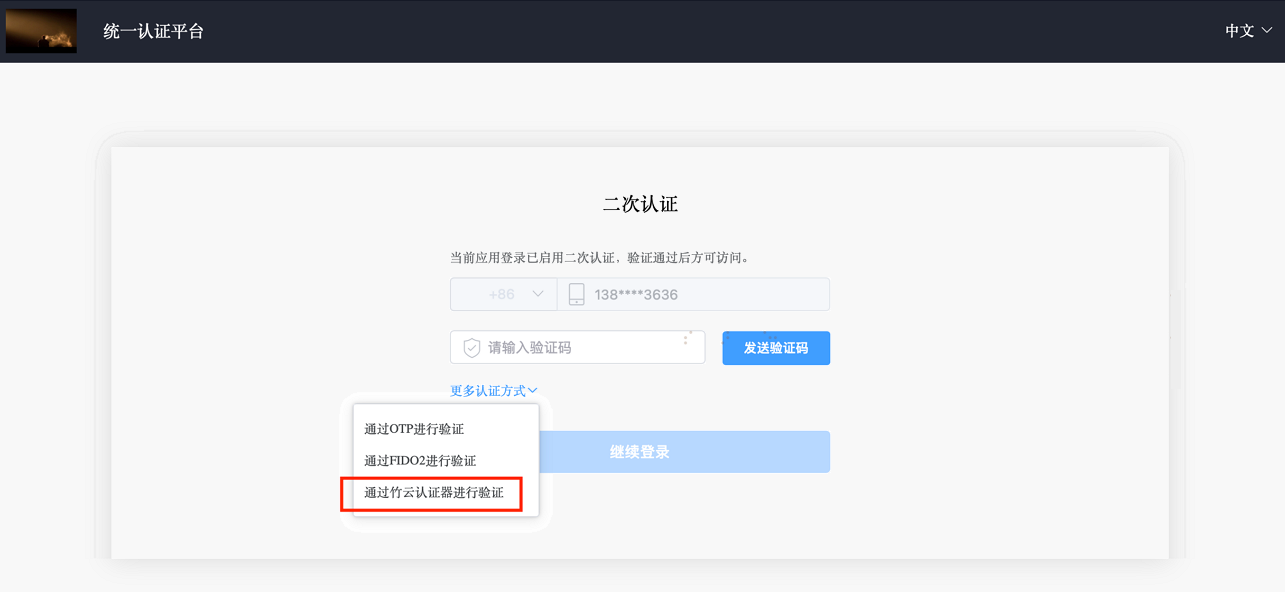
Tap Add Policy. A policy box will pop up on the right. Enter the description, check "Secondary Authentication" and "BambooCloud Authenticator (Face ID or Fingerprint)", and tap OK.
After the above configuration is complete, on the login user center page, after the first-level login, the option "Verify via BambooCloud Authenticator" will appear where secondary authentication is required.
Import Dependency Packages
Fingerprint encryption depends on the external library 'EllipticCurveKeyPair'.
Add Main Library
AuthnCenter_common_2E.framework
AuthnCenter_MFA_BioVerify_2E.bundle
AuthnCenter_MFA_BioVerify_2E.framework
Drag the IDaaS SDK into the project. The import method is as follows:
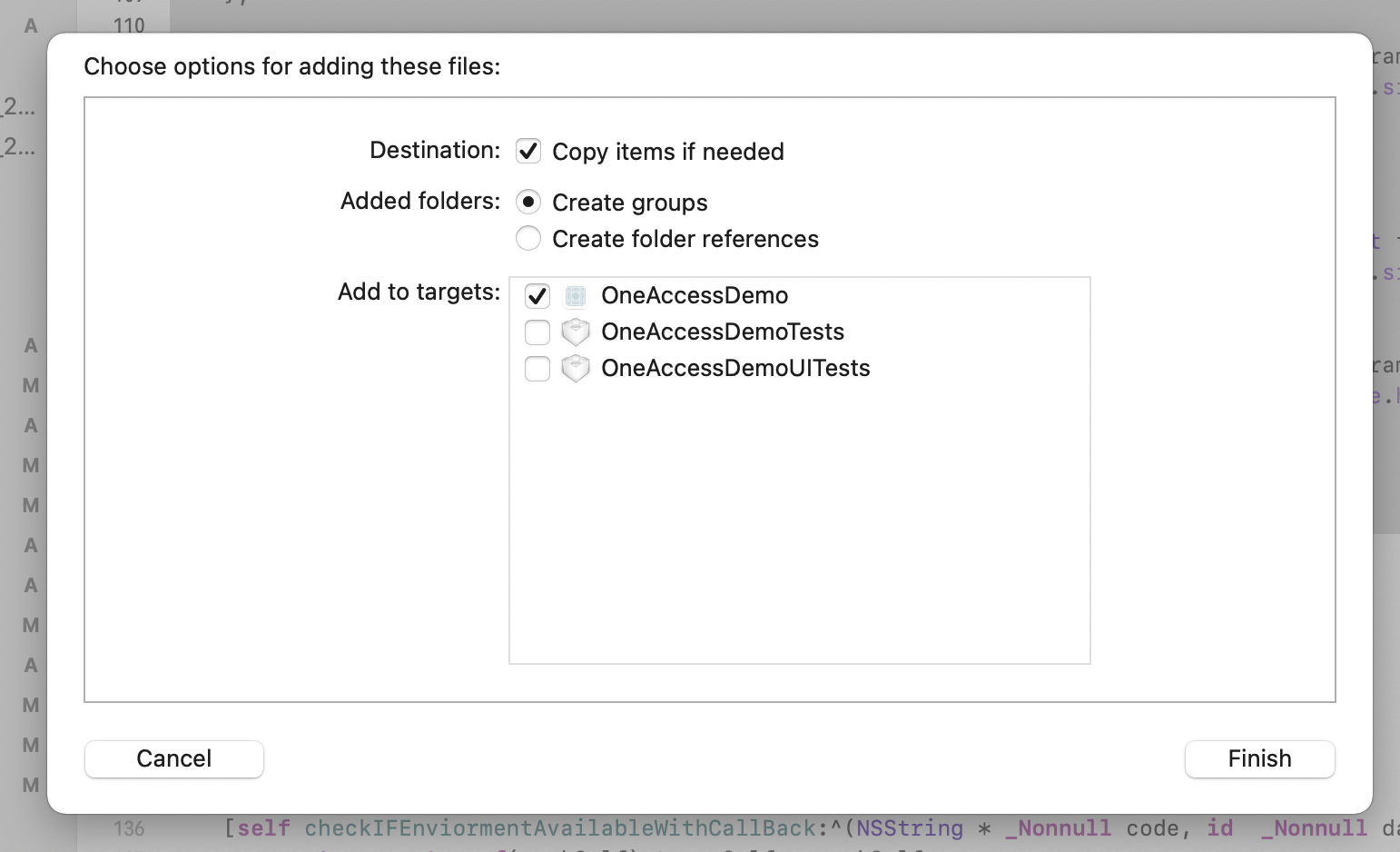
And introduce Pod dependencies.
pod 'JWT', '~> 3.0.0-beta.14'

pod 'EllipticCurveKeyPair'
Target Settings
The IDaaS secondary biometric authentication SDK is compatible with iOS 11 and above.
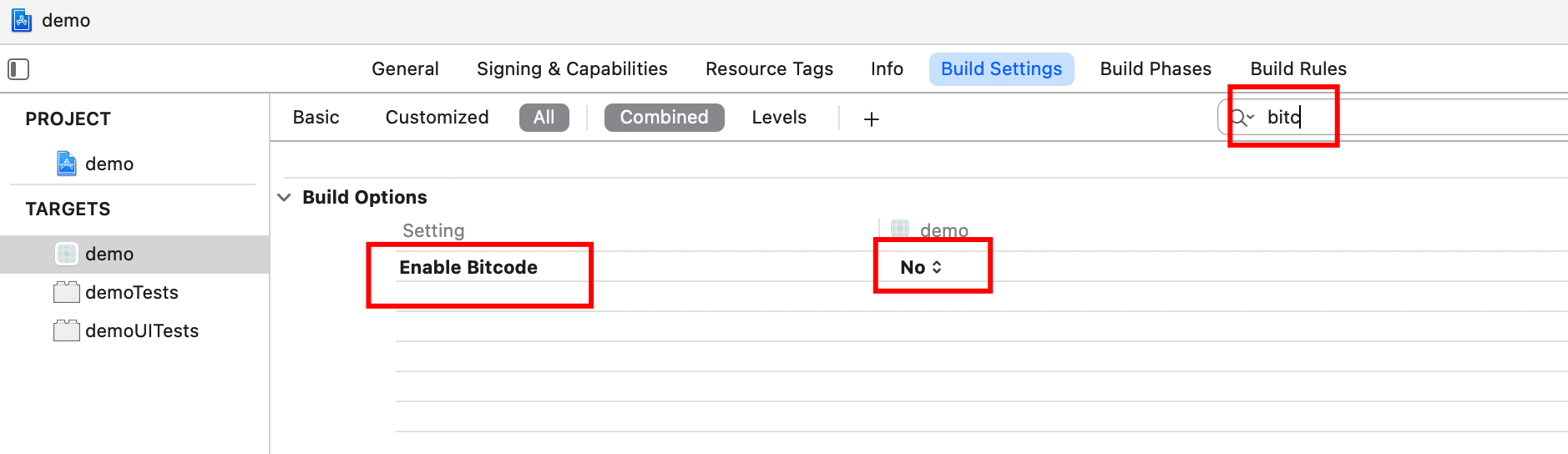
Set Other Linker Flags. In your project file, select Build Setting and add
-ObjCto "Other Linker Flags".Configure bitcode to NO, as shown below.
Development Integration
One-Shot Invocation Integration
This section describes how the APP client can invoke binding, unbinding, and secondary authentication in one shot. The APP client only needs to integrate the IDaaS SDK and does not need to consider writing fingerprint / face recognition code.
Provided methods:
- SDK initialization.
- Query whether the phone uses face recognition or fingerprint recognition, to dynamically load icons (optional utility method).
- Query device binding status.
- Bind device.
- Unbind device.
- Query whether the PC side currently has initiated secondary authentication.
- Secondary authentication method.
SDK Initialization
The IDaaS SDK provides an initialization method. You can fill in the tenant, clientID, and whether to enable log printing in the initialization method.
Initialization example:
Import the header in AppDelegate as follows
#import <AuthnCenter_common_2E/BCIDACommonManager.h>


// In the didFinishLaunchingWithOptions method of AppDelegate
//1. Basic configuration initialization
[[[[[BCIDACommonManager sharedInstance] initWithDomain:@"https://your-tenant-server.com"] initWithClientID:@"tenant-clientID"] initWithSSLCerVerification:NO] setLogEnabled:YES] ;
Basic configuration initialization main class BCIDACommonManager method overview:
/**
  * Method name: sharedInstance
   * @param none
   * @return Singleton instance
 */
+ (instancetype )sharedInstance ;

/**
  * Method name: initWithDomain
   * @param domain, starts with https:// and ends with .com.
   * @return Instance
 */
-(BCIDACommonManager)initWithDomain:(NSString)domain

/**
  * Method name: initWithClientID
   * @param client id.
   * @return Instance
 */
-(BCIDACommonManager)initWithClientID:(NSString)clientID;

/**
  * Method name: setLogEnabled
   * @param Boolean whether to enable log.
   * @return Instance
 */
-(void)setLogEnabled:(BOOL)enable;

/**
  * Method name: initWithSSLCerVerification
   * @param Boolean whether to enable SSL certificate verification.
   * @return Instance
 */
-(BCIDACommonManager*)initWithSSLCerVerification:(bool)sslCerVerification;
Query Whether the Phone Uses Face Recognition or Fingerprint Recognition
This is an optional method to query whether the phone uses face recognition or fingerprint recognition, preparing for dynamically loading face/fingerprint icons.
Example:
// Import header
#import <AuthnCenter_MFA_BioVerify_2E/AuthnCenter_MFA_BioVerify_2E.h>

// Tap (trigger) event
[BCIDAFingerPrintManager checkFingerPrintTypeWithCallback:^(NSString *checkFcode, id checkFdata) {
        NSLog(@"checkFinger method returns %@==%@",checkFcode,checkFdata);

        if([checkFcode isEqualToString:@"3"]){
           [BDEFAULTS setObject:@"FaceID" forKey:BC_Phone_FaceID_TouchID_Type];
           [BDEFAULTS synchronize];
        }else if([checkFcode isEqualToString:@"4"]){
            [BDEFAULTS setObject:@"TouchID" forKey:BC_Phone_FaceID_TouchID_Type];
            [BDEFAULTS synchronize];
        }
    }];
BCIDAFingerPrintManager method overview:
/**
BCIDAFingerCheckTypeBlock callback contains NSString* checkFcode, id checkFdata
 checkFcode=2: fingerprint verification not supported
 checkFcode=3: Face ID
 checkFcode=4: Touch ID
 checkFcode=5: biometric supported but not configured
 checkFcode=6: screen lock password not set, when biometric is unavailable
 checkFcode=7: biometric is locked
 checkFcode=8: user canceled biometric
 checkFcode=9: other reasons, see checkFdata return string
 */
+(void)checkFingerPrintTypeWithCallback:(BCIDAFingerCheckTypeBlock)callBack;
Query Device Binding Status
Call this method wherever needed (before binding, before unbinding, before secondary authentication, or before prompting the user to enable biometric guidance page). Example:
// Import header
#import <AuthnCenter_MFA_BioVerify_2E/AuthnCenter_MFA_BioVerify_2E.h>


// Tap (trigger) event
[[BCIDAMfaBioDeviceBindManager sharedInstance] checkDeviceStatusWithIDToken:_company.user.id_token andWithCallBack:^(NSString * _Nonnull statuscode, id  _Nonnull statusdata) {

        dispatch_async(dispatch_get_main_queue(), ^{
            if([statuscode isEqualToString:@"101"]){// Bound

            }else if([statuscode isEqualToString:@"102"]){// Not bound


            }else{// Error code

            }
        });

    }];
BCIDAMfaBioDeviceBindManager method overview:
/**
  * Method name: sharedInstance
   * @param none
   * @return Singleton instance
 */
+ (instancetype )sharedInstance ;

/** BCMFABioDeviceStatusCompleteHandler callback contains NSString * _Nonnull statuscode, id statusdata
  Input:
 idToken: valid idToken after login success
**/
-(void)checkDeviceStatusWithIDToken:(NSString*)idToken andWithCallBack:(BCMFABioDeviceStatusCompleteHandler)callBack;
BCMFABioDeviceStatusCompleteHandler callback return codes:
| statuscode | Description |
|---|---|
| statuscode=101 | statusdata=Bound |
| statuscode=102 | statusdata=Not bound |
| statuscode=Error code (refer to IDaaS return codes) | statusdata=Error code description |
Bind Device
When device binding is needed, first call the above query device binding status method, then call this method.
// Import header
#import <AuthnCenter_MFA_BioVerify_2E/AuthnCenter_MFA_BioVerify_2E.h>

// Tap (trigger) event
 [[BCIDAMfaBioDeviceBindManager sharedInstance] bindDeviceWithIDToken:_company.user.id_token andWithUserID:_company.user.userid andWithCallBack:^(NSString * _Nonnull bindscode, id  _Nonnull bindsdata) {


            dispatch_async(dispatch_get_main_queue(), ^{


                if([bindscode isEqualToString:@"0"]){// Binding succeeded

                }else if([bindscode isEqualToString:@"COM.0217"]){// Token expired

                }else{// Binding failed

                }
            });
        }];
BCIDAMfaBioDeviceBindManager method overview:
/**
  * Method name: sharedInstance
   * @param none
   * @return Singleton instance
 */
+ (instancetype )sharedInstance ;

/** BCMFABioDeviceBindCompleteHandler callback contains: NSString * _Nonnull bindscode, id bindsdata
Input:
 idToken: valid idToken after login success
  userID: used as the unique identifier of this user in this app, used for generating public/private keys for biometric authentication, ensuring the uniqueness of the user in this app.
**/
-(void)bindDeviceWithIDToken:(NSString*)idToken andWithUserID:(NSString*)userID andWithCallBack:(BCMFABioDeviceBindCompleteHandler)callBack;
BCMFABioDeviceBindCompleteHandler callback return values:
| Local Biometric Error Code | Remarks |
|---|---|
| bindscode=2 | Fingerprint verification not supported |
| bindscode=5 | Biometric supported but not configured |
| bindscode=6 | Screen lock password not set, when biometric is unavailable |
| bindscode=7 | Biometric is locked |
| bindscode=8 | User canceled biometric |
| bindscode=110 | Biometric verification failed |
| bindscode=102 | Pressed home button to cancel biometric |
| Network request error codes | |
| bindscode=1 | Missing input parameters |
| bindscode=101 | Error generating RSA public key |
| bindscode=0 | Binding succeeded |
| bindscode=104 | Binding failed |
| bindscode=Other back-end error codes | For details, see IDaaS error codes at the end |
Unbind Device
When device unbinding is needed, first call the above query device binding status method, then call this method.
Example code:
// Import header
#import <AuthnCenter_MFA_BioVerify_2E/AuthnCenter_MFA_BioVerify_2E.h>

// Trigger event
[[BCIDAMfaBioDeviceBindManager sharedInstance] unbindDeviceWithIDToken:id_token andWithCallBack:^(NSString * _Nonnull unbincode, id  _Nonnull unbindata) {


        dispatch_async(dispatch_get_main_queue(), ^{
            if([unbincode isEqualToString:@"0"])// Unbinding succeeded
            {


            }else{// Unbinding failed

            }


        });
    }];
BCIDAMfaBioDeviceBindManager method overview:
/**
  * Method name: sharedInstance
   * @param none
   * @return Singleton instance
 */
+ (instancetype )sharedInstance ;

/** BCMFABioDeviceUnbindCompleteHandler callback contains: NSString * _Nonnull unbincode, id unbindata
Input:
 idToken: valid idToken after login success

**/


-(void)unbindDeviceWithIDToken:(NSString*)idToken andWithCallBack:(BCMFABioDeviceUnbindCompleteHandler)callBack;
BCMFABioDeviceUnbindCompleteHandler callback return values:
| Local Biometric Error Code | Remarks |
|---|---|
| bindscode=2 | Fingerprint verification not supported |
| bindscode=5 | Biometric supported but not configured |
| bindscode=6 | Screen lock password not set, when biometric is unavailable |
| bindscode=7 | Biometric is locked |
| bindscode=8 | User canceled biometric |
| bindscode=110 | Biometric verification failed |
| bindscode=102 | Pressed home button to cancel biometric |
| Network request error codes | |
| bindscode=1 | Missing input parameters |
| code=105 | Unbinding failed |
| bindscode=0 | Unbinding succeeded |
| bindscode=Other back-end error codes | For details, see IDaaS error codes at the end |
Query Whether the PC Side Has Initiated Secondary Authentication
When logged in and a valid idToken is obtained and the device is bound, query whether the PC side has initiated secondary authentication.
Example code:
// Import header
#import <AuthnCenter_MFA_BioVerify_2E/AuthnCenter_MFA_BioVerify_2E.h>

// Trigger method
 [[BCIDAMfaBioVerifyManager sharedInstance] checkIfMFAAvailableWithidToken:_company.user.id_token andWithCallBack:^(NSString * _Nonnull code, id  _Nonnull data) {

        dispatch_async(dispatch_get_main_queue(), ^{

            if([code isEqualToString:@"0"]&&![StringUtil isBlankString:(NSString*)data]){
                    NSString* randomS= (NSString*)data;// Obtained random number, used as input parameter for secondary authentication method

               [BCAlertPopManager podAlertWithTwoSectionWithTitle:nil andWithMessage:@"You are performing secondary verification" inVC:self andCancelSectionName:@"Cancel" andFirstSelectorName:@"cancelSecondVerifyFingerPrint" andSecondSecName:@"Verify" andSecondSelectorName:@"gotoSecondVerify"];


                }else{// Error code for querying secondary authentication


                }

        });

    }];
BCIDAMfaBioVerifyManager method overview:
/**
  * Method name: sharedInstance
   * @param none
   * @return Singleton instance
 */
+ (instancetype )sharedInstance;

/** BCMFABioVerifyCheckCompleteHandler callback contains NSString * _Nonnull code, id data
Input:
idToken: valid idToken after login success
**/

-(void)checkIfMFAAvailableWithidToken:(NSString*)idToken andWithCallBack:(BCMFABioVerifyCheckCompleteHandler)callBack;
BCMFABioVerifyCheckCompleteHandler return values:
| code | Description |
|---|---|
| code=1 | Missing parameters |
| code=0 | There is currently a secondary authentication to be completed. data returns a random numeric string, which is used as the input parameter for the secondary authentication method below. |
| code=2 | There is currently no secondary authentication to be completed |
Secondary Authentication Method
When the previous method queries that the PC side has initiated secondary authentication and obtained the random number, call this method. The SDK initiates the secondary authentication flow, completes face/fingerprint verification, sends the verification result to the back end, and completes secondary authentication.
Example code:
 // Import header
#import <AuthnCenter_MFA_BioVerify_2E/AuthnCenter_MFA_BioVerify_2E.h>

// Trigger method
 [[BCIDAMfaBioVerifyManager sharedInstance] verifyMFAResponseWithUserID:_company.user.userid andWithIdToken:_company.user.id_token andRandomStr:_randomStr andWithCallBack:^(NSString * _Nonnull code, id  _Nonnull data) {


        dispatch_async(dispatch_get_main_queue(), ^{

            if([code isEqualToString:@"0"]){

                [MBProgressHUD showSuccess:@"Secondary authentication succeeded"];


            }else{// Secondary authentication failed

            }
        });
    }];
BCIDAMfaBioVerifyManager method overview:
/**
  * Method name: sharedInstance
   * @param none
   * @return Singleton instance
 */
+ (instancetype )sharedInstance;

/** BCMFABioVerifyCompleteHandler callback contains NSString * _Nonnull code, id data
Input:
idToken: valid idToken after login success
userid: same userid as the input parameter of the binding method
randomStr: random string obtained from the previous query method for secondary authentication
**/
-(void)verifyMFAResponseWithUserID:(NSString*)userid andWithIdToken:(NSString*)idToken andRandomStr:(NSString*)randomStr andWithCallBack:(BCMFABioVerifyCompleteHandler)callBack;
BCMFABioVerifyCompleteHandler return values:
| code | Description |
|---|---|
| code=1 | Missing input parameters |
| code=101 | Signature method error, please contact the administrator |
| code=2 | Secondary authentication failed |
| code=0 | Secondary authentication succeeded |
| code=Other | Refer to IDaaS back-end error codes at the end |
API-Style Integration
This section describes how to integrate the biometric authentication secondary authentication SDK in API form. Developers need to string together the entire process according to the flowchart at the beginning, including writing biometric authentication code to invoke fingerprint or face authentication, and using the utility classes provided by the SDK.
API List
SDK initialization.
Query device binding status API.
Bind API.
Unbind API.
Secondary authentication API.
SDK Initialization
IDaaS SDK initialization example:
Import the header in AppDelegate as follows
#import <AuthnCenter_common_2C/BCIDACommonManager.h>

// In the didFinishLaunchingWithOptions method of AppDelegate
//1. Basic configuration initialization
[[[[[BCIDACommonManager sharedInstance] initWithDomain:@"https://your-tenant-server.com"] initWithClientID:@"tenant-clientID"] initWithSSLCerVerification:NO] setLogEnabled:YES] ;
Query Device Binding Status API
Call this method wherever needed (before binding, before unbinding, before secondary authentication, or before prompting the user to enable biometric guidance page). Example:
// Import header
#import <AuthnCenter_MFA_BioVerify_2E/AuthnCenter_MFA_BioVerify_2E.h>


// Tap (trigger) event
[[BCIDAMfaBioDeviceBindManager sharedInstance] checkDeviceStatusWithIDToken:_company.user.id_token andWithCallBack:^(NSString * _Nonnull statuscode, id  _Nonnull statusdata) {

        dispatch_async(dispatch_get_main_queue(), ^{
            if([statuscode isEqualToString:@"101"]){// Bound

            }else if([statuscode isEqualToString:@"102"]){// Not bound


            }else{// Error code

            }
        });

    }];
BCIDAMfaBioDeviceBindManager method overview:
/**
  * Method name: sharedInstance
   * @param none
   * @return Singleton instance
 */
+ (instancetype )sharedInstance ;

/** BCMFABioDeviceStatusCompleteHandler callback contains NSString * _Nonnull statuscode, id statusdata
  Input:
 idToken: valid idToken after login success
**/
-(void)checkDeviceStatusWithIDToken:(NSString*)idToken andWithCallBack:(BCMFABioDeviceStatusCompleteHandler)callBack;
BCMFABioDeviceStatusCompleteHandler callback return codes:
| statuscode | Description |
|---|---|
| statuscode=101 | statusdata=Bound |
| statuscode=102 | statusdata=Not bound |
| statuscode=Error code (refer to IDaaS return codes) | statusdata=Error code description |
Bind API
Example code. When not bound, call in the following order:
Call fingerprint/face authentication. After authentication succeeds:
Call the
getPublicKeywithUseridmethod in utility classBCIDAFingerPrintVerifyManagerto successfully obtain the public key string.Call the binding method
bindDeviceWithidToken:idtoken andPublicKey:pubKeyofBCIDAMfaBioAPIManager.
//1. Call fingerprint/face authentication, call after success
  LAContext *context = [[LAContext alloc] init];
  [context evaluatePolicy:LAPolicyDeviceOwnerAuthentication localizedReason:localizedReason reply:^(BOOL success, NSError * _Nullable error) {

      if (success) {// Verification succeeded
//2. Call utility class to generate encryption public key. The input userid can be a string uniquely representing the user and is permanently saved in the phone. If this user id changes, the public key will also change, and the original binding relationship will no longer exist.
// 3. Pass the public key into the binding method
        [[BCIDAFingerPrintVerifyManager sharedInstance] getPublicKeywithUserid:_userID CallBack:^(NSString * _Nonnull gencode, id  _Nonnull gendata) {

            if([gencode isEqualToString:@"0"]){
                NSString* pubKey=(NSString*)gendata;
                [[BCIDAMfaBioAPIManager sharedInstance] bindDeviceWithidToken:idtoken andPublicKey:pubKey andWithCallBack:^(id  _Nonnull bindData) {
                    dispatch_async(dispatch_get_main_queue(), ^{

                        NSDictionary* dic=(NSDictionary*)bindData;
                        NSString* code= [dic objectForKey:@"code"];
                        NSString* message=[dic objectForKey:@"message"];
                        if([code isEqualToString:@"0"]){
                            NSNumber* dataN=(NSNumber*)[dic objectForKey:@"data"];
                            if(dataN!=nil&&dataN!=[NSNull null]){
                                BOOL flag= [dataN boolValue];
                                if(flag){// Success
                                    [self.bindSwitch setOn:YES];
                                    NSString* errstr=[NSString stringWithFormat:@"Binding succeeded"];

                                    [MBProgressHUD showSuccess:errstr];
                                }else{// Failure

                                    NSString* errstr=[NSString stringWithFormat:@"Binding failed"];
                                    [MBProgressHUD showError:errstr];
                                }
                            }else{
                                NSString* errstr=[NSString stringWithFormat:@"Binding failed"];
                                [MBProgressHUD showError:errstr];
                            }

                        }else{
                            NSString* errstr=[NSString stringWithFormat:@"Binding failed: %@--%@",code,message];
                            [MBProgressHUD showError:errstr];
                        }
                    });


                }];

            }else{

                [MBProgressHUD showError:@"Public key acquisition error, please contact the administrator"];
            }
        }];

            }
  }
BCIDAFingerPrintVerifyManager overview:
+ (instancetype )sharedInstance ;

/** Obtain public key. If it does not exist, generate it; if already generated, obtain the existing one.
BCIDAFingerPrintKeypairGenerateCompleteHandler returns NSString * _Nonnull gencode, id gendata
gencode=0 gendata=public key
gencode=101 gendata=error description
**/

-(void)getPublicKeywithUserid:(NSString*)userid CallBack (BCIDAFingerPrintKeypairGenerateCompleteHandler)callBack;
BCIDAMfaBioAPIManager overview:
+ (instancetype )sharedInstance ;
/**
Binding, input idToken
        publicKey (public key generated by the previous method)
     BCMFABioAPIBindCompleteHandler callback returns NSDictionary object

**/
-(void)bindDeviceWithidToken:(NSString*)idToken andPublicKey:(NSString*)publicKey andWithCallBack:(BCMFABioAPIBindCompleteHandler)callBack;
Callback returns NSDictionary object:
| Parameter Name | Description | Type | Remarks |
|---|---|---|---|
| code | Return status code | String | 0 for success, others for error codes |
| data | Returned content | String | Binding succeeded, returns true |
| message | Return message | String | On error, returns specific error information |
Unbind API
Example code. When not bound, call in the following order:
- Call fingerprint/face authentication. After authentication succeeds:
- Call
unbindDeviceAPIWithIDToken:idtoken andWithCallBackofBCIDAMfaBioAPIManagerto unbind.
//1. Call fingerprint/face authentication, call after success
  LAContext *context = [[LAContext alloc] init];
  [context evaluatePolicy:LAPolicyDeviceOwnerAuthentication localizedReason:localizedReason reply:^(BOOL success, NSError * _Nullable error) {

      if (success) {// Verification succeeded

        [[BCIDAMfaBioAPIManager sharedInstance] unbindDeviceAPIWithIDToken:idtoken andWithCallBack:^(id  _Nonnull unbindData) {
            dispatch_async(dispatch_get_main_queue(), ^{

                NSDictionary* dic=(NSDictionary*)unbindData;
                NSString* code= [dic objectForKey:@"code"];
                NSString* message=[dic objectForKey:@"message"];
                if([code isEqualToString:@"0"]){
                    NSNumber* dataN=(NSNumber*)[dic objectForKey:@"data"];
                    if(dataN!=nil&&dataN!=[NSNull null]){
                        BOOL flag= [dataN boolValue];
                        if(flag){// Unbinding succeeded
                            [self.bindSwitch setOn:NO];

                            NSString* errstr=[NSString stringWithFormat:@"Unbinding succeeded"];
                            [MBProgressHUD showSuccess:errstr];
                        }else{// Unbinding failed

                            NSString* errstr=[NSString stringWithFormat:@"Unbinding failed"];
                            [MBProgressHUD showError:errstr];
                        }
                    }else{
                        NSString* errstr=[NSString stringWithFormat:@"Unbinding failed"];
                        [MBProgressHUD showError:errstr];
                    }

                }else{
                    NSString* errstr=[NSString stringWithFormat:@"Unbinding failed: %@--%@",code,message];
                    [MBProgressHUD showError:errstr];
                }
            });
        }];


      }
BCIDAMfaBioAPIManager overview:
+ (instancetype )sharedInstance ;

/** Unbind
Input: idToken
BCMFABioAPIUnBindCompleteHandler callback returns NSDictionary object
**/
-(void)unbindDeviceAPIWithIDToken:(NSString*)idToken andWithCallBack:(BCMFABioAPIUnBindCompleteHandler)callBack;
Callback returns NSDictionary object:
| Parameter Name | Description | Type | Remarks |
|---|---|---|---|
| code | Return status code | String | 0 for success, others for error codes |
| data | Returned content | String | Success, returns true |
| message | Return message | String | On error, returns specific error information |
Secondary Authentication API
Example code. Only when it is confirmed that the device is bound can you query whether secondary authentication is available. No biometric code is required from the developer; the API will automatically perform signing. Call in the following order:
Query whether the PC side has initiated secondary authentication using
checkIFMfaBioRequestAvailableWithIdToken:idToken andWithCallBackofBCIDAMfaBioAPIManager. If secondary authentication exists, a random string is returned for use as the input parameter below.Pop up a dialog asking the user whether to verify.
The user taps Verify. Call
signDataByPrivateKeywithUserid:_userID WithStr:_randomStr andWithCallBack:of utility classBCIDAFingerPrintVerifyManager, passing in the random string obtained in step 1. A signed random string is returned. The signing step will invoke fingerprint or face verification.Call
responseToMfaBioWithIdToken:idtoken andWithSignedStr:signddata andWithCallBack:ofBCIDAMfaBioAPIManager, passing the signed random string from step 3 as thesignddataparameter.
// Query whether secondary authentication has been initiated
-(void)mfaCheckWithidToken:(NSString*)idToken{

    [[BCIDAMfaBioAPIManager sharedInstance] checkIFMfaBioRequestAvailableWithIdToken:idToken andWithCallBack:^(id  _Nonnull mfaReData) {
        dispatch_async(dispatch_get_main_queue(), ^{

            NSDictionary* dic=(NSDictionary*)mfaReData;
            NSString* co=[dic objectForKey:@"code"];
            NSDictionary* da=(NSDictionary*)[dic objectForKey:@"data"];
            NSString* mesg=[dic objectForKey:@"message"];

            if([co isEqualToString:@"0"]){
                if(da!=nil){
                    NSString* randomS=  [da objectForKey:@"random"];
                    NSString* clientId=[da objectForKey:@"clientId"];
                    NSString* clientNameS=[da objectForKey:@"clientName"];
                    if(![BCIDACommonStringUtils isEmptyString:randomS]){
                        _randomStr=randomS;
                        [BCAlertPopManager podAlertWithTwoSectionWithTitle:nil andWithMessage:@"There is a secondary authentication to complete" inVC:self andCancelSectionName:@"Close" andFirstSelectorName:nil andSecondSecName:@"Verify" andSecondSelectorName:@"goMFaVerify"];

                    }else{
                        [MBProgressHUD showMessage:@"No secondary authentication needs verification"];
                    }
                }else{
                    [MBProgressHUD showMessage:@"No secondary authentication needs verification"];
                }


            }


        });
    }];


}

// Go to secondary authentication
-(void)goMFaVerify{
    NSString* idtoken=  [BCIDADEFAULTS objectForKey:idTokenSaveAll];
      if(idtoken==nil||[idtoken isEqualToString:@""]){
          [MBProgressHUD showError:@"Login expired, please log in again"];
          return;
      }
    //1. After the user obtains the random string, use the following method to sign it, and put the signing result as the input parameter of the secondary authentication method.
    [[BCIDAFingerPrintVerifyManager sharedInstance] signDataByPrivateKeywithUserid:_userID WithStr:_randomStr andWithCallBack:^(NSString * _Nonnull signdcode, id  _Nonnull signddata) {
        dispatch_async(dispatch_get_main_queue(), ^{

            if ([signdcode isEqualToString:@"0"]) {
                NSString* signda=(NSString*)signddata;
                [[BCIDAMfaBioAPIManager sharedInstance] responseToMfaBioWithIdToken:idtoken andWithSignedStr:signddata andWithCallBack:^(id  _Nonnull mfaReData) {
                    dispatch_async(dispatch_get_main_queue(), ^{

                        NSDictionary* dic=(NSDictionary*)mfaReData;
                        NSString* code=[dic objectForKey:@"code"];
                        NSNumber* dataflag=(NSNumber*)[dic objectForKey:@"data"];
                        NSString* message=[dic objectForKey:@"message"];
                        if([code isEqualToString:@"0"]){
                            if(dataflag!=nil&&dataflag!=[NSNull null]){
                                BOOL flag= [dataflag boolValue];
                                if(flag){
                                    [MBProgressHUD showSuccess:@"Secondary authentication succeeded"];
                                }else{
                                    [MBProgressHUD showError:@"Secondary authentication failed"];
                                }
                            }else{
                                [MBProgressHUD showError:@"Secondary authentication failed"];
                            }
                        }else{
                            NSString* errStr=[NSString stringWithFormat:@"Secondary authentication failed:%@--%@",code,message];
                            [MBProgressHUD showError:errStr];
                        }

                    });

                }];

            }else{
                [MBProgressHUD showError:@"Random string signing error"] ;

            }
        });
    }];


}
BCIDAMfaBioAPIManager method overview:
+ (instancetype )sharedInstance ;

/** Query whether secondary authentication has been initiated
   Input: idToken
   Callback returns NSDictionary object
**/
-(void)checkIFMfaBioRequestAvailableWithIdToken:(NSString*)idToken andWithCallBack:(BCMFABioAPIRequestAvailableCompleteHandler)callBack;

/** Go to secondary authentication
  Input: idToken
       signedStr: random string returned by the previous method after signing
       Callback returns NSDictionary object

**/
-(void)responseToMfaBioWithIdToken:(NSString*)idToken andWithSignedStr:(NSString*)signedStr andWithCallBack:(BCMFABioAPIResponseToMfaCompleteHandler)callBack;
Callback return values:
BCMFABioAPIRequestAvailableCompleteHandler success callback returns:
{
    "code": "0",
    "data":
            {
                "random":"231123",// Random string, needs to be signed before being used as secondary authentication input parameter
               "clientId":"qwwmx651",
               "clientName":"Huawei Cloud"
            }
        ,
    "message": null
}
Error return: code!=0, message gives error description.

BCMFABioAPIResponseToMfaCompleteHandler success callback returns:
{
    "code": "0",
    "data":true,// Operation succeeded, returns YES; failure returns NO
    "message": null
}
Signing utility class BCIDAFingerPrintVerifyManager overview:
+ (instancetype )sharedInstance ;

/**
Sign the string
Input: userid represents user uniqueness, same as used during binding
    signStr random string obtained from the query secondary authentication interface
    Callback returns NSString * _Nonnull signdcode, id signddata
    signdcode=0, data returns the signed random string
    signdcode=error code, data returns error information
**/
-(void)signDataByPrivateKeywithUserid:(NSString*)userid WithStr:(NSString*)signStr andWithCallBack:(BCIDAFingerPrintSignDataCompleteHandler)callBack;
Error Codes
| HTTP Status | Error Code (error_code) | Error Message (error_msg) | Solution |
|---|---|---|---|
| 400 | IDAAS.SDK.COMMON.1001 | Parameter {0} cannot be left blank | |
| 400 | IDAAS.SDK.COMMON.1002 | The {0} parameter format is incorrect | |
| 400 | IDAAS.SDK.COMMON.1003 | Device information is incomplete | |
| 400 | IDAAS.SDK.COMMON.1004 | Signature decryption error | |
| 400 | IDAAS.SDK.COMMON.1005 | The {0} has failed | |
| 400 | IDAAS.SDK.COMMON.1006 | The {0} parameter error | |
| 400 | IDAAS.SDK.COMMON.1007 | The {0} parameter type error | |
| 500 | IDAAS.SDK.COMMON.1008 | The system is busy. Try again later | |
| 400 | IDAAS.SDK.COMMON.1009 | Unknown authentication configuration | |
| 400 | IDAAS.SDK.COMMON.1010 | Failed to obtain the enterprise center global configuration | |
| 400 | IDAAS.SDK.COMMON.1011 | Failed to obtain the international area code configuration | |
| 400 | IDAAS.SDK.COMMON.1012 | The x-client-ID is incorrect and the corresponding application cannot be found | |
| 400 | IDAAS.SDK.COMMON.1013 | The corresponding user is not found | |
| 400 | IDAAS.SDK.COMMON.1014 | Application private key not found | |
| 400 | IDAAS.SDK.LOGIN.1001 | Error calling interface | |
| 400 | IDAAS.SDK.LOGIN.1002 | User not bound | |
| 400 | IDAAS.SDK.LOGIN.1003 | The user has been locked due to too many unsuccessful login attempts. It will be unlocked in {0} minutes and {1} seconds | |
| 400 | IDAAS.SDK.LOGIN.1004 | Failed to obtain the password policy | |
| 400 | IDAAS.SDK.LOGIN.1005 | Invalid username or password. Remaining login attempts: | |
| 400 | IDAAS.SDK.LOGIN.1006 | Configuration error, unable to find wechat authentication source | |
| 400 | IDAAS.SDK.LOGIN.1007 | Configuration error, unable to find alipay authentication source | |
| 400 | IDAAS.SDK.LOGIN.1008 | The configuration is incorrect. The one-click login authentication source cannot be found | |
| 400 | IDAAS.SDK.SMS.1001 | {0} slide base map is not initialized successfully, please check the path | |
| 400 | IDAAS.SDK.SMS.1002 | {0} verification code coordinate resolution failed | |
| 400 | IDAAS.SDK.SMS.1003 | {0} verification code coordinate verification fails | |
| 400 | IDAAS.SDK.SMS.1004 | The graphic verification code is incorrect | |
| 400 | IDAAS.SDK.SMS.1005 | SMS verification code verification is incorrect | |
| 400 | IDAAS.SDK.SMS.1006 | The email verification code is incorrect | |
| 400 | IDAAS.SDK.SMS.1007 | Sending scenario does not exist | |
| 400 | IDAAS.SDK.SMS.1008 | Failed to send the verification code | |
| 400 | IDAAS.SDK.SOCIAL.1001 | The social account is unbound incorrectly | |
| 400 | IDAAS.SDK.SOCIAL.1002 | The social account has been bound, please unbind it first | |
| 400 | IDAAS.SDK.PWD.1001 | The password length is incorrect | |
| 400 | IDAAS.SDK.PWD.1002 | The password cannot be the username | |
| 400 | IDAAS.SDK.PWD.1003 | Your password complexity is low | |
| 400 | IDAAS.SDK.PWD.1004 | The password is weak | |
| 400 | IDAAS.SDK.PWD.1005 | The password is used before, cannot be used again | |
| 400 | IDAAS.SDK.PWD.1006 | Password cannot username in reverse order | |
| 400 | IDAAS.SDK.PWD.1007 | The number of repeated password characters exceeded the upper limit | |
| 400 | IDAAS.SDK.PWD.1008 | Password cannot contain :username, phone number, email prefix, name in PinYing | |
| 400 | IDAAS.SDK.MFA.1001 | The mobile doesn't match the user | |
| 400 | IDAAS.SDK.MFA.1002 | The access control policy is incorrect | |
| 400 | IDAAS.SDK.MFA.1003 | Access control authentication source type conversion error |