
Implement Single Sign-On Using Custom ID Token Integration with BambooCloud IDaaS
Scenario Description
This solution is applicable when a third-party platform uses its own authentication method to log in and then generates a custom ID Token to enable password-free login to various application systems already integrated with BambooCloud IDaaS.
In this scenario:
- The third-party platform acts as the OIDC OP (OpenID Provider), generating the user's ID Token information.
- The BambooCloud IDaaS platform acts as the OIDC RP (Relying Party), verifying the signature and matching the current user identity information. If the signature verification and user matching are successful, the user single signs on to the target application system already integrated with the BambooCloud IDaaS platform.
Single Sign-On Flow
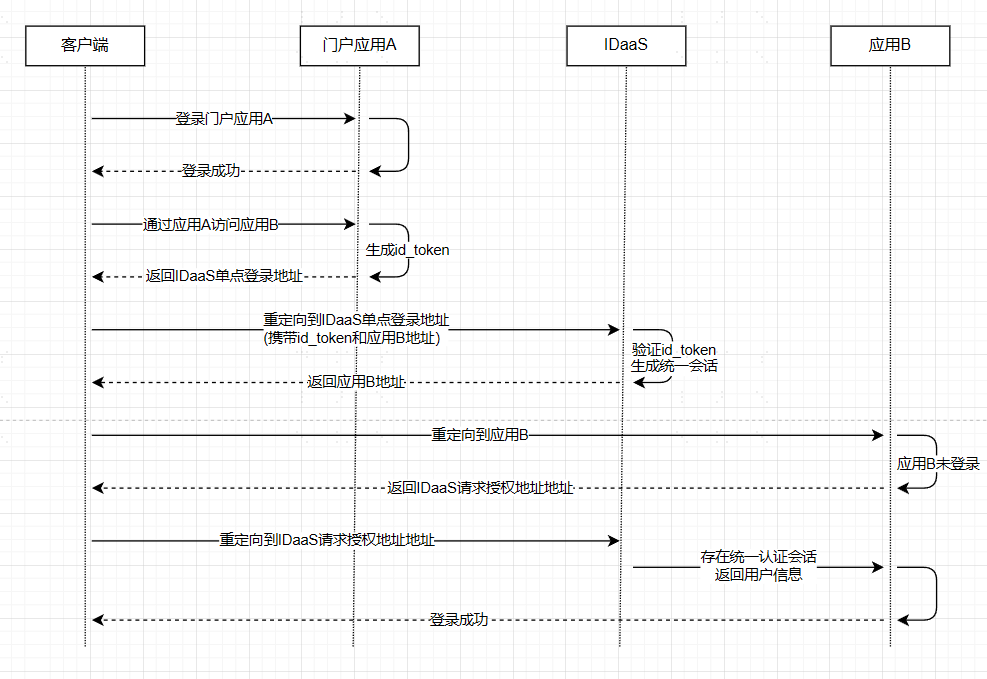
The user first logs in to portal application A, then accesses application B through portal application A to achieve single sign-on.
TIP
- BambooCloud IDaaS single sign-on address: refer to Third-Party Platform Calls BambooCloud IDaaS SSO Interface
- Application B address: the
redirect_toparameter in Third-Party Platform Calls BambooCloud IDaaS SSO Interface - Only supports one-way SSO, i.e., Application A -> SSO Application B; cannot achieve Application B -> Application A
- This solution is a custom protocol, not an international standard protocol. The application/third party must ensure its own security to avoid security risks caused by its own issues.
Integration Steps
Configure OIDC Authentication Source in BambooCloud IDaaS Enterprise Center
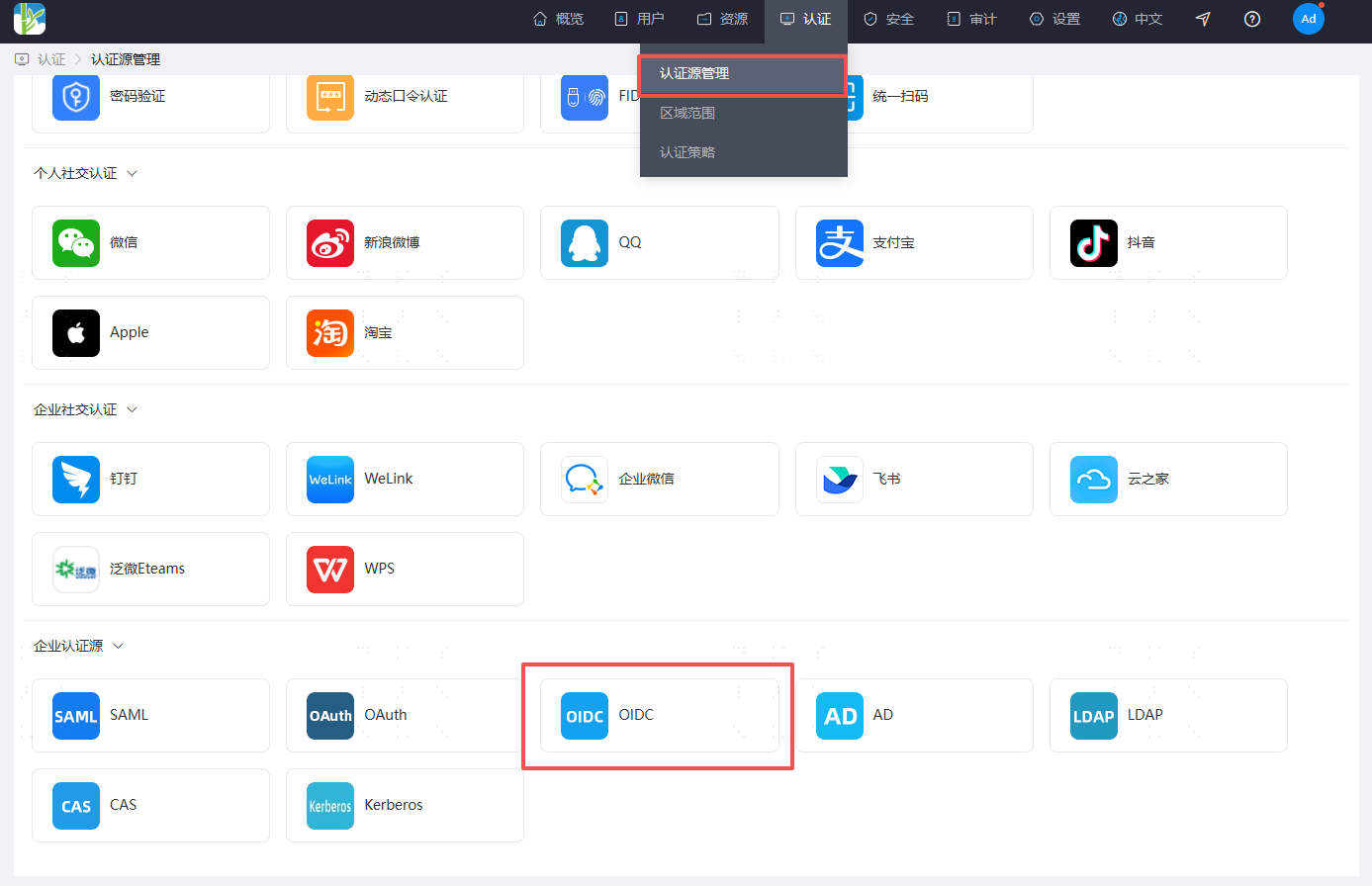
Log in to the BambooCloud IDaaS Enterprise Center and create an OIDC authentication source.
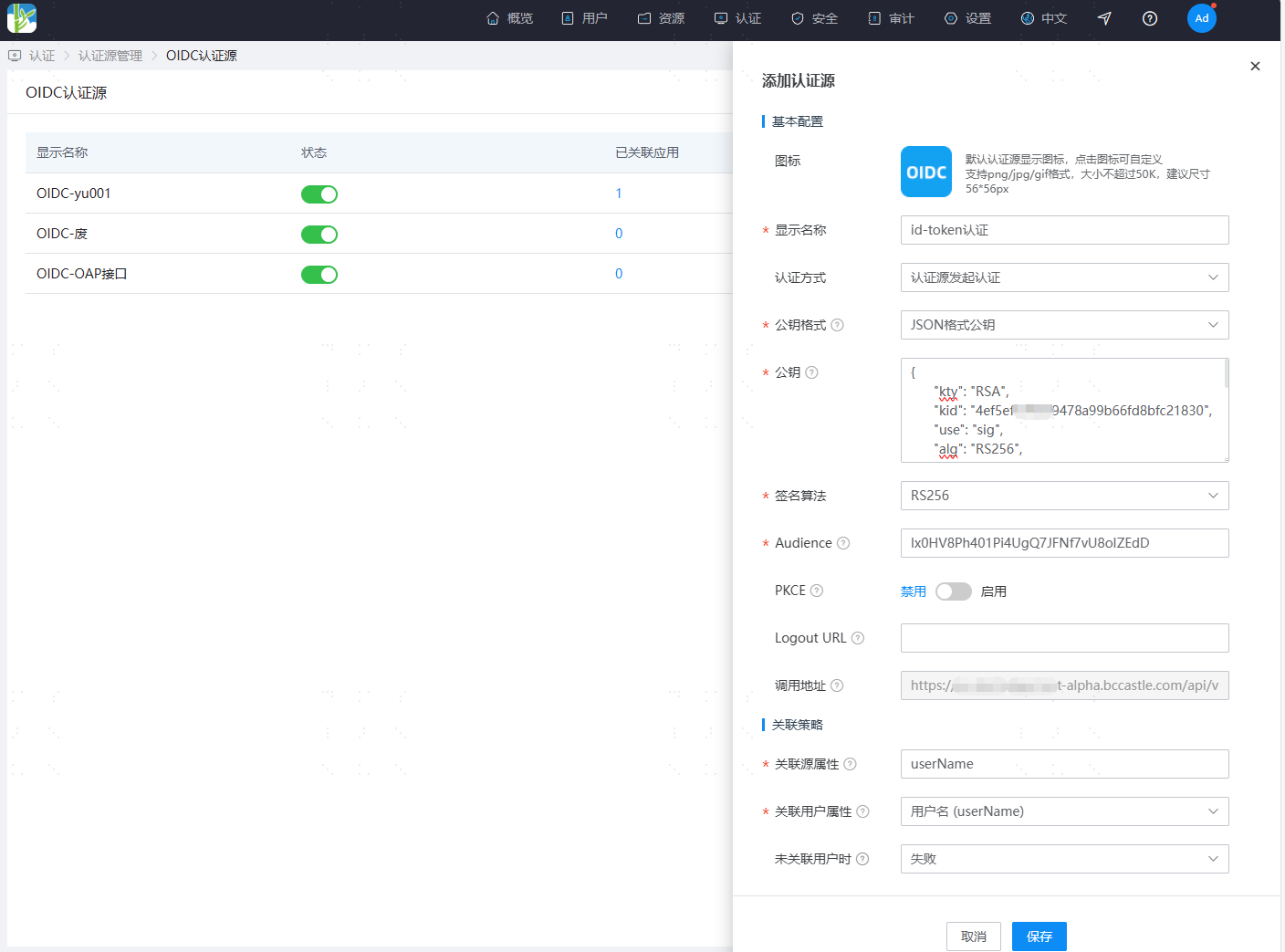
Configuration Name Remarks Authentication Method Select "Authentication Source Initiates Authentication" Public Key Format Supports four formats: JWK URL, PEM format public key, JSON format public key, and certificate format public key Public Key Different public key formats correspond to different content. You can generate them according to the Reference Example Signature Algorithm Fixed "RS256" Audience The audparameter in the generatedid_tokenCallback Address The callback address used to receive the id_tokenreturned by the authentication source; generated automatically after addingSource Association Attribute The attribute key present after id_tokenparsing; default issubUser Association Attribute The unique attribute of the user in the BambooCloud IDaaS platform
Third-Party Platform Generates ID Token
For generation methods, refer to the Sample Code.
HEADER Section
- Parameter Example
json{ "kid": "14a0b7d31d5d284c549f9e3565fb136a", "alg": "RS256" }- Parameter Description
Parameter Name Required Description kid Yes Key ID used when verifying the identity token signature alg Yes Signature algorithm PAYLOAD Section
- Parameter Example
json{ "iss": "https://xxx.com ", "aud": "https://{your_domain}", "exp": 1655779413, "jti": "B6P99VAWZQZBGNa4avp29s", "iat": 1655779293, "nbf": 1655779173, "sub": "subject" }- Parameter Description
Parameter Name Required Description iss Yes Token issuer, the unique identifier of the party providing authentication information, in URI format; generally the application's domain name aud Yes Token recipient, consistent with the Audience configured in the OIDC identity provider exp Yes Token expiration time, timestamp (milliseconds) iat Yes Token issuance time, timestamp (milliseconds) sub Yes Token subject, the user's unique identifier jti No Token ID
Third-Party Platform Calls BambooCloud IDaaS SSO Interface
Based on the OIDC authentication source initiating authentication, call the OIDC callback address provided by BambooCloud IDaaS to complete authentication.
Request Description
Request Address https://{your_domain}/api/v1/openid/id_token/{idpId}
Request Method GET
Request Headers
Parameter Name Name Required Type Example Authorization Authorization Information Required String Bearer {id_token}Request Parameters
Parameter Name Name Required Type Example redirect_to Redirect Address Optional String Access address of the target application system to be visitedWhen the parameter is empty, it defaults to redirecting to the BambooCloud IDaaS user centerYou can configure a whitelist for this address Request Example
httphttps://{your_domain}/api/v1/openid/id_token/202208231445-0FE9-93C4AFCDA?redirect_to=https://demo.comResponse Example
httpHTTP Status: 302 REDIRECT [https://demo.com]
Reference Example
Generate Public-Private Key Pair
To generate PEM format public-private keys online, you can refer to: https://apiked.com/rsa
The following example generates an RS256 algorithm key in JSON format.
Third-party dependency packages:
<dependency>
	<groupId>org.bouncycastle</groupId>
	<artifactId>bcpkix-jdk15on</artifactId>
	<version>1.50</version> <!-- Use the latest version -->
</dependency>
<dependency>
	<groupId>org.bouncycastle</groupId>
	<artifactId>bcprov-jdk15on</artifactId>
	<version>1.50</version> <!-- Use the latest version -->
</dependency>
<dependency>
	<groupId>com.nimbusds</groupId>
	<artifactId>nimbus-jose-JWT</artifactId>
	<version>8.19</version> <!-- Use the latest version -->
</dependency>
Sample code is as follows:
	/**
     * Generate key pair
     */
    public static RSAKey generatorKeys() throws Exception {
        String kid = UUID.randomUUID().toString().replaceAll("-", "");
        RSAKey key = new RSAKeyGenerator(2048)
                .keyUse(KeyUse.SIGNATURE)
                .algorithm(new Algorithm("RS256"))
                .keyID(kid)
                .generate();
		System.out.println("Private key in JSON format (not for external use): "+key.toJSONString());
        System.out.println("Public key in JSON format (for external use): "+key.toPublicJWK().toJSONString());
        return key;
    }
Generate User ID Token
Based on the user's unique identifier, the following example generates an id_token:
Third-party dependency packages:
<dependency>
	<groupId>org.bouncycastle</groupId>
	<artifactId>bcpkix-jdk15on</artifactId>
	<version>1.50</version> <!-- Use the latest version -->
</dependency>
<dependency>
	<groupId>org.bouncycastle</groupId>
	<artifactId>bcprov-jdk15on</artifactId>
	<version>1.50</version> <!-- Use the latest version -->
</dependency>
<dependency>
	<groupId>com.nimbusds</groupId>
	<artifactId>nimbus-jose-JWT</artifactId>
	<version>8.19</version> <!-- Use the latest version -->
</dependency>
Sample code is as follows:
	/**
     * Generate user id_token
     */
    public static String buildIdToken() throws Exception{
         /**
         * 1. Generate signature tool based on the key
         */
        // JSON format; the parse method parameter is the private key in JSON format (not for external use) generated in the previous step
        RSAKey rsaKey = (RSAKey)JWK.parse("{\"p\":\"yuaog5...nNgWLVg\",\"dp\":\"nhr2nPFE...LMP28KylCs0GdE\",\"alg\":\"RS256\",\"dq\":\"xdW66Lr10...6HZXFk\",\"n\":\"oGVHTUb9amuG...J8SAfBV7c49W0lSw\"}");
        RSASSASigner rsassaSigner = new RSASSASigner(rsaKey);
        /**
         * 2. Build header
         */
        JWSHeader header = new JWSHeader.Builder(JWSAlgorithm.RS256).keyID(rsaKey.getKeyID()).build();
        /**
         * 2. Build payload
         */
        JWTClaimsSet claimsSet = new JWTClaimsSet.Builder()
                // aud is required and must be consistent with the Audience configuration in the BambooCloud IDaaS authentication source
                .audience("http://{your_domain}")
                // iss is required and must be in URI format; third-party application domain name
                .issuer("http://xxx.com")
                // sub is required; based on the platform configuration, sub is the user's unique identifier
                .subject("zhangsan")
                // iat is required; token issuance time
                .issueTime(new Date())
                // exp token expiration time
                .expirationTime(new Date(System.currentTimeMillis() + (1000 * 60 * 5)))
                // Custom attribute, optional
                .claim("mobile", "18310773289")
                .build();
        /**
         * 3. Build signature
         */
        SignedJWT signedJWT = new SignedJWT(header, claimsSet);
        signedJWT.sign(rsassaSigner);
        /**
         * 4. Generate id_token
         */
        String id_token = signedJWT.serialize();
        System.out.println("id_token: "+ id_token);
        return id_token;
    }