
SMS Login
Document Description
This document describes how the Android client can integrate SMS login. The SMS login feature sends an SMS verification code to the user's mobile number, and the user authenticates to the IDaaS server with the mobile number and SMS verification code.
SMS login usage scenario: the user enters a mobile number, taps the button to obtain an SMS verification code, the sliding verification is triggered, and after verification succeeds, the IDaaS back end sends an SMS verification code to this number. The user enters the verification code and taps Login, then the IDaaS back end authenticates and returns a ticket. The final authentication result is returned to the App.
Flow Description
SMS Login Flow
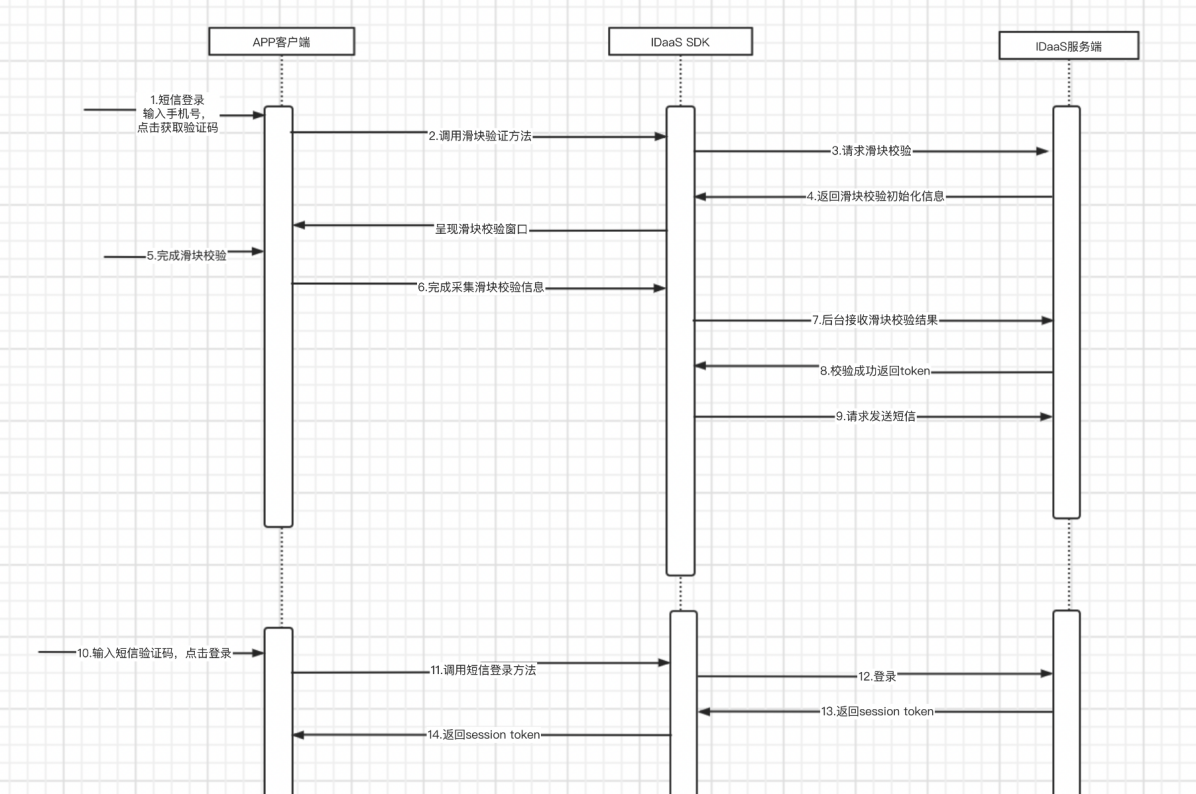
Integration Flow Description
The user enters a mobile number. The App client checks whether the number conforms to the format rules. The user taps to obtain the verification code.
The App client calls the sliding verification method. The IDaaS SDK requests the IDaaS back-end sliding verification initialization information and displays the sliding verification window on the page.
The user drags the slider to complete the sliding verification. The IDaaS SDK completes collecting the sliding verification information and requests the IDaaS server to verify.
The IDaaS server completes the sliding verification successfully and returns a token to the IDaaS SDK.
The IDaaS SDK obtains the token and uses it to request the IDaaS server to send the SMS.
The user receives the SMS, enters the verification code, and taps Login.
The App client uses the mobile number and verification code to call the IDaaS SDK SMS login method.
The IDaaS SDK requests SMS login. The IDaaS server initiates the authentication flow. If authentication succeeds, it returns the session token to the IDaaS SDK; if authentication fails, it returns an error code and message to the IDaaS SDK.
The IDaaS SDK obtains the login result and returns it to the App client, which then enters its own flow based on the result.
The client can use
id_tokento verify login validity and obtain basic user information.The client can use
session_tokento refreshid_token.
Preparation
Import Dependency Packages
AuthnCenter_Common-1.5.3.aar // Common package
AuthnCenter_SMSLogin-1.5.3.aar // SMS login SDK
Configure build.gradle
Place the aar package in the libs directory of the App project and add the following code in build.gradle.
/*begin*/
/*  rxjava2 +  okhttp + retrofit2  */
api 'io.reactivex.rxjava2:rxjava:2.2.10'
api 'io.reactivex.rxjava2:rxandroid:2.1.1'
api 'com.squareup.retrofit2:retrofit:2.6.0'
api 'com.squareup.retrofit2:adapter-rxjava2:2.6.0'
api 'com.squareup.retrofit2:converter-gson:2.6.0'
api 'com.squareup.okhttp3:okhttp:4.3.1'
api 'com.squareup.okhttp3:logging-interceptor:3.6.0'
api 'com.jakewharton.retrofit:retrofit2-rxjava2-adapter:1.0.0'
api 'com.trello.rxlifecycle2:rxlifecycle-components:2.1.0'
/*end*/

/*begin*/
/*  fastjson  */
api 'com.alibaba:fastjson:1.2.61'
/*end*/

/*begin*/
/*  AuthnCenter_Common + AuthnCenter_SMSLogin */
implementation(name: 'AuthnCenter_Common-1.5.3', ext: 'aar')
implementation(name: 'AuthnCenter_SMSLogin-1.5.3.aar', ext: 'aar')
/*end*/
Configure AndroidManifest
This SDK module has no special declarations or registrations.
Development Integration
SDK Initialization
AuthnCenterSDK.Builder()
                .init(this)
                .setBaseUrl("https://xxx.xxx.com")      // Tenant domain
                .setClientId("xxxx") // Tenant console application client-id
                .isCheckSSL(false) // Whether to check SSL certificate
                .logEnable(false).build(); // Whether to enable HTTP request logging. It is recommended to disable it after going live.
Call Sequence
(1) If international number support is enabled, call the international area code API in advance for UI binding and display. For methods that require a mobile number, assemble the international area code (e.g., +86-13800000000) and pass it in. If not enabled, ignore this API.
(2) Call sliding verification (BlockPuzzleDialog), passing in the mobile number.
(3) Call send SMS verification code (smsSend), passing in the mobile number and sliding verification result.
(4) Call SMS login method (smsLogin), passing in the mobile number and SMS verification code.
API Call Instructions
Send SMS Verification Code
The App client needs its own UI page containing the necessary components: mobile number input box, verification code input box, button (or event) to trigger obtaining the verification code, and button (or event) to log in.
- After the user enters the mobile number and before tapping the event to send the verification code, the App client checks the mobile number format.
- When the event to send the verification code is triggered, the App client calls the IDaaS SDK method to send the verification code, as shown below:
// Send verification code
SendSmsReq sendSmsReq = new SendSmsReq();
sendSmsReq.setMobile(getPhoneNum());
sendSmsReq.setType(SendSmsType.login);
sendSmsReq.setCaptcha_token("Result returned after sliding verification succeeds");
AuthnCenterAPI.Builder().smsSend(mContext, sendSmsReq
        , new RequestListener<BaseResponse>() {
            @Override
            public void success(BaseResponse rsp) {
            }
            @Override
            public void error(String code, String errorMessage) {
            }
        });
Mobile Number and SMS Verification Code Login
After the previous verification code is sent, the user receives the SMS verification code, fills it in the verification code box, and triggers the login event. At this time, the App client initiates the SMS login flow. Example code:
AuthnCenterSMSLogin.Builder().smsLogin(mContext, moblie, verifyCode, new LoginListener() {
    @Override
    public void success(String code, String data) {
        ToastUtils.ShowToast(mContext, "SMS login succeeded, returned data: " + data);
    }

    @Override
    public void error(String code, String msg) {
        ToastUtils.ShowToast(mContext, msg);
    }
});
Error Codes
| HTTP Status | Error Code (error_code) | Error Message (error_msg) | Solution |
|---|---|---|---|
| 400 | IDAAS.SDK.COMMON.1001 | Parameter {0} cannot be left blank | |
| 400 | IDAAS.SDK.COMMON.1002 | The {0} parameter format is incorrect | |
| 400 | IDAAS.SDK.COMMON.1003 | Device information is incomplete | |
| 400 | IDAAS.SDK.COMMON.1004 | Signature decryption error | |
| 400 | IDAAS.SDK.COMMON.1005 | The {0} has failed | |
| 400 | IDAAS.SDK.COMMON.1006 | The {0} parameter error | |
| 400 | IDAAS.SDK.COMMON.1007 | The {0} parameter type error | |
| 500 | IDAAS.SDK.COMMON.1008 | The system is busy. Try again later | |
| 400 | IDAAS.SDK.COMMON.1009 | Unknown authentication configuration | |
| 400 | IDAAS.SDK.COMMON.1010 | Failed to obtain the enterprise center global configuration | |
| 400 | IDAAS.SDK.COMMON.1011 | Failed to obtain the international area code configuration | |
| 400 | IDAAS.SDK.COMMON.1012 | The x-client-ID is incorrect and the corresponding application cannot be found | |
| 400 | IDAAS.SDK.COMMON.1013 | The corresponding user is not found | |
| 400 | IDAAS.SDK.COMMON.1014 | Application private key not found | |
| 400 | IDAAS.SDK.LOGIN.1001 | Error calling interface | |
| 400 | IDAAS.SDK.LOGIN.1002 | User not bound | |
| 400 | IDAAS.SDK.LOGIN.1003 | The user has been locked due to too many unsuccessful login attempts. It will be unlocked in {0} minutes and {1} seconds | |
| 400 | IDAAS.SDK.LOGIN.1004 | Failed to obtain the password policy | |
| 400 | IDAAS.SDK.LOGIN.1005 | Invalid username or password. Remaining login attempts: | |
| 400 | IDAAS.SDK.LOGIN.1006 | Configuration error, unable to find wechat authentication source | |
| 400 | IDAAS.SDK.LOGIN.1007 | Configuration error, unable to find alipay authentication source | |
| 400 | IDAAS.SDK.LOGIN.1008 | The configuration is incorrect. The one-click login authentication source cannot be found | |
| 400 | IDAAS.SDK.SMS.1001 | {0} slide base map is not initialized successfully, please check the path | |
| 400 | IDAAS.SDK.SMS.1002 | {0} verification code coordinate resolution failed | |
| 400 | IDAAS.SDK.SMS.1003 | {0} verification code coordinate verification fails | |
| 400 | IDAAS.SDK.SMS.1004 | The graphic verification code is incorrect | |
| 400 | IDAAS.SDK.SMS.1005 | SMS verification code verification is incorrect | |
| 400 | IDAAS.SDK.SMS.1006 | The email verification code is incorrect | |
| 400 | IDAAS.SDK.SMS.1007 | Sending scenario does not exist | |
| 400 | IDAAS.SDK.SMS.1008 | Failed to send the verification code | |
| 400 | IDAAS.SDK.SOCIAL.1001 | The social account is unbound incorrectly | |
| 400 | IDAAS.SDK.SOCIAL.1002 | The social account has been bound, please unbind it first | |
| 400 | IDAAS.SDK.PWD.1001 | The password length is incorrect | |
| 400 | IDAAS.SDK.PWD.1002 | The password cannot be the username | |
| 400 | IDAAS.SDK.PWD.1003 | Your password complexity is low | |
| 400 | IDAAS.SDK.PWD.1004 | The password is weak | |
| 400 | IDAAS.SDK.PWD.1005 | The password is used before, cannot be used again | |
| 400 | IDAAS.SDK.PWD.1006 | Password cannot username in reverse order | |
| 400 | IDAAS.SDK.PWD.1007 | The number of repeated password characters exceeded the upper limit | |
| 400 | IDAAS.SDK.PWD.1008 | Password cannot contain :username, phone number, email prefix, name in PinYing | |
| 400 | IDAAS.SDK.MFA.1001 | The mobile doesn't match the user | |
| 400 | IDAAS.SDK.MFA.1002 | The access control policy is incorrect | |
| 400 | IDAAS.SDK.MFA.1003 | Access control authentication source type conversion error |