
Password Login
Document Description
This document describes how the Android client can integrate password login.
Flow Description
Login Flow
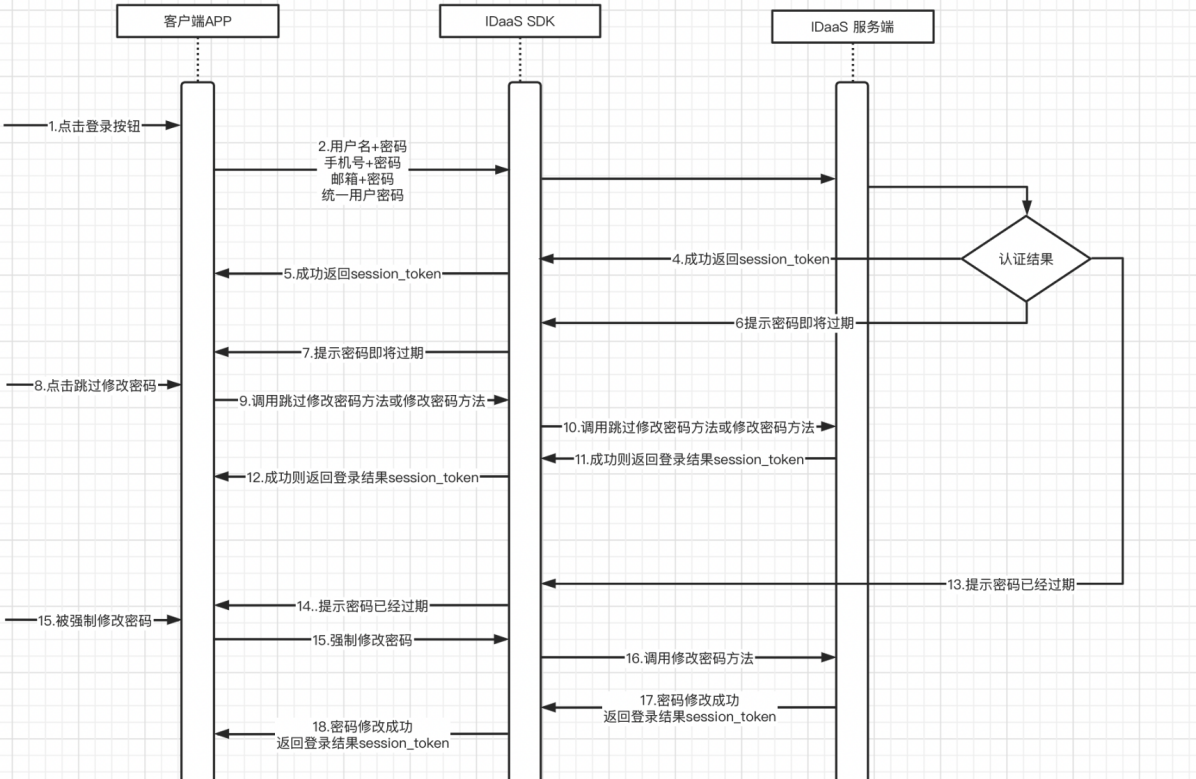
Integration Flow Description
The user enters username + password / mobile number + password / email + password and taps the Login button.
The APP client calls the login method (4 types).
The IDaaS SDK calls the IDaaS server for authentication. The authentication result is one of four types: success, password about to expire, password expired, or failure.
On success, the IDaaS server returns
session_token.The IDaaS SDK returns
session_tokento the APP client.If the password is about to expire, the IDaaS server returns the password-about-to-expire parameter.
The IDaaS SDK returns password-about-to-expire to the APP client.
The user can choose to skip password modification or modify the password directly.
The APP client calls the skip password modification method or the modify password method based on the button tapped.
The IDaaS SDK calls the IDaaS server skip password modification interface or the modify password interface.
The IDaaS server returns
session_tokenif verification succeeds, or an error code if it fails.The IDaaS SDK returns the success or failure parameters to the APP client.
If the password has expired, the IDaaS server returns the force password modification parameter to the IDaaS SDK.
The IDaaS SDK returns the force password modification parameter to the APP client.
The user is forced to modify the password. The APP client calls the modify password method.
The IDaaS SDK calls the IDaaS server modify password interface.
The IDaaS server returns
session_tokento the IDaaS SDK if password modification succeeds, or an error code if it fails.The IDaaS SDK returns
session_tokento the APP client if password modification succeeds, or an error code if it fails.The client can use
id_tokento verify login validity and obtain basic user information.The client can use
session_tokento refreshid_token.
Retrieve Password Flow
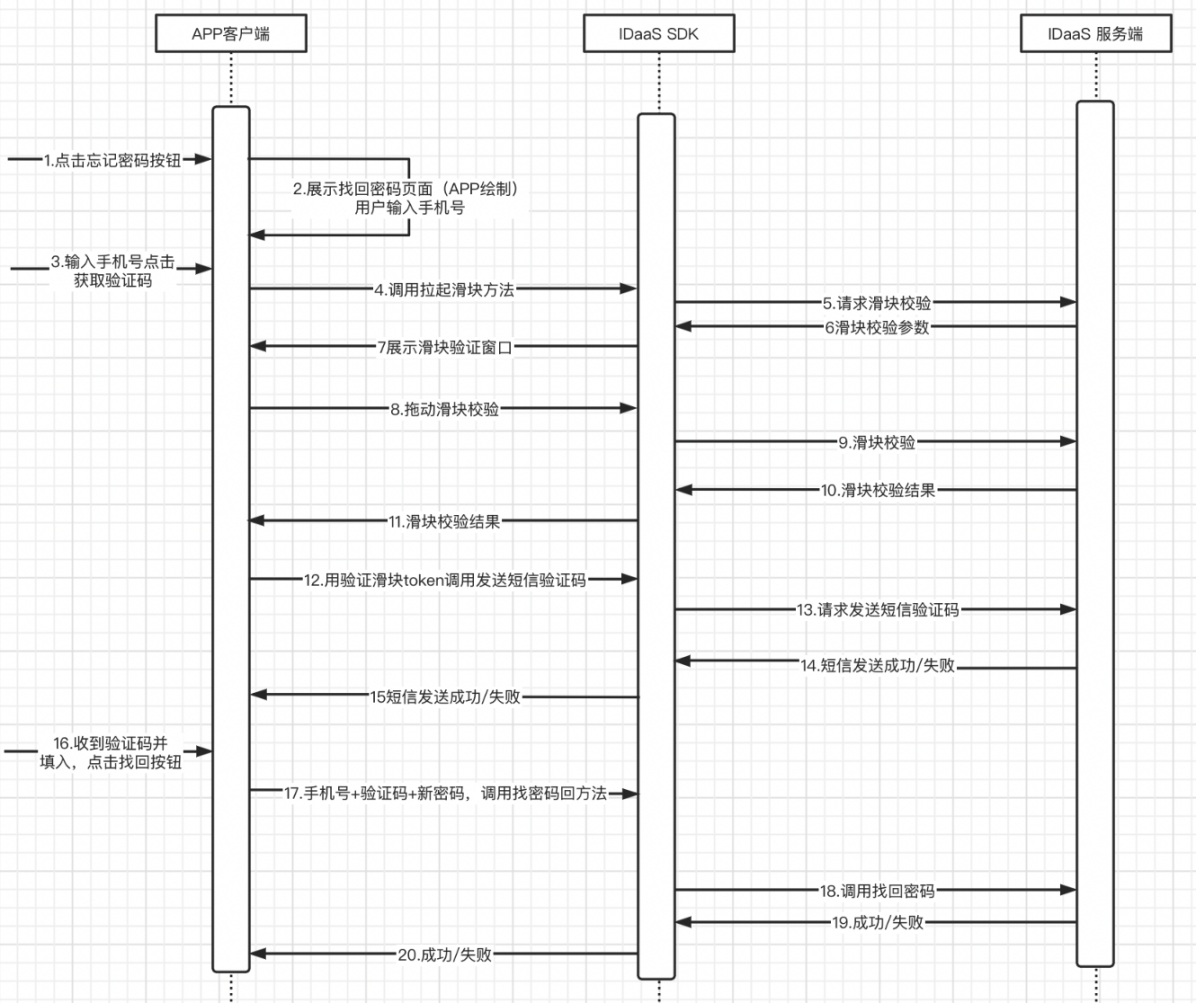
Integration Flow Description
The user taps the Forgot Password button.
The APP client displays the retrieve password page, which must be provided by the APP.
The user enters the mobile number and taps the button to obtain the verification code.
The APP calls the slider verification method.
The IDaaS SDK requests the IDaaS server sliding verification interface.
The IDaaS server returns the sliding verification parameters.
The IDaaS SDK pops up the sliding verification window.
The user drags the slider to verify.
The IDaaS SDK sends the sliding verification to the IDaaS server.
The IDaaS server returns the sliding verification result.
The IDaaS SDK returns the sliding verification result to the APP client.
The APP client calls the IDaaS SDK method to send the SMS verification code using the sliding token.
The IDaaS SDK calls the IDaaS server send verification code interface.
The IDaaS server returns the send verification code result to the IDaaS SDK.
The IDaaS SDK returns the send verification code result to the APP client.
The user receives the SMS verification code and fills it in, and taps the Retrieve Password button.
The APP client calls the IDaaS SDK retrieve password method using mobile number + verification code + new password.
The IDaaS SDK calls the IDaaS server retrieve password interface.
The IDaaS server returns the retrieve password result to the IDaaS SDK.
The IDaaS SDK returns the retrieve password result to the APP client.
Preparation
Obtain clientID
Log in to the IDaaS Enterprise Center, click Resources > Applications, and select the relevant application to view it. 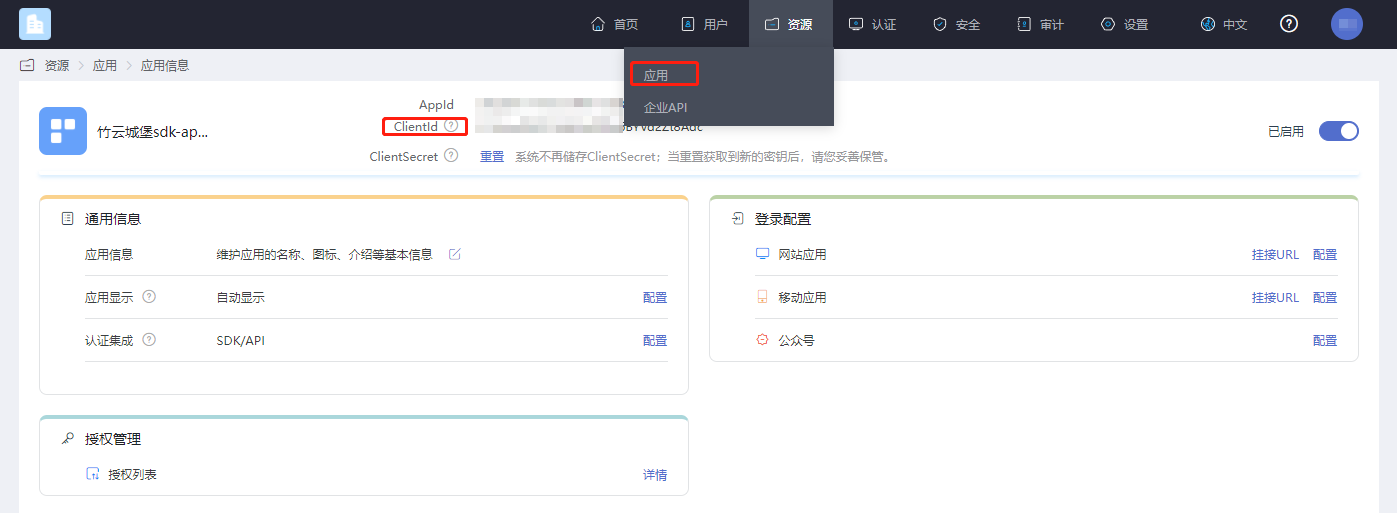
Password Policy Settings
This setting configures the password expiration time and reminder duration.
First, follow the path shown below to the password policy module. 
You can enable password expiration as shown below: 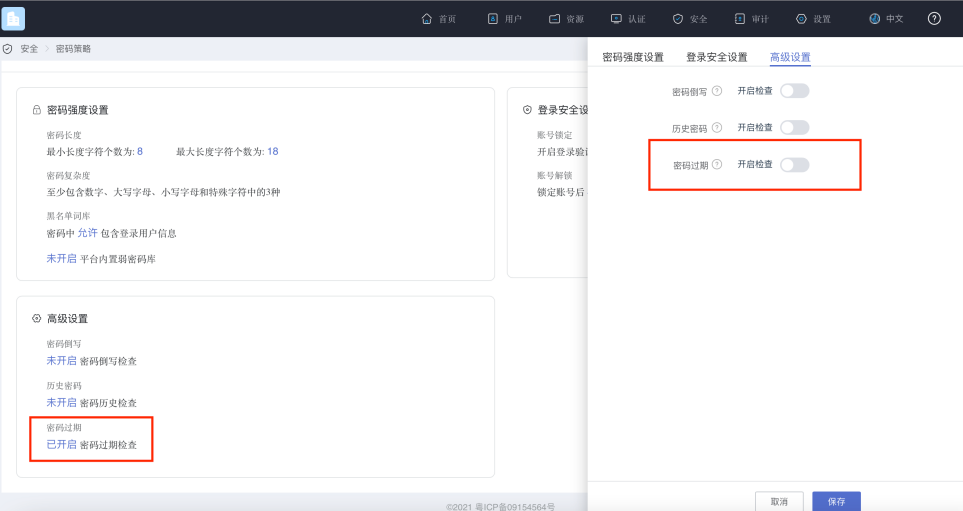
After enabling, you can set how long until the password expires and the number of days in advance to notify, as shown below: 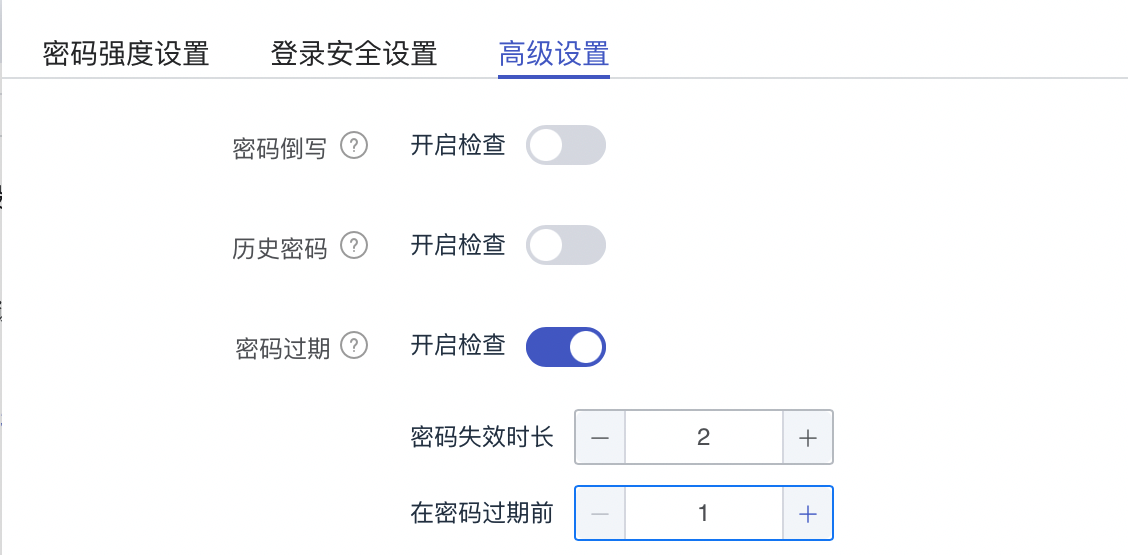
This setting is used so that after login, the IDaaS server detects how long the currently used password needs to be changed and prompts the user to modify it a few days in advance. After password expiration check is enabled, every login will be checked according to the configured parameters.
Import Dependency Packages
AuthnCenter_Common-1.5.3.aar
AuthnCenter_PWLogin-1.5.3.aar
Configure build.gradle
/*begin*/
    /*  rxjava2 +  okhttp + retrofit2  */
    api 'io.reactivex.rxjava2:rxjava:2.2.10'
    api 'io.reactivex.rxjava2:rxandroid:2.1.1'
    api 'com.squareup.retrofit2:retrofit:2.6.0'
    api 'com.squareup.retrofit2:adapter-rxjava2:2.6.0'
    api 'com.squareup.retrofit2:converter-gson:2.6.0'
    api 'com.squareup.okhttp3:okhttp:4.3.1'
    api 'com.squareup.okhttp3:logging-interceptor:3.6.0'
    api 'com.jakewharton.retrofit:retrofit2-rxjava2-adapter:1.0.0'
    api 'com.trello.rxlifecycle2:rxlifecycle-components:2.1.0'
    api 'com.alibaba:fastjson:1.2.61'
     /*end*/

    // Public library, required
    implementation(name: 'AuthnCenter_Common-1.5.3', ext: 'aar')
    // Password login SDK, required
    implementation(name: ''AuthnCenter_PWDLogin-1.5.3', ext: 'aar')
Configure AndroidManifest
 <!--Permissions-->
    <uses-permission android:name="android.permission.INTERNET" />
    <uses-permission android:name="android.permission.WRITE_EXTERNAL_STORAGE" />
    <uses-permission android:name="android.permission.READ_EXTERNAL_STORAGE" />
    <uses-permission android:name="android.permission.CAMERA" />
    <uses-permission android:name="android.permission.RECORD_AUDIO" />
    <uses-permission android:name="android.permission.READ_PHONE_STATE" />
    <uses-permission android:name="android.permission.MOUNT_UNMOUNT_FILESYSTEMS"/>
Development Integration
SDK Initialization
AuthnCenterSDK.Builder()
                .init(this)
                .setBaseUrl("https://xxx.xxx.com")      // Tenant domain
                .setClientId("xxxx") // Tenant console application client-id
                .isCheckSSL(false) // Whether to check SSL certificate
                .logEnable(false).build(); // Whether to enable HTTP request logging. It is recommended to disable it after going live.
API Call Instructions
Get International Mobile Area Code
If international number support is enabled, call the international area code API in advance. The API returns the configured list of international area codes with regular expressions for phone numbers. The figure below shows how to configure the international area code list and preferred area code. 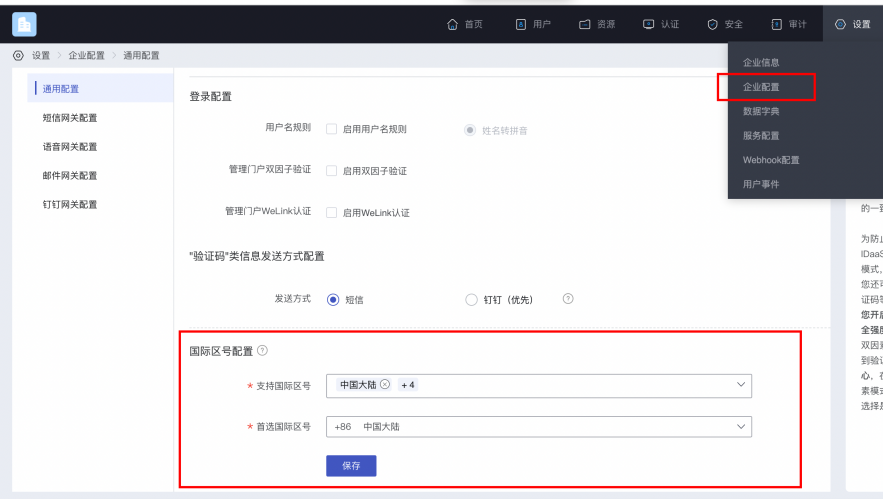
Example code for obtaining the international area code list:
AuthnCenterAPI.Builder().getCountryCode(this, new RequestListener<CountryCodeInfoRsp>() {
    @Override
    public void success(CountryCodeInfoRsp codeInfoRsp) {

    }

    @Override
    public void error(String code, String errorMessage) {
    }
});
Success example code=0, data value:
{
	"phoneAreaCodeDefinitions": [
		{
			"areaCode": "86",
			"displayMapping": {
				"zh-TW": "Mainland China",
				"en": "China",
				"zh-CN": "Mainland China"
			},
			"countryCode": "CN",
			"mobileRegex": "^(\\+86){0,1}\\-?1\\d{10}$",
			"areaCodeSuffixes": []
		},
		{
			"areaCode": "852",
			"displayMapping": {
				"zh-TW": "Hong Kong",
				"en": "Hong Kong",
				"zh-CN": "Hong Kong"
			},
			"countryCode": "HK",
			"mobileRegex": "^(\\+852){1}\\-?0{0,1}[1,4,5,6,7,8,9](?:\\d{7}|\\d{8}|\\d{12})$",
			"areaCodeSuffixes": []
		},
		{
			"areaCode": "886",
			"displayMapping": {
				"zh-TW": "Taiwan",
				"en": "Taiwan",
				"zh-CN": "Taiwan"
			},
			"countryCode": "TW",
			"mobileRegex": "^(\\+886){1}\\-?[6,7,9](?:\\d{7}|\\d{8})$",
			"areaCodeSuffixes": []
		},
		{
			"areaCode": "853",
			"displayMapping": {
				"zh-TW": "Macau",
				"en": "Macau",
				"zh-CN": "Macau"
			},
			"countryCode": "MO",
			"mobileRegex": "^(\\+853){1}\\-?0{0,1}[1,4,5,6,7,8,9](?:\\d{7}|\\d{8}|\\d{12})$",
			"areaCodeSuffixes": []
		},
		{
			"areaCode": "93",
			"displayMapping": {
				"zh-TW": "Afghanistan",
				"en": "Afghanistan",
				"zh-CN": "Afghanistan"
			},
			"countryCode": "AF",
			"mobileRegex": "^(\\+93){1}\\-\\d{6,11}",
			"areaCodeSuffixes": []
		}
	],
	"preferredAreaCode": "CN"
}
Response parameters:
| Parameter Name | Description | Type |
|---|---|---|
| preferredAreaCode | Preferred international area code | String |
| countryCode | Country/region code | String |
| areaCode | International dialing code | String |
| areaCodeSuffixes | International dialing code suffixes | String |
| mobileRegex | Mobile number format regular expression | String |
| displayMapping | Multi-language display name mapping | String |
Built-in Sliding Verification
When sending the verification code, human-machine interaction verification is required:
BlockPuzzleDialog mBlockPuzzleDialog = new BlockPuzzleDialog(mContext);
mBlockPuzzleDialog.setOnResultsListener(new OnResultsListener() {
        @Override
        public void onResultsClick(String result) {
            LogUtil.getInstance().d("Secondary verification callback result mCaptchaToken:" + result);
            // This callback result is the captchaToken parameter for SMS verification
        }
        @Override
        public void onError(String code, String msg) {
            ToastUtils.ShowToast(mContext, String.format("Error code: %s  Error message: %s", code, msg));
        }
    });
Username/Password Login
AuthnCenterPW.Builder().userLoginRequest(this, name, pwd, new PWLoginListener<LoginRsp>() {
    @Override
    public void success(String code, LoginRsp rsp) {
        loginRsp = rsp;
        if (code.equals(SDKCodeType.SDK_SUCCESS.getCode())) {
            ToastUtils.ShowToast(MainActivity.this, "Login succeeded, returned data:" + rsp.getSession_token());
            return;
        }
        onNext(code); // Determine whether password is expired based on return value. Refer to returned CODE: 10006 password expired, 10007 password about to expire. The caller can refer to the DEMO onNext method.
    }
    @Override
    public void error(String code, String t) {
        ToastUtils.ShowToast(MainActivity.this, "Login failed, returned data:" + t);
    }
});
Mobile Number/Password Login
AuthnCenterPW.Builder().userLoginMobilePwd(this, name, pwd, new  PWLoginListener<LoginRsp>() {
    @Override
    public void success(String code, LoginRsp rsp) {
        loginRsp = rsp;
        if (code.equals(SDKCodeType.SDK_SUCCESS.getCode())) {
            ToastUtils.ShowToast(MainActivity.this, "Login succeeded, returned data:" + rsp.getSession_token());
            return;
        }
        onNext(code);
    }
    @Override
    public void error(String code, String t) {
        ToastUtils.ShowToast(MainActivity.this, "Login failed, returned data:" + t);
    }
});
Email/Password Login
AuthnCenterPW.Builder().userLoginEmailPwd(this, name, pwd, new PWLoginListener<LoginRsp>() {

    @Override
    public void success(String code, LoginRsp rsp) {
        loginRsp = rsp;
        if (code.equals(SDKCodeType.SDK_SUCCESS.getCode())) {
            ToastUtils.ShowToast(MainActivity.this, "Login succeeded, returned data:" + rsp.getSession_token());
            return;
        }
        onNext(code);
    }
    @Override
    public void error(String code, String t) {
        ToastUtils.ShowToast(MainActivity.this, "Login failed, returned data:" + t);
    }
});
Unified Username/Password Login
AuthnCenterPW.Builder().userLoginAuthRequest(this, name, pwd, new  PWLoginListener<LoginRsp>() {
    @Override
    public void success(String code, LoginRsp rsp) {
        loginRsp = rsp;
        if (code.equals(SDKCodeType.SDK_SUCCESS.getCode())) {
            ToastUtils.ShowToast(MainActivity.this, "Login succeeded, returned data:" + rsp.getSession_token());
            return;
        }
        onNext(code); // Determine whether password is expired based on return value. Refer to returned CODE: 10006 password expired, 10007 password about to expire.

    }
    @Override
    public void error(String code, String t) {
        ToastUtils.ShowToast(MainActivity.this, "Login failed, returned data:" + t);
    }
});
Skip Password Modification
AuthnCenterPW.Builder().skipPwd(MainActivity.this, loginRsp.getState_token(), new PWLoginListener<LoginRsp>() {
    @Override
    public void success(String code, LoginRsp rsp) {
        loginRsp = rsp;
        ToastUtils.ShowToast(MainActivity.this, "Skip modification succeeded, returned data:" + rsp.getSession_token());
    }
    @Override
    public void error(String code, String t) {
        ToastUtils.ShowToast(MainActivity.this, "Skip modification failed, returned data:" + t);
    }
});
Force Password Modification
UpdatePwdReq up = new UpdatePwdReq();
up.setOld_password(oldPwd);
up.setNew_password(newPwd);
AuthnCenterPW.Builder().updatePwd(MainActivity.this, up, loginRsp.getState_token(), new PWLoginListener<LoginRsp>() {
    @Override
    public void success(String code, LoginRsp rsp) {
        loginRsp = rsp;
        ToastUtils.ShowToast(MainActivity.this, "Force modification succeeded, returned data:" + rsp.getSession_token());
    }
    @Override
    public void error(String code, String t) {
        ToastUtils.ShowToast(MainActivity.this, "Force modification failed, returned data:" + t);
    }
});
SMS Registration
UserInfoReq ur = new UserInfoReq();
ur.setUser_name(et_name.getText().toString().replace(" ", ""));
ur.setPwd(et_new_pwd.getText().toString().replace(" ", ""));
ur.setMobile(moblie);
ur.setVerify_code(verifyCode);
ur.setAttr_birthday(et_new_birthday.getText().toString().replace(" ", ""));
ur.setName("Test One");
ur.setAttr_nick_name("Test Nickname");
ur.setMailing_address("Test Address");
ur.setZip_code("430000");
ur.setAttr_gender(SexType.MALE.getSex()); // Gender enum
ur.setEmail("111@111.com");
ur.setFirst_name("Test First_name");
ur.setLast_name("Test Last_name");
ur.setIndustry("Test Industry");
ur.setHead_img("https://www.baidu.com/img/PCtm_d9c8750bed0b3c7d089fa7d55720d6cf.png");
TestExtensionBean tb = new TestExtensionBean();
tb.setAge(12);
ur.setExtension(tb);
AuthnCenterPW.Builder().userRegister(RegisterActivity.this, ur, new PWLoginListener<LoginRsp>() {
    @Override
    public void success(String code, LoginRsp rsp) {
        if (code.equals(SDKCodeType.SDK_SUCCESS.getCode()))
            ToastUtils.ShowToast(RegisterActivity.this, "Registration succeeded: " + rsp.getSession_token());
    }
    @Override
    public void error(String code, String t) {
        ToastUtils.ShowToast(RegisterActivity.this, "Registration failed: " + t);
    }
});
Explanation of fields related to the UserInfoReq SMS registration entity.
| Parameter Name | Description | Required | Type | Details |
|---|---|---|---|---|
| user_name | Username | No | String | |
| name | Name | No | String | |
| mobile | Mobile number | Yes | String | |
| verify_code | SMS verification code | Yes | String | |
| No | String | |||
| pwd | Password | No | String | |
| head_img | Avatar (URL) | No | String | |
| attr_gender | Gender | No | String | Optional values: female, male, unknow: keep secret |
| attr_birthday | Birthday | No | String | Format: yyyy-MM-dd |
| attr_nick_name | Nickname | No | String | |
| mailing_address | Mailing address | No | String | |
| zip_code | Zip code | No | String | |
| first_name | First name | No | String | |
| middle_name | Middle name | No | String | |
| last_name | Last name | No | String | |
| industry | Industry | No | String | |
| extension | Extension attribute | No | JSONObject | Extended attributes need to be defined in the enterprise |
Error Codes
| HTTP Status | Error Code (error_code) | Error Message (error_msg) | Solution |
|---|---|---|---|
| 400 | IDAAS.SDK.COMMON.1001 | Parameter {0} cannot be left blank | |
| 400 | IDAAS.SDK.COMMON.1002 | The {0} parameter format is incorrect | |
| 400 | IDAAS.SDK.COMMON.1003 | Device information is incomplete | |
| 400 | IDAAS.SDK.COMMON.1004 | Signature decryption error | |
| 400 | IDAAS.SDK.COMMON.1005 | The {0} has failed | |
| 400 | IDAAS.SDK.COMMON.1006 | The {0} parameter error | |
| 400 | IDAAS.SDK.COMMON.1007 | The {0} parameter type error | |
| 500 | IDAAS.SDK.COMMON.1008 | The system is busy. Try again later | |
| 400 | IDAAS.SDK.COMMON.1009 | Unknown authentication configuration | |
| 400 | IDAAS.SDK.COMMON.1010 | Failed to obtain the enterprise center global configuration | |
| 400 | IDAAS.SDK.COMMON.1011 | Failed to obtain the international area code configuration | |
| 400 | IDAAS.SDK.COMMON.1012 | The x-client-ID is incorrect and the corresponding application cannot be found | |
| 400 | IDAAS.SDK.COMMON.1013 | The corresponding user is not found | |
| 400 | IDAAS.SDK.COMMON.1014 | Application private key not found | |
| 400 | IDAAS.SDK.LOGIN.1001 | Error calling interface | |
| 400 | IDAAS.SDK.LOGIN.1002 | User not bound | |
| 400 | IDAAS.SDK.LOGIN.1003 | The user has been locked due to too many unsuccessful login attempts. It will be unlocked in {0} minutes and {1} seconds | |
| 400 | IDAAS.SDK.LOGIN.1004 | Failed to obtain the password policy | |
| 400 | IDAAS.SDK.LOGIN.1005 | Invalid username or password. Remaining login attempts: | |
| 400 | IDAAS.SDK.LOGIN.1006 | Configuration error, unable to find wechat authentication source | |
| 400 | IDAAS.SDK.LOGIN.1007 | Configuration error, unable to find alipay authentication source | |
| 400 | IDAAS.SDK.LOGIN.1008 | The configuration is incorrect. The one-click login authentication source cannot be found | |
| 400 | IDAAS.SDK.SMS.1001 | {0} slide base map is not initialized successfully, please check the path | |
| 400 | IDAAS.SDK.SMS.1002 | {0} verification code coordinate resolution failed | |
| 400 | IDAAS.SDK.SMS.1003 | {0} verification code coordinate verification fails | |
| 400 | IDAAS.SDK.SMS.1004 | The graphic verification code is incorrect | |
| 400 | IDAAS.SDK.SMS.1005 | SMS verification code verification is incorrect | |
| 400 | IDAAS.SDK.SMS.1006 | The email verification code is incorrect | |
| 400 | IDAAS.SDK.SMS.1007 | Sending scenario does not exist | |
| 400 | IDAAS.SDK.SMS.1008 | Failed to send the verification code | |
| 400 | IDAAS.SDK.SOCIAL.1001 | The social account is unbound incorrectly | |
| 400 | IDAAS.SDK.SOCIAL.1002 | The social account has been bound, please unbind it first | |
| 400 | IDAAS.SDK.PWD.1001 | The password length is incorrect | |
| 400 | IDAAS.SDK.PWD.1002 | The password cannot be the username | |
| 400 | IDAAS.SDK.PWD.1003 | Your password complexity is low | |
| 400 | IDAAS.SDK.PWD.1004 | The password is weak | |
| 400 | IDAAS.SDK.PWD.1005 | The password is used before, cannot be used again | |
| 400 | IDAAS.SDK.PWD.1006 | Password cannot username in reverse order | |
| 400 | IDAAS.SDK.PWD.1007 | The number of repeated password characters exceeded the upper limit | |
| 400 | IDAAS.SDK.PWD.1008 | Password cannot contain :username, phone number, email prefix, name in PinYing | |
| 400 | IDAAS.SDK.MFA.1001 | The mobile doesn't match the user | |
| 400 | IDAAS.SDK.MFA.1002 | The access control policy is incorrect | |
| 400 | IDAAS.SDK.MFA.1003 | Access control authentication source type conversion error |