
OTP Authentication
Document Description
This document describes how the iOS client can integrate OTP authentication. The OTP feature allows users to obtain a dynamic password on a mobile APP after activating it in the user center, ensuring account security.
In an OTP scenario, the user logs in to the user center, goes to Account Settings > Account Security > OTP Settings, and activates the dynamic password according to the page prompts. At the next login that requires OTP secondary authentication, the OTP-related SDK can be used to quickly generate the dynamic password.
Flow Description
Integration Flow Description
The App client builds the scan page, scans the string, passes it to the IDaaS SDK to add, and returns to the OTP list after successful addition.
The App client builds the OTP password list and uses the IDaaS SDK to obtain the currently added OTP password list.
In the OTP list, the App client queries the current dynamic password of a single OTP from the IDaaS SDK every 30 seconds or 1 minute, and then refreshes the single OTP password in the list.
In the OTP list, the App client builds the delete animation for a single OTP password. In the response event, call the IDaaS SDK method to delete the single OTP password and refresh the UI.
Preparation
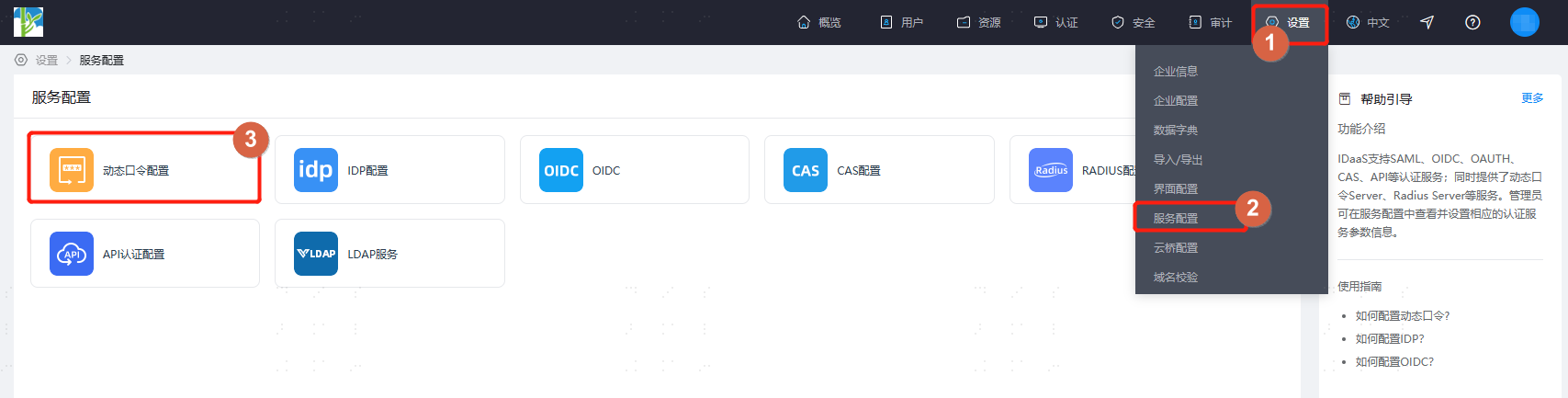
Log in to the IDaaS Enterprise Center, click Settings > Service Configuration > OTP Configuration, and configure the password encryption algorithm, digits, and time interval. Currently the SDK supports HMACSHA1, HMACSHA256H, and MACSHA512.
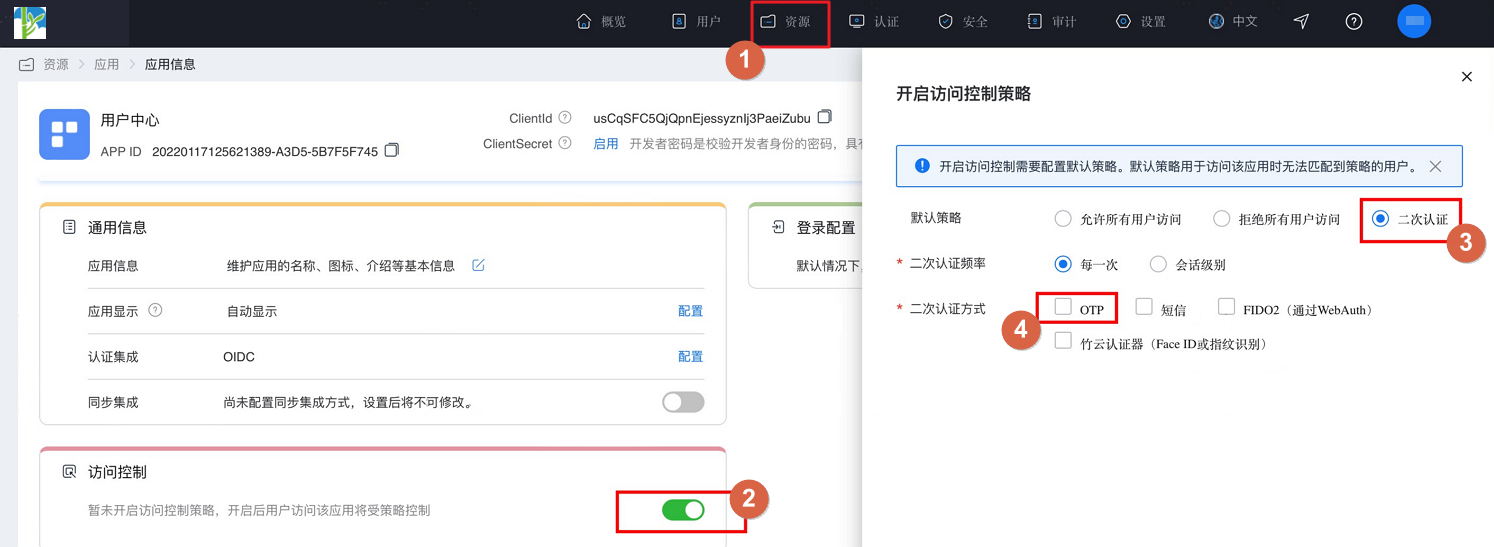
After configuration, click Resources > Applications, find the enterprise application and enter the application panel, turn on the Access Control switch. In the pop-up settings page, select secondary authentication and check OTP as the secondary authentication method.
Import Dependency Packages
Introduce in Pod.
pod 'SwiftBase32', '~> 0.9.0'Add Main Library
AuthnCenter_MFA_OTP_2E.frameworkDrag the IDaaS SDK into the project. The import method is as follows:
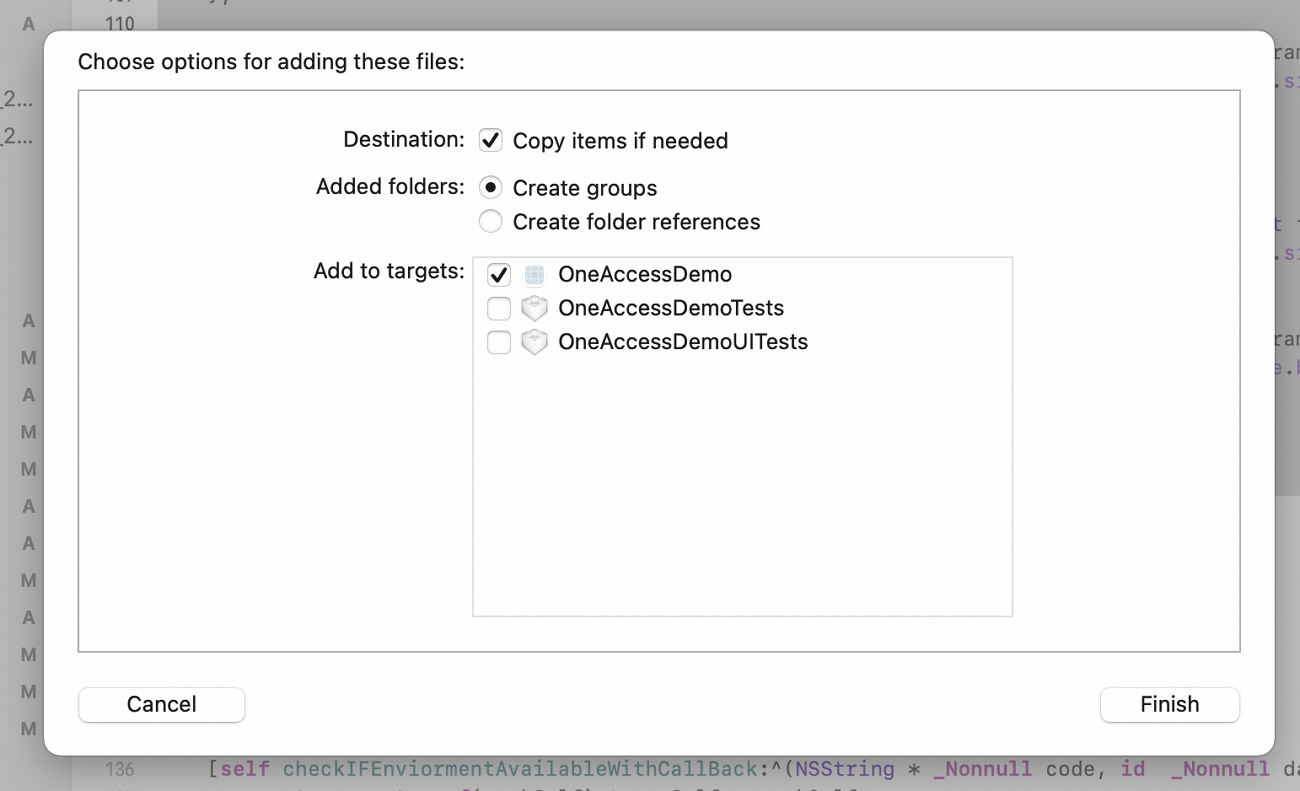
Target Settings
The IDaaS OTP SDK is compatible with iOS 10 and above.
Include the following in the project's Frameworks, Libraries, and Embedded Content.
Security.framework
Foundation.framework
LocalAuthentication.framework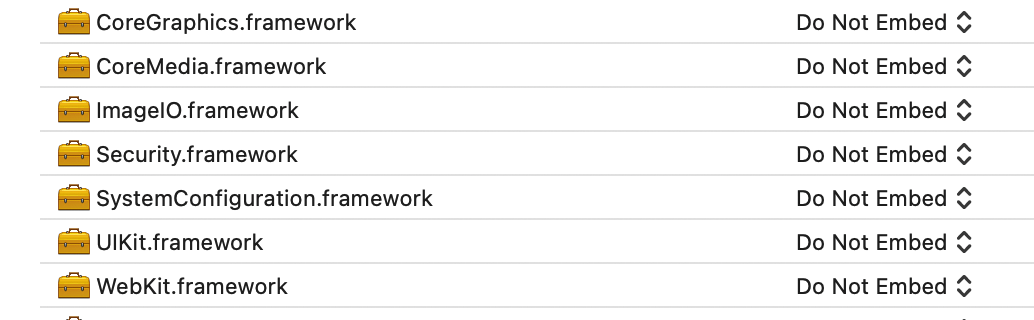
Set Defines Module to YES in Build Settings.
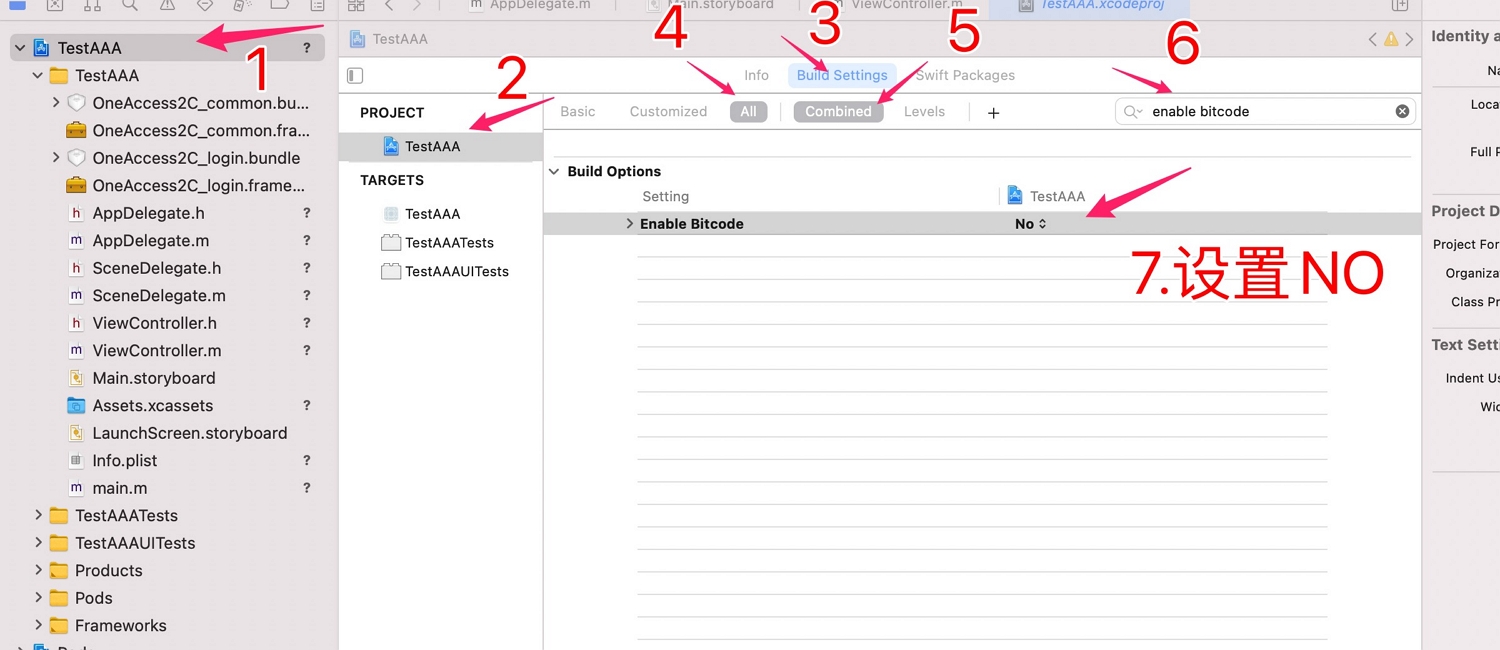
Set bitcode to NO, as shown below.
Development Integration
SDK API Introduction
The IDaaS SDK does not provide any UI. The SDK manages the OTP list, which is stored in the keychain through the SDK. Deleting the APP will not delete the data, but you can call the following delete method to delete items one by one to clear the list. The list can be added, deleted, and queried through the following methods:
Scan QR code to add OTP.
Add OTP by manually entering parameters.
Query all OTP passwords in the list.
Query a single OTP password.
Delete a single OTP password.
Add OTP by Scanning QR Code
The string obtained by the App client after scanning the QR code is passed to the add method. A boolean value is returned upon successful addition.
Call example:
 #import <AuthnCenter_MFA_OTP_2E/BCOTPManager.h>


 BOOL flag=  [BCOTPManager addWithUrl:urlStr];
    if(flag){// Added successfully, navigate back
        [self.navigationController popViewControllerAnimated:YES];
    }else{// Add failed
        [self showAlertWithTitle:@"Failed to add OTP" message:nil sureHandler:nil cancelHandler:nil];

    }
The input parameter urlStr follows the string format:
otpauth://totp/sdk2e:zhangrui1?secret=jw776a3sjogusngvr2u7w57yjoazzo7u6ij2q6uj6r5p3p5anvkdfv2bsvxthncfqjjigedfp35lb6m3trz2zcezlkt736njzxkvy4q%3D&issuer=sdk2e&period=30&digits=6&algorithm=HmacSHA512&logo=null
Note: In the example, sdk2e is the application name and zhangrui1 is the username.
Add OTP by Manually Entering Parameters
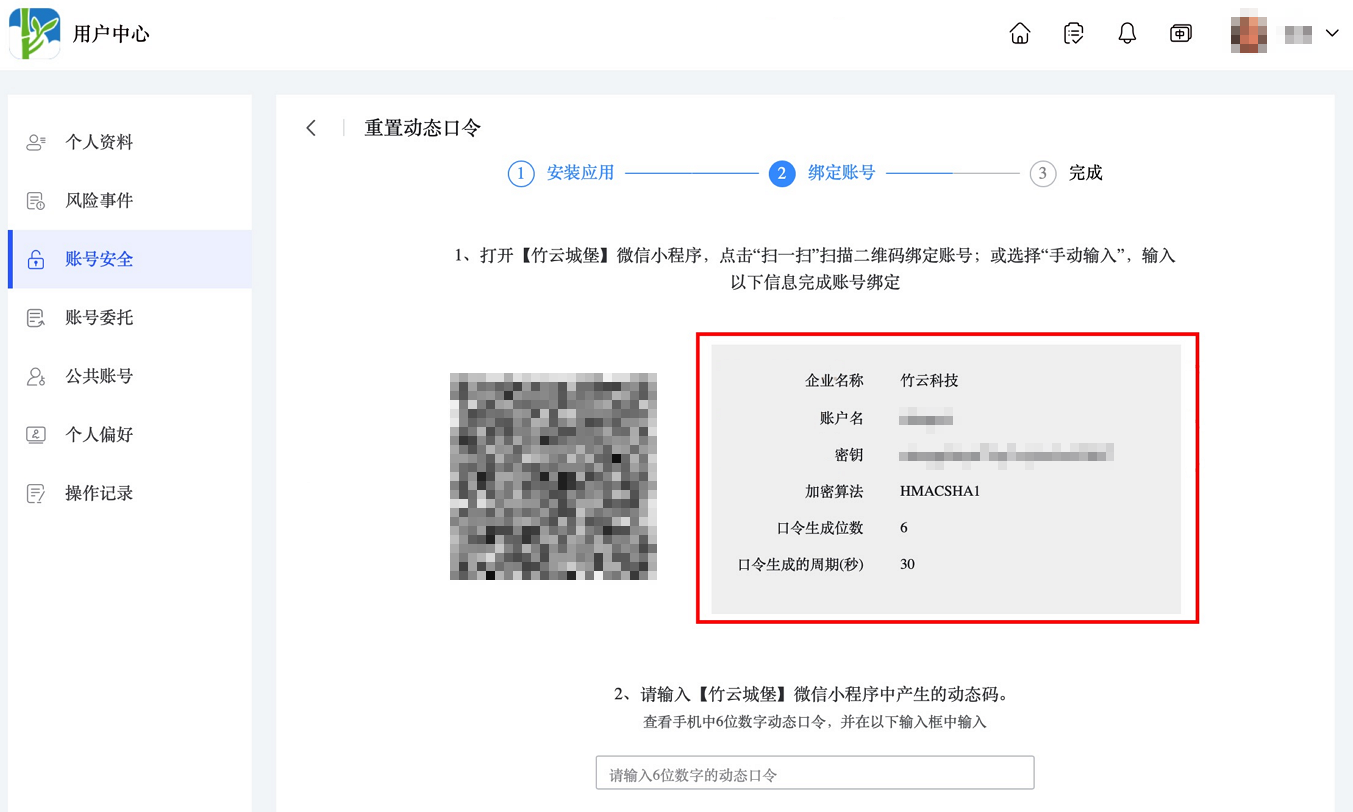
When QR code scanning is unavailable, users can also add OTP by manually entering parameters. The user center settings page also provides various parameters for manual addition, which can be used to add OTP.
Call example:
 #import <AuthnCenter_MFA_OTP_2E/BCOTPManager.h>

[BCOTPManager addManuallyWithAlgorithm:@"HMACSHA512" andWithSecrete:@"22gua6dxykmffoqw5nhnercsckgg3oqhpge2k74xgujgjvmq7ljymwyoazmy6rvj5j4aor5r37dg7honzkxdzgblcsdtmztgo5qtyva=" andWithDigit:6 andWithPeriod:30 andWithIssuer:@"sdk2e" andWithUserName:@"zhangrui1"];
Object method overview:
/**
algorithm: NSString algorithm, e.g.: HMACSHA1, HMACSHA256H, MACSHA512
secrete:  NSString secret, e.g.: 22gua6dxykmffoqw5nhnercsckgg3oqhpge2k74xgujgjvmq7ljymwyoazmy6rvj5j4aor5r37dg7honzkxdzgblcsdtmztgo5qtyva=
digit: int number of digits
period: int refresh interval
issuer: NSString application name
userName: NSString username
Returns boolean: YES if added successfully, NO if failed
**/
+(BOOL)addManuallyWithAlgorithm:(NSString*)algorithm andWithSecrete:(NSString*)secrete andWithDigit:(int)digit andWithPeriod:(int)period andWithIssuer:(NSString*)issuer andWithUserName:(NSString*)userName;
Query All OTP Passwords
Calling this method returns all OTPs.
Example code:
 [BCOTPManager showAllOTPsWithCallBack:^(NSMutableArray* data) {


    }];
Object overview:
/**
BCOTPShowAllSuccessBlock callback: NSArray

**/
+(void)showAllOTPsWithCallBack:(BCOTPShowAllSuccessBlock)callBack;
Callback format:
NSArray contains:
Each OTP is of NSArray type. Each OTP contains two NSDictionary objects: one for the current password and one for the password in the next 30 seconds.


(
        (// First OTP
                {// Current password of the first OTP
            fromDate = "2023-01-09 09:09:30 +0000";// NSDate type, in UTC; add 8 hours if printing
            issuer = "BambooCloud Technology";// NSString application name
            toDate = "2023-01-09 09:10:00 +0000";// NSDate type, in UTC; add 8 hours if printing
            userName = zhangrui;// NSString username
            value = 148910;// NSString dynamic password
        },
                {// Next password of the first OTP
            fromDate = "2023-01-09 09:10:00 +0000";
            issuer = "BambooCloud Technology";
            toDate = "2023-01-09 09:10:30 +0000";
            userName = zhangrui;
            value = 743713;
        }
    ),
        (// Second OTP
                {// Current password of the second OTP
            fromDate = "2023-01-09 09:09:30 +0000";
            issuer = sdk2e;
            toDate = "2023-01-09 09:10:00 +0000";
            userName = zhangrui1;
            value = 662180;
        },
                {// Next password of the second OTP
            fromDate = "2023-01-09 09:10:00 +0000";
            issuer = sdk2e;
            toDate = "2023-01-09 09:10:30 +0000";
            userName = zhangrui1;
            value = 180877;
        }
    )
)
Query a Single OTP Password
Pass in the index to get a single OTP dynamic password.
Call example:
#import <AuthnCenter_MFA_OTP_2E/BCOTPManager.h>

[BCOTPManager loadOtpWithIndex:rowIndex andWithCallBack:^(NSArray* data){
                    dispatch_async(dispatch_get_main_queue(), ^{

                        [_codeArrary replaceObjectAtIndex:rowIndex withObject:data];


                        [_tableView reloadData];
                    });
                }];
Object overview:
/**
Input: index of int type, the index of the OTP in the current list
BCOTPLoadSuccessBlock callback returns NSArray type
**/

+(void)loadOtpWithIndex:(int)index andWithCallBack:(BCOTPLoadSuccessBlock)callBack;
Callback description:
Returns a single OTP containing an NSArray with two NSDictionary objects: one for the current OTP password and one for the OTP password in the next 30 seconds.


        (
                {
            fromDate = "2023-01-09 09:43:30 +0000";// NSDate type, in UTC; add 8 hours if printing
            issuer = "BambooCloud Technology";//
            toDate = "2023-01-09 09:44:00 +0000";// NSDate type, in UTC; add 8 hours if printing
            userName = zhangrui;// NSString username
            value = 942819;// Dynamic password
        },
                {
            fromDate = "2023-01-09 09:44:00 +0000";
            issuer = "BambooCloud Technology";
            toDate = "2023-01-09 09:44:30 +0000";
            userName = zhangrui;
            value = 868491;
        }
    )
Delete a Single OTP Password
A single OTP can be deleted by index.
Call example:
 BOOL flag= [BCOTPManager deleteOtpWithIndex:indexPath.row];

// Returns a boolean, YES if deleted successfully, NO if failed.