
Configure Kerberos Authentication Login
This guide explains the integration configuration process for Kerberos protocol authentication login. After configuring the Kerberos authentication source integration in the IDaaS platform, refer to this module to configure Kerberos authentication login. When accessing the application system, users are redirected from IDaaS to the third-party identity provider to complete identity authentication.
Prerequisites
- An AD domain server has been created, and the IDaaS public cloud service can access the AD service.
- Administrator permissions for the IDaaS Enterprise Center.
- The application has been integrated into the IDaaS platform.
- The Kerberos authentication source has been configured in the IDaaS platform.
Configuration Flow

Procedure
Configure Kerberos Authentication for Application
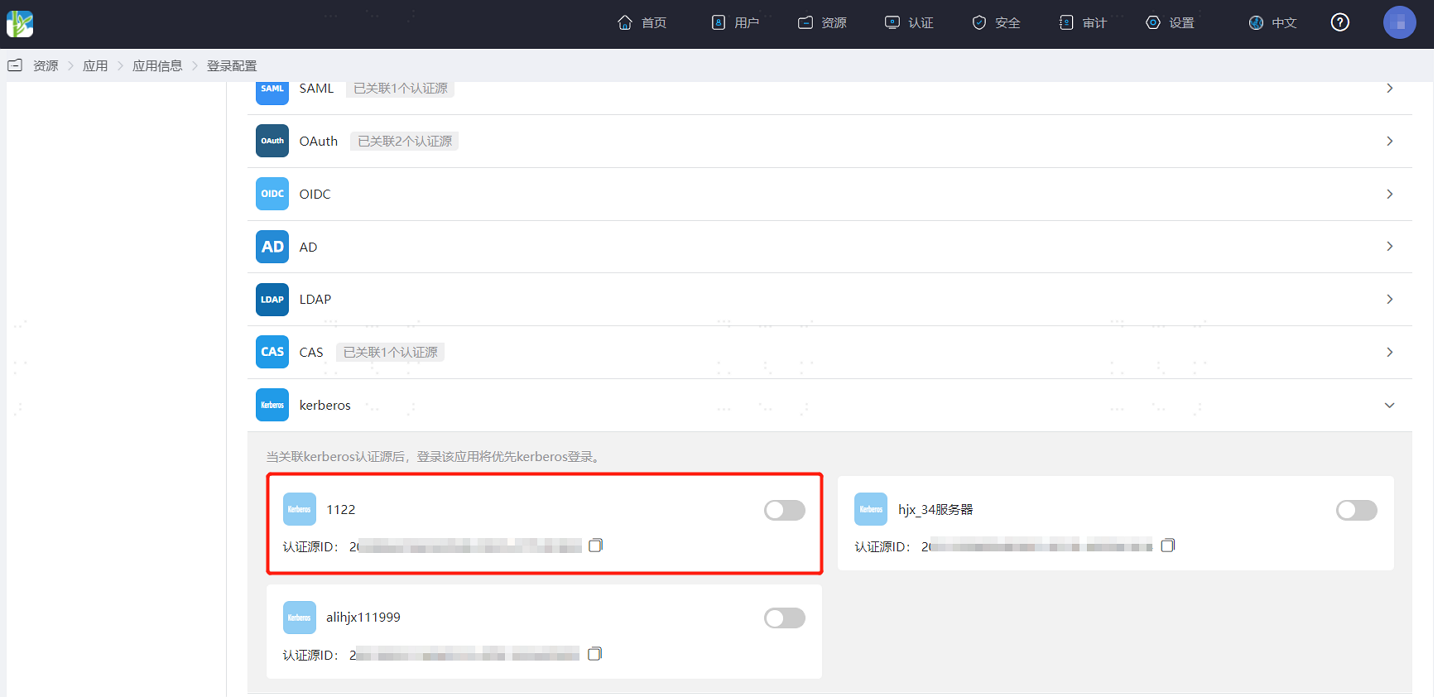
Log in to the IDaaS Enterprise Center, choose Resources > Apps from the top navigation bar. This guide uses the User Center app as an example. Select User Center, switch to the Login Configuration tab, select Kerberos from the dropdown, and enable the previously added Kerberos authentication source.
Verify Kerberos Authentication Login
After the enterprise user's device has joined the AD domain, the user can directly log in to the User Center in the browser without a password after logging in to the device via the AD domain.
TIP
- If the application has enabled multiple authentication methods, Kerberos authentication is triggered first. When Kerberos authentication fails, the User Center login interface appears, and the user can select other login methods.
- If the application has enabled secondary authentication, the user must also pass secondary authentication to access the application.