
vLDAP Authentication
IDaaS supports providing the platform's user organization data to third-party customers through the LDAP protocol, mapping it into an LDAP directory for external systems to authenticate against IDaaS's VLdap and log in to external systems using IDaaS user authentication information. For relevant LDAP protocol concepts, please search and review them yourself.
Prerequisites
You have administrator permissions for the IDaaS enterprise center platform.
Procedure
Log in to the IDaaS enterprise center platform. In the top navigation bar, select "Settings > Service Configuration", and choose "LDAP Service". The platform pre-configures the LDAP service and automatically fills in relevant parameters. Administrators only need to configure a few parameters as follows:
Enable: turn on the LDAP service switch.
Administrator Password: enter the LDAP administrator password.
User Login: configure the LDAP user login authentication method, including password, OTP, and password + OTP authentication.
RDN Attribute: configure the LDAP user RDN attribute name as uid or cn.
RDN Attribute Value: the user attribute mapped to the LDAP user RDN attribute value; you can select id or userName.
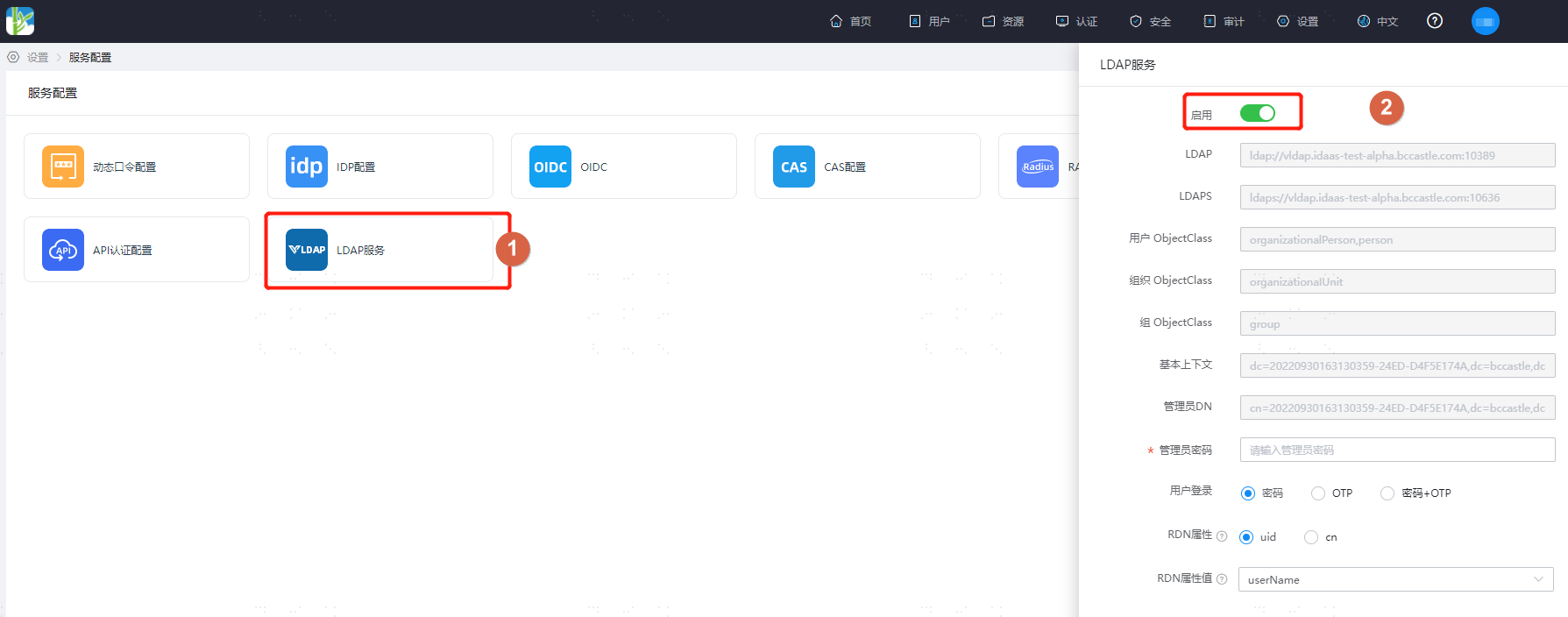
After configuration, click Save. Connect to VLdap using ldapadmin or Apache Directory Studio tools. The key connection parameters for VLdap are usually as follows:
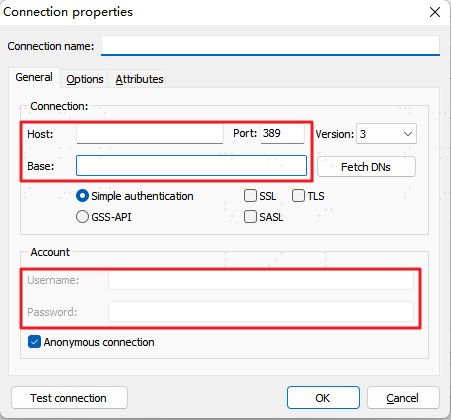
- Host: fill in the LDAP address in the LDAP Service under "Settings > Service Configuration" of the IDaaS enterprise center platform. If encrypted transmission is required, it is recommended to fill in the LDAPS address.
- Port: fill in the port number after the LDAP address in the LDAP Service under "Settings > Service Configuration" of the IDaaS enterprise center platform.
- Base: fill in the base context in the LDAP Service under "Settings > Service Configuration" of the IDaaS enterprise center platform.
- Username: fill in the administrator DN in the LDAP Service under "Settings > Service Configuration" of the IDaaS enterprise center platform.
- Password: fill in the administrator password set in the LDAP Service under "Settings > Service Configuration" of the IDaaS enterprise center platform.
Subsequently, users can log in to external applications connected to VLdap using the login method configured in the IDaaS platform LDAP service parameters.