
Dynamic Script Attribute Mapping
IDaaS supports mapping definitions between platform attributes and application system attributes. This chapter guides you through using JavaScript dynamic scripts as the mapping type for mapping configuration. When writing dynamic scripts, use script code to generate attribute values and set display conditions for the attribute.
Prerequisites
You have administrator permissions for the IDaaS enterprise center platform.
Script Code Rules
Java Class Usage Is Prohibited
For example, the following code is not allowed:
var File = Java.type('java.io.File'); File;The following exception will be thrown:
java.lang.ClassNotFoundException: java.io.FileCPU Time Limit
The default execution time limit is 1 second. If exceeded, an exception will be thrown.
For example, the following code is not allowed:
do{}while(true);The following exception will be thrown:
ScriptCPUAbuseExceptionMemory Usage Limit
The default memory size limit is 10 MB. If exceeded, an exception will be thrown.
For example, the following code is not allowed:
var o={},i=0; while (true) {o[i++] = 'abc'}The following exception will be thrown:
ScriptMemoryAbuseExceptionScript Format Restriction
To facilitate script rewriting, if, while, and for statements in scripts must use braces; otherwise, a format error will occur.
For example, the following code is not allowed:
var o={},i=0; while (true) o[i++] = 'abc';The following exception will be thrown:
BracesExceptionRestricted Functions
The following functions are not allowed in the code. If they appear, they will have no effect.
print
echo
quit
exit
readFully
readLine
load
loadWithNewGlobal
Script Objects
Mapping scripts include the following objects: user (user), organization (organization), enterprise (enterprise), and account (application account).
user Object
The user object stores the attributes of the current user, including built-in attributes and custom attributes defined in attribute configuration.
| Attribute Name | Value Type | Description |
|---|---|---|
| id | string | User ID |
| organizationId | string | Organization ID |
| userName | string | Username |
| name | string | Name |
| firstName | string | First name |
| middleName | string | Middle name |
| lastName | string | Last name |
| string | ||
| mobile | string | Mobile number |
| disabled | boolean | Disabled |
| guid | string | User GUID |
| employeeid | string | Employee ID |
| attrGender | string | Gender |
| attrBirthday | Timestamp | Birthday |
| attrNickName | string | Nickname |
| attrIdentityType | string | Identity type |
| attrIdentityNumber | string | ID card number |
| attrArea | string | Region |
| attrCity | string | City |
| attrManagerId | string | Manager ID |
| attrUserType | string | User type |
| attrHireDate | Timestamp | Hire date |
| attrWorkPlace | string | Work address |
| externalId | string | External system ID |
| employeeRelation | string | Employment relationship |
| deactivationDate | Timestamp | Deactivation date |
| disabledMode | string | Disabled mode |
| Other custom attributes | string |
organization Object
The organization object stores organization information.
| Attribute Name | Value Type | Description |
|---|---|---|
| id | string | Organization ID |
| code | string | Code |
| name | string | Name |
| categoryId | string | Organization category ID |
| parentId | string | Parent organization ID |
| disabled | boolean | Disabled |
| displayPath | string | Organization path |
| leaderId | string | Organization leader ID |
enterprise Object
The enterprise object stores basic enterprise information.
| Attribute Name | Value Type | Description |
|---|---|---|
| id | string | Enterprise ID |
| tenantId | string | Remote enterprise ID |
| domain | string | Enterprise domain |
| name | string | Enterprise name |
| logo | string | Enterprise logo |
account Object
The account object stores the attributes of the current account, including built-in attributes and custom attributes defined in the application account model.
| Attribute Name | Value Type | Description |
|---|---|---|
| id | string | Account ID |
| username | string | Account name |
| name | string | Account name |
| attrManagerId | string | Direct manager |
| organizationId | string | Application organization ID |
| disabled | boolean | Disabled |
| remoteId | string | Remote ID |
| roles | list | Role list |
| Other custom attributes | string |
TIP
When using script objects, you can directly obtain values in the format <u>[Object].[AttributeName]</u>.
For example: user.name, organization.code, account.username, enterprise.domain. This method also applies to extended attributes. For example, if a user has an extended attribute hobby, you can use user.hobby to obtain the hobby value.
Operation Steps
TIP
This section uses the authentication mapping configuration of an OIDC protocol application as an example. Other attribute mapping configurations can refer to the following method.
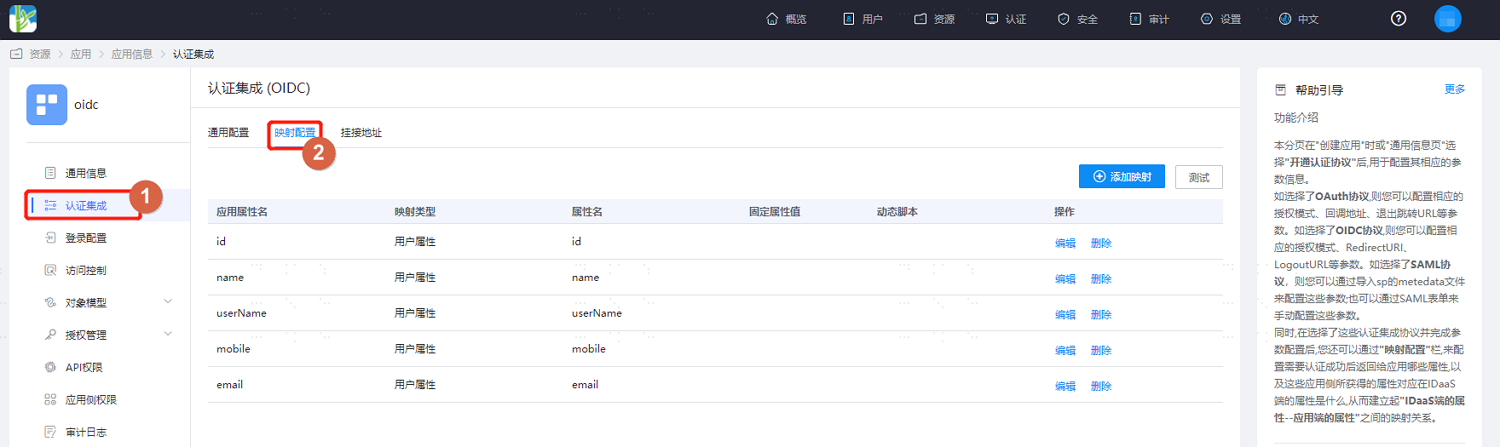
Log in to the IDaaS enterprise center platform, select Resources > Applications in the top navigation bar, and choose an application.
Enter the application details page and select Authentication Integration > Mapping Configuration.
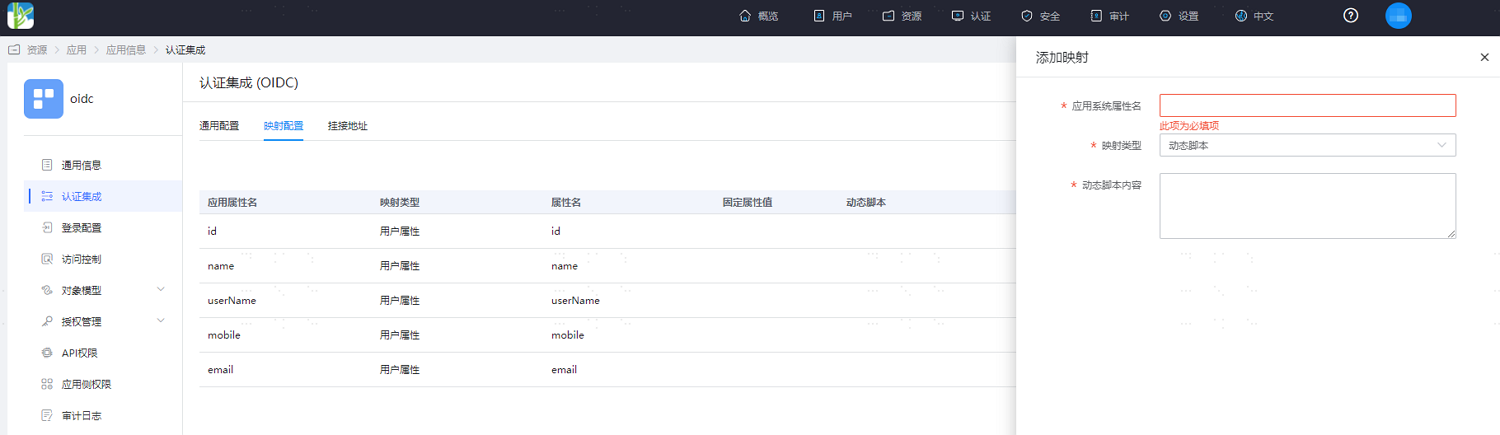
Click Add Mapping and configure the parameters as follows:
Application System Attribute Name: Customize the application system attribute name.
Mapping Type: Select Dynamic Script.
Dynamic Script Content: JavaScript script.
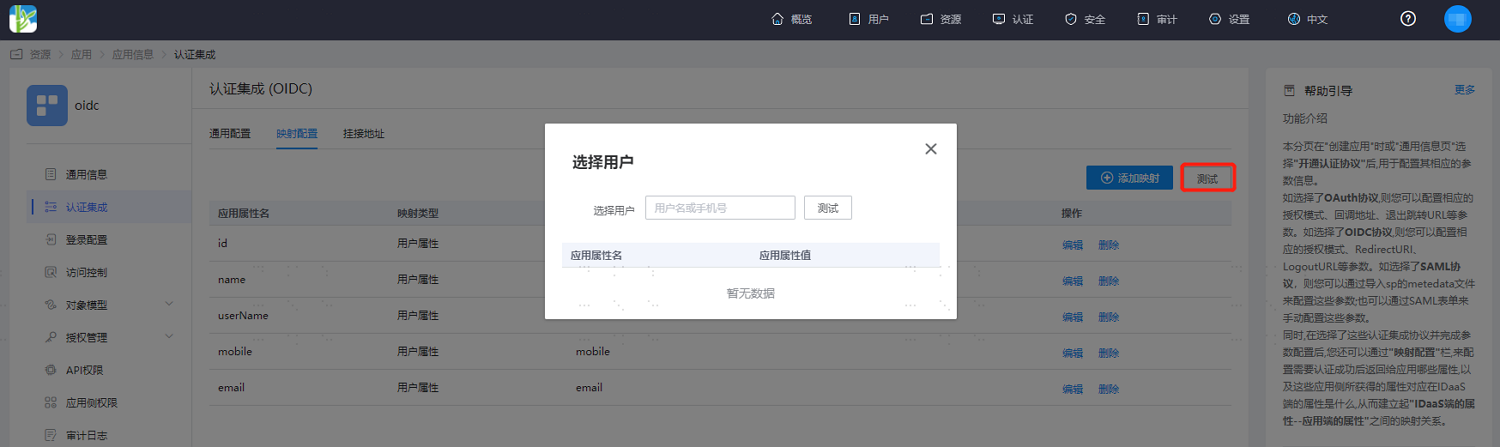
After configuration, save and click the Test button to select a test user.
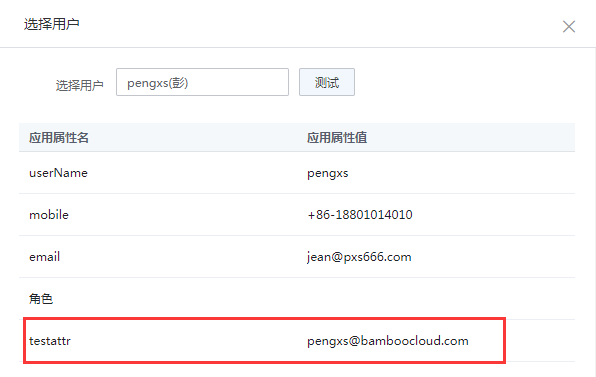
Click Test to display the value corresponding to the attribute. (The example script generates an email address by concatenating the username with an email suffix.)
Script Examples
The following are simple script examples for reference during actual configuration.
Example 1. Current Time of Tomorrow
var date =new Date();
date.setDate(date.getDate()+1);
date.toISOString();
Example 2. User Extended Attribute
First, add hobby as an extended attribute in the user's attribute definition.
user.hobby;Example 3. User Mobile Number with Middle 4 Digits Hidden
var mobile = user.mobile;
var result = "";
if(mobile.length==11){
    result = mobile.slice(0,3)+"****"+mobile.slice(-4);
}
result;
Example 4. Generate User Email Based on Username
var username = user.userName;
username.toLowerCase()+"@bamboocloud.com";