
Configure One-Click Login with Local Phone Number
To facilitate enterprise user authentication login, IDaaS currently supports configuring one-click login with the local phone number through Alibaba Cloud Number Authentication Service. Alibaba Cloud integrates the one-click login SDKs of the three major operators, providing unified mobile application interfaces. Mobile APP users only need to authorize with one click to register/log in with their local phone number, achieving quick login to various applications. This feature is currently only supported in 2C scenarios.
Prerequisites
- An Alibaba Cloud account with real-name authentication.
- Alibaba Cloud Number Authentication Service has been activated.
- Administrator permissions for the IDaaS Enterprise Center.
- The application has been integrated into the IDaaS platform.
Configuration Flow

Procedure
Number Authentication Service Platform Configuration
Refer to the Number Authentication Service One-Click Login and Local Number Verification Process to activate the number authentication service and add authentication schemes. Different operating systems require different authentication schemes.
TIP
After the authentication scheme configuration is complete, a key will be obtained. Please save it locally. It will be used when initializing the SDK using the IDaaS SDK.
Refer to Create AccessKey to create an AccessKey for a RAM user, used for configuring the one-click login authentication source parameters below.
Configure One-Click Login with Local Phone Number Authentication Source in IDaaS
Log in to the IDaaS Enterprise Center, choose Authentication > Authentication Source Management from the top navigation bar, enter the one-click login with local phone number authentication source page, and click Add Authentication Source.
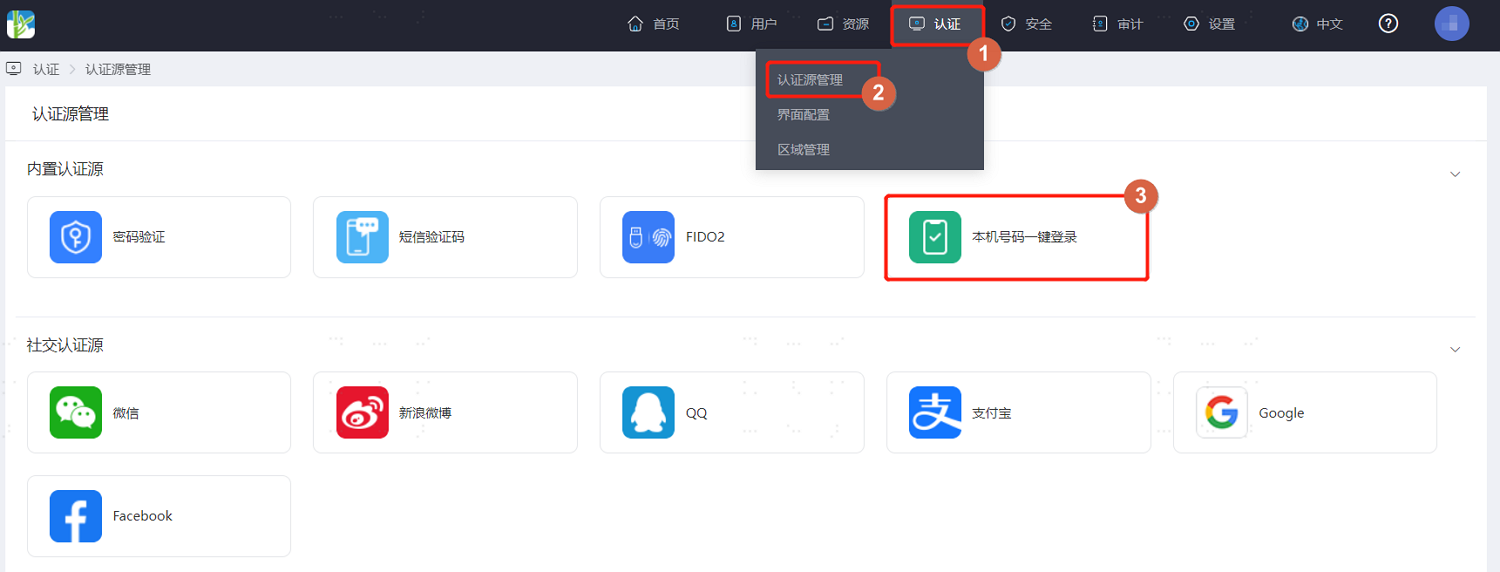
Configure the key parameters of the one-click login with local phone number authentication source according to the table below.
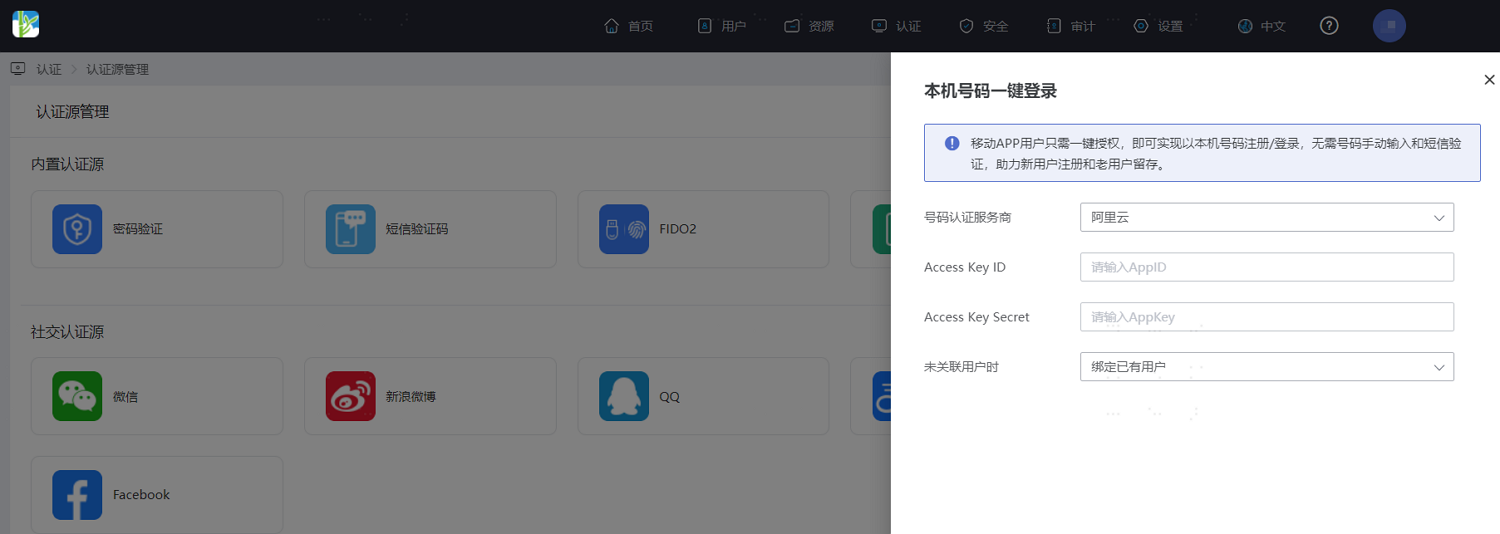
Parameter Description Number Authentication Service Provider Select the number authentication service provider to access. Currently, only Alibaba Cloud is supported. Access Key ID Fill in the AccessKey ID generated when creating the user in Alibaba Cloud above. Access Key Secret Fill in the AccessKey Secret generated when creating the user in Alibaba Cloud above. When User Not Associated Default is to bind existing users. When the user successfully logs in using one-click login with local phone number but is not associated with a system user, the system will automatically bind to an existing system user.
Configure Authentication Integration for Application
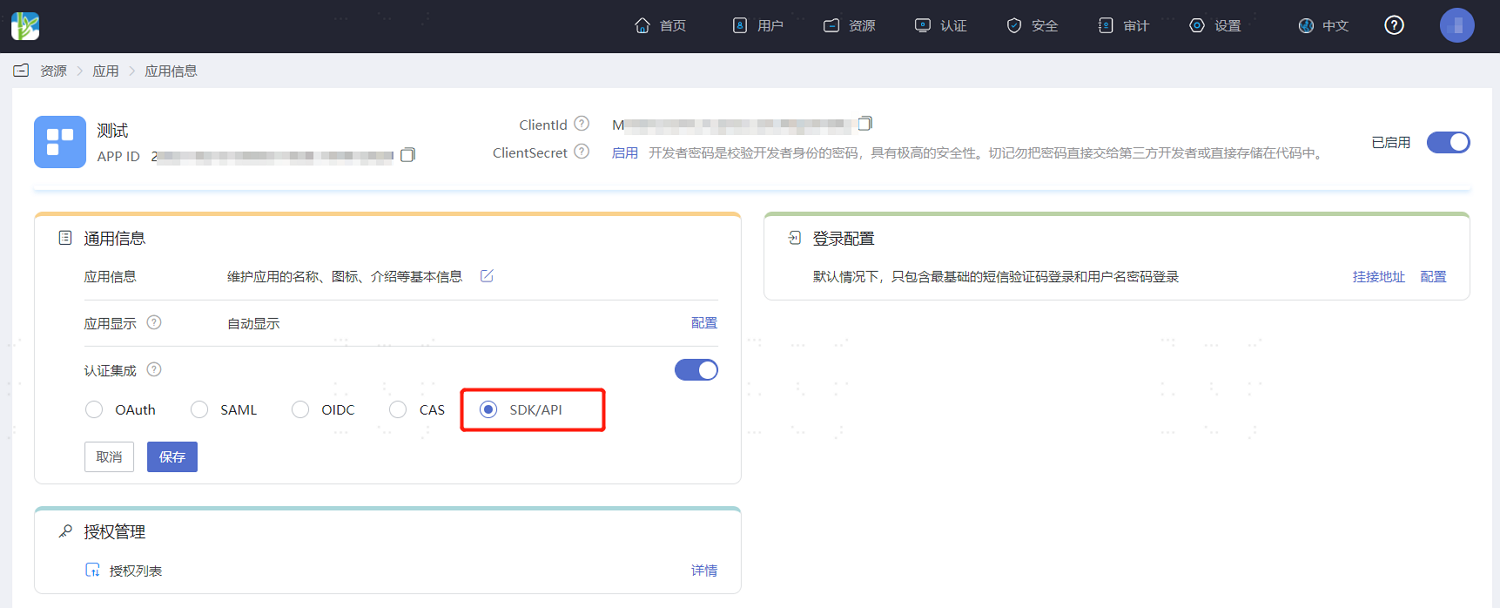
Log in to the IDaaS Enterprise Center, choose Resources > Apps from the top navigation bar, select the application to be configured for authentication, and in the Authentication Integration configuration, be sure to select SDK/API. After configuration, save and enable the application.
TIP
Authentication integration can only be configured once and cannot be changed later.
Development Integration
After configuration in the IDaaS platform is complete, client-side development integration configuration is also required. After development is complete, users can use mobile phone number one-click login for the application.
- If your enterprise user's mobile APP uses the Android operating system, please refer to BambooCloud IDaaS Mobile Android SDK One-Click Login to complete the subsequent client development integration.
- If your enterprise user's mobile APP uses the iOS operating system, please refer to BambooCloud IDaaS Mobile iOS SDK One-Click Login to complete the subsequent client development integration.