Response Header Configuration
Through Enterprise Center - Security Configuration - Response Header Configuration, you can personalize the values of some security response headers in IDaaS interfaces.
TIP
Since HTTP response headers are processed at the gateway layer for interface responses, a caching mechanism is added to prevent performance impact. Updates to response header configuration are not real-time, and the effective time will not exceed five minutes at most.
Prerequisites
You have administrator permissions for the IDaaS Enterprise Center platform.
Procedure
- Log in to the IDaaS Enterprise Center platform. In the top navigation bar, choose Settings > Enterprise Configuration, select the Security Configuration option on the left, and select Response Header Configuration.
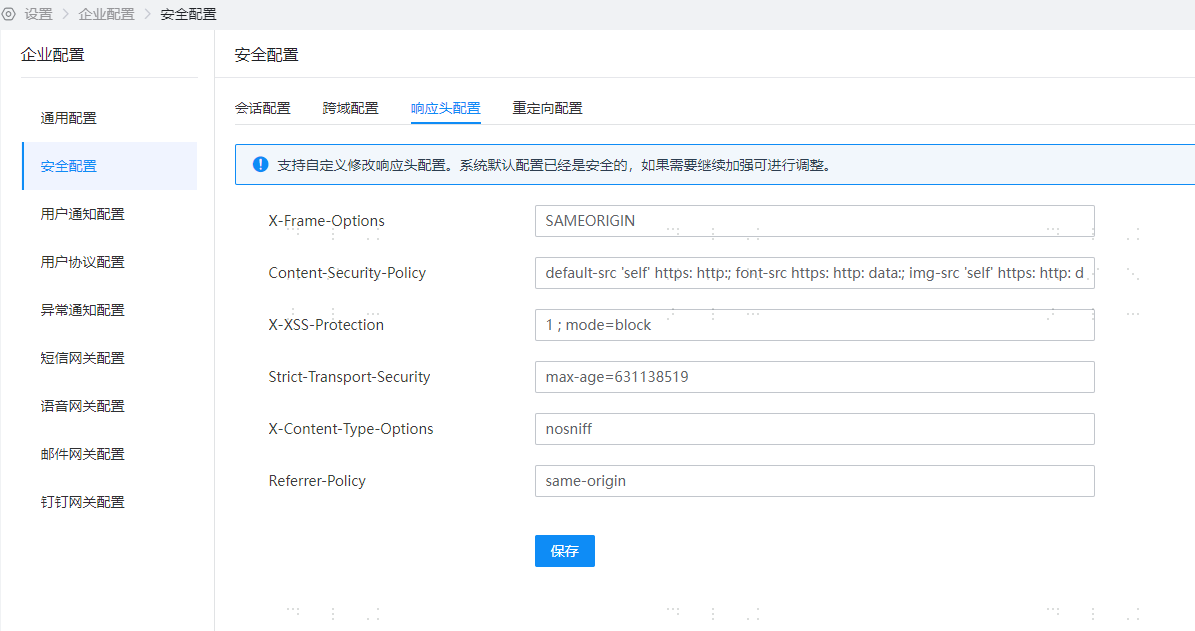
Parameter Description
X-Frame-Options
The X-Frame-Options HTTP response header is a marker that allows a page to be displayed in a <frame>, <iframe>, <embed>, or <object>. Sites can avoid clickjacking attacks by ensuring that the website is not embedded in other sites.
IDaaS provides a text input box for X-Frame-Options. Customers can fill in custom values, which will be applied to HTTP request response headers. For details, refer to: X-Frame-Options - HTTP
TIP
- X-Frame-Options: SAMEORIGIN
- DENY: Indicates that the page is not allowed to be displayed in a frame, even within a page with the same domain name.
- SAMEORIGIN: Indicates that the page can be displayed in a frame on a page with the same domain name.
- ALLOW-FROM uri: Allows embedding by the specified URI. This is a deprecated directive and no longer applies to modern browsers. Compatibility issues exist. The Content-Security-Policy HTTP header has a
frame-ancestorsdirective that can be used as an alternative.
Content-Security-Policy
The HTTP response header Content-Security-Policy (CSP) allows site managers to control which resources the user agent can load for a specified page. Except for a few exceptions, the set policies mainly involve specifying server sources and script endpoints. This helps prevent Cross-Site Script attacks.
IDaaS provides a text input box for Content-Security-Policy. Customers can fill in custom values, which will be applied to HTTP request response headers without content validation. For details, refer to: Content-Security-Policy
TIP
- Syntax format
Content-Security-Policy: <policy-directive>; <policy-directive> - Default value:
default-src 'self' https: http:; font-src https: http: data:; img-src 'self' https: http: data:; object-src 'none'; script-src 'self' https: http: 'unsafe-inline' 'unsafe-eval'; style-src https: http: 'unsafe-inline'; frame-ancestors 'self' https: http:
X-XSS-Protection
The X-XSS-Protection response header is a feature of Internet Explorer, Chrome, and Safari. When a cross-site scripting attack (XSS) is detected, the browser will stop loading the page. If a website has set a good Content-Security-Policy to disable inline JavaScript ('unsafe-inline'), modern browsers have less need for these protections, but they can still provide protection for users of older browsers that do not yet support CSP.
IDaaS provides a text input box for Content-Security-Policy. Customers can fill in custom values, which will be applied to HTTP request response headers without content validation. For details, refer to: Content-Security-Policy
TIP
Content-Security-Policy: 1 ; mode=block
0: Disable XSS filtering.1: Enable XSS filtering (usually browser default). If a cross-site scripting attack is detected, the browser will clear the page (remove unsafe parts).1; mode=block: Enable XSS filtering. If an attack is detected, the browser will not clear the page but will block the page from loading.
Strict-Transport-Security
The HTTP Strict-Transport-Security (commonly referred to as HSTS) response header is used to notify the browser that the site should only be accessed through HTTPS. All subsequent attempts to access the site using HTTP should be automatically redirected to HTTPS.
IDaaS provides a text input box for Strict-Transport-Security. Customers can fill in custom values, which will be applied to HTTP request response headers without content validation. For details, refer to: Strict-Transport-Security
TIP
Strict-Transport-Security: max-age=<expire-time>Strict-Transport-Security: max-age=<expire-time>; includeSubDomainsStrict-Transport-Security: max-age=<expire-time>; includeSubDomains; preload
max-age=<expire-time>: The maximum amount of time (in seconds) that the browser should remember that the site can only be accessed using HTTPS.includeSubDomains: (Optional) If this optional parameter is specified, it means this rule also applies to all subdomains of the website.preload: (Optional) Non-standard.
X-Content-Type-Options
The X-Content-Type-Options HTTP message header is equivalent to a hint flag used by the server to prompt the client to follow the MIME type setting in the Content-Type header and not modify it. This disables the client's MIME type sniffing behavior. In other words, it means the website administrator is confident in their settings.
IDaaS provides a text input box for X-Content-Type-Options. Customers can fill in custom values, which will be applied to HTTP request response headers without content validation. For details, refer to: X-Content-Type-Options
TIP
- Syntax
X-Content-Type-Options: nosniff - The
nosniffparameter will block requests in the following two cases:- The request type is "style" but the MIME type is not "text/css",
- The request type is "script" but the MIME type is not a JavaScript MIME type.
Referrer-Policy
The Referrer-Policy header is used to regulate which access source information—sent in Referer—should be included in generated requests.
IDaaS provides a text input box for Referrer-Policy. Customers can fill in custom values, which will be applied to HTTP request response headers without content validation. For details, refer to: Referrer-Policy
TIP
Referrer-Policy: no-referrerReferrer-Policy: no-referrer-when-downgradeReferrer-Policy: originReferrer-Policy: origin-when-cross-originReferrer-Policy: same-originReferrer-Policy: strict-originReferrer-Policy: strict-origin-when-cross-originReferrer-Policy: unsafe-url
- no-referrer: The entire Referer header is removed. Access source information is not sent with the request.
- no-referrer-when-downgrade: The default behavior of the user agent when no policy is specified. The address of the referring page is sent at the same security level (HTTPS->HTTPS), but not in downgrade cases (HTTPS->HTTP).
- origin: In any case, only the origin of the file is sent as the referrer address. For example,
https://example.com/page.htmlwill sendhttps://example.com/as the referrer address. - origin-when-cross-origin: For same-origin requests, the full URL is sent as the referrer address, while for cross-origin requests, only the origin of the file is sent.
- same-origin: Referrer address is sent for same-origin requests, but not for cross-origin requests.
- strict-origin: At the same security level, the origin of the file is sent as the referrer address (HTTPS->HTTPS), but not in downgrade cases (HTTPS->HTTP).
- strict-origin-when-cross-origin: For same-origin requests, the full URL is sent as the referrer address; at the same security level, the origin of the file is sent as the referrer address (HTTPS->HTTPS); in downgrade cases, this header is not sent (HTTPS->HTTP).
- unsafe-url: For both same-origin and cross-origin requests, the full URL (after removing parameter information) is sent as the referrer address.
Function Verification
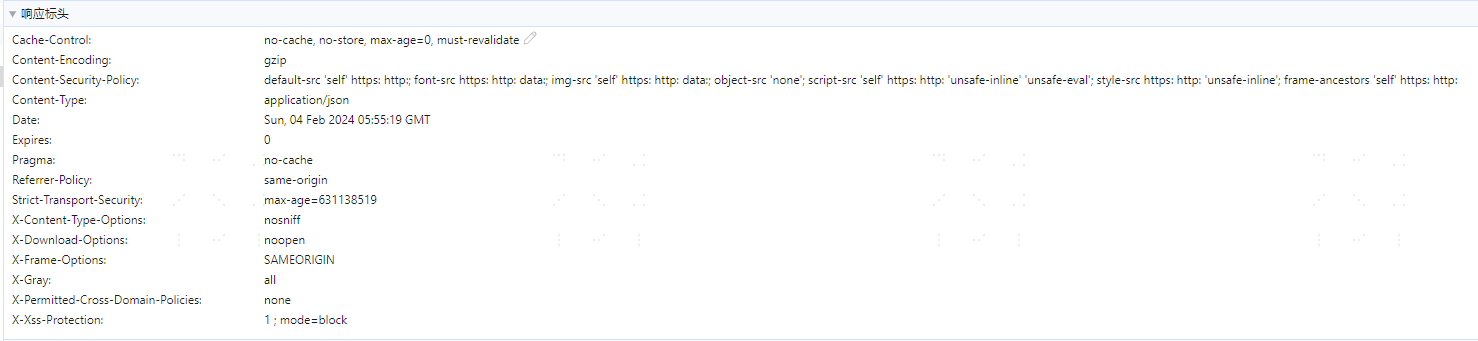
- After editing and saving the response header configuration, wait for the cache reset time, and then access any IDaaS interface to view the changes in the interface response headers.