
Configure Kerberos Authentication Source
To facilitate enterprise user authentication login, the IDaaS platform supports configuring the Kerberos protocol as an authentication source. Users can authenticate and log in to various application systems through the Kerberos protocol, bringing enterprise users a simpler and more convenient login method and better user experience. This feature is currently only supported in 2E scenarios.
This guide explains the related operations for configuring a Kerberos authentication source.
Prerequisites
- An AD domain server has been created, and the IDaaS public cloud service can access the AD service.
- Administrator permissions for the IDaaS Enterprise Center.
Procedure
AD Service Configuration
Open Active Directory Users and Computers, create a new user and password under the AD domain User, and set the password to never expire.
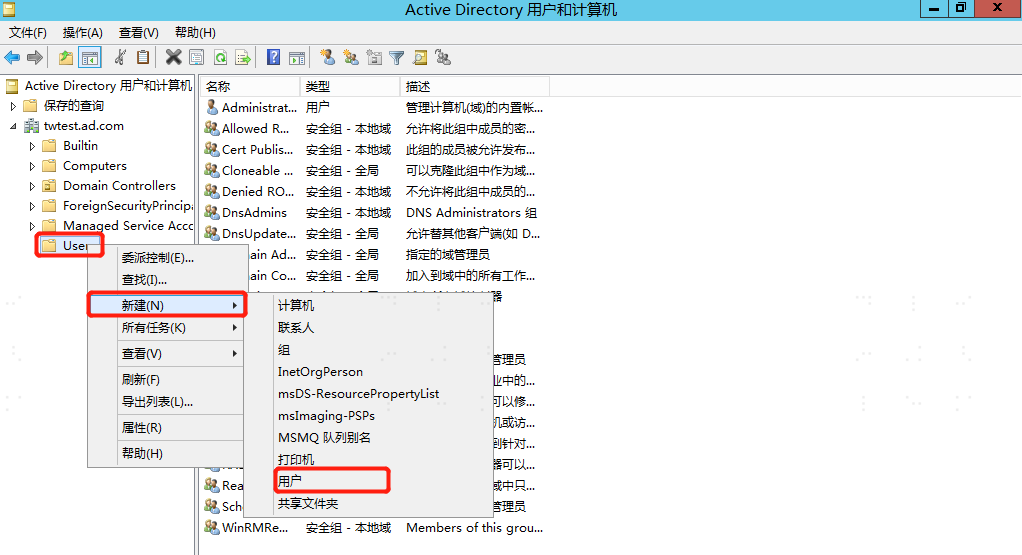
On the AD server, enter cmd and execute the following command to generate the SPN.
bashsetspn -A HTTP/{IDaaS tenant domain} {new AD username}bashktpass /out {file output path and file name} /mapuser {AD username created in step 1} /princ HTTPS/{IDaaS tenant domain@AD domain} /pass {password of AD user created in step 1} /ptype KRB5_NT_PRINCIPAL /crypto AES256-SHA1 Example: ktpass /out c:\tomcat.keytab /mapuser gltomcat /princ HTTPS/gl1234.bccastle.com@idaas-test.com /pass P@ssw0rd /ptype KRB5_NT_PRINCIPAL /crypto AES256-SHA1