Configure Unified Password Policy
This module is used to configure your enterprise's global password policy. You can set password complexity, login failure lockout and unlock policy, initial password notification policy, and advanced policies such as whether to allow repetition with historical passwords.
Prerequisites
You have administrator permissions for the IDaaS Enterprise Center platform.
Procedure
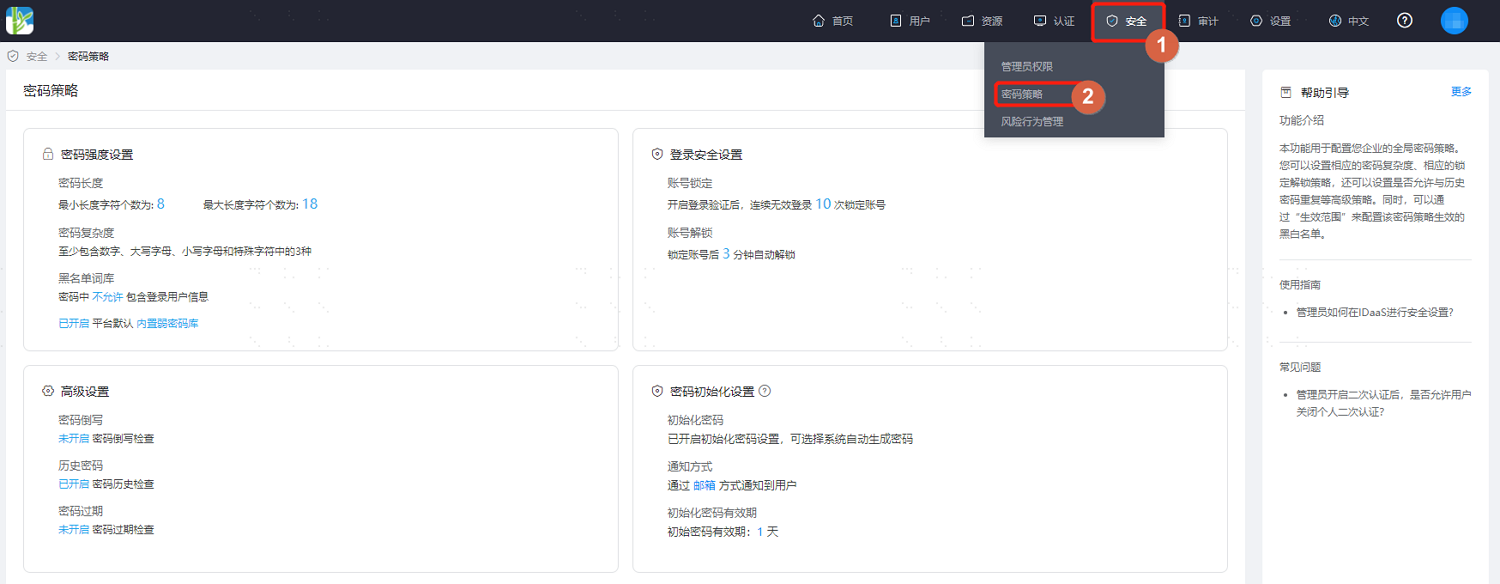
Log in to the IDaaS Enterprise Center platform. In the top navigation bar, choose Security > Password Policy.
Password Strength Settings
On the password security policy page, select Password Strength Settings. Key parameter descriptions are as follows.
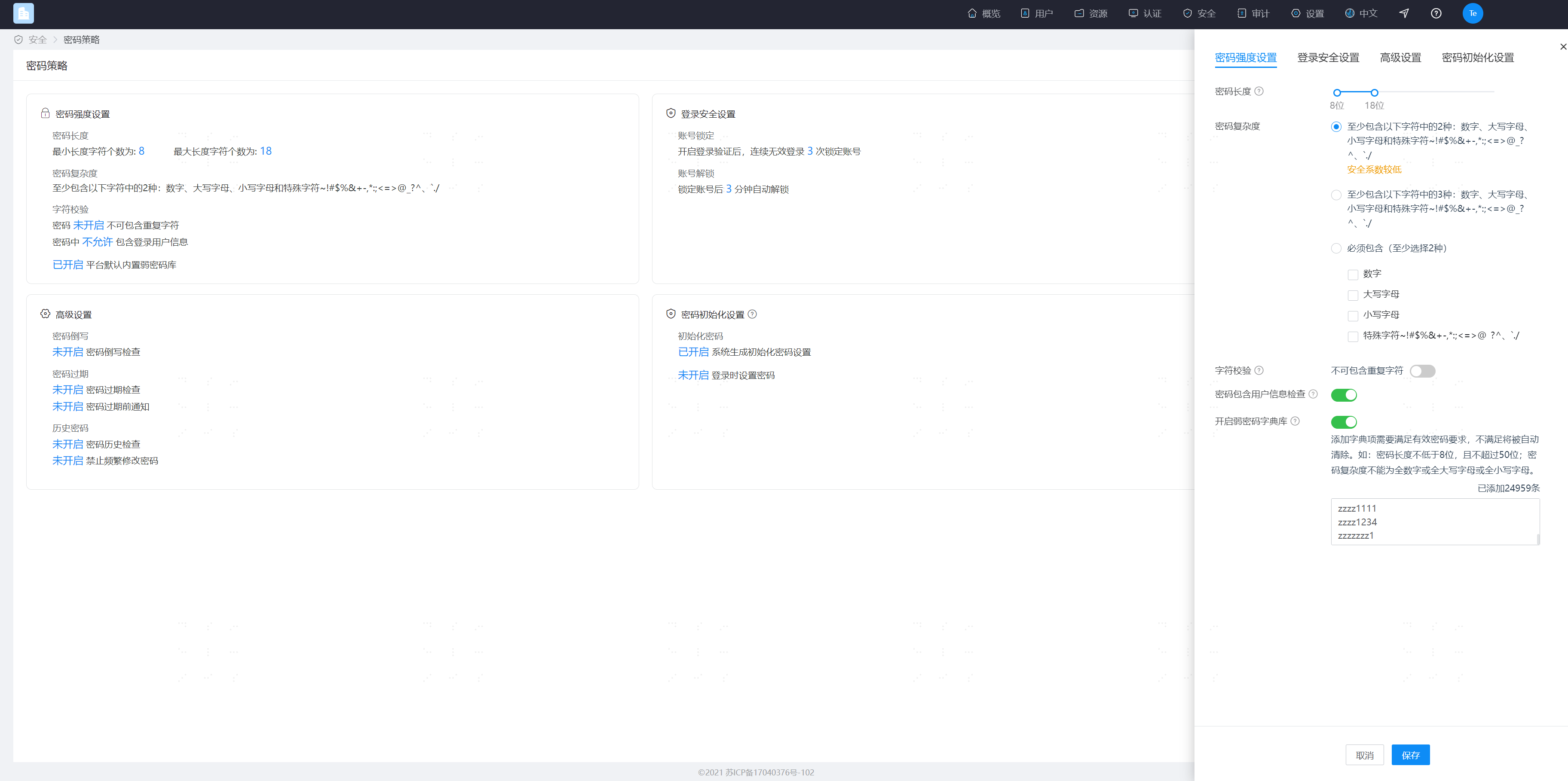
- Password Length: Set the password length (supports setting a range). Minimum length is 8, maximum length is 50.
- Password Complexity: Set password complexity requirements. Single selection. Choose a combination of numbers, letters, uppercase/lowercase, and special characters.
- Character Validation: Choose whether to perform character validation. After enabling, the repeated character count is limited to 1-10.
- Password Contains User Information Check: After enabling, passwords cannot contain the user's username, mobile number, email prefix, or name pinyin.
- Enable Weak Password Dictionary: After enabling, user passwords cannot use passwords in the weak password dictionary. In addition to system default dictionary items, custom dictionary items are supported. The system-built weak password dictionary and custom weak password dictionary take effect simultaneously. Please note that the IDaaS system will actively update the system-built weak password dictionary from time to time.
- Add Custom Weak Password: Added custom weak passwords must meet valid password requirements. Inputs that obviously do not meet password requirements will be automatically cleared, such as passwords shorter than 8 characters or longer than 50 characters, or all numbers, all uppercase letters, all lowercase letters, or containing non-password characters. For example, inputting Chinese will be automatically cleared. Each tenant can have up to 30,000 custom weak password dictionary items.
Login Security Settings
On the password security policy page, select Login Security Settings. Key parameter descriptions are as follows.
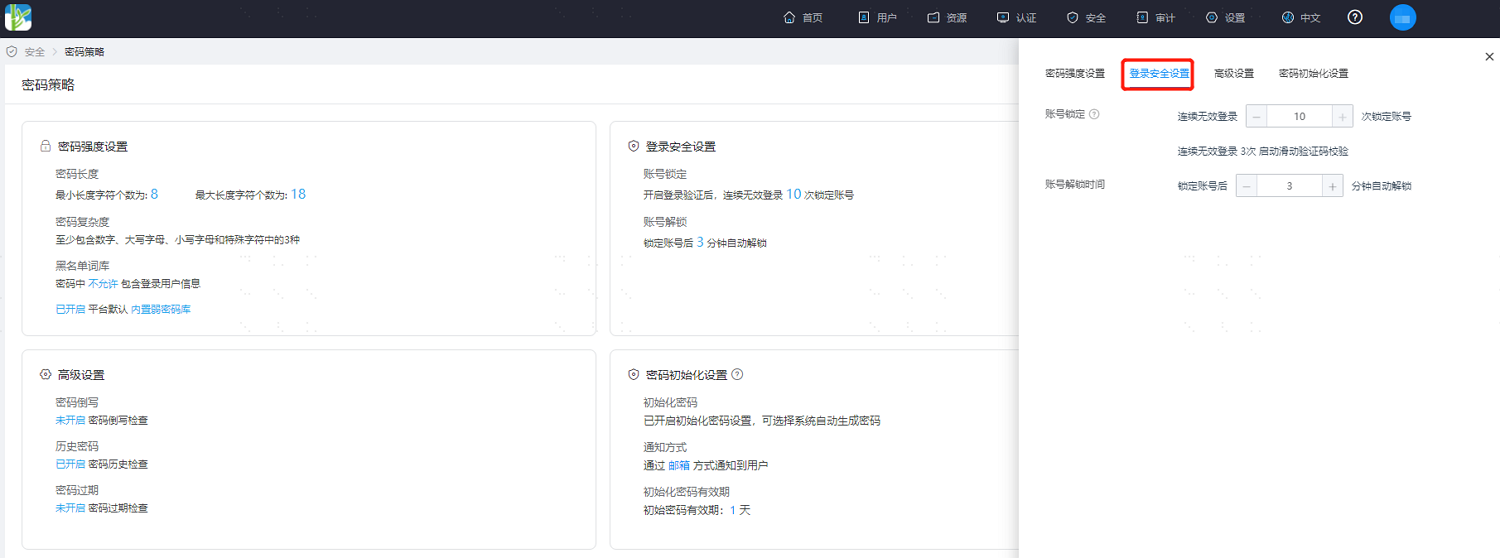
- Account Lockout: Set the account lockout policy. When the number of consecutive login failures reaches the set value, the account will be automatically locked. The configurable range is 1-10 times.
- Account Unlock Time: Set the automatic unlock time after the account is locked. Between 1-1440 minutes.
Advanced Settings
On the password security policy page, select Advanced Settings. Key parameter descriptions are as follows.
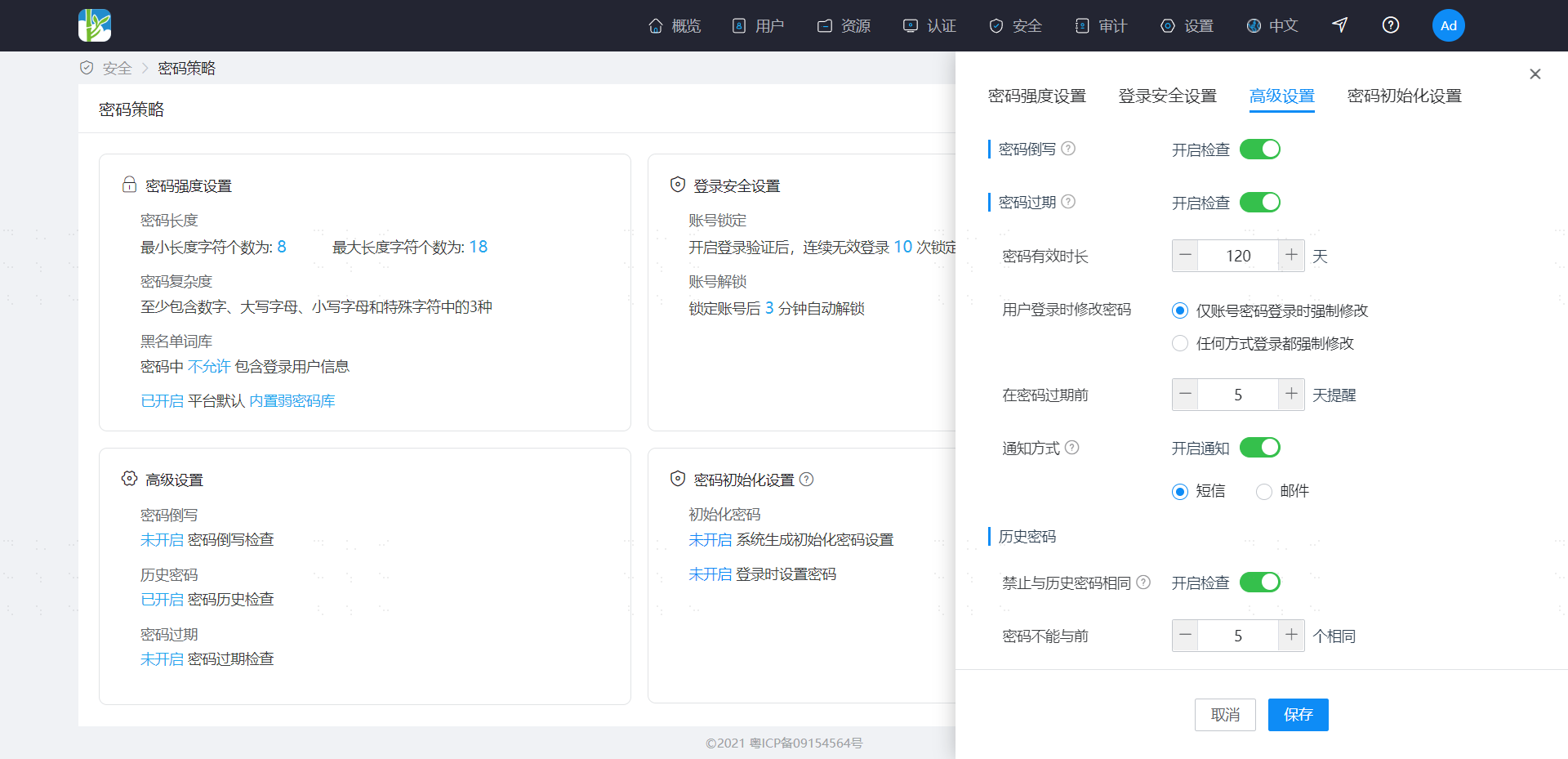
- Password Reverse Writing: After enabling the check, passwords cannot use the username written in reverse.
- Password Expiration: After enabling the check, set the password validity period. Password expiration reminders are supported, and the reminder method can be selected. For users whose passwords are about to expire, reminders are sent daily at 10:00 AM according to the password expiration reminder days setting. If reminders are enabled, please ensure that users have valid contact information; otherwise, users cannot be notified.
- Historical Passwords: After enabling the check, the system records historical passwords to ensure that old passwords are not reused consecutively. Between 1-10 times.
- Prohibit Frequent Modifications: After enabling, the minimum interval time for password modifications needs to be configured. When a user modifies a password, if the time since the last password modification has not exceeded the interval time, modification is not allowed. The maximum allowed value is 365.
- Force Password Change: Specify whether to force password change only when logging in with a password or when logging in with any method when a password change is mandatory (for example, password expiration or initial password).
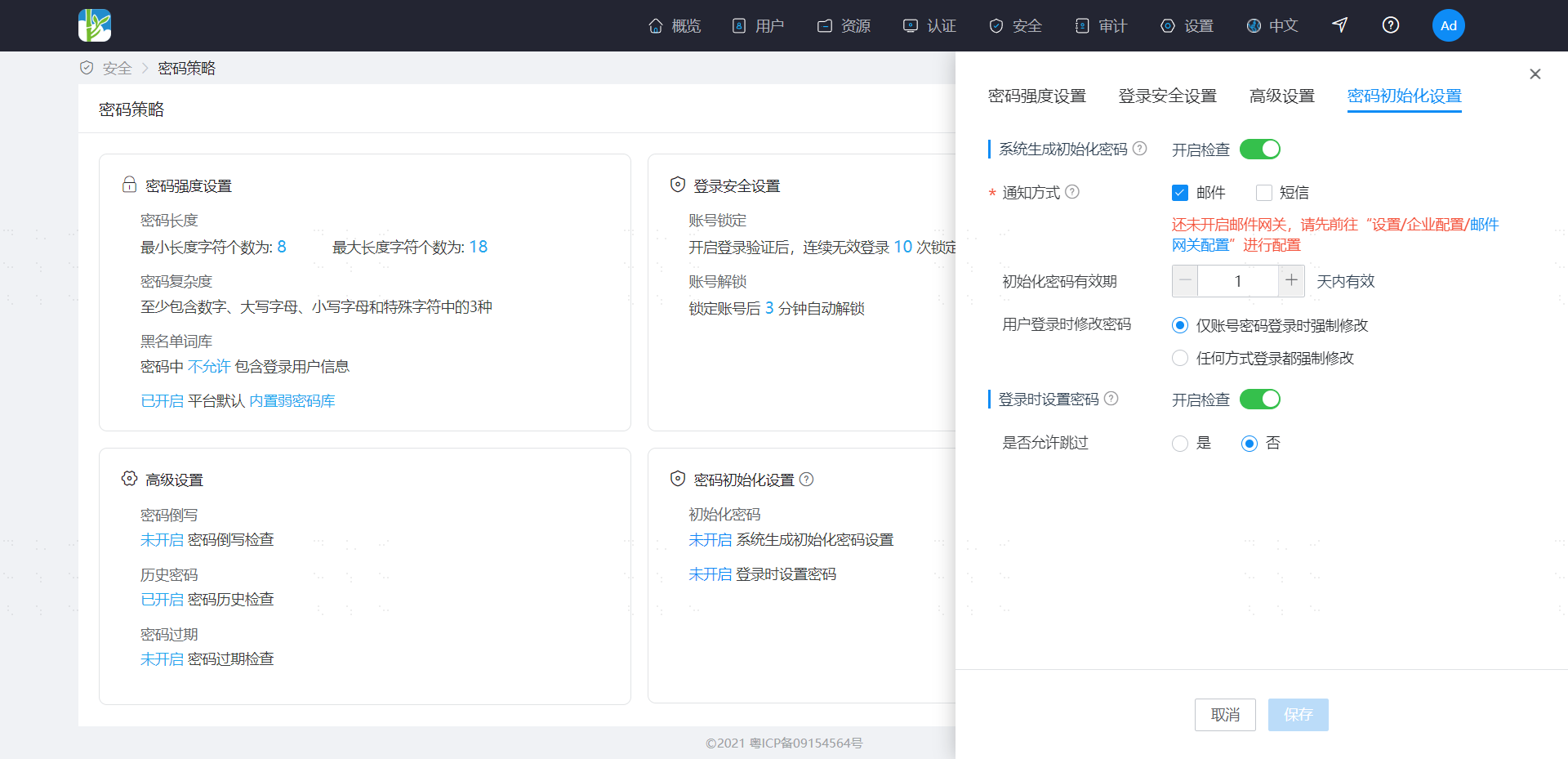
Password Initialization Settings
On the password security policy page, select Password Initialization Settings. After enabling, select to push initial password notifications to users in IDaaS via email or SMS. The validity period of the custom initial password can be set from 1-7 days.