
Customize User Events with Pipeline
Pipeline is a set of user-defined JavaScript code running in the cloud. By customizing JavaScript ES5 code at different nodes such as before user creation, after user creation, before user update, after user update, before user deletion, and after user deletion, it provides a reference guide for developers to extend and customize functionality. IDaaS also provides rich built-in functions for developers to call. This feature is currently only supported in 2C scenarios.
Prerequisites
You have administrator permissions for the IDaaS enterprise center platform.
Procedure
User Event Types
Currently, IDaaS supports six user events:
| Trigger Scenario | Description |
|---|---|
| Before User Creation | Before the user is saved to the database, developers can customize user fields and restrict creation conditions. |
| After User Creation | The user has been saved to the database. Developers can obtain complete user information to implement synchronization to third-party applications, asynchronous notifications, and other functions. |
| Before User Update | Before the updated user fields are saved to the database, developers can customize user fields and compare database fields with updated fields. |
| After User Update | The updated user fields have been saved to the database. Developers can customize notification sending. |
| Before User Deletion | The user has not actually been deleted. Developers can restrict deletion conditions. |
| After User Deletion | The user has been deleted. Developers can customize notification sending. |
Define User Events
Log in to the IDaaS enterprise center platform. In the top navigation bar, select "Settings > User Events", choose the corresponding trigger scenario, and add a script.
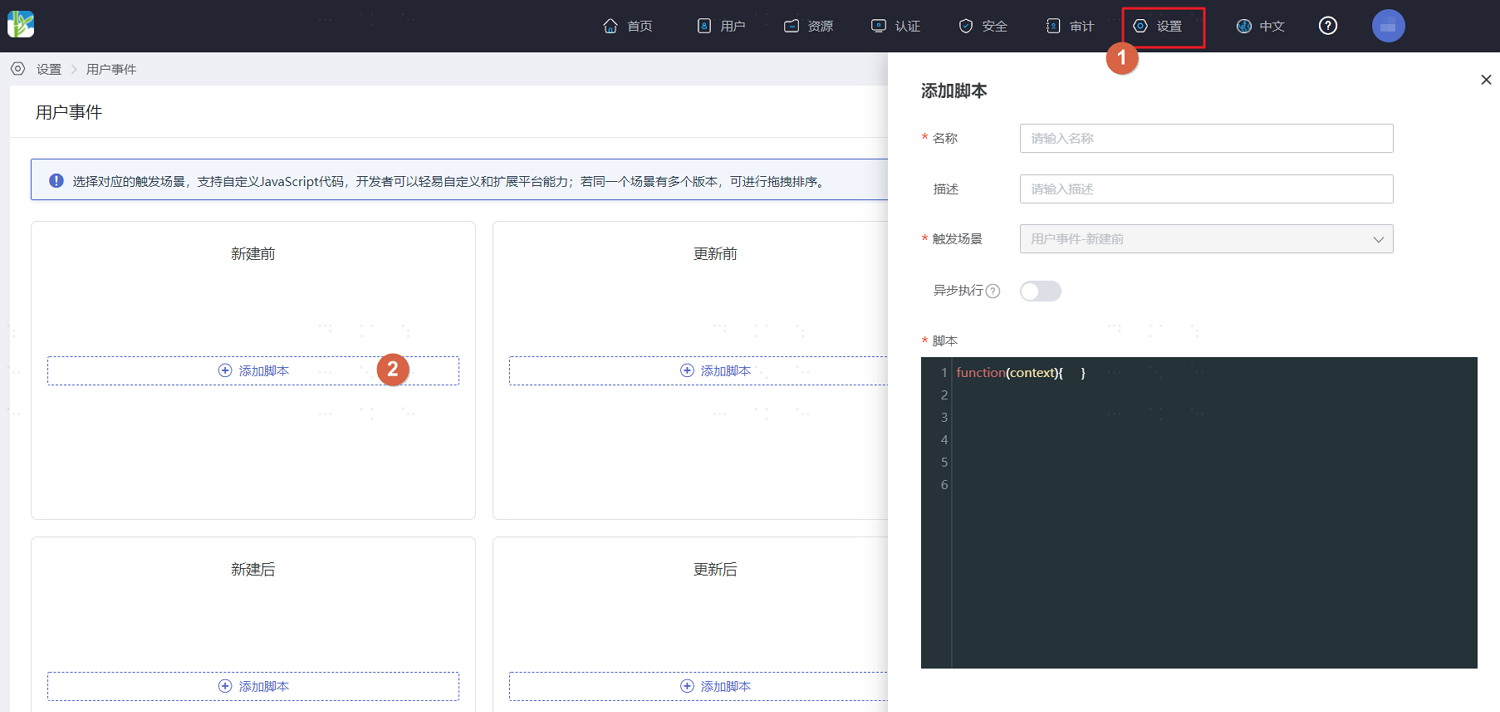
Configure relevant information according to the interface prompts. After configuration, save. For script configuration instructions, please refer to Script Definition.