
Authentication Source Cloud Bridge
Overview
The authentication-source type Cloud Bridge is a type of IDaaS Cloud Bridge. It is used to establish a connection channel between BambooCloud IDaaS and the corresponding internal enterprise authentication source. Currently, AD authentication source and LDAP authentication source are supported.
This chapter guides you through deploying and using the Authentication Source Cloud Bridge Agent on the IDaaS platform, and provides update records for the Authentication Source Cloud Bridge installation package so you can choose the appropriate version according to project requirements. The following uses CentOS Linux release 8.0.1905 as an example for deploying the Authentication Source Cloud Bridge Agent.
Prerequisites
You have administrator permissions for the IDaaS Enterprise Center platform.
You have internal network server operation permissions.
The server has net-tools, curl, JDK (OpenJDK 17 or later), and rng-tools installed. Installation steps are as follows:
net-tools Installation
Verify whether net-tools is installed.
rpm -q net-toolsIf it is not installed, download the installation package and upload it to the internal network server.
Enter the directory where the file is located and run the installation command.
yum -y install net-tools-2.0-0.22.20131004git.el7.x86_64.rpmVerify the installation.
rpm -q net-tools
curl Installation
Most Linux distributions include curl by default. Verify whether it is installed.
curl --version
JDK Installation
Download the installation package and upload it to the internal network server.
Enter the directory where the file is located and run the installation command.
yum -y install jdk-17.0.13_linux-x64_bin.rpmVerify the installation.
java -version
rng-tools Installation
Install the rng-tools utility to increase the system entropy pool replenishment rate. Run the following command to install rng-tools:
yum install rng-toolsCheck whether the rngd configuration file exists:
cat /etc/sysconfig/rngdIf the file does not exist or is empty, run the following command to create it:
echo "OPTIONS=\"-r /dev/urandom\"" > /etc/sysconfig/rngdRun the following commands to start the rng service and check its status.
service rngd start   Start the rng service
service rngd status   Check the rng service status
If the status is enabled, the service started successfully:

Pre-Deployment Preparation
Software Package
Please prepare the following software packages in advance.
| Package Name | Description | Download Link |
|---|---|---|
| cloudAgent-authSource-{version}.zip | Authentication Source Cloud Bridge installation package. | Download |
| cloudAgent-authSource-{version}.zip.sha256 | SHA256 checksum file for the Authentication Source Cloud Bridge installation package, used to verify package integrity. | Download |
The files extracted from the Authentication Source Cloud Bridge installation package are as follows:
| Name | Description |
|---|---|
| agent.sh | File used to configure the Cloud Bridge Agent to start automatically on boot. |
| cloudAgent-authSource.jar | Deployment package of the Authentication Source Cloud Bridge Agent. |
| cloudBridge.sh | File used to start the Cloud Bridge Agent manually. |
| config | Directory for storing Cloud Bridge Agent configuration files (application.yml). |
| log | Directory for storing Cloud Bridge Agent logs (agent.log). |
Deploying the Authentication Source Cloud Bridge
Log in to the IDaaS Enterprise Center platform. In the top navigation bar, choose Settings > Cloud Bridge Configuration, click Add Cloud Bridge Agent, set a name, and select the authentication-source type Cloud Bridge.
TIP
- After the Cloud Bridge Agent is added, the system automatically generates a ClientID and ClientSecret. Please keep them safe.
- If you forget the ClientSecret, click Reset Secret for the target Agent to regenerate it. After reset, the original secret becomes invalid. Please proceed with caution.
- You can view Cloud Bridge connection logs and service logs.
- You can configure an IP address for the Cloud Bridge Agent. Set it to the egress IP of the server where the Cloud Bridge Agent is deployed. After configuration, only that IP is allowed to connect to the IDaaS cloud service, ensuring service security.
- You can delete the target Agent. Please proceed with caution.

Upload all software packages obtained for the Authentication Source Cloud Bridge to the target server, and run the following command to verify the integrity of the Cloud Bridge installation package. When the output shows OK, the integrity verification is successful.
sha256sum -c cloudAgent-authSource-{version}.zip.sha256Run the following command to extract the Authentication Source Cloud Bridge installation package. The extraction destination must be unique; otherwise, installation errors will occur.
unzip -od {extraction-directory} cloudAgent-authSource-{version}.zipEnter the extracted directory and configure the
application.ymlfile in the config directory.###UTF-8格式YAML配置标识头,勿删除### server: # 云桥启动端口 port: 9082 agent: # 云桥服务地址,domain为在IDaaS的租户域名xx.bccastle.com 示例:serverAddress: wss://domain/api/v1/ws # 云桥ClientID,在IDaaS创建的云桥的ClientID 示例:agentId: 7jve68NwihfnjsD8SJToWxTU5Wg8hkl1 # 云桥ClientSecret,在IDaaS创建的云桥的ClientSecret 示例:agentSecret: LdfwryojYHLMaeNGVdr9fSh1iwyDCL0QuBx2wewrjxT5UOhUQVpAqwerfgj8pLNV1 authentication: ad: # AD认证开关,默认值为false,为true开启AD认证 示例:enable: false # AD服务器地址,格式为ldap://host:port/,多个地址时使用,分隔,多个地址时schema必须全部相同,全部都为ldap或全部都为ldaps 示例:urls: ldap://localhost:389/ # AD中的节点,会到该节点下查询用户 示例:rootDn: User # AD中的域名,域名存在时,自动拼接登录名+@+域名作为查询条件,否则仅登录名作为查询条件 示例:domain: test.ad.com # 用户查询条件,根据对象类和用户登录名进行查找,userPrincipalName可根据实际情况调整; # 占位符说明:{0}-带域名查询,页面输入值+域名,如zhangsan@companya.cn, # 无域名时获取认证源域名属性值拼接后查询,{1}-原值查询,以页面输入值查询,如zhangsan。 示例:searchFilter: '(&(objectClass=user)(userPrincipalName={0}))' # AD连接超时时间,可设置范围 1000 - 3000 毫秒 示例:timeout: 1000 ldap: # LDAP 认证开关,默认值false,为true开启LDAP认证 示例:enable: false # LDAP服务器地址,格式为ldap://host:port/,多个地址时使用,分隔,多个地址时schema必须全部相同,全部都为ldap或全部都为ldaps 示例:urls: ldap://localhost:389/ # LDAP目录树最顶部的根目录 示例:baseDn: DC=test,DC=com,DC=cn # LDAP管理员账号标识 示例:managerDn: testadmin # LDAP管理员账号密码 示例:managerPassword: Passw0rd # Ldap公共搜索路径 示例:userSearchBase: ou=people # LDAP中匹配系统用户的过滤条件,详细请参考:https://ldap.com/ldap-filters/,基于条件的查询优先级低于基于DN的查询 示例:userSearchFilter: (&(objectClass=user)(uid={0})) # 填写用户ID或者组织单元除BaseDn外,Ldap用户搜索路径,用户DN模式查询优先 示例:dnPatterns: uid={0},ou=people # LDAP连接超时时间,可设置范围 1000 - 3000 毫秒 示例:timeout: 1000 # This is the Agent log level control configuration logging: level: com.bamboocloud.bcidaas.cloudbridge: DEBUG file: # The value of the attribute must have a unit, which can be KB or MB # 单个日志文件大小。默认值10MB,最大值10MB # default: 10MB # max-size: 10MB # The maximum number of days that log files are to be archived # 日志最长保留时间。默认值7天,最大值7天 # default: 7 DAYS # max-history: 7After the configuration file is complete, run the following command in the extracted Cloud Bridge installation directory to start the Cloud Bridge. When the message Starting Agent Success appears, the Cloud Bridge started successfully. If startup fails, check the configuration file.
./cloudBridge.sh start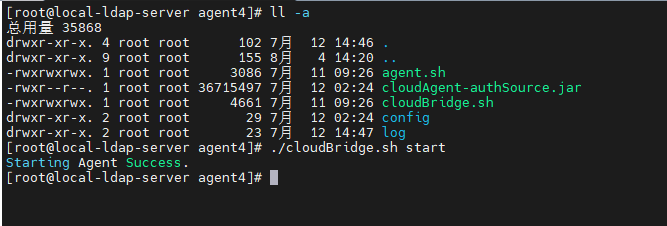
(Optional) If you want the Cloud Bridge to start automatically on boot, run the following command in the extracted Cloud Bridge installation directory. When the message The Agent service installed successfully, need to reboot will take effect appears, the operation succeeded.
./agent.sh install(Optional) If you want to disable automatic startup of the Cloud Bridge, run the following command in the extracted Cloud Bridge installation directory. When the message uninstall Agent Success appears, automatic startup has been disabled successfully.
./agent.sh uninstallYou can obtain log information from the
log/agent.logfile in the directory.
Using the Authentication Source Cloud Bridge
- When configuring an AD authentication source to use the Authentication Source Cloud Bridge on the IDaaS platform, refer to Configuring AD Authentication Source.
- When configuring an LDAP authentication source to use the Authentication Source Cloud Bridge on the IDaaS platform, refer to Configuring LDAP Authentication Source.
Changelog
This section shows update records for the Authentication Source Cloud Bridge Agent installation package.
| Version | Update Description |
|---|---|
| V25.2.1.1 | Third-party component upgrade; security vulnerabilities fixed |
| V25.2.1.0 | Spring version upgrade; security vulnerabilities fixed |
| V24.11.1.0 | Third-party component upgrade; security vulnerabilities fixed |
| V24.8.2.0 | Cloud Bridge client security hardening |
| V24.4.1.0 | Cloud Bridge client security hardening |
| V24.2.1.0 | Supports AD and LDAP connection timeout configuration |
| V23.10.1.0 | JDK version upgraded to JDK 17 |
| V23.5.1.0 | Added client connection information and log backup |
| V22.11.1.0 | 1. Optimized some known bugs 2. Optimized WebSocket connection |
| V22.9.1.0 | 1. Modified Cloud Bridge installation script to install watchdog via systemd, supporting Ubuntu 2. Added pre-installation environment checks to the installation script |
| V22.7.1.0 | Supports viewing Cloud Bridge service logs |
| V22.6.1.0 | Supports LDAP authentication |
| V21.10.2.0 | 1. More precise configuration error messages 2. Optimized Agent PID retrieval |
| V21.9.2.0 | Added watchdog mechanism |
| V21.9.1.0 | 1. Optimized Cloud Bridge reconnection mechanism 2. Optimized some known bugs |