Install or Update Cross-Browser Password-Free Login Plugin
Please click the link below to download the plugin package first.
Download bamboocloud.exe Plugin
Install the Plugin
After downloading, double-click the .exe file. A command window will pop up and close automatically, indicating successful installation.
Verify Installation
- Verify whether the installation is successful through File Explorer. Search for the directory
C:\Program Files\bamboocloud\idaas_open. If it exists, the installation is successful. - Verify whether the installation is successful through the registry. Press Win + R, enter
regedit, and search forComputer\HKEY_CLASSES_ROOT\openIEto check whether the custom protocol registration is successful.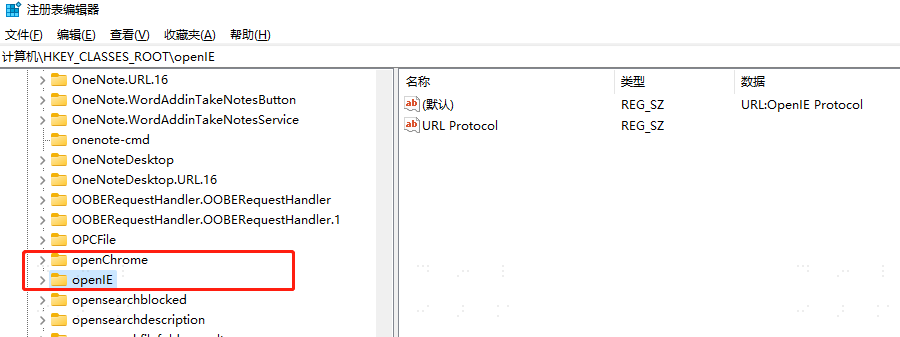
WARNING
Note: Since this plugin adds registry entries, if local antivirus software is installed, it may pop up a prompt to block this operation. Please select Allow this operation.
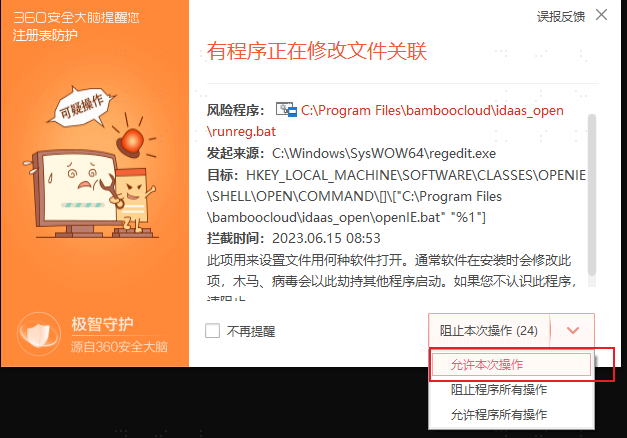
Trojan scanning may also delete the installation file. Please keep the file and choose not to clear it.