
Configure WeChat Official Account Authorization Login
This guide explains the configuration process for WeChat Official Account authorization login. After configuring the WeChat authentication source integration in the IDaaS platform, refer to this module to configure WeChat Official Account authorization authentication login for various application systems.
Prerequisites
- Administrator permissions for the IDaaS Enterprise Center.
- An official account has been registered on the WeChat Public Platform.
- The application has been integrated into the IDaaS platform.
- A WeChat authentication source with the login scenario Official Account Authorization Login has been configured in the IDaaS platform.
Configuration Flow

WeChat Official Account Platform Configuration
Obtain Official Account Developer ID and Secret
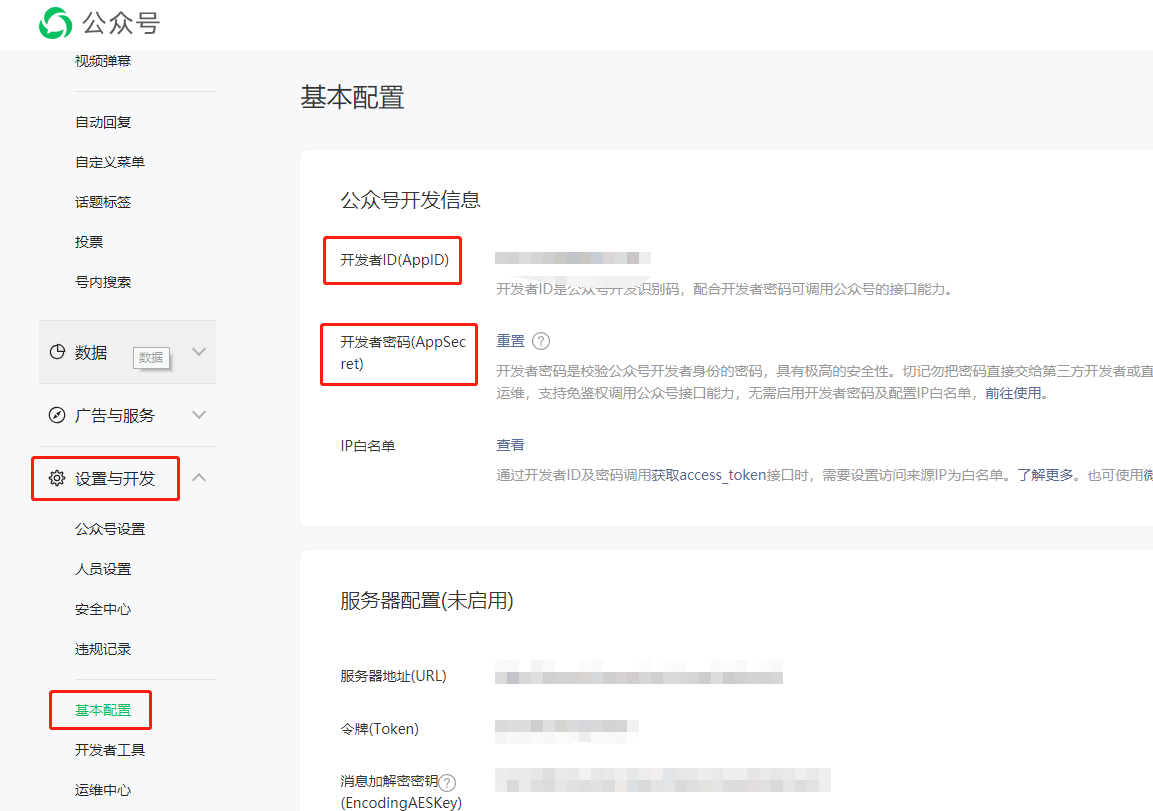
The developer logs in to the WeChat Public Platform, enters the created official account, chooses Settings & Development - Basic Configuration, and views and saves the Developer ID (AppID) and Developer Secret (AppSecret).
Configure Official Account Web Authorization Callback Domain
- After the developer logs in to the public platform official website, enter the created official account, and choose Settings & Development - Interface Permissions - Web Services - Web Account - Web Authorization to Obtain User Basic Information.
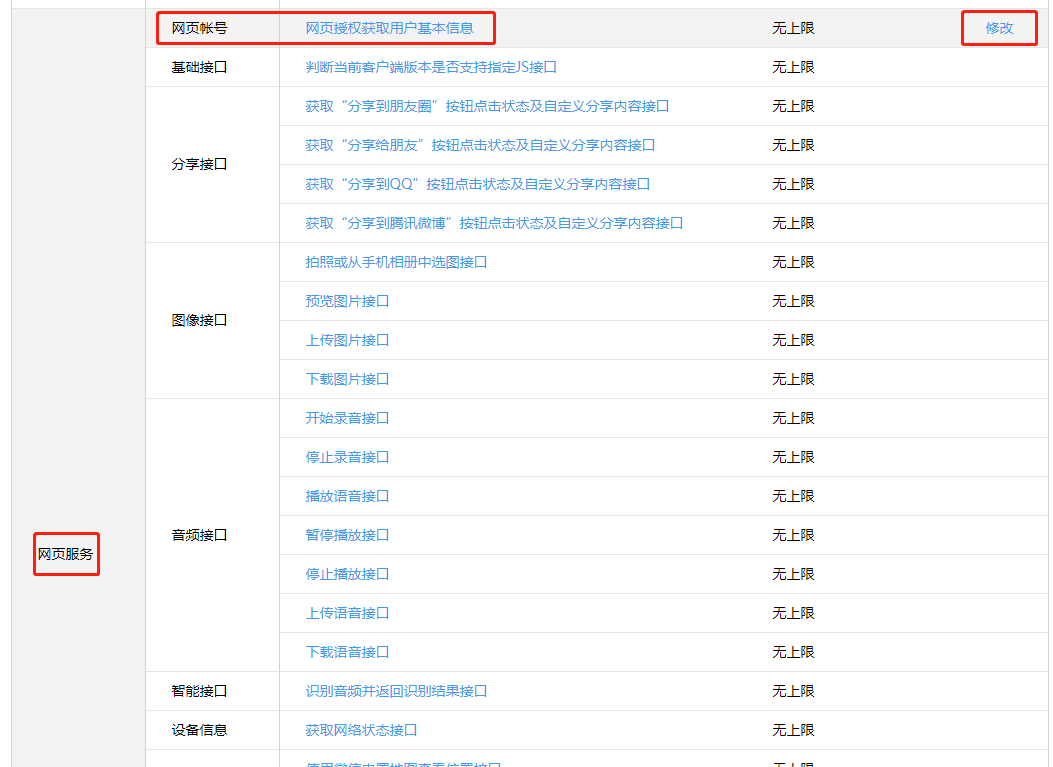
- Click Modify, and modify the authorized callback domain to the enterprise tenant domain in IDaaS, for example,
xxx.bccastle.com(do not add protocol headers such ashttp://). If the enterprise uses the IDaaS platform's custom domain function, the custom enterprise domain needs to be filled in here.
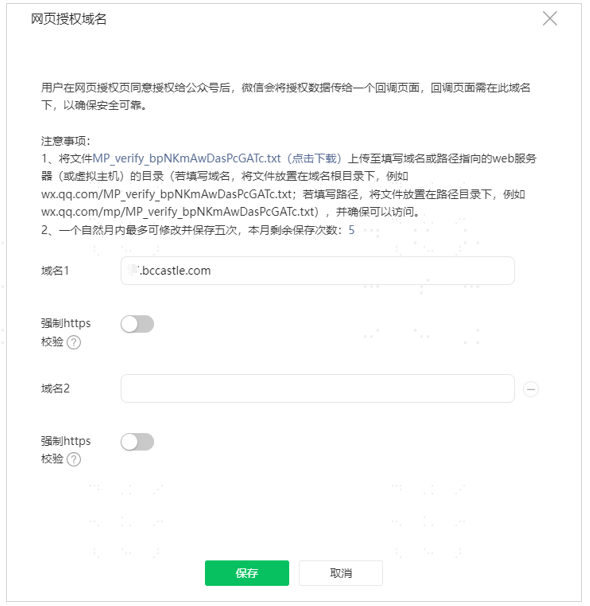
⚠️ Note: Formal official accounts need to verify the callback domain. You need to upload the verification file in the IDaaS platform first. For details, refer to Upload Domain Verification File.
IDaaS Platform Configuration
Add WeChat Official Account Authentication Source
For operation steps, please refer to Configure WeChat Authentication Source, and select Official Account Authorization Login as the login scenario.
Register Application
You can choose to create an OAuth protocol application for integration or an OIDC protocol application for integration. The enterprise chooses according to the actual situation of its business system.
Configure Official Account Authorization Login for Application
Enter the configuration page of the registered application, click the Login Configuration menu, and turn on the switch for the WeChat Official Account authentication source in Social Login - WeChat.
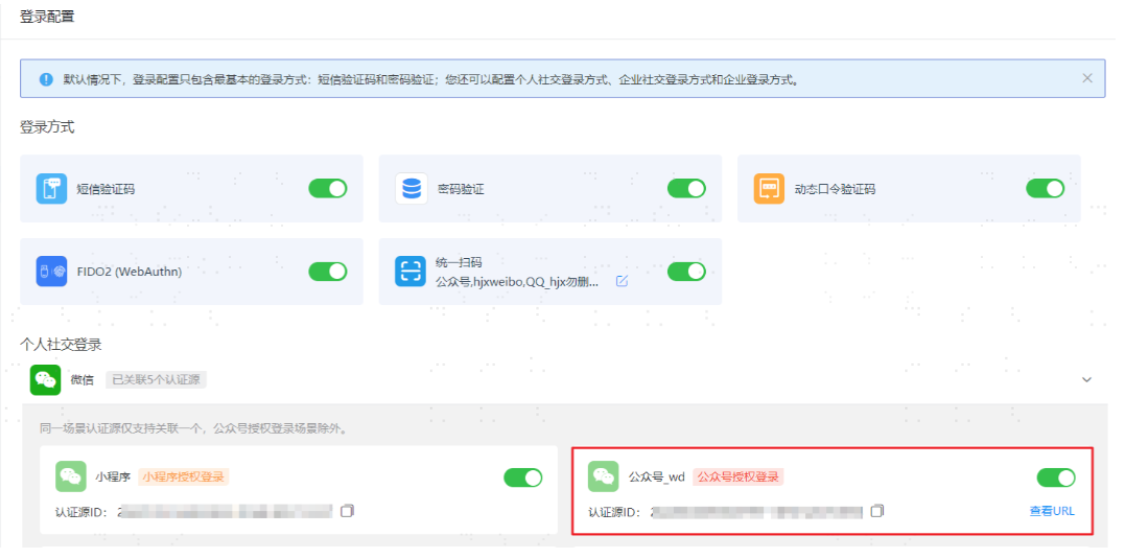
Click the official account authentication source link View URL, and copy and save it.
Display Effects
There are currently 2 usage scenarios for WeChat Official Account authorization login, corresponding to different display effects. You can choose according to your actual business situation.
Official Account Menu Mounting SSO Authorization Login URL
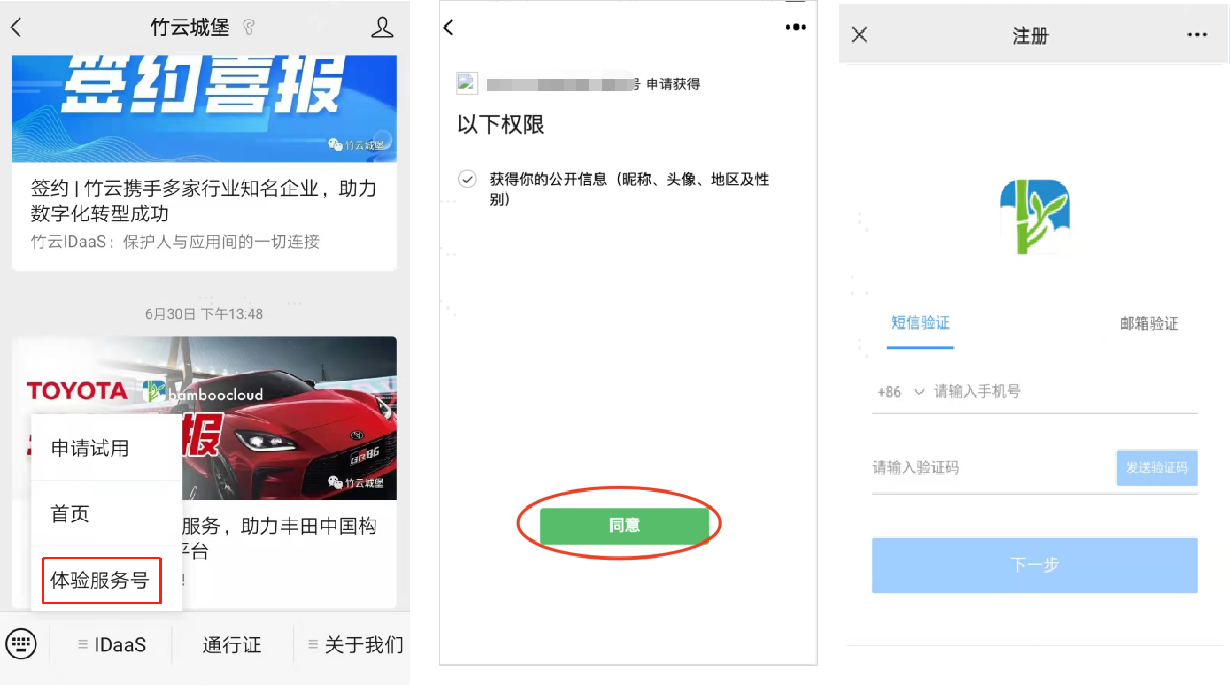
This scenario is applicable to: After users follow the official account, they need to complete WeChat authentication and bind their mobile number/email for the first time before entering the H5 business system. When users access the H5 business system again, they automatically enter the system through WeChat Official Account authorization without a password.
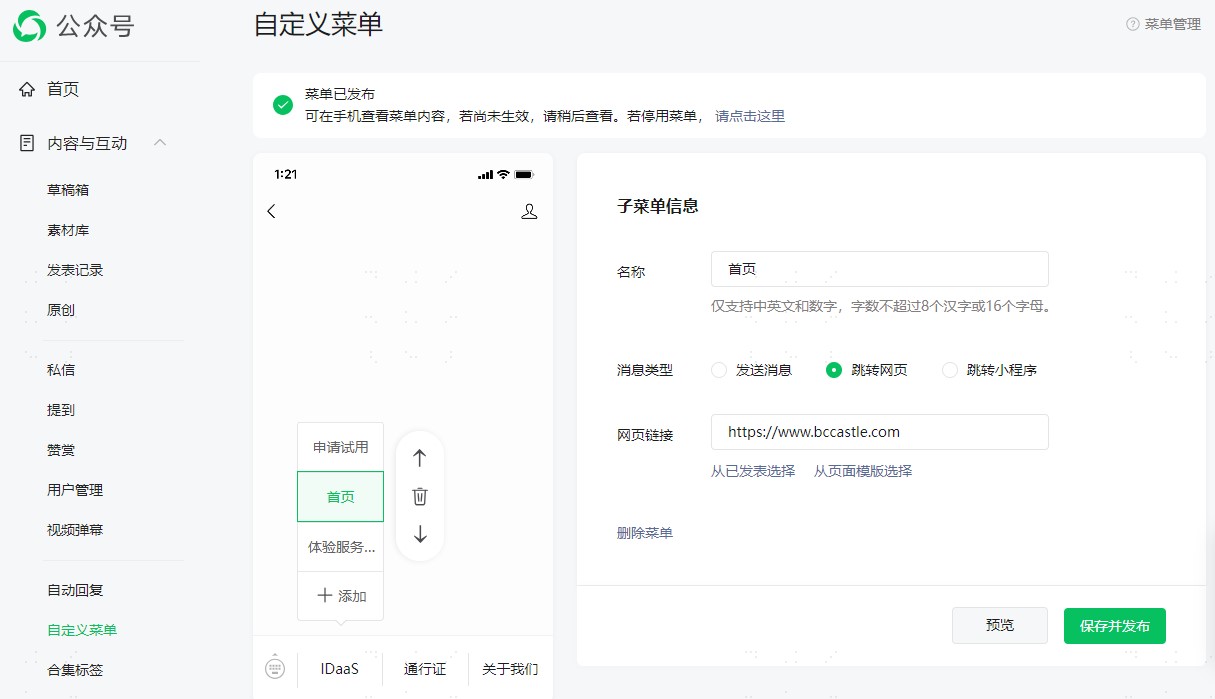
- In the formal official account management console, go to Content & Interaction > Custom Menu page, enter the sub-menu name, enter the address obtained from the official account authentication source link View URL in Web Link, save and publish.
- After the official account is published, the effect diagram for users accessing the official account is as follows.
Only Automatically Display WeChat Official Account Logo in Unified Login Page in WeChat
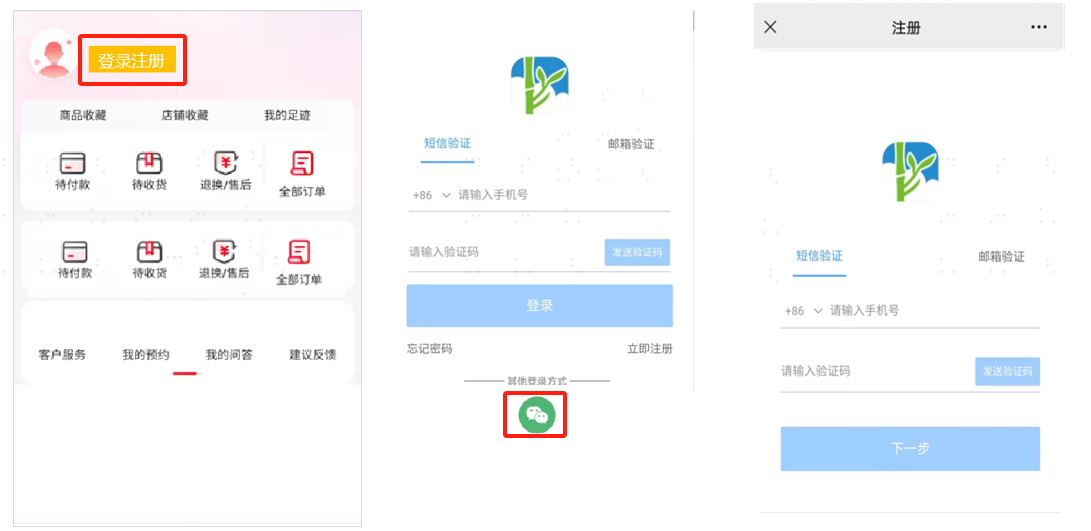
This scenario is applicable to: Enterprises have multiple H5 business systems. When users access the business system, the system homepage is displayed first. When users are interested in the website and click login/register, the IDaaS unified login page is displayed. In addition to supporting mobile number/email login/registration, users who open the login page in the WeChat browser automatically see the WeChat Official Account authorization login logo. Users click the WeChat logo to automatically log in using WeChat Official Account authorization. Other non-WeChat browsers automatically hide the WeChat Official Account authorization login logo.
- The effect is as follows.
Other Instructions
During the joint debugging and testing phase, you may first use a personal official account for testing, and then use a formal official account for release after joint debugging verification is completed. It should be noted that when using a personal official account -> custom menu, WeChat currently does not support adding configuration menus through the interface, and only supports creating custom menus through API. For details, please refer to the WeChat Open Platform for operation.
Refer to the official documentation and interface prompts to obtain the official account
access_tokenthrough the tool. Fill in the previously obtained official accountAPPIDandAPPsecret.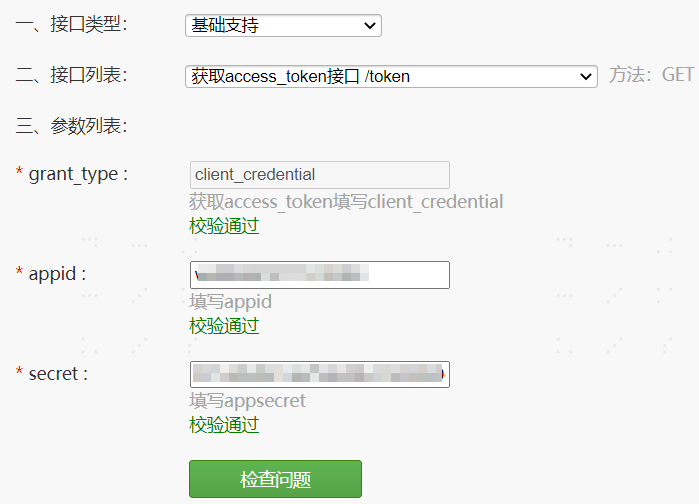
Then customize a menu button for the official account for authentication login to the User Center. Refer to the official documentation to supplement the body code, where
nameis the name displayed for the menu in the official account, andurlis replaced with the URL obtained when enabling the official account authorization login authentication source for the application.
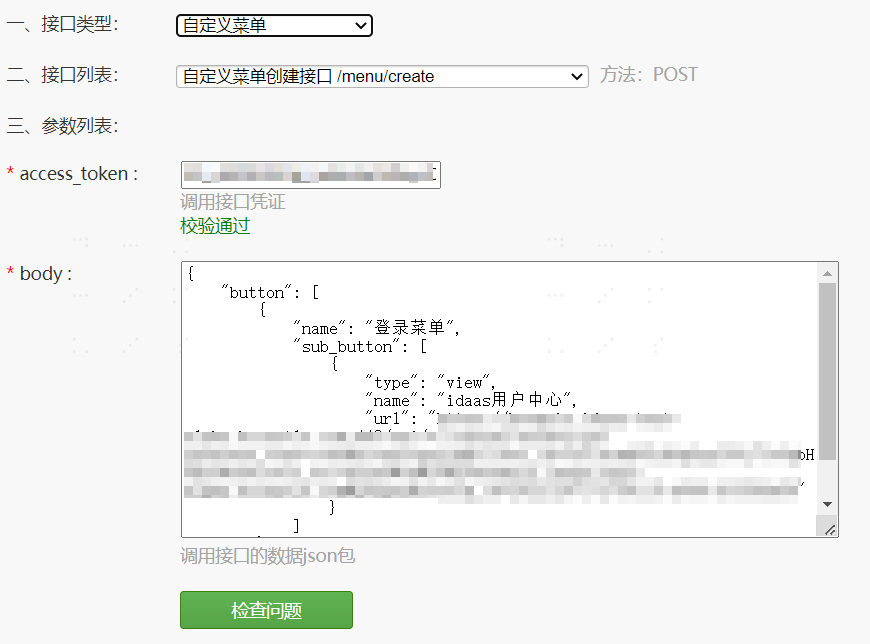
- After configuration, click Check Problem. If it prompts no errors, the configuration is successful. Visit the personal official account to display the newly added menu.