Configure User Session
IDaaS can configure user login session attributes, such as session expiration duration, maximum valid duration of a single login session, maximum number of sessions per user, and cookie Samesite. At the same time, IDaaS supports clearing user sessions in the management console to kick users out of IDaaS.
Prerequisites
You have administrator permissions for the IDaaS Enterprise Center platform.
Procedure
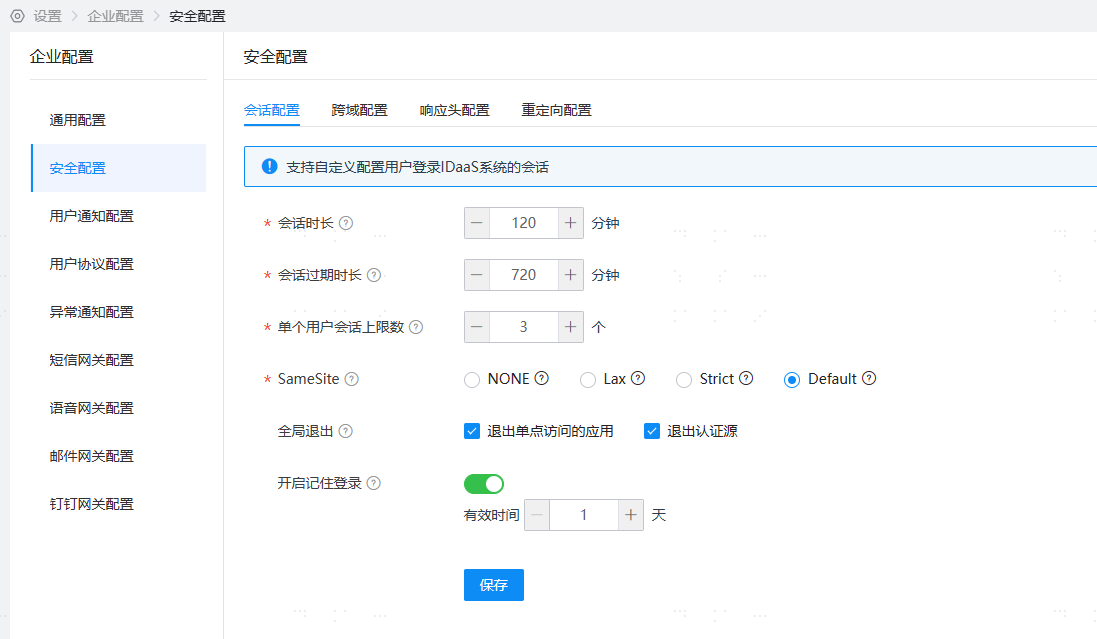
- Log in to the IDaaS Enterprise Center platform. In the top navigation bar, choose Settings > Enterprise Configuration, and select the Security Configuration option on the left. Click the Save button to save the modified configuration.
Session Duration
The retention duration of the session after user access. If no operation is performed within the specified duration, the session will expire. Default is 120. You can enter a number from 5 to 480, in minutes.
Session Expiration Duration
The duration from session establishment to session expiration. Even if the user continuously accesses, the session will expire after this duration. Default is 720. You can enter a number from 5 to 1440, in minutes.
Maximum Sessions Per User
When the user's session count has reached the upper limit and the user logs in again, the earliest session will expire. Default is 5. You can enter a number from 1 to 50.
SameSite
Cookie samesite configuration prevents CSRF attacks and user tracking (third-party malicious acquisition of cookies), and restricts third-party cookies, thereby reducing security risks. Default selection is Default.
- None: Carry cookie information in cross-site requests. For example, when logged in to website B, navigating from website A to website B will carry cookie information, and website B will remain logged in.
- Lax: When requesting a URL across sites, only navigation GET requests to the target URL will carry cookies, including links (a tags), preloads (link tags), and GET forms (forms with method GET). Cookies will not be carried in other cases. For example, when logged in to website B, using a link on website A to navigate to website B will carry cookie information, and website B will remain logged in.
- Strict: When requesting a URL across sites, cookies will only be carried if the current page URL matches the requested target URL. Cookies will not be carried in other cases. For example, when logged in to website B, using a link on website A to navigate to website B will not carry cookie information, and website B will be in a logged-out state.
- Default: IDaaS default processing mechanism. Different attribute values are set according to device and browser versions. iOS 12, macOS 10-14, Safari, Macintosh, 360 Browser 10.0, UC 12 and 13, and Chrome 51 and 67 do not set the Samesite attribute. Other devices and browsers are set to None, that is, cookies are carried when requesting URLs across sites.
Global Logout
Global logout is when the user actively logs out of IDaaS. It supports logging out of single sign-on accessed applications and authentication sources at the same time as global logout, provided that the applications and authentication sources have configured HTTPS logout URLs.
Enable Remember Login
Disabled by default. After enabling, the user's login status can be remembered, supporting password-free login on the same device within the valid time. Valid time (1 day recommended, maximum 3 days). After expiration, the user needs to log in again.
Clear User Session
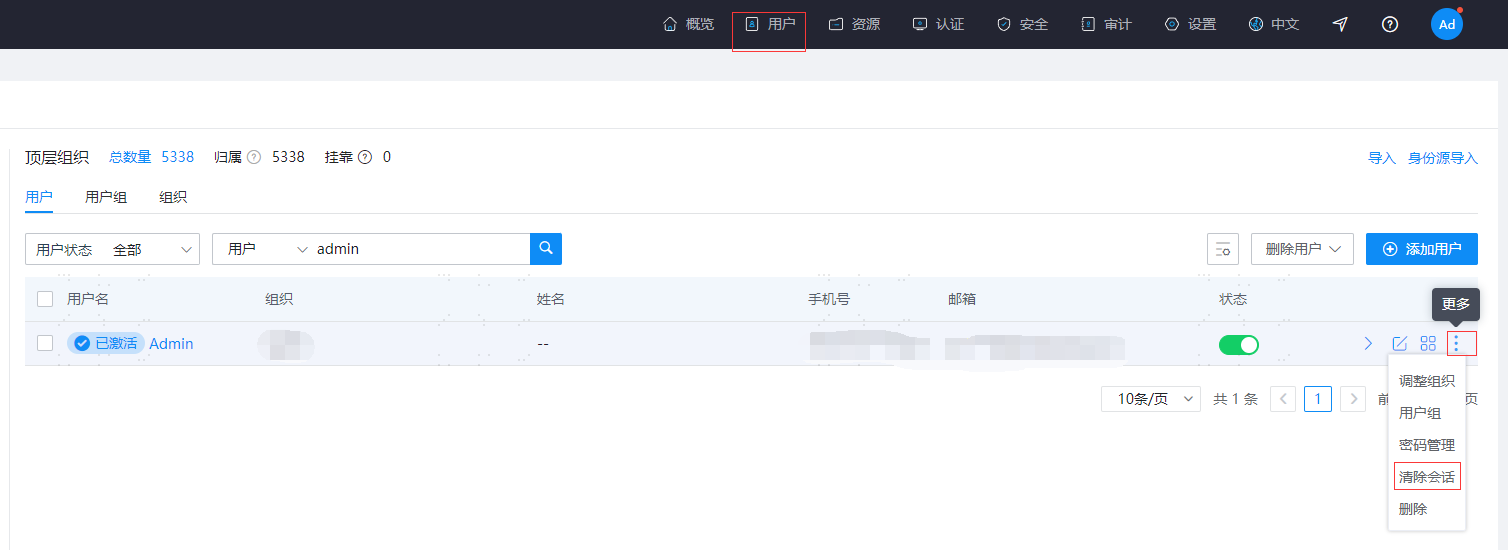
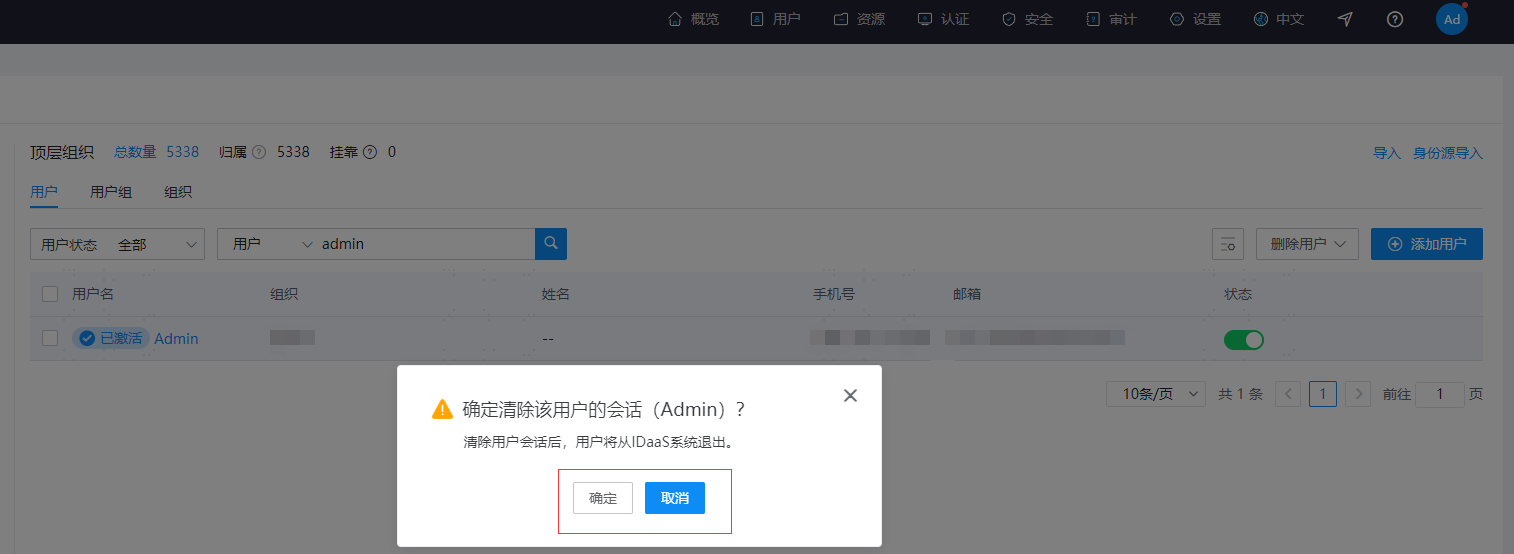
IDaaS supports clearing user sessions in the management console. After the user session is cleared, the user will be kicked out of IDaaS. Log in to the IDaaS Enterprise Center platform, choose Users > Organization and Users in the top navigation bar, select Clear Session from the more operations on the far right of the user list, and click the Confirm button in the pop-up window to clear the user session and kick the user out of IDaaS.