
YiKuaibao SSO
Overview
This article describes how to configure BambooCloud IDaaS to achieve single sign-on to the YiKuaibao system.
Prerequisites
- Your enterprise application has been connected to the YiKuaibao platform.
- You have administrator permissions for the BambooCloud IDaaS Enterprise Center platform.
Authentication Configuration
BambooCloud IDaaS Configuration
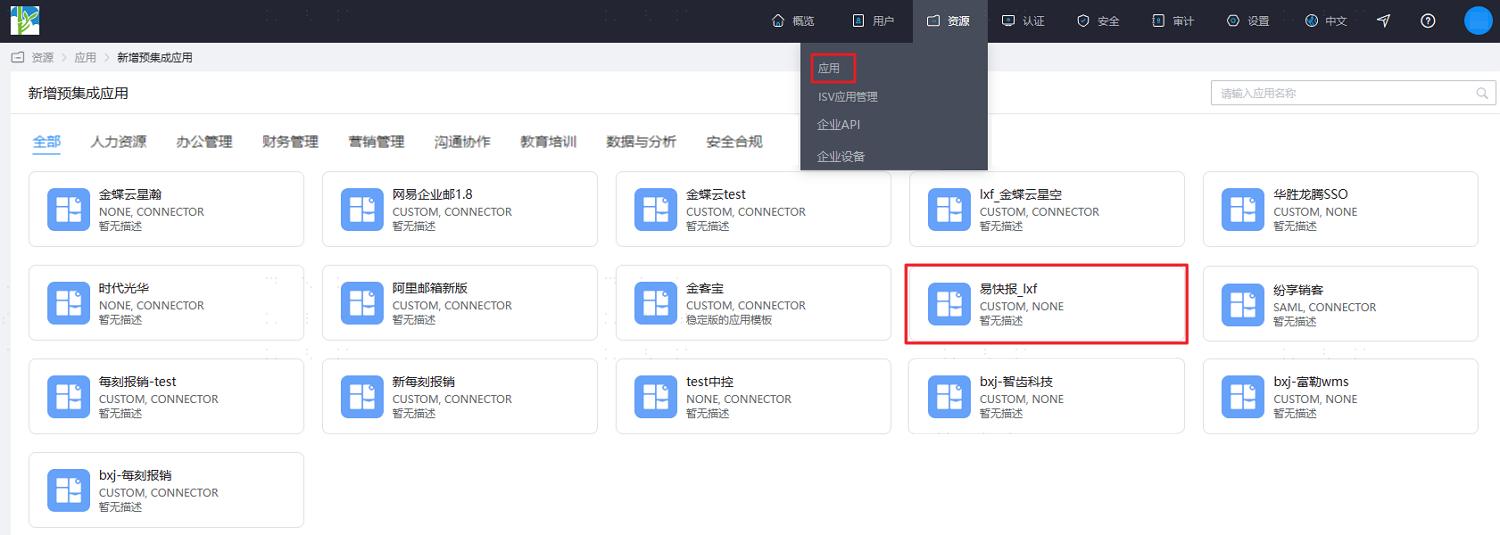
Log in to the BambooCloud IDaaS Enterprise Center platform, choose Resources > Applications, and add the pre-integrated application YiKuaibao.
Configure application parameters. Key parameters are as follows.
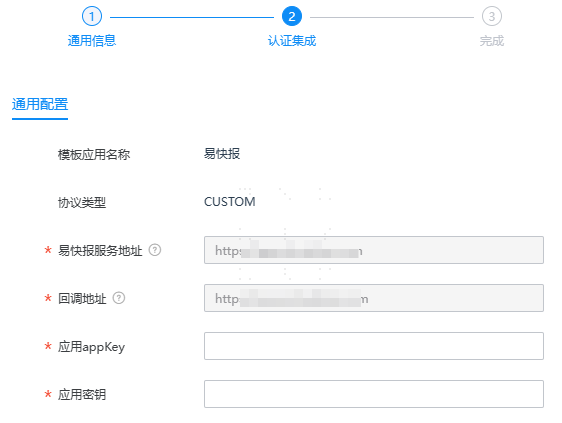
Parameter Description Application appKey The access account of the enterprise application in YiKuaibao. Obtain the access account corresponding to your enterprise application in the YiKuaibao App Store. Application Secret The access password of the enterprise application in YiKuaibao. Obtain the access password corresponding to your enterprise application in the YiKuaibao App Store. After configuration is complete, enter the application details, switch to the Authorization Management > Application Account page, click Add Account to authorize the user as an application account, or click Authorization Policy to enable automatic user authorization, select the user scope, click the Save button, and then click Execute Add.
Login Verification
Authorized users log in to the BambooCloud IDaaS User Center, click the YiKuaibao application LOGO to enter the YiKuaibao system.